
Table of Contents >> Show >> Hide
- What Changed in the New iMovie for iOS?
- Why Homogenization Happens in Template-Based Editing
- The Big Benefit: iMovie Makes Video Less Intimidating
- The Creative Trade-Off: Easy Can Become Predictable
- How Creators Can Avoid the iMovie “Sameness Trap”
- What This Means for Mobile Video Culture
- Is the New iMovie for iOS Good or Bad?
- Real-World Experience: Using iMovie Without Losing Your Voice
- Conclusion
Apple’s new iMovie for iOS is charming, friendly, and almost suspiciously helpful. It looks at your photos and clips, smiles politely, and says, “Don’t worry, I’ll make this into a movie.” For anyone who has ever opened a blank video timeline and immediately considered taking up a quieter hobbylike competitive napkin foldingthat is wonderful news.
But convenience always comes with a tiny creative invoice. The latest iMovie experience for iPhone and iPad, especially through features like Magic Movie and Storyboards, makes video creation faster, simpler, and more accessible. It also raises a bigger question: when millions of people use the same templates, shot lists, titles, transitions, music styles, and automatic editing logic, do our videos start to look like they came from the same polite robot film school?
That is the heart of the concern. The new iMovie for iOS is not “bad.” In fact, it is extremely good at what it wants to do. The problem is that what it wants to do may quietly flatten creative differences. It helps beginners make polished videos, but it can also make everyone’s vacation recap, cooking tutorial, product review, school project, birthday montage, and pet tribute feel like cousins at the same family reunion.
What Changed in the New iMovie for iOS?
iMovie has long been Apple’s friendly entry point into video editing. It is free, approachable, and designed for people who want to make something attractive without needing to learn professional software. The newer iOS version doubled down on that mission by adding two major creation paths: Magic Movie and Storyboards.
Magic Movie: The “Please Edit This for Me” Button
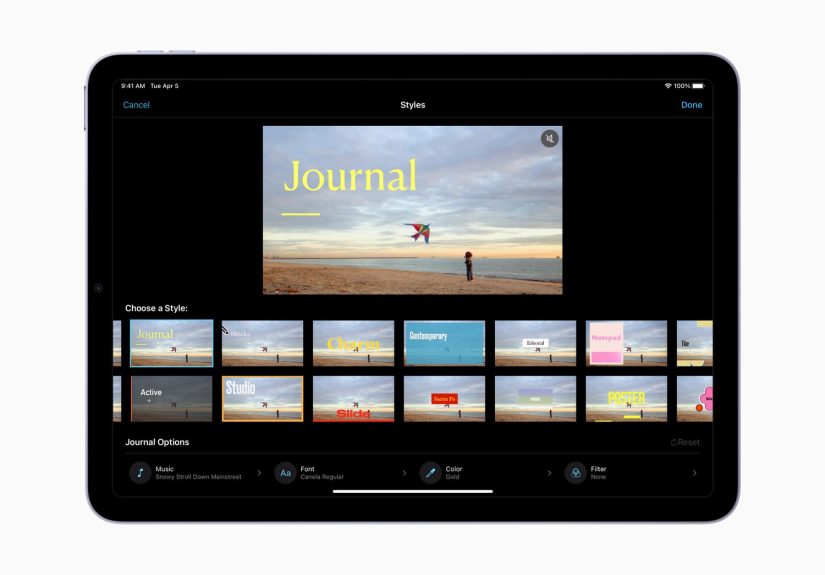
Magic Movie lets users select photos and videos, then automatically creates a styled video with music, transitions, titles, and a finished structure. The app identifies strong moments in the footage, arranges clips, and applies a visual style. In plain English: you give it the ingredients, and iMovie bakes the cake. You may still decorate it afterward, but the cake has already decided it wants to be vanilla with tasteful frosting.
This is incredibly useful. A parent can turn a weekend soccer game into a highlight reel before the cleats are dry. A small business owner can create a quick promo from product shots. A student can assemble a class project without first Googling “what is a timeline and why is it yelling at me?”
But automatic editing also means the software makes creative decisions before the creator does. It chooses pacing, rhythm, emphasis, and mood. That is helpful when the goal is speed. It is less helpful when the goal is a distinct voice.
Storyboards: Video Templates With Training Wheels
Storyboards are prebuilt video templates for common content types, such as cooking tutorials, product reviews, Q&As, news reports, science experiments, and how-to videos. Each storyboard offers a shot list, suggested structure, titles, transitions, and a general narrative path.
Again, this is smart design. Most beginners do not struggle because they lack creativity. They struggle because they do not know where to start. A blank timeline can feel like an empty gym at 5 a.m.technically full of opportunity, emotionally full of dread.
Storyboards solve that by giving users a map. Need a product review? Start with an introduction, show the product, highlight features, add a closing opinion. Need a recipe video? Open with the finished dish, show ingredients, cut to preparation, reveal the final plate. It is practical, organized, and educational.
The risk is that a map can become a highway. Once everyone follows the same route, the scenery starts to blur.
Why Homogenization Happens in Template-Based Editing
Homogenization in video creation means different people produce content that feels unusually similar. Not identical, of course. Your dog’s birthday video is not the same as someone else’s sourdough tutorial, although both may contain dramatic music and a suspiciously emotional slow-motion shot. But the underlying rhythm, structure, and visual language can become standardized.
Templates are not evil. They are tools. The trouble begins when templates stop being a starting point and become the final creative shape. If an app suggests the same type of opening shot, the same title placement, the same pacing, and the same emotional arc, users may unconsciously accept those choices as “the correct way” to make a video.
The Algorithm Has a Style
Every editing tool has a personality. Professional editors develop theirs over years: the way they cut on movement, hold on a reaction, let silence breathe, or use music sparingly. Software also has a personality, but it is designed for mass appeal. That means it often favors clarity, polish, and familiarity.
Magic Movie’s strength is that it makes a video look complete quickly. Its weakness is that “complete” may become confused with “creative.” A clean title, gentle transition, and upbeat soundtrack can make almost anything look presentable. But presentation is not the same as perspective.
The result is a world where more people can make videos, but fewer videos feel surprising. The edges get sanded down. The weird pauses disappear. The messy moments vanish. And sometimes, those messy moments are where personality lives.
Popular Formats Become Default Formats
Storyboards are built around popular video genres, which makes sense. People want to create content that already performs well online: tutorials, reviews, explainers, school presentations, personal highlights, and social-friendly recaps. Apple is not guessing randomly; it is designing around real user behavior.
However, when popular formats become built-in options, they become even more popular. This creates a loop. Users choose familiar templates because they are easy. Audiences see more of those formats. Platforms reward recognizable structures. Then creators make even more of the same. At some point, the internet starts to feel like one very long product review with different lighting.
The Big Benefit: iMovie Makes Video Less Intimidating
It would be unfair to criticize the new iMovie for iOS without giving it credit. Video editing can be intimidating. Even basic editing involves decisions about clips, order, trimming, pacing, sound, titles, transitions, color, and export settings. That is a lot to ask from someone who simply wants to make a sweet birthday montage before Grandma texts, “Where is the video?” for the fifth time.
iMovie lowers the barrier. It helps people move from “I have footage” to “I made something.” That is powerful. Creative confidence often begins with a guided first step. Many people learn by copying structure before breaking it. In writing, students learn essays before they write experimental memoirs. In music, beginners learn scales before jazz decides to politely ignore them. Video is no different.
For classrooms, families, small businesses, and casual creators, iMovie’s guided features can be genuinely useful. A teacher can assign video projects without turning the classroom into a technical support center. A local baker can make a polished cupcake promo without hiring a production crew. A traveler can turn a messy camera roll into a watchable recap during the flight home.
The democratization of video matters. When tools become easier, more people get to participate. That is a good thing. The question is not whether iMovie should help people create. The question is whether it helps them grow beyond the default look.
The Creative Trade-Off: Easy Can Become Predictable
The more an app simplifies creation, the more it must make decisions on the user’s behalf. That is the trade-off. When iMovie chooses the structure, it saves time. When it chooses transitions, it reduces confusion. When it suggests shots, it teaches storytelling. But each of those choices also narrows the field of possibility.
Imagine ten people filming the same farmers market. One might focus on hands exchanging money. Another might capture the colors of fruit. Another might follow the tired musician near the entrance. Another might record the squeaky wheel of a produce cart because, somehow, that wheel is the main character. A template may guide all ten toward the same basic opening, middle, and ending. The videos become clearer, yesbut maybe less personal.
Polish Can Hide Personality
Polish is seductive. It tells us something is finished. It makes a video feel professional, even when the footage was shot while balancing iced coffee and a phone with 7% battery. But too much polish can make personal videos feel generic.
Some of the most memorable videos online are not technically perfect. They have strange timing, unexpected reactions, imperfect framing, or jokes that arrive half a second too late. They feel human. A fully guided editing system may remove those quirks because quirks look like mistakes to automation.
That does not mean users should avoid Magic Movie or Storyboards. It means they should treat them as drafts, not destiny. Let the app build the skeleton. Then add the fingerprints.
How Creators Can Avoid the iMovie “Sameness Trap”
The best way to use the new iMovie for iOS is to accept its help without surrendering your taste. Think of Magic Movie as a helpful assistant, not a tiny director living in your phone. It can organize the footage, but you still decide what the video means.
Change the Opening
Templates often begin in predictable ways. Break that pattern. Instead of starting with a title card, open with a surprising sound, a funny moment, a close-up, or the ending before the beginning. A cooking video can start with smoke from a failed first attempt. A product review can begin with the one thing that annoyed you most. A travel video can open with the least glamorous moment: lost luggage, bad coffee, or the heroic search for a phone charger.
Use Music Carefully
Automatic music can make a video feel instantly complete, but it can also flatten mood. Not every family picnic needs to sound like a cheerful insurance commercial. Try lowering the music volume, cutting it out for a key moment, or choosing a track that feels less obvious. Silence, natural sound, and voices can create intimacy that stock music sometimes steamrolls.
Keep One Imperfect Moment
A laugh, a stumble, a dog barking at the exact wrong timethese moments are gold. Do not automatically delete them because they look unpolished. Personality often enters through the side door wearing mismatched socks.
Reorder the Story
Storyboards are useful, but they are not sacred tablets delivered from Mount Cupertino. Move scenes around. Start with the conflict. Delay the reveal. Put the funniest clip earlier. If the template says the product beauty shot belongs in the middle, ask whether it might work better at the end. Editing is not just arranging clips; it is controlling curiosity.
Customize Titles and Text
Default titles are clean, but clean can become forgettable. Rewrite them in your own voice. A title like “Step 1: Prepare Ingredients” is fine. A title like “Step 1: Pretend You Measured Everything” has a pulse. The words on screen should sound like the person behind the camera.
What This Means for Mobile Video Culture
The new iMovie for iOS reflects a broader shift in creative software. Apps are no longer just tools; they are collaborators. They suggest, arrange, generate, correct, beautify, and sometimes over-help. This is happening across photography, writing, design, music, and video. The promise is speed. The danger is sameness.
For casual users, that may not matter. If someone wants a good-looking vacation video, they may not care whether the structure resembles thousands of other vacation videos. The goal is memory, not cinema. Nobody at Thanksgiving is likely to pause the family slideshow and say, “Frankly, the editorial grammar lacks subversive intent.” If they do, give them more pie.
But for creators, brands, educators, and storytellers, sameness matters. Distinctive videos stand out because they feel authored. They reveal choices. They show taste. A template can support those choices, but it cannot replace them.
That is why the most important skill in the age of easy editing is not technical mastery alone. It is judgment. Knowing when to accept the template and when to rebel against it is the difference between using iMovie and being used by iMovie.
Is the New iMovie for iOS Good or Bad?
The honest answer is: both, depending on how it is used.
It is good because it removes friction. It makes video creation approachable for people who would otherwise never edit at all. It gives beginners structure, confidence, and fast results. It makes storytelling feel less like homework and more like play.
It is risky because it can normalize one-size-fits-all creativity. When the same app teaches millions of users how a video “should” look, variety may shrink. The internet does not need fewer voices. It needs more strange, specific, delightful, human ones.
So the new iMovie for iOS is not a villain. It is more like a very enthusiastic assistant who alphabetizes your spice rack and then starts seasoning dinner without asking. Helpful? Absolutely. Slightly dangerous? Also yes.
Real-World Experience: Using iMovie Without Losing Your Voice
The best experience with the new iMovie for iOS comes when you use it as a launchpad rather than a landing pad. In practice, Magic Movie is excellent for getting past the hardest part of editing: beginning. Many people shoot dozens of clips and never do anything with them because the first edit feels too big. Magic Movie turns that pile of footage into something visible. Once a rough version exists, it is much easier to react, revise, and improve.
For example, imagine creating a short video from a family weekend at the beach. Magic Movie may quickly assemble waves, smiling faces, food, sunsets, and a cheerful soundtrack. The result might be pleasant, but also predictable. The experience becomes more personal when you go back in and change the emotional center. Maybe the real story is not “beautiful beach day.” Maybe it is “Dad spent 20 minutes fighting a beach umbrella and lost.” That is the version people will remember.
Storyboards can be equally useful for small business owners. A handmade candle seller, for instance, can choose a product review or promotional storyboard to make a clean video. The shot list may suggest showing the product, highlighting details, and ending with a call to action. That structure works. But to avoid sameness, the creator should add specific sensory details: wax being poured, the sound of a lid closing, a close-up of a handwritten label, or a quick comment about the scent that does not sound like it escaped from a corporate brochure.
Students can also benefit from iMovie’s guidance. A science experiment storyboard can help them understand sequence: question, materials, process, result, conclusion. That structure teaches communication. But the student’s own curiosity should still lead. A funny failed attempt, a surprised reaction, or a simple explanation in their own words will make the project stronger than a perfectly sterile template.
From a creator’s perspective, the trick is to perform a “template audit” before exporting. Ask: Does this video sound like me? Is the first shot too expected? Did the music choose the mood for me? Is there a moment only I could have included? Did I leave in anything real, odd, local, funny, or emotionally specific?
That final pass is where creativity returns. iMovie can make the first version. You should make the final one. The app may be great at assembling clips, but it does not know why a shaky five-second shot of your friend laughing matters more than the perfectly framed sunset. You know. That is the point.
Conclusion
The new iMovie for iOS is a powerful example of modern creative software: fast, guided, polished, and built for everyone. Its Magic Movie and Storyboards features can help beginners create videos that once required more time, confidence, and technical knowledge. That is a genuine win.
But the same features that make iMovie so accessible can also make videos feel more alike. Templates, automatic edits, prebuilt styles, and guided shot lists are useful starting points, not creative commandments. The future of mobile video should not be a sea of beautifully edited sameness. It should be full of personal choices, unexpected cuts, strange jokes, imperfect moments, and stories that feel like they came from actual humansnot from the same shiny template drawer.
Use the new iMovie for iOS. Enjoy the shortcuts. Let it save time. Then mess with it. Rearrange the clips. Change the titles. Lower the music. Keep the weird laugh. Break the template just enough to let your own voice sneak through. That is where the real movie begins.







 Close
Close