
Table of Contents >> Show >> Hide
- Why Online Music Collaboration Is Booming (Even After the Panic Era)
- The Real Villain: Latency (a.k.a. “Why Does the Snare Sound Late?”)
- Meet the New Gadget: The “Bridge” Device Built for Real-Time Jamming
- What You Actually Need to Collaborate Online (Without Hating It)
- Synchronous Collaboration: How to Jam Online in Real Time
- Asynchronous Collaboration: The “Send Stems, Save Friendships” Method
- “But We Still Want to See Each Other”: Video Chat Without Killing Your Audio
- Specific Examples: How Different Musicians Use Online Collaboration
- Best Practices That Make Online Collaboration Actually Work
- What’s Next: Faster Networks, Smarter Hardware, Smoother Sessions
- Field Notes: Experiences Musicians Report When Collaborating Online (Extra)
- 1) The First Time It “Clicks,” People Get Quiet
- 2) The Gadget Doesn’t Create Chemistry, but It Stops Destroying It
- 3) Remote Sessions Become More Intentional (In a Good Way)
- 4) The “Two-Track Brain” Emerges: Real-Time for Feel, Async for Finish
- 5) Education Gets a Surprise Upgrade
- 6) The Most Common “Aha” Fix Is Embarrassingly Simple
- 7) The Emotional Win: Collaboration Without Geography Guilt
- Conclusion
- SEO Tags
Remember when “collaboration” meant cramming into a rehearsal space that smelled like old pizza, broken dreams, and someone’s “vintage” amp that definitely shocked you?
Cute era. Today, musicians collaborate onlinesometimes across town, sometimes across oceansusing a growing stack of apps, workflows, and one increasingly important piece
of gear: a low-latency collaboration gadget that treats timing like it matters (because it does).
This is the story of why remote music-making used to feel like playing tennis with a 3-second delay… and how a new class of devicesthink “smart audio interface meets
network brain”is helping bands, producers, and educators finally jam online without wanting to throw a metronome through a window.
Why Online Music Collaboration Is Booming (Even After the Panic Era)
Remote collaboration exploded when touring paused and studios went quiet, but it didn’t disappear when the world reopened. It simply evolved. Musicians found upsides:
easier scheduling, broader talent pools, lower costs, and more “let’s try it” sessions that would never happen if everyone had to drive 45 minutes and fight for parking.
In 2026, “online collaboration” isn’t just one thing. It’s two main modes:
- Asynchronous collaboration (send files, trade stems, version projects): great for songwriting, production, edits, mixing notes, and sanity.
- Synchronous collaboration (play and react in real time): great for rehearsals, lessons, live writing, and capturing the magic you can’t email.
The catch: asynchronous workflows are easy-ish. Real-time collaboration is where timing gets spicy.
The Real Villain: Latency (a.k.a. “Why Does the Snare Sound Late?”)
Latency is the time it takes audio to leave one musician’s instrument, travel through the system, and arrive in another musician’s headphones. For conversation,
our brains forgive delays. For music, our brains file a complaint.
How Much Latency Is “Too Much”?
Many networked-music researchers point to about 25 milliseconds as a critical threshold where delay becomes perceptible and coordination gets harder.
For a fun reality check: sound travels roughly 343 meters per second, so 25 ms is like standing about 8.6 meters (28 feet) away from a speakerfine for a concert,
not ideal for tight ensemble playing when your drummer is emotionally attached to the grid.
Why Video Chat Isn’t Built for Music
Standard video meeting tools prioritize intelligible speech, stability, and echo cancellationnot the precise timing, full frequency range, and uncompressed detail
musicians crave. They also add processing that can smear transients (your crisp pick attack becomes a polite suggestion).
Meet the New Gadget: The “Bridge” Device Built for Real-Time Jamming
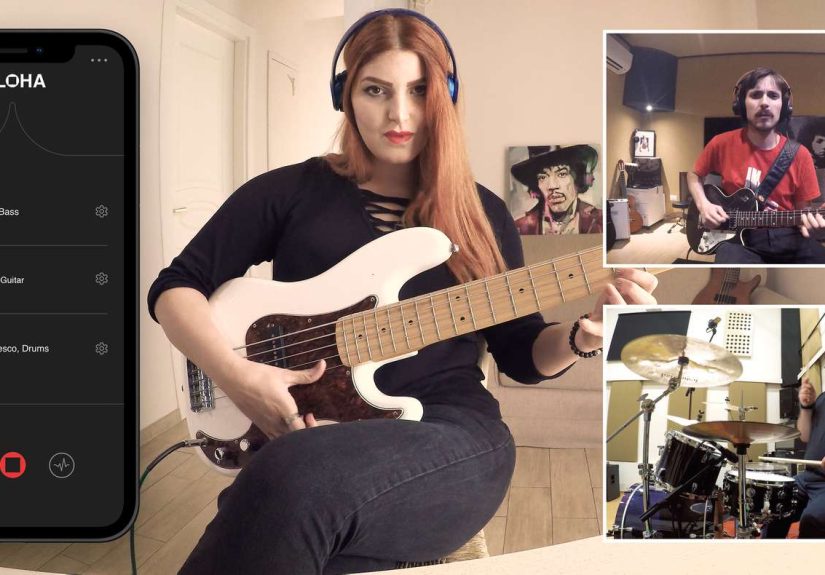
A standout example of this new gadget category is Elk Audio’s approach, originally introduced as Alohaa pocket-size hardware device paired with an app
designed to reduce latency and make remote sessions feel more like being in the same room.
The concept is simple but powerful: instead of forcing musicians to route everything through generic video chat pipelines, the gadget acts like a purpose-built
audio network bridge. You plug in your instrument/mic, connect the device to your router (wired), and use the companion app for video chat and session control.
The aim is to keep timing tight by optimizing audio transmission (including peer-to-peer approaches and uncompressed/high-quality streams, depending on the platform’s design).
What Makes These Devices Different From “Just an Audio Interface”?
A normal audio interface is like a great translator between your mic/instrument and your computer. A collaboration bridge is more like a translator who also:
packs your bags, books your flights, and personally argues with the laws of physics on your behalf.
Typically, these gadgets focus on:
- Low-latency networking (lean signal path, fewer “helpful” speech filters, smarter routing)
- Stable, wired connectivity (because Wi-Fi is amazing… until it isn’t)
- Simple “join a session” UX (musicians want to play, not earn a networking certification)
- Integrated monitoring controls (so you can hear yourself clearly without delay-induced existential dread)
What You Actually Need to Collaborate Online (Without Hating It)
Let’s talk practical setups. Whether you’re using a dedicated collaboration gadget or a more traditional setup (interface + software),
the best results usually come from four boring-but-life-saving fundamentals:
1) A Wired Internet Connection
If you do one thing today, do this: plug an Ethernet cable into your computer or collaboration device. Wired reduces jitter, packet loss,
and the random chaos that makes your groove feel haunted.
2) A Solid Audio Interface (and the Right Drivers)
Even if a collaboration gadget handles networking magic, you still need clean input, good preamps (especially for vocals), and stable drivers.
For traditional setups, interfaces with efficient drivers and low buffer performance matter a lot.
3) Headphones (Yes, Really)
Speakers plus microphones equals echo cancellation, and echo cancellation equals “why does my guitar sound like it’s underwater?”
Headphones keep your monitoring clean and your collaborators less likely to text you “lol what is happening.”
4) A Collaboration Workflow You Can Repeat
Great sessions are less about the fanciest tools and more about predictable structure: who’s tracking what, what tempo/key, how you’ll share files,
how feedback will be delivered, and what “done” means.
Synchronous Collaboration: How to Jam Online in Real Time
Real-time collaboration is the dream: you play, they respond, you all laugh at the same accidental chord change, and suddenly the song exists.
But to pull it off, you need a system designed for timing.
Option A: A Dedicated Low-Latency Collaboration Gadget
This is the “plug it in and go” pathideal for bands, music schools, and anyone who wants fewer moving parts. Devices in this category often bundle
audio routing, latency management, and a session app into one workflow so you spend less time troubleshooting and more time actually making music.
Option B: Low-Latency Software Platforms (When You’re Feeling Brave)
Platforms like JackTrip (born from academic work and later commercialized in friendlier forms) aim for very low latency by focusing on high-quality audio streaming
and network optimization. These tools can be impressiveespecially on good wired connectionsbut may require more setup discipline than the average guitarist
(who is already busy debating pedals).
Asynchronous Collaboration: The “Send Stems, Save Friendships” Method
If real-time jamming is hard because geography and internet physics exist, asynchronous collaboration wins because it doesn’t care about latency.
You can trade:
- Stems (drums, bass, guitars, vocals, FX)
- Project files (DAW sessions, tempo maps, MIDI)
- Reference mixes and notes (time-stamped feedback is a love language)
Many producers rely on version-based project sharing or cloud workflows. The key is keeping organization tight:
consistent naming, BPM/key in the folder name, and a “LATEST MIX” file that is actually the latest mix (wild concept, I know).
Pro Tip: Use Versioning Like a Grown-Up
Tools like Splice popularized the idea of saving iterative versions so collaborators can roll back, compare changes, and avoid “wait which file is the real one?”
arguments at 1:00 a.m. Some major DAWs have also built collaboration workflows; for example, Pro Tools shifted parts of its cloud collaboration workflow over time,
including changes in how collaboration features are accessed within the app.
“But We Still Want to See Each Other”: Video Chat Without Killing Your Audio
Sometimes you need faces: cues, smiles, “are we ending on the IV?” panic eyes. If you’re using Zoom or similar tools, there are music-focused settings that can help.
Zoom’s Original Sound for musicians and High-fidelity music mode reduce speech-oriented processing and raise audio quality settings
(with the tradeoff that you should use headphones and manage your own echo/feedback responsibly).
Loopback: The Secret Sauce for Better Remote Sessions
Loopback lets you route audio from your DAW back into a conferencing app (or into a streaming link) so collaborators hear the real mix, not your laptop mic’s
emotional interpretation of it. Many modern interfaces now offer built-in loopback, which makes routing far less painful.
Specific Examples: How Different Musicians Use Online Collaboration
The Band Rehearsal That Doesn’t Fall Apart
A four-piece band uses a low-latency gadget for real-time rehearsals twice a week. They treat it like rehearsal, not recording:
minimal plug-ins, low buffer, click track optional, and a strict “no one updates their router firmware 10 minutes before downbeat” rule.
They record rough board mixes for review later, then do detailed tracking asynchronously.
The Producer + Vocalist “Remote Session” Workflow
The producer sends a guide track with tempo map and lyric sheet. The vocalist records at home on a decent mic and interface, sends clean takes and harmonies,
and then both jump on a call for comping decisions. For real-time feedback, they use a high-quality audio stream link so the vocalist can hear the producer’s
mix moves immediately without waiting for bounces.
The Music Teacher Who Needs Students to Play in Time
Music education is where latency hurts the most. Teachers can teach theory and technique over standard video chat, but ensemble worktiming, blend, articulation
benefits hugely from low-latency solutions. Some schools explore specialized platforms and devices to bring back “play together” lessons without forcing students
to “just clap along” like it’s a fitness class.
Best Practices That Make Online Collaboration Actually Work
Start With a “Session Agreement” (No, It’s Not Unromantic)
- Define the goal: writing, rehearsal, tracking, feedback, or final mix?
- Pick the format: real-time jam vs. stems and notes.
- Decide the tech stack: gadget platform, DAW, video chat, file sharing.
- Set naming rules: “SongName_BPM_Key_V03” saves lives.
Reduce Variables Before You Add Creativity
The first session is not when you test five new plug-ins, three virtual instruments, and a beta audio driver. Nail stability first. Then get weird.
Your future self will thank you. Your collaborators will also thank you, mostly by continuing to collaborate with you.
Protect the Work (and the Vibe)
Remote collaboration raises practical questions: who owns what, how splits are tracked, and where files live. Use clear agreements earlyespecially when
you’re working with new partners. The internet is forever, and so are awkward misunderstandings.
What’s Next: Faster Networks, Smarter Hardware, Smoother Sessions
The trend line is clear: more musicians want real-time collaboration that feels natural, and the tools are slowly catching up. We’re seeing:
- More purpose-built devices that combine audio interface functionality with network optimization
- Better platform integration inside DAWs and collaboration services
- Improved high-fidelity conferencing modes for performance and teaching
- More education and best-practice sharing (because everyone is tired of reinventing the same routing diagram)
Will online collaboration replace in-person sessions? Probably not. But it’s becoming a powerful new categorylike a second studio that happens to be wherever your
collaborators live. And it doesn’t charge hourly rates or judge your third take of the chorus.
Field Notes: Experiences Musicians Report When Collaborating Online (Extra)
Below are experiences commonly reported by musicians, producers, and educators who’ve adopted online collaborationespecially when adding a low-latency gadget
(or an optimized platform) into the mix. Think of this as a “what it feels like in the real world” section, not a brochure.
1) The First Time It “Clicks,” People Get Quiet
In early remote sessions, everyone talks over each other: “Can you hear me?” “Is that clipping?” “Wait, you’re ahead of me.” Then, when latency drops low enough
and monitoring is clean, something changesmusicians stop troubleshooting and start listening. People get quiet in the way they do right before a great take.
The drummer plays a fill and the guitarist responds instantly, not two beats later. Someone laughs because it feels oddly normal.
2) The Gadget Doesn’t Create Chemistry, but It Stops Destroying It
Musicians often say the biggest win isn’t “perfect realism.” It’s simply removing the constant timing friction that kills creative momentum. When lag is high,
everyone becomes cautious; they play simpler, they hesitate, they stop making musical jokes (yes, musical jokes are real, and yes, they are essential).
Lower-latency setups don’t magically write the hook for youbut they stop punishing you for trying.
3) Remote Sessions Become More Intentional (In a Good Way)
A funny side effect: online collaboration forces structure. Bands report they start sending setlists ahead of time, agreeing on tempos, and choosing who leads each
song section. Producers report they prep sessions bettercleaner track layouts, printed rough mixes, clearer reference notesbecause nobody wants to waste the first
20 minutes watching someone search for “VocalComp_FINAL_final2.wav.”
4) The “Two-Track Brain” Emerges: Real-Time for Feel, Async for Finish
Many teams settle into a hybrid rhythm. They use real-time tools for the parts that require human feedbackarrangement decisions, harmony ideas, coaching a vocal
performance, tightening a groove. Then they switch to asynchronous workflows for detailed editing, comping, sound design, and mixing. It’s not a compromise;
it’s specialization. Real-time sessions generate momentum. Async sessions turn momentum into deliverables.
5) Education Gets a Surprise Upgrade
Teachers report that standard video chat is fine for explanation and demonstration, but ensemble work is where students feel discouraged (“I can’t tell if I’m late”).
Lower-latency platforms and devices can make timing-based practice feel fair again. Even when not perfect, students often feel more engaged because they can
participate instead of merely observing. Some educators also note that online collaboration encourages students to record more, listen back more,
and develop production skills alongside performancean accidental curriculum upgrade.
6) The Most Common “Aha” Fix Is Embarrassingly Simple
Over and over, experienced remote collaborators repeat the same advice: use Ethernet, wear headphones, simplify routing, and don’t run your session on a laptop
that’s also uploading five videos and updating three apps. People love exotic solutions, but the boring basics are usually what turn a messy session into a musical one.
7) The Emotional Win: Collaboration Without Geography Guilt
Finally, musicians often describe a subtle emotional shift: they collaborate more often with people they genuinely like, not just people who live nearby.
The “we should totally work together” promise becomes real. That means cross-genre writing rooms, long-distance bandmates, mentors coaching from afar,
and producers building teams that look more like the music itselfdiverse, distributed, and alive.
Conclusion
Online collaboration used to be a trade: convenience in exchange for timing pain. But the rise of low-latency collaboration gadgets (like Elk’s Aloha-style bridge)
plus smarter software and better audio modes in mainstream platforms is changing the deal. Musicians can now choose the right workflowreal-time, asynchronous,
or hybridwithout sacrificing the musical feel that makes collaboration worth doing.
If you’re curious, start small: wire your connection, use headphones, set up clean routing, and do one short session with a clear goal. When it works, it’s not just
“remote.” It’s collaborationperiod.






 Close
Close