
Table of Contents >> Show >> Hide
- Discord Formatting Basics: The “Markdown” Idea in Plain English
- Bold, Italic, Underline, Strikethrough: The “Make It Look Like You Mean It” Set
- Combo Moves: Bold + Italic + Underline (Yes, You Can Layer It)
- Spoilers in Discord: Hide Text Like a Responsible Human
- Inline Code: The “Don’t Autocorrect This” Formatting
- Code Blocks: Clean, Readable, and Way Less Chaotic Than Pasting Raw Code
- Block Quotes: Reply With Style (and Less Confusion)
- Lists and Readability: Make Your Message Skimmable
- Escaping Characters: When Discord Keeps “Helping” You
- Keyboard Shortcuts and Formatting Controls: Faster Than Typing Symbols
- Practical Examples: Real Messages You’ll Actually Send
- Common Discord Formatting Mistakes (and How to Fix Them)
- When to Use Formatting (So You Don’t Become “That Person”)
- Extra : Real-Life Experiences With Discord Formatting (The Good, the Messy, the Hilarious)
- Conclusion
Discord is where serious conversations go to get interrupted by a GIF, a reaction emoji, and someone typing “real” in italics like it’s a dramatic stage direction.
And honestly? That’s part of the charm.
But when you want your message to be clear (or hilariously extra), Discord text formatting is your best friend. Discord uses a Markdown-style system,
which means you can add emphasis, hide spoilers, share tidy code blocks, and quote messages without needing a fancy editoror a minor in typography.
Discord Formatting Basics: The “Markdown” Idea in Plain English
Markdown is a lightweight way to format text using normal keyboard characters. Think of it like stage makeup for your messages:
it makes the important parts pop, without turning your chat into a glitter explosion (unless you choose to).
In Discord, you’ll mostly format text by wrapping words with certain symbolsasterisks, underscores, backticks, tildes, and pipes.
If that sounds like a hardware store aisle, don’t worry. You’ll get the hang of it in about three messages.
Bold, Italic, Underline, Strikethrough: The “Make It Look Like You Mean It” Set
How to Bold in Discord
Use double asterisks to make text bold:
Best use: headlines, strong emphasis, or politely yelling at your future self in a notes channel.
How to Italicize in Discord
Use single asterisks or single underscores:
Best use: subtle emphasis, sarcasm seasoning, or adding “dramatic narration” to ordinary sentences.
How to Underline in Discord
Use double underscores:
Best use: highlighting key details like dates, deadlines, or the one rule everyone keeps breaking.
How to Strikethrough in Discord
Use double tildes:
Best use: showing edits, jokingly “taking back” something you said, or documenting the evolution of a bad idea into a better one.
Combo Moves: Bold + Italic + Underline (Yes, You Can Layer It)
Discord lets you stack formatting by combining symbols. The main trick is: wrap text carefully, and close what you open.
Bold + Italic
Underline + Bold
Underline + Bold + Italic (The “I Mean Business” Trilogy)
If your message starts looking like a ransom note, you’ve probably gone too far. But heyyour server, your vibe.
Spoilers in Discord: Hide Text Like a Responsible Human
Spoiler tags are perfect for movie endings, game plot twists, and “accidentally” revealing surprise party details in the wrong channel.
Spoiler Syntax (Manual)
Spoiler Slash Command (Sometimes Available)
Pro tip: Spoilers are also a great way to reduce “wall of text” anxiety. Hide optional details (like long stats, extra context, or the punchline),
so people can opt in.
Inline Code: The “Don’t Autocorrect This” Formatting
Inline code is for short snippetscommands, file names, small bits of code, or anything you don’t want Discord formatting to chew up.
Best use: commands (like /ban), settings names, or tiny code fragments such as npm i.
Code Blocks: Clean, Readable, and Way Less Chaotic Than Pasting Raw Code
For longer code snippets (or anything that needs spacing), use a code block with triple backticks.
Basic Code Block
Syntax Highlighting (Language Hint)
You can add a language name right after the first triple backticks to enable syntax highlighting:
Reality check: “Colorful text” tricks you’ve seen online usually come from syntax highlighting inside code blocks (not true text color).
It’s useful for code readability, but it won’t magically turn regular chat messages into rainbow gradients.
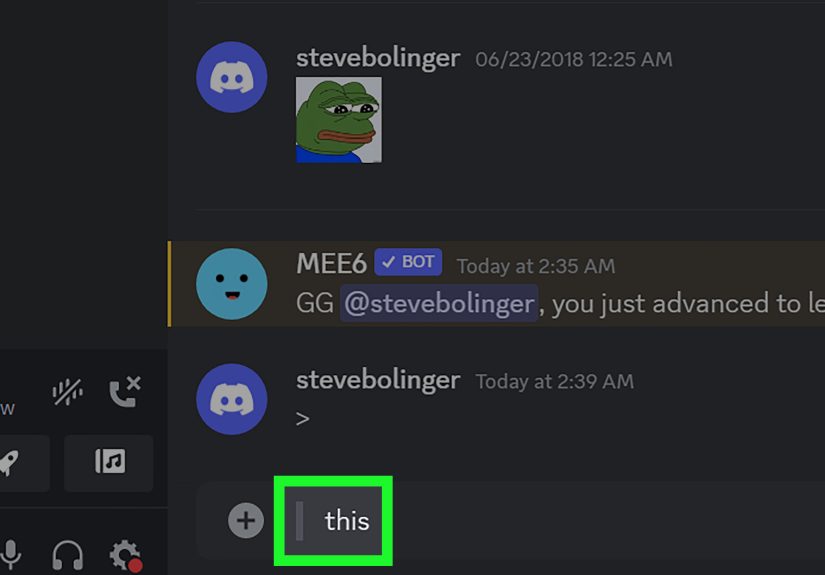
Block Quotes: Reply With Style (and Less Confusion)
Block quotes are great when you’re responding to a specific statement, summarizing something, or quoting a message without dragging everyone back through 400 lines of chat history.
Single-Line Quote
Multi-Line Quote
Best use: meeting notes, feedback, rules, announcements, and “as you said earlier…” moments that require receipts.
Lists and Readability: Make Your Message Skimmable
Discord supports simple Markdown-style lists, which is a fancy way of saying: yes, you can stop sending instructions as one giant paragraph.
Your friends (and your mods) thank you.
Bulleted List
Numbered List
Checklist-Style Message (Quick and Practical)
Discord doesn’t always render interactive checkboxes like some apps, but you can still make a clean checklist format:
Escaping Characters: When Discord Keeps “Helping” You
Sometimes you want to type symbols like *, _, or ~~ without triggering formatting.
The simplest trick is to use a backslash before the character.
Quick save: If you’re trying to show Markdown examples, put them in inline code (`...`) or a code block (triple backticks).
That prevents Discord from interpreting the formatting while you’re teaching it.
Keyboard Shortcuts and Formatting Controls: Faster Than Typing Symbols
Depending on your Discord version and device, you may be able to use keyboard shortcuts for common formattingespecially on desktop.
For example, bold/italic/underline shortcuts can help when you’re editing longer messages.
- Bold: Ctrl/Cmd + B
- Italic: Ctrl/Cmd + I
- Underline: Ctrl/Cmd + U
If you don’t see formatting options, you can always fall back on Markdown symbols. The symbols work everywhere the Markdown engine is supported.
Practical Examples: Real Messages You’ll Actually Send
Example 1: A Clear Event Announcement
Example 2: A Clean Support Reply
Example 3: A Moderator Reminder That Doesn’t Sound Like a Robot
Common Discord Formatting Mistakes (and How to Fix Them)
1) “My bold didn’t work.”
Usually this happens because you forgot a closing symbol or added a space:
2) “My spoilers aren’t hiding.”
Make sure you used two pipes on each side:
3) “My code block looks weird.”
Check that you used triple backticks and closed them properly:
4) “Formatting is eating my symbols.”
Use inline code or escaping:
When to Use Formatting (So You Don’t Become “That Person”)
Formatting is like hot sauce: a little makes everything better, too much makes people regret showing up.
Use it to improve clarity, highlight the key point, or make longer messages easier to scan.
- Use bold for titles, key actions, or the main takeaway.
- Use italics for gentle emphasis, tone, or asides.
- Use underline sparingly for truly important details (dates, rules, boundaries).
Use strikethroughfor edits and humor.- Use code blocks for anything technical or multi-line.
- Use spoilers for plot twists and optional “extra info.”
Extra : Real-Life Experiences With Discord Formatting (The Good, the Messy, the Hilarious)
Once you start using Discord formatting, you notice something kind of funny: it’s not just about making text look nicerit changes how people behave in a channel.
A bold headline makes announcements feel official. A clean quote makes disagreements calmer because everyone can see exactly what’s being addressed.
And a well-placed spoiler tag can save friendships. (Yes, really.)
In gaming servers, formatting becomes a social tool. People use bold like a hype button: “RAID STARTS NOW.”
They use italics for playful trash talk that stays friendly: “sure you’ll carry this time.”
And when someone posts patch notes, the difference between a readable update and a chaotic text blob is usually just… lists and code blocks.
When patch changes are in bullets, everyone skims faster, asks fewer repeat questions, and nobody has to type “scroll up” like it’s their full-time job.
In study groups or professional communities, formatting quietly prevents confusion. Think about someone sharing instructions:
“Submit by Friday, use this template, include screenshots.” If that’s one paragraph, half the group misses at least one step.
But if it’s formatted with a bold title, underlined deadlines, and a short numbered list, people actually follow it.
You don’t need to sound strictyou just need the message to be easy on the eyes.
Moderation teams also develop a “house style.” Many servers end up with a consistent pattern:
bold for rule names, underline for the one part nobody reads, and block quotes for clarifying what a rule applies to.
It’s oddly comfortinglike walking into a store where everything is labeled correctly.
It also reduces arguments because the rules are presented clearly, not buried under jokes and emojis (even if emojis are still absolutely welcome).
And then there are the moments that prove Discord formatting is basically a comedy engine.
Strikethrough is especially powerful for jokes, because it shows the thought you “totally didn’t” have:
“We should all be productive today ~~and definitely not watch videos for three hours~~.”
Spoiler tags are another favorite: people hide punchlines, surprises, or dramatic reveals so the timing lands better.
It’s like giving your chat the power of a tiny stage curtain.
The biggest lesson from using formatting over time is this: the goal isn’t to decorate your textit’s to guide attention.
If someone can understand your message in five seconds instead of fifteen, you’ve won. If they laugh because your emphasis lands perfectly, you’ve won twice.
And if your code block saves a beginner from copy-pasting a broken command, congratulationsyou’re basically a hero, just with more backticks.
Conclusion
Discord text formatting is simple, fast, and surprisingly powerful. With a few symbols, you can make messages clearer, funnier, and easier to follow.
Start with bold and italics, add spoilers and code blocks when you need them, and remember: formatting should help your messagenot wrestle it to the ground.
Now go forth and format responsibly. Or irresponsibly. Just please, for the love of all that is readable, use bullet points when you post rules.






 Close
Close