
Table of Contents >> Show >> Hide
- Step 1: Make Sure Your Bank Offers Online Banking
- Step 2: Use the Official Website or App Only
- Step 3: Gather the Information You Will Need
- Step 4: Click Enroll, Register, or Sign Up
- Step 5: Enter Your Identity and Account Details Carefully
- Step 6: Create a Username You Can Actually Remember
- Step 7: Build a Strong Password, Not a Tragic One
- Step 8: Turn On Multi-Factor Authentication
- Step 9: Verify Your Contact Information
- Step 10: Log In From a Secure Device and Network
- Step 11: Learn the Dashboard Before You Start Clicking Everywhere
- Step 12: Set Up Alerts and Basic Security Preferences
- Step 13: Know What to Do If Something Goes Wrong
- Common Mistakes to Avoid
- Why Online Banking Is Worth It
- Conclusion
- Common Experiences When People First Start Using Online Banking
- SEO Tags
Online banking used to sound futuristic, like something only a tech wizard in a turtleneck could manage while sipping espresso and saying words like “synergy.” Now it is about as normal as checking the weather, ordering dinner, or pretending you will finally stick to a budget this month. If your bank offers digital access, you can usually view balances, transfer money, pay bills, review statements, and monitor transactions without setting foot in a branch.
That said, convenience and care need to travel as a pair. Accessing your bank account online is simple, but doing it the smart way matters. The difference between “I can see my checking account in 30 seconds” and “Why is this website asking for my soul and my Social Security number twice?” usually comes down to knowing the right steps. This guide walks you through exactly how to access your bank account online in 13 practical steps, with security tips, examples, and a few sanity-saving reminders along the way.
Step 1: Make Sure Your Bank Offers Online Banking
Most banks and credit unions in the United States offer online banking, but not every account is automatically enrolled. Some institutions require you to register first. Others let you sign in right away once your account is open. Before doing anything else, confirm that your bank has a web portal or official mobile app for personal banking.
A quick reality check helps here: do not rely on a random search result, a message in your inbox, or a text that says, “Urgent! Your account needs verification!” That is not a banking assistant. That is a scam wearing a fake mustache. Start from the bank’s official website or from contact information listed on your bank statement, debit card, or printed materials.
Step 2: Use the Official Website or App Only
This step sounds obvious until you are tired, in a hurry, and one click away from a fake site that looks almost real. Go directly to your bank’s official homepage by typing the address yourself, or download the institution’s official app from the Apple App Store or Google Play. Avoid signing in through links sent by email, text message, or social media.
If a website address looks odd, has misspellings, or adds weird extra words before or after the bank’s name, stop right there. A legitimate bank will not ask you to “verify your account immediately” through a surprise message. If you are unsure whether the bank is real, verify that it is a legitimate institution before entering any information.
Step 3: Gather the Information You Will Need
Before you begin enrollment, round up your essentials. This makes setup faster and reduces the chance that you will abandon the process halfway through and forget where you left that paper statement. Most banks commonly ask for some version of the following:
- Your bank account number, debit card number, credit card number, or loan number
- Your Social Security number, Individual Taxpayer Identification Number, or Tax ID
- Your email address
- Your mobile phone number
- Possibly your ZIP code, date of birth, or other identifying details
If you are not sure where to find your account number, check a paper statement, deposit slip, or the bottom of a personal check. Keep everything nearby so you are not doing the world’s least exciting scavenger hunt during registration.
Step 4: Click Enroll, Register, or Sign Up
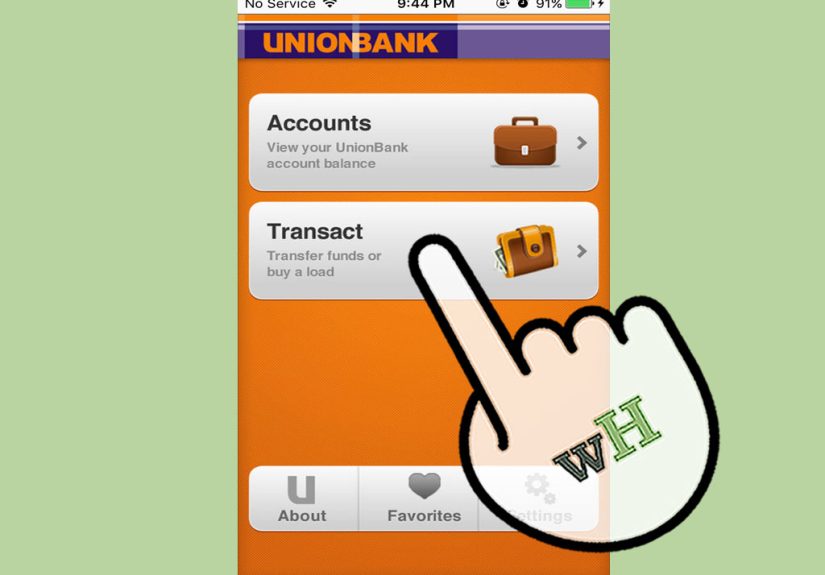
Once you are on the official website, look for language like Enroll in Online Banking, Register, Sign Up, or Set Up Online Access. Every bank uses slightly different wording, but the idea is the same: first-time users need to create online credentials before they can log in.
Some banks also let you enroll through their mobile app. Others recommend setting up access on a desktop browser first and then using the same username and password in the app. If the bank gives both options, choose the one you are most comfortable using. There is no prize for making setup harder than it needs to be.
Step 5: Enter Your Identity and Account Details Carefully
This is the part where the bank confirms that you are really you and not a stranger trying to adopt your checking account. Enter your identifying details exactly as requested. Double-check account numbers, email addresses, and phone numbers before moving on. One wrong digit can turn a five-minute setup into a fifteen-minute headache.
Some banks ask for only the last few digits of your card or account number. Others may request a full number or a combination of details. Follow the prompts exactly as shown on the screen. If something does not match the bank’s records, the system may stop the process and ask you to contact support.
Step 6: Create a Username You Can Actually Remember
You now get to create your username, which is exciting in the same way naming a Wi-Fi network is exciting, except this one matters more. Choose something memorable but not obvious. Avoid usernames based on your full name, birth year, or anything a scammer could guess after spending thirty seconds on social media.
A good username is simple enough for you to recall and boring enough that nobody else would guess it. Banking is one of the few areas in life where boring is beautiful.
Step 7: Build a Strong Password, Not a Tragic One
Please do not make your password Password123, your dog’s name, or your birthday with an exclamation point slapped on top like a tiny security hat. A strong password should be long, unique, and difficult to guess. A passphrase made of unrelated words can work well, especially if the bank allows longer passwords.
The key rule is uniqueness. Do not reuse the same password you use for shopping sites, email, streaming services, or that online store where you bought one cable and somehow still get six promotional emails a week. If one reused password gets exposed, multiple accounts can fall like dominoes. A password manager can help if remembering strong passwords feels like a part-time job.
Step 8: Turn On Multi-Factor Authentication
If your bank offers multi-factor authentication, enable it. Yes, it adds one more step. No, that is not a bad thing. Multi-factor authentication helps protect your account by requiring something beyond your password, such as a one-time code sent by text, an authenticator app prompt, or a security check tied to your device.
Think of it this way: a password is one lock on the door. Multi-factor authentication is the second lock, the deadbolt, and maybe the suspicious neighbor who notices everything. Even if someone gets your password, that extra step can stop unauthorized access before it starts.
Step 9: Verify Your Contact Information
During setup, your bank may send an authorization code to your email address or mobile phone. Enter the code promptly and make sure the contact details attached to your account are current. If your phone number is old, mistyped, or tied to a landline from another era, account recovery can become much harder later.
Keeping your contact information updated also helps your bank send alerts about suspicious activity, password changes, transfers, and other important account events. In banking, being easy to reach is not clingy. It is practical.
Step 10: Log In From a Secure Device and Network
Once your online access is set up, sign in from a device you trust. A personal computer, tablet, or smartphone is ideal. Avoid public computers in places like libraries, hotels, or shared workspaces for routine banking whenever possible. Also be cautious with public Wi-Fi. If you can wait until you are on a secure home or private network, do that.
Make sure your browser, operating system, and banking app are up to date. Software updates are not just there to annoy you while you are trying to do something else. They often fix security issues that criminals love to exploit.
Step 11: Learn the Dashboard Before You Start Clicking Everywhere
After your first successful login, take a minute to look around. Most online banking dashboards show your available balance, recent transactions, pending charges, linked accounts, and shortcuts to common tools. You may also find tabs for statements, transfers, bill pay, check images, credit card activity, alerts, or customer support.
Spend a few minutes learning where things are before you need them in a rush. That way, when rent is due or a mystery charge appears, you are not squinting at a menu bar like it is a puzzle designed by a very smug engineer.
Step 12: Set Up Alerts and Basic Security Preferences
One of the best things about online banking is that it can keep an eye on your money even when you are busy living your life. Turn on alerts for low balances, large withdrawals, debit card transactions, password changes, and transfers. These notifications can help you spot fraud quickly or simply avoid the classic “Wait, that subscription renewed again?” moment.
You should also review any available security settings, such as trusted devices, login verification frequency, notification preferences, and paperless statement options. The goal is not to create a fortress so complicated that you lock yourself out. The goal is to build practical, layered protection.
Step 13: Know What to Do If Something Goes Wrong
Even well-designed online banking systems can hit a snag. You might forget your username, mistype your password too many times, lose access to your phone, or spot a transaction that makes your eyebrows fly straight into the ceiling. The good news is that most banks have built-in recovery tools for login help, password resets, and identity verification.
If you notice unauthorized activity, contact your bank or credit union right away. Review your statements regularly and report suspicious transfers quickly. Timing matters. The sooner you act, the better your chances of limiting damage and resolving the issue smoothly. Save your bank’s customer service number in your phone so you do not have to go searching for it during a stressful moment.
Common Mistakes to Avoid
Now that you know the setup process, here are the mistakes that trip people up most often:
- Clicking a login link from a text or email instead of going directly to the bank’s website
- Reusing an old password from another account
- Ignoring multi-factor authentication because it feels slightly inconvenient
- Doing first-time setup on public Wi-Fi or a shared computer
- Skipping alerts and then noticing fraud three weeks later
- Forgetting to update your phone number or email address
- Waiting too long to report unauthorized transactions
Most online banking problems are not caused by the technology itself. They come from rushing, trusting the wrong link, or assuming nothing bad happens to careful people. Unfortunately, scammers adore careful people who are in a hurry.
Why Online Banking Is Worth It
Once everything is set up, online banking becomes one of those tools you wonder how you lived without. You can check balances before swiping your debit card, transfer money between accounts in seconds, review statements at midnight, and keep track of spending without waiting for paper mail. Many banks also let you pay bills, search transaction history, lock cards, manage travel notices, or access customer support online.
In other words, the payoff is real. You trade a short setup process for ongoing convenience, better visibility into your money, and faster fraud detection. That is a deal worth taking.
Conclusion
Learning how to access your bank account online is less about being “good with technology” and more about following a clear process. Use the official website or app, gather your information, enroll carefully, create strong credentials, enable extra security, and learn where the most useful tools live once you sign in. That is the whole game plan.
The smartest online banking habit is not just logging in. It is logging in safely. When you combine convenience with good security practices, online banking becomes a powerful everyday tool instead of a source of stress. Set it up once, set it up right, and let your money stop demanding so many field trips.
Common Experiences When People First Start Using Online Banking
For many people, the first experience with online banking is a weird mix of relief, suspicion, and mild triumph. Relief comes from realizing that you no longer have to call the bank or drive to a branch just to confirm whether your paycheck landed. Suspicion appears the moment the website asks for personal details and you think, “This is normal, right?” Then triumph arrives when you finally log in, see your balances, and feel like you have joined the modern financial world without setting anything on fire.
A common first-time experience is that setup takes less time than expected, but more attention than expected. The actual enrollment may only take a few minutes, yet people often pause to hunt down a statement, find the right account number, check which email they want to use, or decide whether their password is secure enough. That pause is not a problem. In fact, it is usually a sign that someone is doing it carefully instead of speed-running straight into avoidable trouble.
Another typical experience is realizing that online banking is not just a digital version of a bank statement. It is much more interactive. People often log in for the first time intending to “just check the balance” and then discover tools for bill pay, alerts, transfers, mobile deposits, spending categories, statement downloads, and account settings. Suddenly the account feels less like a static record and more like a control panel. That is usually the moment online banking becomes genuinely useful.
Security can also feel more personal once someone starts using digital banking regularly. Before enrolling, advice like “use a strong password” sounds generic. After enrolling, it hits differently because now it is your checking account, your debit card activity, and your notifications. Many people become more willing to use multi-factor authentication once they see how much sensitive information sits inside the account dashboard. Convenience is great, but convenience with guardrails feels even better.
There is also a very real confidence boost that comes with routine use. The first login may feel cautious. By the fifth or sixth, people are checking transactions in seconds, moving money between accounts, and spotting unusual charges before they become bigger issues. That confidence matters, especially for people who used to feel intimidated by online financial tools. Once the process becomes familiar, it usually feels less like a technical task and more like a normal household habit, right up there with checking the mailbox or locking the front door.
Finally, one of the most valuable experiences people report is peace of mind. Being able to log in anytime, review activity, confirm deposits, and receive alerts makes money feel less mysterious. Instead of wondering whether a payment posted or whether a card charge cleared, you can simply look. That visibility helps people feel more organized, more in control, and less likely to be blindsided by fraud or forgotten expenses. In a world that already provides enough surprises, your bank account should not need to audition for the role.





 Close
Close