
Table of Contents >> Show >> Hide
- What “Open Source Serial Adapter” Actually Means (No Vibes-Only Definitions)
- The Problem It Solves: Serial Is Simple… Until It Isn’t
- Meet the “Break Me Off a Piece” Adapter: Why This Design Is So Fun
- The Chips Behind the Curtain: USB-to-UART and RS-232 Transceivers
- Drivers and COM Ports: The Part Nobody Brags About (But Everyone Fights)
- Choosing the Right Serial Adapter Setup (A Decision Guide for the Sleep-Deprived)
- Why Open Source Hardware Makes a Better Serial Adapter
- Real-World Scenarios: Where This Adapter Pays for Itself
- Field Notes: of Serial Adapter Experiences (a.k.a. “Lessons Paid for in Time”)
- Conclusion: One More Adapter… But Make It the Last One You Regret Buying
If you’ve ever done embedded work, retrocomputing, or the kind of debugging that involves squinting at a blinking LED like it owes you money, you already know the truth: serial never really left. It just changed outfits. Today it wears a USB-C hoodie, shows up uninvited, and asks if you “still have a COM port.”
And that’s where the open source serial adapter enters the chatconfident, hackable, and just quirky enough to make you want to build one even though you already own three… okay, thirteen… fine, a whole drawer.
What “Open Source Serial Adapter” Actually Means (No Vibes-Only Definitions)
A USB-to-serial adapter is a bridge between modern computers and devices that still speak “UART” or “RS-232.” The “open source” part means the design filesschematics, PCB layout, BOMare available so you can inspect, modify, and remix the tool. That’s huge when your work involves weird pinouts, odd voltage levels, or legacy gear that predates the concept of “plug and play.”
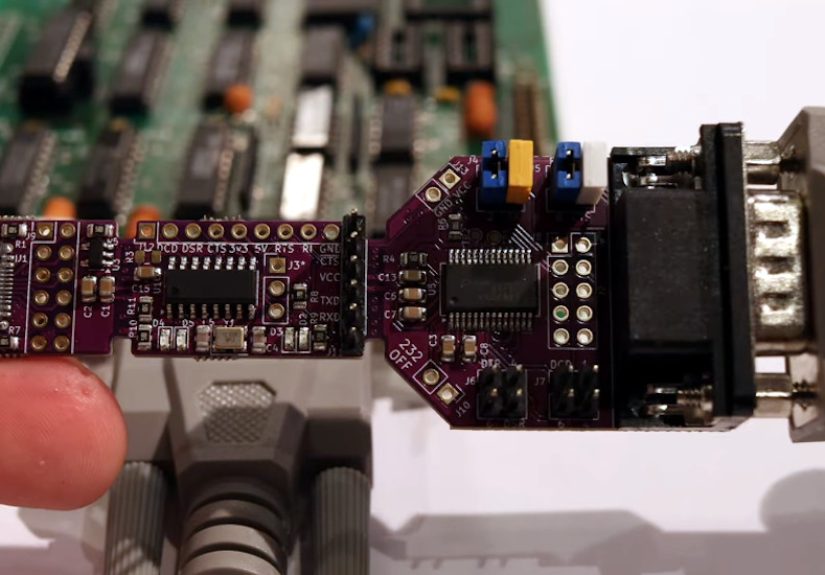
One especially clever example making the rounds is the Universal Serial Adapter, an open-source hardware design that combines USB-C, TTL UART breakouts, and a true RS-232 interface in a single boardand then adds a delightfully chaotic twist: parts of the PCB are designed to snap off so you can physically reconfigure it to match your needs. Yes, it’s hardware with DLC.
The Problem It Solves: Serial Is Simple… Until It Isn’t
At a glance, serial looks like the easiest thing in tech: TX goes to RX, RX goes to TX, you set a baud rate, and the universe is at peace. Then reality shows up holding a DE-9 connector, a “TTL serial” label that’s lying, and a driver installer from 2009.
Two Serial Worlds: TTL UART vs. RS-232
“Serial” can mean different electrical realities:
- TTL UART (common on microcontrollers): typically 0–3.3V or 0–5V logic-level signals.
- RS-232 (common on industrial and retro gear): uses higher bipolar voltages (often around ±12V-ish in practice), and the polarity is inverted compared to TTL logic.
Translation: a TTL USB-to-UART dongle plugged straight into an RS-232 port is not “bold.” It’s “smoke-testing your budget.” Proper RS-232 needs a level shifter/transceiver that generates positive and negative swings from a single supply using charge pumps.
Meet the “Break Me Off a Piece” Adapter: Why This Design Is So Fun
The Universal Serial Adapter (the open-source project that inspired the title’s snack-commercial energy) is designed to be a USB-C ↔ RS-232 bridge while also exposing TTL UART pins for embedded work. In other words: it’s trying to be the one adapter you reach for first, not the one you find last… under a solder spool… next to a mystery jumper.
Feature #1: A Real RS-232 Connector (Hello, Retro World)
Most USB-to-serial tools end in a header or a cable. This one terminates in a male DE-9 style connector so it can plug directly into classic RS-232 portsan instant win for retrocomputing, lab equipment, industrial controllers, and “I swear this CNC machine is only 20 years old.”
Feature #2: Jumper-Configurable Straight-Through or Crossover
RS-232 doesn’t just bring voltage drama; it brings wiring drama. Some setups need straight-through wiring, others need a null-modem/crossover arrangement. This adapter uses configurable jumpers that let you re-route RX/TX (and certain control signals) without hunting down the one cable you own that’s “the other kind.”
Feature #3: TTL Breakouts for UART Debugging
Working with microcontrollers? You often need logic-level RX/TX pins and maybe a control line or two. This design breaks out TTL RX/TX and control pins so you can connect directly to boards, modules, and prototypes without “creative” clip leads.
Feature #4: A Built-In 3.3V Regulator (Because Power Happens)
It includes an onboard 3.3V regulator so you can power small external circuits while debugging. That won’t replace a bench supply, but it’s incredibly handy for quick testsespecially when your target device is allergic to your breadboard’s power rail.
Feature #5: Snap-Off Sections (The Most Satisfying Hardware Optimization)
Here’s the party trick: the PCB is designed so you can physically snap off sections. If you only need the TTL USB-to-UART part today, you can break away the RS-232 chunk. Or, if you want to repurpose the RS-232 portion on a breadboard (with a right-angle header), you can do that too. It’s modular, but with fewer screws and more “careful bending while whispering encouragement.”
The Chips Behind the Curtain: USB-to-UART and RS-232 Transceivers
Under the hood, this style of adapter typically has two key roles:
- USB-to-UART bridge: makes your computer see a serial port over USB.
- RS-232 transceiver: converts logic-level UART signals to true RS-232 voltages and polarity (and back).
USB-to-UART: Why CH340 Shows Up Everywhere
A common USB-to-UART bridge is the CH340 family. It’s popular because it’s inexpensive and widely used across dev boards and adapters. The tradeoff is that driver experience can vary by OS version and device implementation. On many systems, it installs automatically; sometimes you’ll need a manual driver installespecially on older setups or after certain OS changes.
RS-232 Transceiver: Charge Pumps, Polarity, and “True RS-232”
A proper RS-232 interface uses a transceiver with an internal charge pump to generate the positive and negative voltages required for RS-232 signaling from a single supply. A transceiver family like the SP3243-class devices is designed for that job, offering compliant RS-232 performance from low-voltage supplies and supporting multiple driver/receiver channels.
Practical takeaway: if you need to talk to real RS-232 equipment reliablyespecially older or pickier gear“true RS-232 levels” matter. Some cheaper adapters cut corners with limited swing, which can be the difference between “solid link” and “why does it only work on Tuesdays.”
Drivers and COM Ports: The Part Nobody Brags About (But Everyone Fights)
Serial adapters are basically tiny diplomats negotiating between your OS and your device. Most of the time, the OS creates a virtual COM port (Windows) or a device node (macOS/Linux) and you’re off to the races. But when it breaks, it breaks loudly.
CDC vs. Vendor Drivers: Two Roads to the Same Terminal Window
Some USB serial devices use the standard USB communications class (CDC), which allows operating systemsespecially Windowsto use in-box drivers (like the built-in USB serial driver) with minimal fuss. Others rely on vendor-specific drivers, which can be perfectly fine… until you’re on a locked-down machine, or your OS updates at 2 a.m., or your adapter uses a chipset clone that your driver refuses to acknowledge.
Pro Tip: Test Your Adapter Before Blaming Your Firmware
Before you rewrite your bootloader in a fit of despair, do a simple loopback test: connect TX to RX on the TTL header, open a serial terminal, and see if typed characters echo back. If they do, the adapter and driver path are probably fine. If not, the problem is likely upstream (driver/port selection) or downstream (cable/pinout/voltage mismatch).
Choosing the Right Serial Adapter Setup (A Decision Guide for the Sleep-Deprived)
If you’re connecting to microcontrollers (UART TTL)
- Pick an adapter with selectable 3.3V/5V logic if you work across platforms.
- Make sure the pinout matches your target (GND, RX, TX, and maybe DTR/RTS).
- For Arduino-style boards, DTR is often used to auto-reset during uploads.
If you’re connecting to legacy/industrial gear (RS-232)
- Use a true RS-232 interface with a proper transceiver (not a “TTL serial” impostor).
- Expect crossover vs straight-through confusionchoose hardware that can adapt without special cables.
- Watch for ground loops and noisy environments; RS-232 is single-ended and can be cranky over long runs.
If you’re doing both (the “why not” lifestyle)
This is where an open-source hybrid adapter shines. One tool can handle USB-C to RS-232 for legacy ports, while still giving you TTL breakouts for embedded debugging. That reduces friction, reduces mistakes, andmost importantlyreduces the number of adapters you buy “just in case” (down from 17 to 16).
Why Open Source Hardware Makes a Better Serial Adapter
With proprietary adapters, you’re trusting that the designer made sensible choices and didn’t hide any surprises. With an open-source serial adapter, you can:
- Inspect the schematic to confirm signal routing, protection, and level shifting.
- Edit the PCB to fit your workspace (different headers, mounting holes, labeling).
- Swap components if you prefer a different USB-UART bridge or need higher baud rates.
- Fix what annoys you (the ultimate luxury in electronics).
Even if you never manufacture a board, open designs help you debug faster because you’re not guessing how things are wired. When you’re staring down a silent serial line, certainty is priceless.
Real-World Scenarios: Where This Adapter Pays for Itself
1) Retrocomputing and “Vintage” Hardware
Old computers, routers, modems, lab instruments, and industrial controllers often expose RS-232 ports. A direct-plug DE-9 adapter cuts out cable clutter and makes quick diagnostics feel… almost modern.
2) Embedded Development and UART Console Access
Many boards expose a UART console for logs and boot messages. TTL breakouts let you wire up RX/TX quickly, and control lines can help with auto-reset or boot mode toggling on certain targets.
3) Field Debugging Where You Don’t Control the Environment
Open-source hardware tools are easier to trust in the field because you can confirm what’s on the board. If you need ESD protection, strain relief, or a different connector orientation, you can build it that way.
Field Notes: of Serial Adapter Experiences (a.k.a. “Lessons Paid for in Time”)
My first “serious” serial debugging session started the same way most do: confidence, coffee, and a USB-to-UART dongle I’d used exactly once. The goal was simpleread boot logs from a board. The board even had pins labeled RX and TX, which felt like cheating. So I connected RX-to-RX and TX-to-TX because, in my defense, it was 1:13 a.m. and the labels looked friendly. Nothing happened. Naturally, I assumed my firmware was broken and began planning a dramatic rewrite.
Ten minutes later I swapped the lines (TX-to-RX, RX-to-TX) and the console sprang to life like it had been waiting patiently for me to stop being creative. That’s the first serial lesson: the electrical universe is consistent, and your brain is the variable. The second lesson arrived immediately after: my adapter was set to 5V logic and the target was 3.3V. It still “worked,” which is the most dangerous kind of workingjust enough to fool you into thinking you’re safe. After that, I became the kind of person who checks voltage jumpers the way normal people check if they locked the door.
Then came the RS-232 phase. I had a piece of equipment with a DE-9 port that looked like a normal serial connection, so I tried to use a TTL adapter with jumper wires because hubris is a renewable energy source. The results were predictably confusing: garbage characters, inconsistent behavior, and a growing suspicion that the device was haunted by the ghost of a standards committee. That’s when I learned that “serial” is a family name, not a single personRS-232 and TTL UART might both be “serial,” but they don’t speak the same electrical language.
Once I got a true RS-232 adapter, the connection became boring (the highest compliment in debugging). But the cable situation got ridiculous. Straight-through? Null modem? Which one swaps what? Why do I own three cables that all look identical but behave like morally different objects? I started labeling everything, then ran out of labels and began using painter’s tape like an engineer in a sitcom.
That’s why the open-source “snap-off” serial adapter design feels like it was made by someone who has lived the same pain. Being able to reconfigure signal routing with jumpers instead of digging for the correct mythical cable is a quality-of-life upgrade. Having TTL breakouts and a real RS-232 interface on one board means fewer tools, fewer mistakes, and fewer late-night debates with your past self. And if you want to tweak itadd clearer silkscreen labels, change the header orientation, reinforce the USB-C connector, or just make it neon purple because you canyou’re allowed. Open-source hardware turns a serial adapter from a disposable accessory into a tool you can understand, trust, and evolve.
Conclusion: One More Adapter… But Make It the Last One You Regret Buying
Serial adapters are the duct tape of digital communication: not glamorous, not trendy, but shockingly essential. A well-designed open source serial adapter goes a step further by making the tool transparent and customizable. The “Break Me Off A Piece” style design nails it with a hybrid approachUSB-C, TTL UART breakouts, true RS-232 support, configurable jumpers, and even physical modularity.
If you’re the kind of person who debugs hardware, talks to legacy gear, or just enjoys owning tools that make you feel smarter, this is the rare gadget that earns its space in the drawer. And heyif it snaps cleanly when you break it apart, that’s basically a dopamine feature.





 Close
Close