
Table of Contents >> Show >> Hide
- What Is an Over-The-Air (OTA) Antenna?
- Why OTA Antennas Are Making a Comeback
- How OTA Antennas Work (Without the Jargon Headache)
- Types of OTA Antennas
- How to Choose the Right OTA Antenna
- Placement and Installation Tips
- Common OTA Antenna Myths (Debunked)
- Using OTA Antennas with Streaming and DVRs
- Troubleshooting OTA Reception Problems
- Real-World Experiences with OTA Antennas
- Conclusion: Is an OTA Antenna Right for You?
If your monthly cable or live TV streaming bill makes you want to hide under the couch, it might be time to look upright at your TV antenna options. Over-the-air (OTA) antennas let you watch local channels for free, in high definition, with no subscription required. They’re one of the simplest ways to cut costs without giving up news, sports, and prime-time favorites.
In this guide, we’ll walk through how OTA antennas work, the different types, how to choose the right one, where to place it, and how to fix annoying reception issues. We’ll also talk about how antennas fit into a modern streaming setup and share some real-world experiences from people who’ve actually lived with OTA TV day to day.
What Is an Over-The-Air (OTA) Antenna?
An over-the-air (OTA) antenna is simply a TV antenna that picks up free broadcast signals sent out by local television stations over VHF and UHF radio frequencies. Your TV’s built-in tuner (or an external tuner) decodes these signals into the channels you see when you choose “Antenna” or “Air” as your TV input.
In the United States, broadcasters deliver digital television using the ATSC standard (currently ATSC 1.0, with ATSC 3.0 or “NextGen TV” rolling out in many markets). As long as your TV has an ATSC tunerwhich most sets manufactured in the last decade doyou can connect an OTA antenna with a coaxial cable and scan for channels.
You’ll see a lot of marketing phrases like “HD antenna” or “4K antenna,” but here’s the secret: the antenna itself isn’t HD or 4K. It’s just grabbing radio waves. The broadcast format (HD, 4K, surround sound) is determined by the station and your tuner, not by some magical “ultra-mega-HD” sticker on the package.
Why OTA Antennas Are Making a Comeback
A decade ago, TV antennas sounded old-schoollike something your grandparents had to fiddle with to watch a fuzzy game show. Today, they’re squarely back in style for three big reasons:
1. Free Local Channels in HD
With a decent antenna, you can often get major networks like ABC, NBC, CBS, FOX, PBS, and local independents, all in sharp HD. Consumer-focused organizations note that, in many markets, OTA broadcasts can look better than compressed streams because the signal isn’t squeezed to fit through an internet connection.
2. Cord-Cutting Without Losing Live TV
Cord-cutters often realize that streaming services don’t always include all local channelsor they’re locked behind higher-priced packages. A basic OTA antenna fills that gap, giving you local news, sports, and big events without having to subscribe to an expensive “live TV” streaming bundle.
3. Future-Friendly with NextGen TV
As ATSC 3.0 (“NextGen TV”) rolls out in many U.S. cities, broadcast stations are adding features like improved audio, HDR video, and potentially 4K for some content. The good news: you don’t need a special ATSC 3.0 antenna; an OTA antenna that works for ATSC 1.0 will also work for ATSC 3.0. You’ll just need a compatible TV or tuner box to take advantage of the new features.
How OTA Antennas Work (Without the Jargon Headache)
Broadcast towers send out TV signals across the air, kind of like a giant radio station. Your antenna’s job is to capture those signals and pass them down a coaxial cable to your TV or tuner, which then decodes the digital data into picture and sound.
TV signals travel mostly line-of-sight. That means hills, tall buildings, trees, and even your neighbor’s brick wall can weaken or block the signal. The higher you can place your antenna and the fewer obstacles between it and the tower, the better. Engineers even use a measurement called “height above average terrain” (HAAT) to estimate how far signals can goheight really matters.
For you, the key takeaway is simple: elevation and a clear view toward the towers are your best friends. That’s why attic and rooftop antennas often outperform antennas stuck behind a big TV in the basement.
Types of OTA Antennas
Indoor vs. Outdoor Antennas
Indoor antennas are the thin, flat panels or small tabletop gadgets that sit near your TV or window. They’re easy to install, renter-friendly, and inexpensive, but they perform best if you live relatively close to the broadcast towers and don’t have a lot of obstructions.
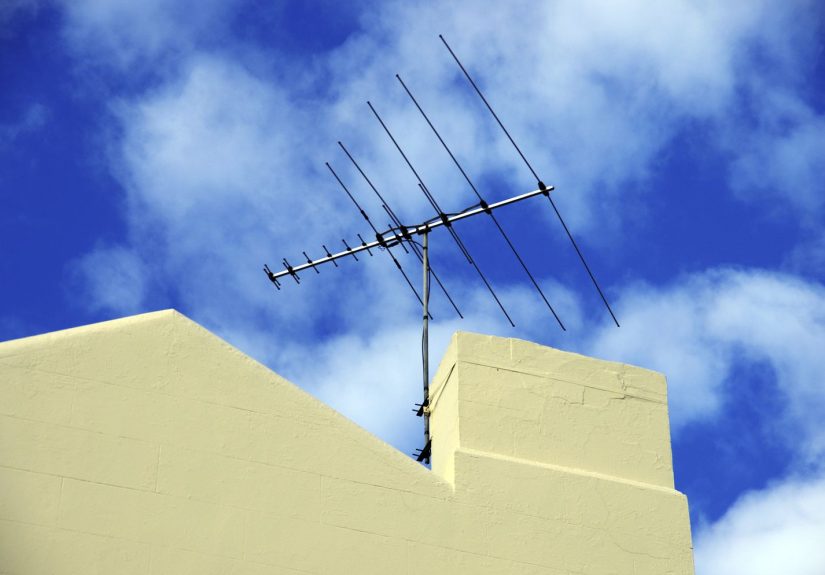
Outdoor antennas are larger units mounted on your roof, an exterior wall, or sometimes in the attic. Because they’re higher and less blocked by walls, they usually pull in more channels and provide a more stable signalespecially in suburban or rural areas.
If you’re in a dense city apartment with strong nearby signals, start with an indoor antenna. If you’re on the fringe of coverage or want maximum reliability, an outdoor model is often worth the effort.
Directional vs. Omnidirectional Antennas
Directional antennas focus on signals from one main direction. They’re great if most of your towers are clustered in roughly the same part of the sky. You aim the antenna toward that cluster to maximize signal strength.
Omnidirectional antennas (often flat or round designs) try to pull in signals from all around you. They’re more forgiving if your towers are scattered, but they typically offer less gain and can be more vulnerable to interference.
Amplified vs. Passive Antennas
An amplified antenna has a built-in signal amplifier powered via USB or an AC adapter. Amplifiers can help if the signal coming into your home is weak or if you’re splitting the signal to multiple TVs. However, they can also amplify noise and create problems if you’re already close to strong towers.
A passive antenna has no power and no amplifier. In many urban or strong-signal areas, a passive antenna is all you need. If you experiment and find that channels actually look worse with the amplifier on, don’t be shy about turning it off.
How to Choose the Right OTA Antenna
Picking an antenna isn’t about grabbing the biggest one on sale. It’s about matching your antenna to the signals around you and your living situation. Here’s a step-by-step approach.
Step 1: Check What Channels You Can Get
Before you buy anything, use an online signal map tool. The FCC’s DTV Reception Maps let you plug in your address or ZIP code and see which stations should be available, plus an estimate of signal strength.
Sites like AntennaWeb and commercial tools from antenna manufacturers (for example, Antennas Direct’s transmitter locator) show tower locations and distances, plus which direction you should aim your antenna.
Step 2: Note Distance and Frequency Bands
Your TV stations may broadcast on:
- VHF-High (channels 7–13)
- UHF (channels 14–36, typically, after the spectrum repack)
Many modern antennas are optimized for UHF, but some markets still rely heavily on VHF-High for major networks. A good buying guide or product box will specify which bands the antenna supports. Reviewers often test how well each model handles both VHF and UHF, so it can be worth checking recent lab tests from respected tech publications.
Step 3: Match Antenna Type to Your Situation
- Urban / close to towers (0–15 miles): Start with a small indoor antenna, possibly passive, placed near a window.
- Suburban (15–35 miles): A higher-quality indoor antenna or attic/outdoor antenna will usually perform better.
- Rural (35+ miles): A larger outdoor directional antenna with good gain is often the most reliable choice.
If most of your towers are in one direction, a directional antenna makes sense. If you have towers in multiple directions you care about, an omnidirectional model or a rotor (to physically rotate a directional antenna) might be worth considering.
Placement and Installation Tips
You’ve bought the antenna. Now the fun puzzle begins: finding the sweet spot.
Go High and Near a Window
Indoor antennas usually work best when mounted high on a wall or in an upstairs window facing the towers. Avoid placing them behind your TV or near big metal objects if you can. Some manufacturer and DVR support guides specifically recommend avoiding windows with metallic mesh or reflective coatings, since these can block signals.
Aim Toward the Towers
For directional antennas, pointing matters. Use tower locator tools to figure out the compass heading of your nearest cluster of towers, then aim the antenna accordingly. Even small adjustmentsa few inches or a slight rotationcan make a noticeable difference in signal strength.
Many tuners and OTA DVRs have a signal strength meter you can watch in real time while someone slowly adjusts the antenna. It’s the techie version of “a little to the left… no, back a bit.”
Scan, Rescan, Repeat
Once the antenna is in place, go into your TV’s settings and choose “Channel Scan” or “Auto Program.” Any time you move the antenna, add a splitter, or notice you’re suddenly missing a channel, run another scan. Broadcasters sometimes change channel assignments or power levels, and rescanning helps your TV keep up.
Common OTA Antenna Myths (Debunked)
“I Need an ‘HD’ or ‘4K’ Antenna”
No you don’t. Any properly designed TV antenna that covers the right frequency bands will work for SD, HD, or 4K broadcasts. The content format is up to the broadcaster and your tuner, not the antenna’s marketing label.
“Amplified Antennas Are Always Better”
Amplifiers help when your signal is weak or when you’re running long coaxial cables. But in areas close to strong towers, they can actually make things worse by overloading your tuner or amplifying noise and interference. Independent tests show that some models perform better with the amplifier turned off.
“OTA Picture Quality Is Worse Than Streaming”
Not necessarily. Because broadcast stations can devote more bandwidth to each channel than many streaming services do, OTA signals can look very cleansometimes better than overloaded streams during peak viewing hours. And as NextGen TV rolls out, OTA quality should continue to improve in many markets.
Using OTA Antennas with Streaming and DVRs
The smartest cord-cutting setups combine a cheap OTA antenna with streaming apps.
- Local channels via antenna: News, sports, major shows, and special events come in free.
- On-demand content via streaming: Services like Netflix, Prime Video, or others cover movies and series that aren’t on broadcast TV.
- Optional OTA DVR: A standalone DVR or network tuner lets you record broadcast shows, pause live TV, and watch antenna channels on multiple devices around your home.
Consumer-focused guides often recommend this mix as a way to drastically cut monthly bills while keeping a “cable-like” experience for your favorite shows.
Troubleshooting OTA Reception Problems
If your OTA experience looks more like scrambled eggs than crisp HDTV, try these fixes:
- Move the antenna: Even a foot or two can dramatically change reception, especially indoors.
- Raise it higher: Move it higher on the wall, to another room, or into the attic if possible.
- Re-point the antenna: Slightly rotate directional antennas or try a different window for omnidirectional models.
- Reduce splits: Each splitter weakens the signal. If possible, test with a direct run to one TV.
- Check cables: Replace old, damaged, or very long coax runs; use RG-6 cable rather than thin, low-quality coax.
- Experiment with amplification: Turn the amp off and on to see which gives a more stable picture.
If nothing works, you may need a different antenna type or an outdoor installation. Sometimes the terrain and building layout simply demand more hardware.
Real-World Experiences with OTA Antennas
Guides and lab tests are helpful, but living with an OTA antenna day to day teaches you a few extra lessons. Here are some real-world scenarios that highlight what to expect.
The City Apartment: Small Antenna, Big Results
Imagine you live on the 10th floor of a downtown apartment building. When you check an online signal map, you find out that most of your local towers are within 10–12 miles, and the signals are rated strong. You grab a simple flat indoor antenna, stick it on a window that faces the towers, and run a channel scan.
Result? You pick up 40+ channels, including multiple subchannels you didn’t even know existedclassic TV, foreign news, and a channel that seems to play cooking shows 24/7. The entire setup costs less than one month of cable. The biggest lesson you learn: placement matters more than price. When you first put the antenna behind the TV, you got about half as many channels and some of them were glitchy. One move to the window and everything cleaned up.
The Suburban Family: Mixing Antenna and Streaming
In the suburbs, things look different. You’re 25–30 miles from the towers, and some of them are in slightly different directions. An indoor antenna gives you a few core channels, but bad weather turns your football game into a pixelated impressionist painting.
After a little research, you install a medium-sized outdoor directional antenna on the roof and run a single coax cable to an OTA DVR box in your living room. From there, your family watches antenna channels on multiple TVs and tablets through the home Wi-Fi. Streaming services handle your on-demand shows; the antenna covers local news, kids’ programming, and Sunday sports.
What you notice over time is reliability. Once the outdoor antenna is locked in, you basically forget it’s there. It just works, and the DVR behaves like the cable box you used to pay forminus the painful monthly bill.
The Rural Cabin: Pushing the Limits
Now picture a rural cabin, 50 miles from the nearest big city, surrounded by hills and trees. Online maps show weak to moderate signals at best. You decide to go all-in: a high-gain outdoor antenna mounted on a mast above the roofline, pointed carefully at the main tower cluster. You use high-quality RG-6 coax and keep the cable run as short as you reasonably can.
The first scan gets a handful of channelsfewer than in the city, but enough to cover the big networks and PBS. On windy days, you notice occasional dropouts, and heavy storms can disrupt reception completely. Still, for a weekend place where you mostly stream movies over satellite or cellular data, the antenna feels like a bonus: free news and sports when you want them, no monthly commitment.
Everyday Lessons from OTA Users
Across all these situations, a few themes keep popping up:
- Expect some trial and error: Don’t be discouraged if the first spot you try doesn’t work. OTA is a little bit science, a little bit “walk around the room with an antenna until the picture looks good.”
- Use tools but trust your eyes: Signal maps and reviews are helpful, but your exact building, walls, and surroundings are unique. The final verdict always comes from your own TV screen.
- Think long term: A slightly more expensive antenna that reliably works for years is cheaper than paying for live TV bundles every month.
- Combine, don’t replace: OTA doesn’t have to replace streaming; it complements it. The happiest cord-cutters usually mix the two.
Once you’ve gone through the initial setup and tweaking, OTA TV mostly fades into the backgroundwhich is exactly what you want from a good home system. Free, dependable local channels quietly doing their thing while you get on with binge-watching whatever you like elsewhere.
Conclusion: Is an OTA Antenna Right for You?
Over-the-air antennas are one of the best budget-friendly tools for watching TV in the United States today. They harness free broadcast signals to deliver local news, sports, and prime-time shows in high definition, and they pair perfectly with modern streaming services.
If you’re tired of cable bills or want a safety net when streaming services drop local channels, an OTA antenna is worth considering. Check your local signal maps, choose an antenna matched to your distance and surroundings, experiment with placement, and don’t be afraid to tweak and rescan. Once dialed in, your antenna can quietly save you hundreds of dollars a yearno subscription, no contracts, just you, your TV, and the airwaves.






 Close
Close