
Table of Contents >> Show >> Hide
- What Is a Session Recording?
- How Session Recordings Work
- Why Session Recordings Matter for Conversion Optimization
- How Session Recordings Reveal Lost Sales
- What Session Recordings Do Better Than Standard Analytics
- Best Ways to Use Session Recordings Without Wasting Time
- Privacy, Consent, and Responsible Use
- Common Mistakes Businesses Make with Session Recordings
- A Simple Example of Lost Sales in Action
- Experience-Based Lessons from the Field
- Final Thoughts
- SEO Tags
If your analytics dashboard says, “Traffic looks fine,” but your revenue says, “Absolutely not,” you may have a visibility problem. This is where session recordings come in. They help you move beyond charts, percentages, and polite little line graphs into the messy, very human reality of how people actually use your website.
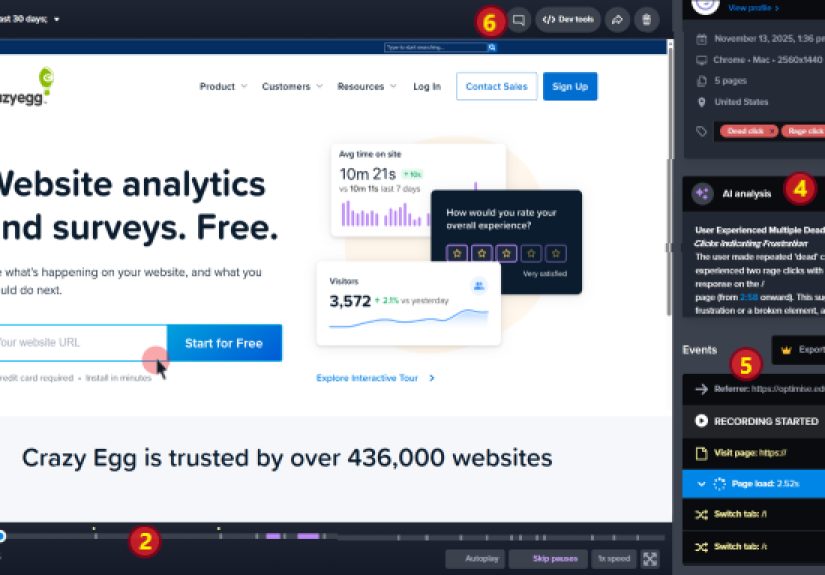
A session recording, also called a session replay, lets you watch a reconstruction of a visitor’s journey on your site or app. You can see where they click, where they hesitate, where they scroll like they are hunting for buried treasure, and where they give up and disappear. In other words, session recordings show you what standard analytics often cannot: why customers fail to convert.
For ecommerce brands, SaaS teams, lead-gen sites, and subscription businesses, that insight can be pure gold. A broken button, a confusing form, a sticky mobile menu, an unclear shipping message, or a checkout field that behaves like it has personal issues can quietly kill sales all day long. Session recordings expose those problems in plain sight.
This article breaks down what session recordings are, how they work, why they matter for conversion rate optimization, and how they reveal lost sales that would otherwise hide behind the vague phrase “user drop-off.”
What Is a Session Recording?
A session recording is a visual playback of a real user’s visit to your website or app. It typically captures actions such as page navigation, clicks, taps, scrolling, mouse movement, form interactions, and moments of friction. It is not a Hollywood film of your customer eating cereal while shopping on your site. It is a reconstructed view of what happened on the screen during their session.
That distinction matters. A good session recording tool is designed to help product, UX, marketing, and ecommerce teams understand behavior at a practical level. Instead of only seeing that 62% of users dropped off at checkout, you can watch what happened right before the exit. Did they rage-click a disabled button? Did they keep reopening the shipping dropdown? Did a promo code field hijack their attention and send them bargain-hunting into the abyss?
Those details are where revenue problems stop being abstract and start becoming fixable.
How Session Recordings Work
Most session recording tools use a script or SDK that tracks front-end interactions and reconstructs the journey in a replay interface. Depending on the platform, recordings may also be tied to analytics events, errors, funnels, segments, heatmaps, and conversion metrics.
That connection is what makes modern session recordings so useful. You are not just watching random visitor clips for entertainment. You are filtering sessions by business value. For example, you can review recordings from:
- Users who added to cart but did not buy
- Visitors who abandoned a lead form
- Mobile users with repeated dead clicks
- High-intent visitors who saw an error message
- Returning customers who failed to log in
- Traffic from paid campaigns with poor conversion rates
This lets your team focus on the sessions that matter most to revenue, not just the ones that happen to be weird enough to tell at lunch.
Why Session Recordings Matter for Conversion Optimization
Traditional analytics are excellent at showing what happened. You can see bounce rate, conversion rate, funnel abandonment, time on page, exit rate, and event completion. That is valuable. But on their own, those metrics often leave teams making educated guesses.
Session recordings provide the missing context. They reveal behavior in a way that numbers alone cannot. When you watch real journeys, you begin to notice patterns that explain lost sales:
- Users click product images expecting zoom, but nothing happens
- Shipping costs appear too late in checkout
- Coupon fields distract buyers who were ready to pay
- Form validation messages are too vague to be useful
- Mobile users struggle with sticky headers covering buttons
- Navigation creates loops that trap users between pages
These are not dramatic failures. They are tiny moments of friction that stack up until a customer decides your competitor suddenly looks charming.
How Session Recordings Reveal Lost Sales
1. They expose checkout friction
Checkout is where intent meets reality. Someone has decided to buy, which means every obstacle in this stage is especially expensive. Session recordings frequently reveal friction points like confusing address fields, surprise fees, payment errors, login walls, or shipping options that do not display clearly on mobile.
Let’s say your funnel report shows a steep drop between “Begin Checkout” and “Payment Submitted.” Analytics tells you the leak exists. Session recordings tell you whether the leak comes from a broken promo field, forced account creation, a laggy payment step, or a design issue that makes the final button look inactive.
That is how a “conversion problem” becomes a specific list of fixes.
2. They show dead clicks and rage clicks
Some of the most useful session recording insights come from frustration signals. A dead click happens when a user clicks something that does not respond. A rage click happens when they click repeatedly in quick succession because they expect something to happen and it does not.
Those signals are incredibly revealing. A customer who rage-clicks your product filter, shipping estimator, or “Place Order” button is not confused in theory. They are frustrated in real time. And frustrated buyers do not become loyal buyers. They become former opportunities.
3. They uncover form abandonment
Forms are where many businesses quietly lose money. Lead generation sites lose prospects in contact forms. SaaS companies lose signups in onboarding flows. Ecommerce sites lose conversions in billing and shipping fields.
Session recordings can reveal whether users abandon because the form is too long, the keyboard covers a field on mobile, the date selector is awkward, the password rules are too strict, or the error message appears after submission instead of in context. One extra field may not seem like a crisis until you watch 30 users stumble over it.
4. They reveal navigation confusion
Sometimes users do not leave because they dislike your product. They leave because they cannot find what they need. Recordings often show visitors bouncing between collection pages, reopening menus, scrolling up and down product pages, or returning to search because the page hierarchy is unclear.
This is especially important for large ecommerce catalogs, service businesses with multiple offers, and B2B sites that try to say everything at once. If a user cannot confidently move toward the next step, your website becomes a maze with a credit card form at the end. Not ideal.
5. They catch bugs that analytics miss
Not every lost sale comes from bad messaging or weak design. Some come from simple technical failures: a field that will not accept a ZIP code, a modal that will not close, a script conflict that breaks a button, a page that flickers on Safari, or a chat widget that covers the CTA on small screens.
These issues may only affect a segment of users, which makes them hard to detect in aggregate reports. Session recordings make them visible quickly, especially when paired with device type, browser filters, and error logs.
What Session Recordings Do Better Than Standard Analytics
Analytics tools are fantastic for scale. They help you measure trends across thousands or millions of sessions. But they often flatten behavior into events and percentages. Session recordings restore the story around those events.
Think of it this way:
- Analytics tells you that 1,200 users dropped out of checkout
- Session recordings show you that many of them got stuck on the shipping step after seeing vague validation errors
That is why the best teams do not choose between quantitative and qualitative tools. They combine them. Funnel analysis shows where the problem lives. Session recordings help explain why it lives there. A/B testing helps validate the fix. Together, that creates a practical optimization loop.
Best Ways to Use Session Recordings Without Wasting Time
Start with a business question
Do not open a replay tool and wander around like you are channel surfing. Start with a sharp question:
- Why are mobile checkout conversions down?
- Why are users abandoning the demo form?
- Why does traffic from paid search bounce after product view?
- Why are customers adding to cart but not purchasing?
Good questions make recordings useful. Random watching makes them a very expensive hobby.
Filter by revenue-related behavior
Review recordings from users who reached high-intent steps but failed to convert. That gives you the highest chance of discovering sales friction with direct business impact.
Look for patterns, not one-off drama
One confusing session may be a personal quirk. Twenty similar sessions are a signal. Watch enough recordings to identify recurring friction before changing core UX.
Pair recordings with funnels and heatmaps
Funnels identify drop-off. Heatmaps reveal aggregate engagement. Recordings add behavioral detail. The combination gives you a much fuller picture than any single tool alone.
Share clips across teams
One powerful replay can align marketing, design, product, engineering, and leadership faster than a 27-slide presentation full of arrows. When everyone sees the same friction, prioritization becomes easier.
Privacy, Consent, and Responsible Use
Session recordings are useful, but they are not a free-for-all. Responsible implementation matters. Sensitive information such as passwords, payment details, personal data, and certain form content should be masked or excluded from capture. Depending on your audience and jurisdiction, consent requirements may also apply.
That means your team should treat session recordings as part of a serious analytics and privacy practice, not a secret surveillance toy. Review your privacy notice, configure masking carefully, test in a safe environment, and make sure legal, analytics, and engineering teams agree on what should and should not be collected.
The goal is simple: understand behavior without capturing information you do not need.
Common Mistakes Businesses Make with Session Recordings
- Watching too few sessions: A handful of replays can mislead you if you mistake anecdotes for patterns.
- Ignoring segmentation: Mobile users, paid traffic, returning visitors, and logged-in customers often behave very differently.
- Using recordings without analytics: Recordings show behavior, but funnel metrics help you measure scale and impact.
- Capturing too much data: Overcollection creates privacy risk and analysis clutter.
- Failing to act: Insight without implementation is just expensive empathy.
A Simple Example of Lost Sales in Action
Imagine an online store notices that product page traffic is healthy, add-to-cart rates are decent, but revenue is underperforming. The analytics team builds a funnel and finds a sharp drop at checkout. Session recordings reveal a pattern: on mobile, the shipping options load below the fold, the “Continue” button remains disabled until a selection is made, and users do not realize anything changed. They tap the button several times, scroll around, then leave.
Nothing is technically “broken” in the dramatic sense. But the experience is unclear, and unclear experiences lose sales.
The team moves the shipping section higher, improves the active state of the next-step button, adds clearer microcopy, and tests the update. The result is not magic. It is better UX. But better UX is often what revenue growth looks like in real life.
Experience-Based Lessons from the Field
Teams that regularly use session recordings tend to report the same eye-opening experiences again and again. First, they realize customers are more determined than expected. People will try surprisingly hard to complete a task before giving up. They will re-open menus, refresh pages, pinch and zoom on mobile, retype the same field, and hunt around a layout that made perfect sense in the design review. Watching that persistence is humbling because it shows how much work customers are willing to do before the site finally convinces them to leave.
Second, teams often discover that the biggest revenue leaks are not always giant defects. They are usually small moments of hesitation. A delivery estimate appears too late. A size guide opens in a new tab. A promo code box steals focus from checkout. A “Continue” button looks inactive even when it works. A sticky banner covers a form field on a smaller phone. None of these problems sounds dramatic in isolation. Together, they become a slow, steady tax on conversion.
Third, session recordings often change internal conversations. Before watching them, teams may argue in abstractions: maybe the traffic is low quality, maybe the offer is weak, maybe users just are not ready to buy. After watching recordings, the discussion gets sharper. People stop guessing and start pointing to actual behavior. That shared view can shorten the distance between identifying a problem and fixing it.
Another recurring experience is discovering that customers do not use pages the way the business imagined. A polished homepage section meant to educate gets skipped. A tiny FAQ link becomes a major trust signal. Users rely on product images more than feature bullets. They scroll past brand messaging and zoom in on shipping, returns, and price details. Session recordings remind brands that a website is not a brochure. It is a decision environment, and customers interact with it according to their own priorities, not the marketing team’s hopes and dreams.
Experienced teams also learn not to treat every awkward replay as a crisis. Some users will always behave unpredictably. The real value comes from repeated patterns. When five, ten, or fifty sessions show the same confusion, that is when a team has found something worth prioritizing. Over time, the most effective organizations build a habit around this. They review recordings weekly, connect them to funnel metrics, and create a feedback loop between customer behavior and design decisions.
Perhaps the biggest lesson is emotional. Session recordings create empathy. It is one thing to read that a form has a 38% abandonment rate. It is another thing to watch a real person struggle with it, pause, retry, and finally leave. That moment tends to focus a team very quickly. Lost sales stop feeling like a spreadsheet issue and start feeling like a solvable customer experience issue. And that is exactly where meaningful optimization begins.
Final Thoughts
So, what is a session recording? It is one of the clearest ways to see how real people experience your website and where your revenue leaks begin. It helps you catch friction, diagnose bugs, understand hesitation, and uncover the reasons buyers abandon before converting.
Most businesses do not lose sales only because of pricing, traffic quality, or weak demand. They also lose sales through avoidable UX mistakes that standard analytics can hint at but not fully explain. Session recordings fill that gap. They turn mystery into evidence and evidence into action.
If you want to reveal lost sales, do not just count where people leave. Watch what happens right before they do.







 Close
Close