
Table of Contents >> Show >> Hide
- What “NASty” Means in Plain English
- Why Build a Raspberry Pi NAS Instead of Buying a NAS?
- Pick Your “NASty” Hardware: From Pocket-Friendly to Powerhouse
- Choose Your Software Stack: Three Practical Paths
- How to Build a NASty Pi That Doesn’t Hate You Later
- Performance Reality Check: How Fast Can a NASty Pi Be?
- Security: Keep Your NASty Pi Helpful, Not Haunted
- Reliability: RAID Is Not a Backup (and USB RAID Gets Weird)
- NASty Use Cases That Actually Make Sense
- Troubleshooting: The Most Common NASty Pi Headaches
- Conclusion: NASty Is a Feature, Not a Bug
- Real-World NASty Pi Experiences: Lessons From the Field (500+ Words)
A Raspberry Pi is cute. A Raspberry Pi with storage and Wi-Fi is useful. A Raspberry Pi that spins up its own little
file-sharing universeno internet required, no accounts required, no “please update your password” pop-upswell…
that’s NASty (in the most lovable way).
“NASty” isn’t a formal standard (sadly, there’s no IEEE committee for “tiny computers with attitude”), but it’s a
perfect nickname for a Pi that behaves like a network-attached storage box, a local sharing hub, or a pop-up “drop
your files here” station for a group. Think: hackerspace, classroom, film crew, family reunion, LAN party, workshop,
makers’ meetup, or a disaster-prep kit where the internet is a distant memory.
In this guide, we’ll break down what makes a Raspberry Pi “NASty,” the best ways to build one (from “cheap and
cheerful” to “wow, that’s basically a server”), and how to keep it fast, reliable, and not accidentally open to the
entire planet. (Because the only thing scarier than a broken RAID is a wide-open file share.)
What “NASty” Means in Plain English
A NASty Pi is any Raspberry Pi setup that focuses on sharing storage over a networkusually your
home LAN or a private Wi-Fi hotspot the Pi creates. There are three common “flavors”:
-
Classic Raspberry Pi NAS: the Pi joins your home network and serves shared folders (SMB/Samba,
NFS, SFTP), backups, media libraries, and maybe Docker apps. -
Portable “dropbox” hotspot: the Pi becomes the Wi-Fi network and hosts an upload/download portal
(sometimes called a PirateBox-style setup). Great for group file exchange without internet. -
Overbuilt “because I can” NAS: Pi 5 / CM4 builds with fast storage, multiple drives, and
benchmarking that makes you say, “Wait… this isn’t supposed to be this capable.”
You can build any of these on a budget, but your choices affect speed, capacity, and how much tinkering you’ll do on
a Saturday night. (Spoiler: you will do tinkering. That’s the point.)
Why Build a Raspberry Pi NAS Instead of Buying a NAS?
A commercial NAS is convenient, polished, and usually comes with glossy marketing photos of a family smiling while
“organizing memories.” A NASty Pi is different: it’s yours. You decide what it does, what it runs, what it
shares, and how it behaves.
Reasons people love the NASty Pi route
- Cost control: start tiny, upgrade later (storage, enclosure, networking, software features).
- Flexibility: NAS + media server + backup target + personal cloud + ad blocker + whatever.
- Learning: Linux, permissions, networking, containersskills you keep.
- Portability: you can make a “share box” that works anywhere, even offline.
- Power efficiency: a Pi sipping watts 24/7 can be appealing for always-on use.
Reasons people bail and buy a commercial NAS
- Time: DIY is fun until you need it to “just work” during a deadline.
- Drive bays: multi-drive setups get expensive and fiddly fast.
- Redundancy expectations: RAID-ish setups on DIY gear require careful planning.
The sweet spot? Use a NASty Pi when you want control, customization, portability, or a learning project.
Buy a NAS when you want appliance vibes.
Pick Your “NASty” Hardware: From Pocket-Friendly to Powerhouse
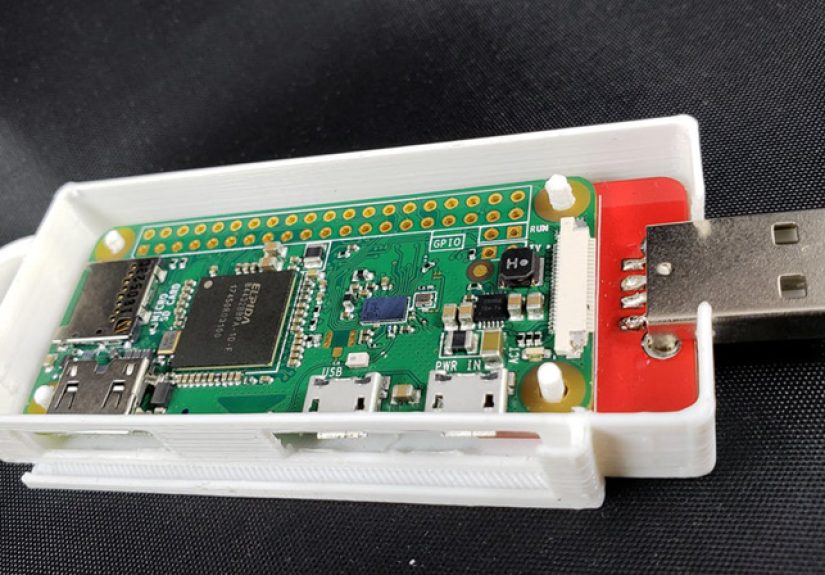
Option A: The tiny NASty hotspot (Pi Zero W / Zero 2 W)
If your goal is a portable “share box” (local uploads/downloads over Wi-Fi), a small Pi is enough. A Pi Zero W-class
device is compact and can run off a battery pack. The tradeoff is speed: it’s perfect for documents, photos, and
casual file swapsnot ideal for shuttling terabytes at warp speed.
Typical parts list:
- Raspberry Pi Zero W or Zero 2 W
- MicroSD card (OS)
- USB flash drive or small SSD (shared storage)
- Battery pack (optional, but makes it magical)
Option B: The “real” home NAS (Pi 4 or Pi 5)
For a home network NAS, you’ll be happiest with a Pi that has solid USB bandwidth and wired Ethernet. Raspberry Pi 4
is a classic pick; Raspberry Pi 5 adds more horsepower and better expansion options.
Typical parts list:
- Raspberry Pi 4 or Raspberry Pi 5
- Good power supply (don’t improvise with a questionable phone charger from 2013)
- External SSD or HDD (preferably with stable power)
- Case + cooling (especially if it runs 24/7)
- Gigabit Ethernet connection to your router/switch
Storage choice: SSD, HDD, or “whatever was in a drawer”?
SSDs are quiet, fast, and great for responsiveness. HDDs are cheaper per terabyte and fine for bulk storage. If you
attach a power-hungry HDD, consider a powered USB hub or an enclosure with its own powerrandom disconnects are the
enemy of happiness.
File system matters too: for Linux-first setups, ext4 is reliable and fast. If you need
“plug into Windows anytime,” exFAT may be convenient, but you’ll usually get the best experience keeping the NAS
drive Linux-native and sharing over the network.
Want faster storage on Pi 5? Meet the M.2 era
Raspberry Pi 5 opens the door to NVMe storage via a PCIe adapter board. That’s a big deal: it can turn your NASty Pi
from “pretty good for the price” into “why is this tiny board so snappy?”
Choose Your Software Stack: Three Practical Paths
Path 1: Raspberry Pi OS + Samba (simple, classic, flexible)
This is the DIY “I want control” route. You install Raspberry Pi OS (Lite is fine), attach storage, mount it
properly, and share it via Samba (SMB) so Windows, macOS, and Linux devices can access it easily.
Best for: people who like the command line, minimal overhead, and custom setups.
Path 2: OpenMediaVault (NAS-focused dashboard, lots of features)
OpenMediaVault (OMV) gives you a web interface for drive management, user accounts, shared folders, and services.
It’s popular because it turns a Pi into something that feels closer to a “real NAS appliance,” but you still get the
freedom of Linux underneath.
Best for: people who want a NAS UI, plugins, and easier service management.
Path 3: “PirateBox-style” local sharing (offline hotspot + upload portal)
This is the vibe behind the “This Raspberry Pi Is NASty” nickname: a Pi that creates its own Wi-Fi network and hosts
a landing page where anyone connected can upload and download files. No internet required. You can run it open for a
friendly groupor lock it down with a password if you prefer.
Best for: events, classrooms, workshops, travel, crews, and situations where internet access is limited or unwanted.
How to Build a NASty Pi That Doesn’t Hate You Later
Step 1: Decide the network model (LAN NAS vs. Pi hotspot)
Ask yourself one question: Should this Pi join an existing network, or create its own?
-
Join your LAN if you want always-on storage for your household, backups, media streaming, or a
“home cloud.” - Create its own Wi-Fi hotspot if you want a portable, offline sharing station for groups.
Step 2: Make storage boring (boring = reliable)
Reliability is a chain. The weak link is usually power, cables, or storage enclosuresnot the Pi itself.
- Use a quality USB cable and avoid loose connectors.
- Prefer powered enclosures for big HDDs.
- Format and mount the drive cleanly; keep your mount points consistent.
- Enable SMART monitoring if your enclosure supports it.
Step 3: Choose a sharing method that matches your users
If you have Windows and macOS clients, SMB (Samba) is the common language. If you have Linux-heavy use, NFS can be
fast and clean. If you want “just open a browser,” a simple web portal can be perfect for drop-style sharing.
Step 4: Permissions are not optional (sorry!)
A NASty Pi is still a Linux box. Take 15 minutes to decide:
- Who can read?
- Who can write?
- Do you want public drop folders?
- Do you want user accounts per person?
For group events, a common pattern is:
one “Public Drop” folder (write-only for guests, read for admins) plus
private folders (read/write per user).
Performance Reality Check: How Fast Can a NASty Pi Be?
Speed depends on three bottlenecks: network, storage, and protocol
overhead.
For LAN NAS builds
-
Gigabit Ethernet tops out around ~125 MB/s in theory, and less in practice. That’s usually enough
for backups, photo libraries, and multiple media streams. -
A fast SSD can make the NAS feel “instant,” especially with lots of small files (projects, documents, photo
thumbnails). -
The Pi 5 + NVMe can feel dramatically more responsive for heavy workloads, especially if you’re running containers
alongside file sharing.
For hotspot sharing builds
Your speed depends on Wi-Fi quality, interference, and the Pi’s wireless capabilities. A “share box” is about
convenience and portability, not replacing enterprise storage. If your goal is rapid multi-terabyte transfers for a
production team, you’ll want wired networking, better radios, or a different class of hardware.
Security: Keep Your NASty Pi Helpful, Not Haunted
The most important security decision is simple:
don’t expose file sharing directly to the public internet.
If you need remote access, use a VPN (like WireGuard) into your home network, then access the share normally.
Hardening tips that pay off immediately
- Disable SMB1 and use modern SMB versions (SMB2/SMB3) for better security.
- Use user accounts instead of anonymous write access for anything sensitive.
- Firewall it: limit file-sharing services to your LAN or VPN subnet.
- Update regularly: OS updates + service updates reduce risk.
- Separate “public drop” from private storage if guests will connect.
For portable hotspot builds, consider a “no secrets” policy: only share what you’d be comfortable showing to the room.
If you need privacy, password-protect the Wi-Fi, require logins, or keep the NASty Pi isolated from your personal data.
Reliability: RAID Is Not a Backup (and USB RAID Gets Weird)
Let’s say it louder for the people in the back: RAID is not a backup. RAID can help with uptime,
but it doesn’t protect you from accidental deletes, corruption, ransomware, or “I dropped the enclosure” events.
For most NASty Pi builds, a better plan is:
- One main storage drive on the Pi
- One separate backup (another drive, another machine, or cloud)
- Automate it so you don’t rely on memory and good intentions
If you do go multi-drive, invest time in research and testing. Verify that your enclosures handle power management
properly, and test failure scenarios. “It worked once” is not a data protection strategy.
NASty Use Cases That Actually Make Sense
1) The “family file cabinet”
A shared folder for household documents, scanned receipts, photos, and backup targets for laptopsaccessible from
anything on your network.
2) The “creator dump box”
A fast place to offload camera footage, audio recordings, and project assets during a shoot or session. Pair a wired
connection with a Pi 4/5 and an SSD for best results.
3) The “workshop share station”
Host files for a class or meetup: PDFs, firmware, slides, CAD files, example code. People connect, download what they
need, upload their results, and everyone goes home with the right stuff.
4) The “internet optional” kit
In a storm, travel, remote cabin, or busy conference Wi-Fi environment, a NASty Pi hotspot can keep file sharing simple
and local.
Quick legal note: build and use your NASty Pi for legitimate sharingyour own files, open-source projects, class
materials, and authorized media. “Portable sharing” is a tool; don’t turn it into a problem.
Troubleshooting: The Most Common NASty Pi Headaches
“It was fast yesterday, now it’s slow.”
- Check if you accidentally moved from wired Ethernet to Wi-Fi.
- Verify the drive didn’t fall back to a slower USB mode/cable.
- Look for thermal throttlingimprove cooling if needed.
“The drive keeps disconnecting.”
- Power issue. Use a powered hub or powered enclosure.
- Swap the USB cable (yes, really).
- Avoid sketchy adaptersstorage hates chaos.
“Windows can’t see the share.”
- Confirm SMB2/SMB3 settings and credentials.
- Check firewall rules and network profile settings.
- Make sure the Pi and client are on the same subnet (especially with VPNs).
Conclusion: NASty Is a Feature, Not a Bug
A Raspberry Pi doesn’t need to be a giant server to be genuinely useful. A NASty Piwhether it’s a home NAS, a
portable “dropbox” hotspot, or a Pi 5 with NVMe ambitionscan solve real problems with a tiny footprint and a lot of
charm.
Build the version that matches your life:
portable sharing for groups, LAN NAS for home, or upgraded storage
for speed demons. Keep storage stable, keep security sane, and back up anything you’d cry over.
Real-World NASty Pi Experiences: Lessons From the Field (500+ Words)
The first time you run a NASty Pi at an event, you learn a beautiful truth: people will connect to anything if the Wi-Fi
name is funny enough. “NASty-Pi-Free-Stuff” works. “TotallyNotASpyDevice” works even better. (Oddly, “ConferenceFiles”
is the least successful name, which says a lot about humanity.)
In practice, the biggest win is how quickly a NASty Pi changes group logistics. Instead of explaining “Okay, I’ll text
you a link, then you request access, then Google Drive asks you to sign in again,” you just point at the SSID and say,
“Connect. Open the portal. Grab the files.” Suddenly the room is moving. People are building.
You also learn that power is the real boss. A Pi can be perfectly configured and still ruin your
evening if the storage drive browns out. In one memorable setup, everything worked flawlesslyuntil three people tried
uploading video at once and the drive decided to take a nap. The fix wasn’t a reinstall. It was a powered enclosure.
NASty lesson #1: if your storage is hungry, feed it properly.
Another classic moment is the “why is it slow?” mystery. On a quiet workbench, transfers seem fine.
Then you take the NASty Pi to a busy building where forty Wi-Fi networks are shouting over each other like caffeinated
parrots. Your hotspot becomes less “private cloud” and more “polite suggestion.” That’s when you appreciate wired
Ethernet for serious transfersor you switch expectations and treat the NASty Pi as a convenience layer, not a racecar.
If you use SMB shares at home, you’ll probably experience the rite of passage known as
Permissions: The Reckoning. It starts with good intentionsone shared folder for everyone. Then you
realize someone deleted a directory called “Final_Final_ActuallyFinal” and you can’t even be mad because the folder
name was lying. The cure is boring but effective: separate folders, user accounts, and a backup routine that doesn’t
depend on “I swear I’ll do it later.”
For portable drop-style sharing, the social dynamic is hilarious. You’ll get useful uploads: photos, notes, code,
documentation. You’ll also get somebody’s meme collection. Occasionally you’ll get a file named “readme.txt” that
contains exactly one line: “lol.” This is normal. Embrace it. If you run a “public drop,” keep it isolated from your
important data, and consider periodically wiping the drop folder like you’re cleaning a whiteboard after class.
The most satisfying NASty Pi moment, though, is when you stop thinking about it. The share is just there. Backups run.
Devices connect. People grab what they need. Your tiny board becomes infrastructurequiet, dependable, and weirdly
lovable. That’s the endgame: a NASty Pi that’s “nasty” only in the sense that it gets the job done and asks for
nothing except steady power and the occasional update.







 Close
Close