
Table of Contents >> Show >> Hide
- What Is a Pi Port Protection PCB (and What It Isn’t)
- Why Raspberry Pi Ports Need Protection
- The Usual Suspects: What Damages Raspberry Pi Ports
- Protection Building Blocks You’ll See on a Pi Port Protection PCB
- PCB Layout Matters More Than You Want to Admit
- Designing Your Own Pi Port Protection PCB
- Concrete Example: A Practical GPIO Protection Channel
- How to Test (Without Owning an ESD Gun)
- Common Mistakes (So You Can Avoid Becoming a Forum Post)
- Final Takeaways
- Extra: Real-World Experiences and Lessons from Building Pi Port Protection PCBs (About )
Raspberry Pi boards are brilliant little computers: cheap, fast, and eager to control the physical world. They’re also a bit like a toddler in a museum gift shopcurious, helpful, and one static zap away from chaos. A Pi Port Protection PCB is the grown-up in the room: a small board you add between your Raspberry Pi and the outside world to protect ports and GPIO from electrostatic discharge (ESD), “oops-I-fed-it-5V” moments, and other real-life electrical shenanigans.
In this guide, we’ll break down what a Pi port protection board does, which threats actually matter, and how to design (or choose) a protection PCB that works in the messy, cable-tugging, carpet-zapping world your Pi lives in.
What Is a Pi Port Protection PCB (and What It Isn’t)
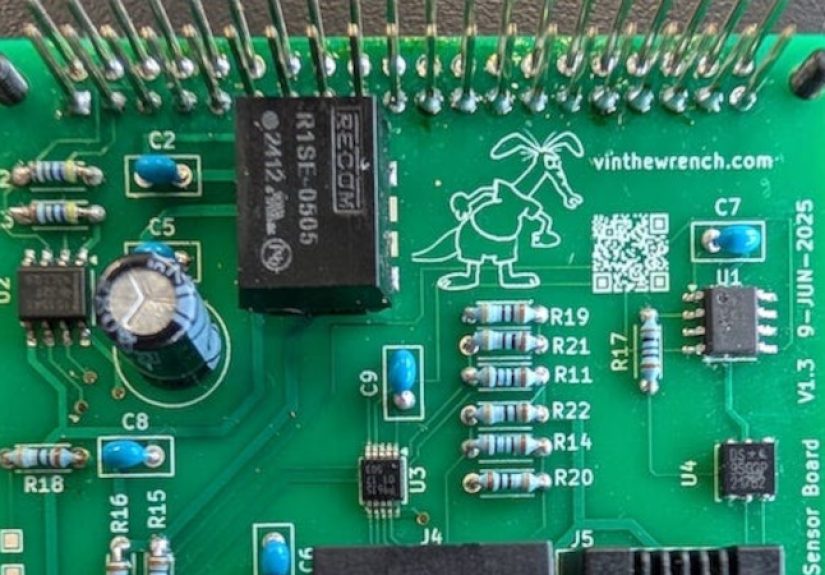
A Pi Port Protection PCB is a printed circuit boardoften a HAT, pHAT, or inline breakoutthat adds protective circuitry to signals leaving or entering the Raspberry Pi. It can protect:
- GPIO header signals (the most commonly “accidentally smoked” area)
- External connector lines you route off-board (I2C, UART, SPI, digital inputs)
- Power rails you share with sensors, relays, motors, or long cables
What it usually doesn’t do: magically make the Raspberry Pi “industrial.” If you’re running 20-foot cables outdoors, switching inductive loads, or interfacing with unknown equipment, you may also need isolation, surge-rated protection, and good enclosure/grounding practices. Think of a protection PCB as a seatbeltnot a teleportation device.
Why Raspberry Pi Ports Need Protection
1) GPIO logic is 3.3V, not 5V-tolerant
Raspberry Pi GPIO uses 3.3V logic. Many common hobby modules (certain sensors, relay boards, older Arduino accessories) assume 5V signals. If 5V gets into a Pi GPIO pin, damage can happen quicklyand the Pi won’t file an insurance claim for you. This is why level shifting and clamping are such common features on a port protection PCB.
2) GPIO current is limited (and the 3.3V rail can sag)
GPIO pins aren’t designed to power a small city. Even if an individual pin can source/sink limited current, loading many pins (or driving LEDs/relays directly) can stress the 3.3V supply and create voltage dips and noise that show up as weird behavior: flaky SD cards, mysterious resets, or that “my code is haunted” feeling.
3) Real-world ESD is fast and rude
ESD events happen in nanoseconds. That means protection isn’t just about choosing a “TVS diode” from a catalogit’s about PCB layout, grounding, and making sure the surge energy finds a short, low-inductance path away from your Pi’s sensitive silicon.
The Usual Suspects: What Damages Raspberry Pi Ports
Most “my Pi died” stories fall into a few categories:
- ESD: You touch a cable, a connector, a sensor lead, or a breadboard after walking across carpet. The Pi receives a microscopic lightning bolt and decides it’s done with your project.
- Overvoltage on GPIO: A 5V signal, miswired module, or “helpful” friend connects VCC to a GPIO pin.
- Back-powering: Power sneaks in through signal lines or the GPIO header when the Pi is “off,” causing brownouts, latch-ups, or odd boot behavior.
- Inductive kickback: Relays, motors, solenoids, and long wires generate spikes when switched.
- Power rail accidents: Reverse polarity, short circuits, or undervoltage due to thin wires / weak adapters.
A good Pi port protection PCB is designed around these realities, not around wishful thinking and vibes.
Protection Building Blocks You’ll See on a Pi Port Protection PCB
TVS diodes and ESD diode arrays
A TVS diode (Transient Voltage Suppressor) is basically a bouncer for voltage spikes: normally it stays out of the way, but when a transient shows up, it clamps and shunts energy to ground. For data lines, designers often use TVS diode arrays because they’re compact and can protect multiple lines with matched routing.
The tricky part: TVS devices add capacitance. On slow GPIO inputs, that’s rarely a problem. On faster interfaces (USB, HDMI, high-speed differential pairs), too much capacitance can degrade signal integrity. High-speed protection parts often emphasize ultra-low capacitance and careful layout to keep the “eye diagram” happy.
- Great for: ESD events, fast transients, connector zaps
- Watch out for: capacitance on fast lines, poor grounding/layout that makes the TVS ineffective
Series resistors (the underrated heroes)
A small series resistor (often tens of ohms for fast-ish signals, or higher for simple inputs) can limit surge current into a pin, tame ringing on long wires, and reduce stress during accidental shorts. Many “GPIO protection” boards use resistor arrays so each line gets its own tiny speed bump.
Clamping to the rails (Schottky diodes and safe clamps)
Another classic trick is clamping a signal to 3.3V and GND using fast diodes (often Schottky) so the GPIO pin doesn’t see a voltage far beyond its safe range. It’s simple and effective for many casesespecially when paired with series resistance.
One important nuance: clamps can feed the 3.3V rail if an external signal is present while the Pi is unpowered. That’s how you get back-powering and ghost-LEDs. A strong design accounts for that with buffering, isolation, or explicit power sequencing.
Level shifting and buffering
If you need to interface with 5V logic, a protection PCB often includes level shifters or buffer ICs so the Pi never sees 5V. Common patterns:
- I2C: MOSFET-based bidirectional level shifting (popular and simple, but layout and pull-ups matter)
- UART/SPI/general GPIO: dedicated level translator ICs or 3.3V-tolerant buffers
- Inputs from the outside world: Schmitt-trigger buffers for noise immunity
Fuses and polyfuses for power rails
If your protection PCB carries power (5V to sensors, 3.3V to modules, or power out to external connectors), adding a resettable fuse (polyfuse) or regular fuse can prevent “one shorted cable” from turning into “one dead Pi.” This is especially useful on boards intended for classrooms, workshops, or prototypes that will be rewired a lot.
Inductive load protection
If your Pi controls relays, motors, or solenoids, a protection PCB can include:
- Flyback diodes across coils
- Snubbers (RC networks) where needed
- MOSFET drivers so GPIO isn’t asked to do power electronics for a living
The motto here is: “GPIO is for logic, not for heroics.”
Isolation (when you want your Pi to sleep at night)
For noisy environments, long cables, or connections to unknown external equipment, isolation is a game-changer. Opto-isolators or digital isolators break the direct electrical path, so a surge on the cable doesn’t go sightseeing in your Pi. Isolation adds cost and complexity, but it’s the difference between “mostly safe” and “I can plug this into a factory floor and keep my eyebrows.”
PCB Layout Matters More Than You Want to Admit
Protection components are only as good as the path they provide. With ESD, the rise time is so fast that a little extra trace inductance can turn a “nice clamp” into a “polite suggestion.” A Pi port protection PCB should follow a few layout fundamentals:
- Put ESD protection close to the connector where the zap enters (not near the Raspberry Pi header after the damage is done).
- Use a short, wide return to ground (a solid ground plane is your best friend).
- Minimize loop area: route the protected line into the TVS, then immediately continue onwardavoid long detours.
- Use stitching vias to tie the TVS return to the ground plane with low impedance.
If you only remember one sentence: ESD wants the shortest route to groundgive it one.
Designing Your Own Pi Port Protection PCB
Whether you’re building a custom HAT or an inline adapter board, here’s a practical design process that keeps you out of the “I accidentally invented a smoke machine” business.
Step 1: Decide what you’re protecting
List the exact interfaces leaving the Raspberry Pi:
- How many GPIO lines?
- I2C only? UART only? A mix of signals?
- Are cables short (inside a case) or long (across a room)?
- Will humans touch the connectors directly?
Human-touch connectors are the top ESD risk. Long cables are the top “antenna for weird transients” risk.
Step 2: Choose a protection strategy per signal type
A solid baseline for many GPIO lines:
- Series resistor per line
- Low-capacitance TVS array near the external connector
- Clamp strategy (TVS-to-ground, or rail clamp + resistor) tuned for 3.3V logic
For I2C, consider level shifting and protect SDA/SCL near the external connector. For UART lines going off-board, series resistance plus ESD diodes is often a good start.
Step 3: Don’t forget the power rails
If your protection PCB exports 5V to sensors or accessories, add:
- Fuse or polyfuse on the 5V line
- Reverse polarity protection if using screw terminals or barrel connectors
- Bulk capacitance near connectors for load steps
Also remember: Raspberry Pi boards generally expect a tightly regulated 5.1V supply via recommended power solutions, and undervoltage can cause instability long before “it turns off.”
Step 4: Make it hard to connect wrong
The best protection is the kind that prevents mistakes:
- Keyed connectors where possible
- Clear silkscreen labels (VOLTS, GND, SDA/SCL, etc.)
- Color-coded terminal blocks or shrouded headers
- Test points for critical nets (3.3V, 5V, GND, protected lines)
Step 5: Budget for replaceable “sacrificial” parts
In the real world, a TVS diode sometimes takes the hit and fails short. That’s not a tragedyit’s the plan. A great Pi port protection PCB uses parts that are cheap and easy to replace, so your Raspberry Pi isn’t the sacrificial offering.
Concrete Example: A Practical GPIO Protection Channel
Here’s a common “one line” pattern used on many port protection boards for 3.3V GPIO that goes to a user-facing connector:
- External connector pin → (short trace) → TVS diode array to ground near the connector
- Then route the line through a series resistor (for current limiting and damping)
- Optionally add a rail clamp (Schottky to 3.3V/GND) near the Pi header if needed
- Finally connect to the Raspberry Pi GPIO header
For slow signals (buttons, limit switches, digital sensors), this approach is usually robust and forgiving. For faster signals, you’ll care more about capacitance, trace impedance, and keeping the protective components from turning your signal into oatmeal.
How to Test (Without Owning an ESD Gun)
Professional ESD testing uses standardized equipment, but you can still sanity-check a Pi port protection PCB in maker-friendly ways:
- Continuity and shorts: confirm rails and protected lines aren’t shorted before power-up.
- Current-limited first power: use a bench supply (or inline USB power meter + cautious setup) for initial tests.
- Intentional miswire rehearsal: with a current limit and no Raspberry Pi attached, test that fuses/clamps behave as intended.
- Swap test: if the protection board is meant to be sacrificial, confirm you can replace the TVS array and keep going.
The goal isn’t to prove you meet every standard in the book; the goal is to prevent the most common real-life failures that kill Raspberry Pi ports.
Common Mistakes (So You Can Avoid Becoming a Forum Post)
- Putting the TVS “near the Pi” instead of near the connector: by the time the zap reaches the TVS, it has already visited your signal trace like a tourist with no itinerary.
- Using a high-capacitance TVS on fast lines: great protection, terrible signal integrity. Pick parts that match the interface speed.
- Forgetting back-power paths: clamps and I/O protection can unintentionally power the Pi through a GPIO line if external gear is powered while the Pi is off.
- Assuming “breadboard = safe”: breadboards are convenient, but also excellent at accidental shorts and intermittent connections. Protection PCBs exist because reality exists.
Final Takeaways
A Pi Port Protection PCB is a small investment that can save you from the big annoyance of replacing a Raspberry Pi (or rebuilding a project because one pin stopped working). The best designs combine:
- Protection components that match your risk (ESD, overvoltage, inductive loads)
- Layout discipline (short paths, solid ground, protection near the connector)
- User-proofing (labels, keyed connectors, fusing, and sane defaults)
If you’re building anything that will be touched, unplugged, moved, rewired, or operated by someone who says “don’t worry, I’ve done this before,” protection isn’t optionalit’s just cheaper than therapy.
Extra: Real-World Experiences and Lessons from Building Pi Port Protection PCBs (About )
People usually learn port protection the same way they learn why you don’t microwave foil: once, loudly. In maker spaces and home labs, a pattern shows up again and againprojects don’t die during calm, careful wiring sessions. They die during the “quick tweak”: you hot-plug a sensor, swap a cable, or adjust something while the Pi is powered because you’re in a groove and you don’t want to reboot. That’s when ESD and transients show up like uninvited guests who also ate your chips.
One common experience: a Raspberry Pi works perfectly on a bench for weeks, then moves into a plastic enclosure with a panel-mount connector. Suddenly, touching the connector makes the Pi reboot. Nothing else changed… except the connector became a convenient ESD entry point. Adding a small protection PCB at the panel connectorTVS array close to the jack, short ground return, and series resistorsoften turns that “mystery reboot” into a non-event. The Pi keeps running, and you stop side-eyeing your code like it betrayed you.
Another classic: the 5V module that “should work with Raspberry Pi.” Many boards say “3–5V compatible,” but their logic pins still output 5V. Builders often report that the Pi survives for a while, then one GPIO pin becomes flaky, then dead. This is where a protection PCB earns its keep: a level shifter or buffer IC between the module and the Pi, plus current limiting and clamps, prevents the slow damage that’s hard to diagnose. It’s not glamorous, but neither is spending your Saturday debugging a pin that now behaves like a moody housecat.
Long cable runs create their own stories. A soil moisture sensor 15 feet away sounds harmlessuntil the cable picks up noise, static, and ground potential differences. People often discover that “digital input” lines on long wires can trigger randomly, especially near motors, fluorescent lights, or anything that’s basically an EMI generator wearing a trench coat. Protection boards that include Schmitt-trigger input buffers, RC filtering, and ESD protection tend to make these installations dramatically calmer. The signal becomes boring, which is exactly what you want.
Many makers also learn about back-powering the hard way: the Pi is “off,” but a powered sensor board is still connected, and the Pi’s LEDs glow faintly or it half-boots. A well-designed Pi port protection PCB can prevent this by buffering I/O, using proper level translators, or adding circuitry that blocks unintended current paths. The result is a system that behaves like a professional device: off means off.
The most valuable lesson people share is surprisingly non-technical: make wrong connections difficult. Labels, keyed connectors, consistent pinouts, and “one connector per interface type” reduce accidents more than any single diode. A protection PCB isn’t just electronics; it’s good product design for your future selfthe version of you who is tired, in a hurry, and absolutely convinced that red is ground this time.







 Close
Close