
Table of Contents >> Show >> Hide
- What Is the Surface Adaptive Kit, Exactly?
- Designed with the Disability Community, Not Just for It
- Why the Surface Adaptive Kit Embarrasses Its Rivals
- Real-World Use Cases: How the Kit Changes Everyday Computing
- Where the Kit Falls Short (and Where Rivals Still Compete)
- How the Surface Adaptive Kit Fits into Microsoft’s Bigger Accessibility Ecosystem
- Living With the Surface Adaptive Kit: Experiences and Stories
- The Little Kit That Shames a Big Industry
In a world obsessed with thinner bezels, higher refresh rates, and “now with 7% more pixels,”
Microsoft quietly launched one of the most meaningful accessories in modern computing:
the Surface Adaptive Kit. It doesn’t have RGB lighting. It won’t make your
benchmarks faster. But it might actually determine whether some people can use a laptop
comfortably at all. And that’s where, frankly, a lot of Microsoft’s competitors should be
blushing.
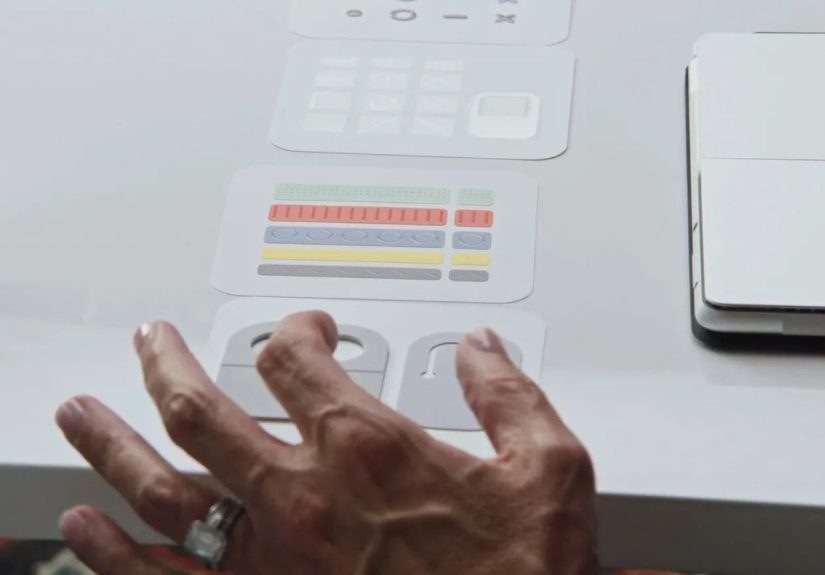
The Surface Adaptive Kit is a small, inexpensive pack of tactile labels, port indicators,
and opener tabs that make laptops and tablets easier to see, feel, and physically manipulate,
especially for people with low vision or limited dexterity. Designed in partnership with the
disability community and built on Microsoft’s broader accessibility push, it’s a reminder
that “innovation” isn’t only about speed and specsit’s about who gets to use the device
in the first place.
What Is the Surface Adaptive Kit, Exactly?
On paper, the Surface Adaptive Kit sounds almost underwhelming. Microsoft’s
store listing describes it as a set of keycap labels, 3D bump labels, port indicators,
and opener supports designed to improve how people find, open, and use their Surface
devices and accessories.
What’s in the Box
When you open the kit (which comes in fully recyclable, cleverly organized packaging, by the way),
you get four main components:
-
Keycap labels: Transparent stickers with raised shapeslines, arrows,
and a distinctive horseshoethat help users tactually identify important keys like Enter,
Function, or arrow keys. -
3D bump labels: Sixteen small, colorful, tactile stickers in different
shapes (dot, open circle, dash, and X) that can be placed near ports, buttons, or other
controls to create physical landmarks you can feel without looking. -
Port indicators: Paired stickers for cables and portsso the USB-C plug
and USB-C port share the same color and symbolmaking it easier to match connections at a
glance or by touch. -
Opener supports: Pull-tabs and loop-style stickers that attach to the
edge of a laptop lid or accessory, giving users with limited grip strength a better way
to open or hold the device.
None of these parts require special software, firmware updates, or a YouTube tutorial.
They’re literally peel-and-stick. The point is not to impress you with engineering bravado;
it’s to quietly remove frustration from everyday tasks like “Which port is HDMI again?”
or “How do I open this laptop without feeling like I’m trying to pry open a paint can?”
Designed with the Disability Community, Not Just for It
One of the reasons the Surface Adaptive Kit feels so different from many competitors’ efforts
is how it was built. Microsoft’s accessibility team has spent years co-designing solutions
with people with disabilitiesstarting with projects like the Xbox Adaptive Controller
and expanding into PC accessories and packaging.
“Nothing About Us Without Us” in Hardware Form
Microsoft openly highlights the disability community’s involvement in the kit’s development,
emphasizing real-world problems: people who can’t see tiny port icons, users who struggle
to distinguish similar keys, or those who physically can’t pinch a laptop lid open.
That design process shows up everywhere:
-
The shapes and colors are deliberately distinct, so people who can’t rely solely on color
differences still get unique tactile feedback. -
The adhesives are strong enough to stay on but not so permanent that you’re terrified of
misplacing a sticker. -
The packaging itself is accessible and reusable, which mirrors what Microsoft did with
the Xbox Adaptive line and its accessible packaging guidelines.
It’s all very “unsexy,” which is precisely why it’s radical. Instead of assuming users will
adapt to the product, the kit helps the product adapt to the users.
Why the Surface Adaptive Kit Embarrasses Its Rivals
To be clear, Microsoft isn’t alone in caring about accessibility. Apple, for example, has
some of the best built-in screen readers and vision tools on the market, and Windows PC
makers like Lenovo, Dell, and HP increasingly highlight accessibility-related features like
high-contrast displays, large trackpads, and configurable keyboards.
But when you look specifically at hardware customization for physical and sensory access,
the Surface Adaptive Kit is oddly uniqueand that’s where rivals start to look a little
behind the curve.
1. It Solves Problems Competitors Pretend Don’t Exist
Browse most laptop marketing pages today and you’ll see endless talk about color accuracy,
5G modems, AI-enhanced performance, and battery life that allegedly lasts until the next
presidential election. What you won’t see very often is a concrete, low-tech solution for:
- Finding ports without leaning into the screen with a flashlight.
- Identifying keys by touch when you have low vision or use a screen reader.
- Opening a tightly sprung laptop hinge without strong grip strength.
Those problems are real for millions of people, yet most OEMs leave them to be solved by
DIY hacksbits of tape, glue-on rubber dots, or third-party accessories. Microsoft’s kit
formalizes those hacks into something dignified, consistent, and intentionally designed.
2. It Works on Any Laptop, Not Just Surface
Despite the name, the Surface Adaptive Kit isn’t locked to the Surface lineup.
Reviewers and accessibility advocates have pointed out that the stickers, labels, and tabs
work just as well on non-Microsoft laptops, desktops, monitors, and even headphones or TV
remotes.
That makes the kit less of a “Surface accessory” and more of a general-purpose accessibility
upgrade for your entire tech ecosystem. Meanwhile, competitors largely restrict their
adaptive solutions to specific devices or don’t offer a comparable kit at all.
3. It’s Inexpensive but Feels Thoughtful, Not Cheap
The Surface Adaptive Kit is priced like a mid-range laptop sleeve, not a high-end piece of
assistive technology. Yet its impact can rival far more expensive solutions because it sits
at the intersection of low cost and high usability.
By contrast, some third-party adaptive hardware can be expensive, fragmented, or tied to
specific use cases. Microsoft’s kit, by virtue of being a simple add-on, sidesteps a lot of
that complexity while still integrating nicely with more advanced tools like the
Microsoft Adaptive Accessories ecosystem and the Xbox Adaptive hardware.
4. It Extends a Larger Accessibility Story
The kit isn’t a one-off PR stunt; it’s part of a multi-year accessibility strategy.
Microsoft has been vocal about treating accessibility as a core design pillar, not a
checkboxbacking it up with inclusive design frameworks, assistive input devices, and
policies aimed at making accessible tech a baseline expectation.
Many rivals talk about inclusion, but relatively few release this kind of humble,
everyday accessory that literally anyone can stick on their laptop in five minutes and
feel the difference.
Real-World Use Cases: How the Kit Changes Everyday Computing
To understand why the Surface Adaptive Kit matters, it helps to walk through some real-world
scenarios where it can transform the experience of using a computer.
For People with Low Vision
Imagine a user with low vision who primarily relies on a screen reader like Narrator or
NVDA. On a standard laptop, the keyboard layout becomes a memorization exercise: you know
where keys should be, but a single mis-press can trigger the wrong shortcut or close a
window you were navigating by audio alone.
With tactile keycap labels, that same user can physically feel which key is Ctrl, which
is Alt, or where the function row starts. A horseshoe-shaped sticker on the Enter key,
or a raised line on the Escape key, turns a flat sea of chiclet keys into a map of landmarks.
Combine that with high-contrast displays, larger system fonts, and Windows’ built-in
vision accessibility features, and you get a much more confident computing experience
without needing a custom keyboard.
For Users with Limited Dexterity or Grip Strength
If you’ve ever broken a nail opening a modern ultrabook, you have a tiny glimpse of what
it’s like for users with limited dexterity. For them, that narrow fingernail-sized groove
at the front of the laptop is not a design accentit’s a barrier.
The opener supports in the Surface Adaptive Kit turn that groove into a loop or tab you can
hook a finger through, pull with your whole hand, or even grab using a tool. Paired with
bump labels on power buttons or volume keys, the device becomes more manageable and less
physically demanding to use.
For Everyone Else (Yes, Including You)
Accessibility tools often end up being “universal design” wins. Even if you don’t identify
as disabled, the kit can still make your daily laptop life nicer:
- Tag your most-used ports so you don’t unplug the wrong cable in a rush.
- Highlight your favorite keyboard shortcut keys for editing, coding, or gaming.
- Mark the mute button or camera shutter so you know, instantly, where privacy lives.
Accessibility isn’t charity. It’s good design that happens to benefit a wide range of
peopleincluding distracted students, overcaffeinated remote workers, and anyone who uses
their laptop on a dim redeye flight.
Where the Kit Falls Short (and Where Rivals Still Compete)
Of course, the Surface Adaptive Kit doesn’t solve every accessibility challenge, and rivals
aren’t standing still either.
-
It’s still a manual solution. Someone has to place the labels correctly,
which can be tricky for users with low vision or limited dexterity without assistance. -
It can’t replace software-level accessibility. Screen readers, voice control,
captioning, eye-tracking, and magnification tools remain criticaland here, companies like
Apple and Microsoft are closer to peers than rivals. -
It’s one-size-fits-many. While versatile, some users may still need highly
specialized hardware or custom 3D-printed solutions that go beyond what stickers can offer.
Competitors also deserve credit for areas where they shine. Apple’s VoiceOver, Zoom,
and AssistiveTouch features set high bars for integrated accessibility; PC makers increasingly
provide ergonomic keyboards, bright matte displays, and privacy features that support
neurodiverse and visually impaired users.
Still, the fact that Microsoft is the only major vendor offering a polished, branded kit of
tactile, physical accessibility enhancements for laptops says a lot. The bar should never
have been this lowand yet Microsoft is the one currently clearing it.
How the Surface Adaptive Kit Fits into Microsoft’s Bigger Accessibility Ecosystem
The Surface Adaptive Kit isn’t an isolated product; it connects to a larger ecosystem of
accessible hardware and software:
-
Microsoft Adaptive Accessories provide customizable buttons, hubs, and
switches that can replace or supplement a traditional mouse and keyboard for users with
limited mobility. -
Xbox Adaptive hardwarelike the Adaptive Controller and the new Adaptive
Joystickextends the same thinking into gaming, complete with accessible packaging and
design guidance for third parties. -
Windows accessibility features enhance vision, hearing, mobility, and
neurodiversity support, from voice typing to high-contrast themes and system-wide magnifiers.
In that context, the Surface Adaptive Kit feels like the physical glue that connects the
digital and hardware sides of Microsoft’s accessibility strategy. It doesn’t shout as loudly
as a new OS feature or a fancy controller, but it quietly makes all of those tools easier
to access in the first place.
Living With the Surface Adaptive Kit: Experiences and Stories
So what is it actually like to live with the Surface Adaptive Kit day-to-day? Let’s walk
through some practical, experience-based scenarios that show how it plays out beyond a spec
sheet.
Scenario 1: The Remote Worker with Zoom Fatigue
Picture a remote worker who spends most days bouncing between video calls, spreadsheets,
and project management dashboards. They don’t consider themselves disabled, but by 4 p.m.,
their eyes are strained and their patience is thin. They’ve fumbled their mute key more
times than they’d like to admit.
After applying the Surface Adaptive Kit, they place a raised bump label at the F4 key
(their custom mute shortcut) and another on the key they use to toggle screen sharing.
Suddenly, instead of glancing down and hunting for the right key under pressure, they just
slide a fingertip across the function row until they feel the bump. It’s faster, calmer,
and reduces that awkward “Sorry, I was on mute… again” moment.
Scenario 2: A Student with Low Vision Navigating a Busy Campus
Now imagine a college student with low vision who’s constantly hauling a laptop from lecture
hall to library to coffee shop. Lighting conditions change all day, and tiny port icons on a
silver laptop are basically invisible in a dim classroom.
Using the kit, they pair each USB-C cable with matching port indicatorsblue circle for the
charger, orange X for their external drive. When they plug into a crowded power strip mid-lecture,
they don’t have to bring the laptop up to their face or strain their eyes; they just feel for
the matching shape. That small change doesn’t just save timeit preserves energy they can spend
on actually learning instead of wrestling with hardware.
Scenario 3: An Older User Returning to Tech
Consider an older user who’s recently retired and is returning to laptops after years of using
only a phone. They may have mild arthritis, reduced grip strength, and a strong dislike of
“tiny, fiddly stuff.”
The Surface Adaptive Kit helps them set up their laptop so it behaves more like a familiar tool.
An opener tab on the lid means they don’t have to pinch the edge. A couple of bump labels on the
power button and volume keys mean they’re no longer guessing which is which. A keycap label on
Enter and Backspace turns those into unmistakable tactile anchors on the keyboard.
None of this requires them to learn new software or memorize menus. The laptop simply
becomes friendlier to their hands and eyes.
Scenario 4: Power Users and Creators
Even advanced users can benefit. A video editor might mark their most important keyboard
shortcuts with different tactile stickerscut, paste, ripple delete, mark in/outturning
a standard layout into a custom editing console. A programmer might tag the Esc, Ctrl, and
Alt keys to make modal workflows more fluid. A gamer could mark macro keys or WASD in a way
that doesn’t rely on backlighting alone.
These are the kinds of “micro-experiences” that don’t show up in spec sheets, but they add up
to fewer errors, smoother workflows, and less mental loadespecially over years of daily use.
Why These Experiences Matter
All of these scenarios share a common thread: the Surface Adaptive Kit doesn’t demand that
people fit some idealized notion of “the average user.” Instead, it lets real people with
real bodies, abilities, and preferences shape their devices around how they actually live
and work.
That’s ultimately why the kit feels like it “embarrasses” rivals. It exposes how rare it still
is for big tech firms to ship accessibility solutions that are:
- Practical in daily life.
- Affordable.
- Compatible with hardware people already own.
- Co-designed with the communities they’re meant to serve.
Microsoft’s Surface Adaptive Kit isn’t perfect, but it proves that a few thoughtfully designed
stickers can say more about a company’s values than a dozen keynote slides about “inclusion.”
The Little Kit That Shames a Big Industry
When you zoom out, the Surface Adaptive Kit is both modest and quietly revolutionary. It doesn’t
overhaul Windows. It doesn’t demand a brand-new device. It simply acknowledges that laptops and
tablets, as shipped, are still not equally usable for everyoneand then offers a practical fix.
While competitors continue to pack in more cores and more nits of brightness, Microsoft has shown
that a simple, tactile, user-driven accessory can dramatically improve real-world accessibility.
For people with disabilities, it can mean the difference between fighting with a device and
working with it. For everyone else, it’s a reminder that good design should feel considerate,
not complicated.
Until rival manufacturers release their own thoughtful, affordable, and widely available adaptive
kits, Microsoft’s little sheet of stickers will keep doing something their competitors haven’t quite
managed yet: making everyday computing genuinely easier for more people.







 Close
Close