
Table of Contents >> Show >> Hide
- What Are GameShark Codes on Visual Boy Advance?
- What You Need Before You Start
- How to Enter GameShark Codes on Visual Boy Advance
- Do You Need a Master Code?
- An Example Workflow
- Why GameShark Codes Sometimes Do Not Work
- How to Troubleshoot Cheats Like a Pro
- Best Practices for Safe Cheat Use
- Common User Experiences With GameShark Codes on Visual Boy Advance
- Final Thoughts
- SEO Tags
If you have ever loaded up a Game Boy Advance classic on Visual Boy Advance and thought, “This boss is cheating, so I should too,” welcome to the club. GameShark codes can turn a brutally difficult grind into a breezy victory lap, unlock hidden items, or simply let you experiment with a game in weird and wonderful ways. The trick is getting those codes to work without turning your save file into digital soup.
This guide explains how to use GameShark codes on Visual Boy Advance in a practical, beginner-friendly way. We will cover what you need, how to enter codes correctly, why some cheats fail, how master codes work, and how to troubleshoot the most common problems. Along the way, you will also get some real-world advice that can save you a lot of “Why is this not working?!” energy.
What Are GameShark Codes on Visual Boy Advance?
GameShark codes are cheat codes originally designed for hardware cheat devices used with older consoles and handhelds. On the Game Boy Advance, those devices could modify memory values in real time. In plain English, they could give you infinite health, max money, unlocked items, rare encounters, or all kinds of glorious nonsense.
Visual Boy Advance, and especially modern VBA-M builds, can apply many of those same codes without requiring original cheat hardware. That means your emulator can act like a built-in cheat device, provided you enter the code in the right format and use the correct game version.
That last part matters more than people think. Cheat codes are picky. They are like cats: useful sometimes, dramatic always, and very sensitive to doing things the “wrong” way.
What You Need Before You Start
1. A Working Version of Visual Boy Advance
Use a stable, up-to-date build of VBA-M rather than a very old random copy you found lurking in a downloads folder from another era. Newer builds generally handle interface issues and cheat menus better, and they make the overall experience less painful.
2. Your Game Loaded and Running
Open your game first. Most users enter cheats after the game is already loaded. This also makes it easier to test whether the cheat works right away.
3. The Correct Cheat Type
Not every cheat is interchangeable. A GameShark code should be entered as a GameShark code. A CodeBreaker code should go into the CodeBreaker field. If you mix them up, the emulator will usually respond by doing absolutely nothing, which is its favorite form of protest.
4. The Right Region of the Game
Cheats often depend on the exact game version. A code built for a North American release may fail on a European or Japanese release, even when the game title looks the same. If a cheat source says “USA” or “North America,” believe it.
5. A Backup Save
Before turning your careful RPG progress into a science experiment, back up your save file. Some cheats can cause crashes, item corruption, soft locks, or broken scripts. Save states help, but an actual backed-up save file is even better.
How to Enter GameShark Codes on Visual Boy Advance
Here is the step-by-step method most players use.
Step 1: Load Your Game
Open Visual Boy Advance and start the game you want to modify. Let the game reach a point where you can check whether the cheat is working. For example, if you are using a money cheat, load into a menu where your currency is visible.
Step 2: Open the Cheat Menu
In many versions of Visual Boy Advance or VBA-M, the path is Tools > Cheats > List Cheats or Cheats > Cheat List. If you see an option to Enable Cheats, make sure it is turned on. This sounds obvious, but plenty of people have spent half an hour “debugging” a problem caused by one unchecked menu option.
Step 3: Choose the Right Cheat Type
Inside the cheat window, choose the button for GameShark if your code is in GameShark format. If your source labels the code as CodeBreaker, select CodeBreaker instead. Do not guess. Cheat formats may look similar, but the emulator does not read your mind.
Step 4: Add a Description
Name the cheat something helpful, such as “Infinite HP,” “Max Cash,” or “Rare Candy.” Avoid naming it “test” unless your future self enjoys confusion.
Step 5: Paste or Type the Code Exactly
Enter the code exactly as the source provides it. Multi-line cheats must remain multi-line. Missing one character, adding an accidental space, or swapping a zero for the letter O can make the cheat fail. Hexadecimal codes are not forgiving.
Step 6: Enable the Cheat
Once added, make sure the cheat is checked or marked active in the list. Some builds show a clear enabled state, while others simply rely on the checkbox or active entry status.
Step 7: Return to the Game and Test It
Go back into the game and trigger whatever action should activate the cheat. Some codes work instantly. Others activate only when entering a battle, opening a menu, walking into a new area, or restarting the game.
Do You Need a Master Code?
Sometimes yes, sometimes no, and that is why this topic confuses so many players.
A master code, sometimes labeled “Must Be On” or “Enable Code,” is a base code required for other cheats to function. On original hardware, master codes are often essential. On emulators, the situation can be mixed. Some cheat sources say emulator users may not need the master code for certain games, while others still recommend using it first, especially for more complex cheats.
The safest rule is this: if the cheat source includes a master code for your exact game version and cheat type, add it first and keep it enabled before activating other cheats. If the cheat works without it, great. If not, the master code is often the missing ingredient.
Also pay attention to where it sits in the list. Some users and cheat guides recommend putting the master code at the top. It is not glamorous, but neither is spending your Saturday wondering why infinite health turned into infinite disappointment.
An Example Workflow
Using a GameShark Code in a GBA RPG
Let us say you want to apply a max-money cheat in a role-playing game. A reliable workflow looks like this:
- Load your legal backup of the game in Visual Boy Advance.
- Open the cheat list menu.
- Add the master code first if your cheat source provides one.
- Add the money cheat in the GameShark field, not CodeBreaker.
- Enable both entries.
- Return to the game and open the money menu, or earn or spend a small amount to refresh the display.
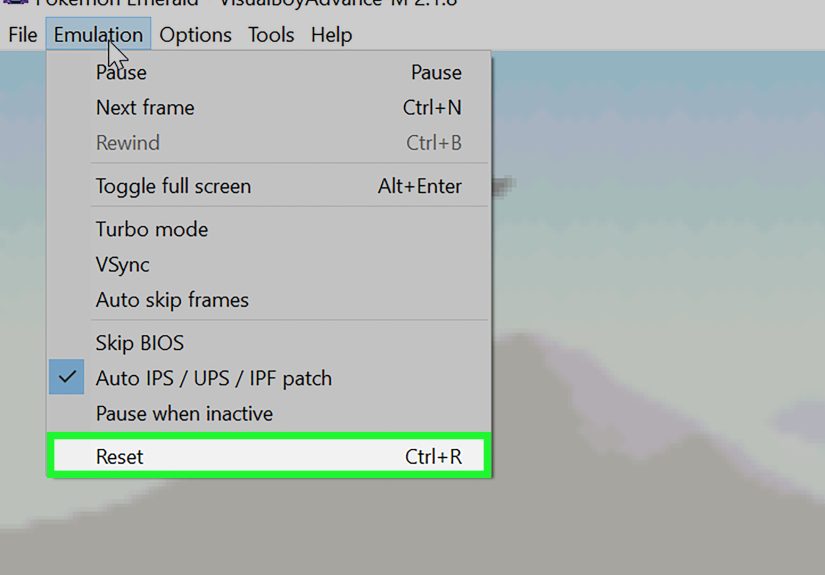
- If nothing changes, save in-game, hard reset the game, and test again.
This last step matters more than many beginners realize. Some cheats modify memory only after a screen refresh, battle trigger, or full reset. If the number on screen refuses to change, that does not always mean the code failed. Sometimes the game simply has not re-read the value yet.
Why GameShark Codes Sometimes Do Not Work
You Used the Wrong Cheat Type
This is the number one problem. A CodeBreaker code entered as GameShark is like trying to unlock your front door with a car key. It might be metal, but the relationship ends there.
The Code Matches a Different Region
If the cheat was designed for the USA version and your game is a Europe release, addresses may differ and the cheat can fail completely. Match the region carefully.
The Cheat Needs a Master Code
Many advanced codes, especially on GBA, depend on a master code. Without it, the cheat may never activate.
The Cheat Is Incomplete
Some effects require multiple lines, sometimes a lot of them. If you enter only one line from a twelve-line encounter modifier, the emulator is not being stubborn. It simply does not have enough information to do the job.
The Code Format Is Unsupported or Mislabeled
Some databases mix up Action Replay, GameShark, and CodeBreaker labels. Others assume you already know the difference. When a code looks right but still fails, the source may be the problem rather than your setup.
The Game Needs a Hard Reset
Certain patches and memory modifications only appear after restarting the game. If a cheat changes wild encounters, item behaviors, or scripted events, do not be surprised if a reset is required.
Multiple Cheats Are Conflicting
More cheats are not always better. Running several modifiers at once can overwrite the same memory values, break scripts, or cause crashes. Test one at a time, then combine only the ones that play nicely together.
How to Troubleshoot Cheats Like a Pro
- Test one cheat at a time. If you load ten codes at once and the game explodes, you have created mystery instead of progress.
- Verify the region. North American, European, and Japanese releases can require different codes.
- Re-check every character. Zero and O, one and I, and missing spaces are frequent troublemakers.
- Try the master code. Add it first and enable it before other codes.
- Use the correct menu button. GameShark goes in GameShark, CodeBreaker in CodeBreaker, raw formats where applicable.
- Reset after applying. Especially for patch-style or encounter-related cheats.
- Disable auto chaos. If your game starts behaving strangely, remove the newest cheat first.
- Keep a clean save. One save with cheats, one without. Future-you will be grateful.
Best Practices for Safe Cheat Use
Back Up Saves Before Experimenting
This is not optional if you care about your progress. Cheats can corrupt inventory, story flags, or entire save files.
Prefer In-Game Saves Over Only Save States
Save states are convenient, but they capture everything, including active cheats and unstable memory conditions. An in-game save gives you a cleaner fallback point.
Turn Off Cheats After You Use Them
If you only wanted one item or one unlock, disable the code afterward. Leaving every cheat on forever is how games become bizarre little haunted houses.
Use Reliable Cheat Sources
Established databases and long-running communities are usually more trustworthy than random copy-paste lists with no notes. A good source often explains whether the code is for USA, Europe, GameShark, CodeBreaker, or Action Replay.
Common User Experiences With GameShark Codes on Visual Boy Advance
One of the most relatable experiences with GameShark codes on Visual Boy Advance is the emotional roller coaster. It usually begins with confidence. You find a cheat, paste it in, check the box, and prepare to become unstoppable. Then nothing happens. At that point, every player goes through the same five stages: optimism, confusion, denial, menu-clicking, and finally enlightenment.
A lot of users discover that the problem is not the emulator at all. It is usually one tiny detail. Maybe the code was for CodeBreaker and not GameShark. Maybe the code was built for the USA version while the loaded game is from another region. Maybe the master code was missing. Maybe the cheat needed all lines entered, not just the first one that looked important. Retro cheating is a bit like cooking without a recipe card. If you skip one ingredient, dinner becomes a science project.
Another common experience is how satisfying it feels when a cheat finally works. Suddenly the game bends in ways it never did before. Money jumps. Inventory fills. Enemies become harmless. Rare encounters appear like magic. Even if the cheat is simple, there is something genuinely fun about seeing an old game behave differently. For long-time players, this can make a familiar title feel brand new again.
There is also a strong experimental side to using cheats. Many players do not use them just to make games easier. They use them to test mechanics, explore hidden content, revisit old favorites without grinding, or create funny self-imposed challenges. Some turn on max currency but leave combat untouched. Others unlock equipment early just to see how the balance breaks. Some people use cheats to speed through repeat playthroughs, which is honestly a noble public service to their own free time.
Of course, not every experience is smooth. Some users report cheats disappearing, not saving correctly, or failing after restarting the emulator. Others find that a cheat works for one game but not another. A few run into crashes or odd script behavior, especially when stacking too many codes at once. That is why experienced players tend to become methodical. They keep backups. They test one code at a time. They label everything clearly. They know that “Infinite HP test final final 2” is not a serious file-management strategy.
In the end, the most useful experience-related lesson is this: patience beats panic. When a GameShark code does not work on Visual Boy Advance, it usually means something small needs to be corrected, not that the whole idea is doomed. Once you learn the rhythm of matching the right code type, region, and master code, the process becomes much easier. After that, cheats stop feeling mysterious and start feeling like just another emulator tool. A slightly chaotic tool, sure, but still a tool.
Final Thoughts
Learning how to use GameShark codes on Visual Boy Advance is not difficult once you understand the moving parts. Load the game, open the cheat list, choose the right cheat type, enter the code carefully, use a master code when needed, and test methodically. Most failures come down to wrong format, wrong region, incomplete code entry, or skipped reset steps.
The good news is that once you get the process down, cheat management becomes surprisingly easy. You can speed through old games, test builds, explore hidden content, or just enjoy the absolute comedy of becoming overpowered in five seconds flat. Just remember to back up your saves, keep your cheat list organized, and never trust a mysterious code dump that looks like it was assembled by gremlins at 2 a.m.






 Close
Close