
Table of Contents >> Show >> Hide
- What Is a Command Block in Minecraft?
- How to Get a Command Block in Minecraft
- How Command Blocks Work
- Understanding Basic Minecraft Command Syntax
- How to Use Command Blocks in Minecraft: Beginner Setups
- How Command Block Chains Make Minecraft Smarter
- Best Commands to Try in Command Blocks
- Common Command Block Mistakes
- Practical Tips for Better Command Block Builds
- Conclusion
- Real-World Experiences With Command Blocks in Minecraft
- SEO Tags
If you have ever looked at a Minecraft world and thought, “This could use more lightning, teleporters, secret doors, and dramatic announcements,” command blocks are your new best friend. They are one of the most powerful tools in the game, yet they also scare off a lot of players because they look like tiny orange computers disguised as blocks. Fair enough. At first glance, the interface feels a little like redstone met a spreadsheet and decided to raise a very nerdy child.
The good news is that learning how to use command blocks in Minecraft is much easier than it seems once you understand the basics. You do not need to be a programmer. You do not need to memorize every command ever made. And you definitely do not need to become the mayor of Syntax Town on day one. What you do need is a basic understanding of cheats, redstone signals, and how a few simple commands work together.
In this complete guide, you will learn what command blocks are, how to get them, how the different command block types work, how to enter useful Minecraft commands, and how to build beginner-friendly setups that actually do something cool. We will also cover common mistakes, practical tips, and a longer experience-based section at the end so the guide feels helpful in the real world, not just pretty on the page.
What Is a Command Block in Minecraft?
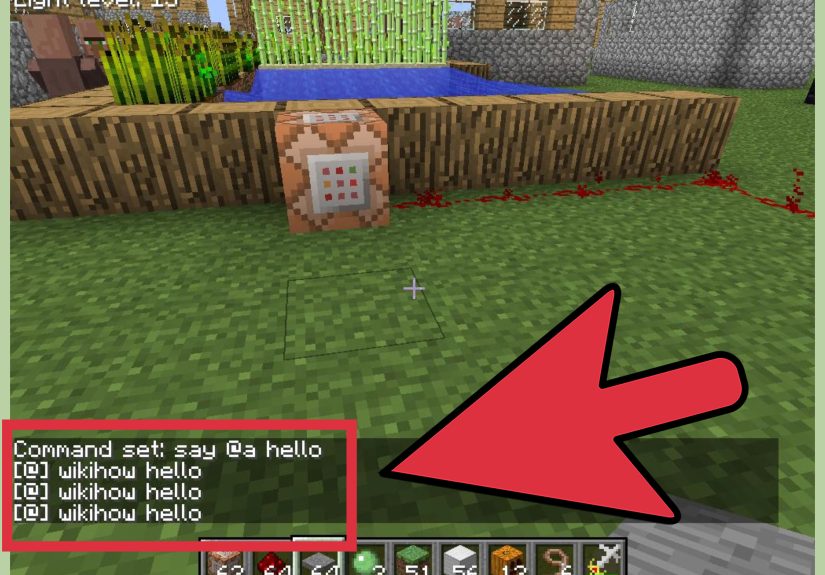
A command block is a special block that runs a command automatically when activated. Instead of typing a command manually in chat every time, you can store that command inside the block and trigger it with redstone, pressure plates, buttons, levers, or other command blocks. In other words, command blocks turn one-time chat commands into repeatable game mechanics.
This is why command blocks are so popular in adventure maps, minigames, puzzle worlds, custom challenges, and creator-made experiences. They can teleport players, give rewards, change the weather, detect certain actions, run announcements, open hidden passages, and even create full gameplay loops. If regular Minecraft feels like building with bricks, command blocks feel like wiring the building so the lights come on when somebody walks in.
It is also important to know that command blocks are primarily meant for Creative mode, mapmaking, and admin-style world control. They are not normal survival items you casually pick up next to your wheat farm.
How to Get a Command Block in Minecraft
1. Enable cheats first
Before you can use command blocks, your world needs cheats enabled. In many versions of Minecraft, turning on cheats also disables achievements for that world. In multiplayer, you may also need operator or admin permissions.
2. Open the chat window
On PC, this is usually the T key. On consoles and mobile devices, the chat button or menu shortcut will do the job.
3. Use the give command
A common way to get the block is with a give command such as:
Depending on your edition and version, you may also see examples written a little differently, especially in Bedrock Edition. That is normal. Minecraft commands are powerful, but they are not always shy about changing their outfit between editions.
4. Place the block
Once the command block appears in your inventory, place it like any other block. Then interact with it to open the command block interface.
How Command Blocks Work
One of the first things you will notice is that not all command blocks behave the same way. Minecraft has three main command block types, and understanding them is the difference between “I built a working teleporter” and “Why is my world screaming commands into the void?”
Impulse Command Block
This is the orange one. It runs its command once when it receives a redstone signal. Think of it like a doorbell. Press the button, it rings once, job done.
Chain Command Block
This is the green one. It runs when the command block behind it successfully triggers it. Chain blocks are used when you want multiple actions to happen in sequence, such as testing a condition first and giving a reward second.
Repeating Command Block
This is the purple one. It keeps running its command continuously while active. That makes it useful for checks, loops, timers, and ongoing world behavior. It is also the easiest way to accidentally create a lag machine if you are not careful, so use repeating blocks with respect.
Conditional vs. Unconditional
A command block can also be set to Conditional or Unconditional. A conditional block only runs if the previous block in the chain succeeded. An unconditional block tries to run no matter what. This is extremely useful for logic-based builds.
Needs Redstone vs. Always Active
Needs Redstone means the block waits for a signal. Always Active means it runs without needing a separate redstone trigger. On an impulse block, Always Active usually is not very exciting because it only fires once. On repeating and chain setups, though, it can be the secret sauce.
Understanding Basic Minecraft Command Syntax
If command blocks are the machine, commands are the fuel. Here are the beginner ideas you should know before building more advanced systems.
Every command starts with a slash
Commands typed in chat start with /. Inside a command block, Minecraft usually handles that context for you, but you will still see commands written with the slash in tutorials.
Commands use arguments
Arguments are the details after the command name. For example:
Here, the command is /give. The arguments are the target player, the item, and the amount.
Target selectors save time
Instead of typing a player name every time, you can use selectors like:
@pfor the nearest player@afor all players@sfor yourself or the entity running the command@efor all entities
Coordinates matter a lot
Minecraft commands often use X Y Z coordinates. Absolute coordinates send you to an exact location. Relative coordinates use the tilde symbol, like ~ ~1 ~, to mean “right here, but adjusted a little.” That is handy when you want a command to work relative to the block or player instead of a fixed global point.
On PC, tab autocomplete can help finish commands and even fill in coordinates for the block you are looking at. That alone can save enough typing to preserve your sanity.
How to Use Command Blocks in Minecraft: Beginner Setups
Example 1: A button that sets daytime
- Place an impulse command block.
- Open it and enter:
- Set it to Needs Redstone.
- Attach a button.
- Press the button and enjoy your instant sunrise like a very powerful weather intern.
Example 2: A teleport pad
- Place an impulse command block under or beside a pressure plate.
- Enter a teleport command such as:
- Set it to Needs Redstone.
- Step on the plate.
This is one of the easiest ways to make fast travel in a custom map.
Example 3: A reward block
- Place an impulse command block.
- Enter:
- Connect it to a button or lever.
Simple? Yes. Useful? Also yes. Especially when you are testing minigames or building a starter kit room.
How Command Block Chains Make Minecraft Smarter
Once you understand single commands, the next step is chaining command blocks together. This is where Minecraft starts feeling less like a sandbox and more like a custom game engine wearing a pickaxe hat.
A common chain setup works like this:
- A repeating block checks whether a condition is true.
- A chain block verifies an extra condition, such as whether the player has already been rewarded.
- A final chain block gives the reward, teleports the player, sends a message, or changes the world.
For example, an official-style Bedrock workflow uses a repeating block to test whether a certain block exists at a certain coordinate. If the test succeeds, a conditional chain block can then reward the player, and another conditional chain block can tag that player so they do not get the reward twenty times per second. That is a great example of why chain blocks are so useful: they let you create logic instead of just isolated effects.
The key detail is arrow direction. Command blocks execute in the direction their arrows point. If the arrows do not line up, your chain can break even when the command text itself is correct. Many beginners spend far too long hunting for a typo when the real villain is a block facing the wrong way.
Best Commands to Try in Command Blocks
If you are learning how to use command blocks in Minecraft, start with commands that give obvious results. Fast feedback makes the system easier to understand.
/say Welcome to the arena!/weather clear/time set night/give @p torch 16/tp @p 0 80 0/gamemode creative @p/effect give @p speed 10 1
These let you test messaging, world control, inventory changes, movement, and player effects without diving straight into advanced logic. It is the Minecraft equivalent of learning to ride a bike before entering a flaming obstacle course.
Common Command Block Mistakes
Cheats are not enabled
If commands do nothing, check your world settings first. A lot of command block trouble starts before the block is even placed.
The block type is wrong
If something should run once, use impulse. If it should run constantly, use repeating. If it depends on another block, use chain. Picking the wrong type creates confusion fast.
The redstone setting is wrong
If the block never fires, it may still be waiting for redstone. If it fires nonstop, it may be set to Always Active when you only wanted one trigger.
The arrows do not line up
In a command block chain, block direction matters. The arrows show the execution flow. If they point the wrong way, the chain can fail.
The command syntax does not match your edition
Java Edition and Bedrock Edition share many commands, but not all syntax is identical. If a tutorial seems correct but will not run, check whether it was written for the same edition and current version you are using.
The repeating block is too aggressive
Repeating blocks can run very fast. If you leave one active with a heavy command, you may cause lag, spam the chat, or trigger the same event far too often.
Practical Tips for Better Command Block Builds
- Test in a flat Creative world before using command blocks in your main project.
- Label areas or keep notes so you remember what each command block does.
- Start with visible commands like
/sayor/weatherbefore building logic chains. - Use one command block at a time until you understand the result.
- Keep backups of worlds before making big command systems.
- Be careful with repeating blocks and broad selectors like
@e.
These habits save time, reduce confusion, and keep your Minecraft world from turning into a mysterious disaster zone where every chicken has somehow been teleported into the sky.
Conclusion
Learning how to use command blocks in Minecraft opens up a completely different side of the game. Instead of just placing blocks and wiring redstone, you start building rules, behaviors, and systems. A simple command block can make a teleporter. A chain of command blocks can create a reward machine. A carefully planned repeating setup can make a whole custom map feel alive.
The trick is to start small. Get comfortable with cheats, commands, selectors, and redstone triggers. Learn what impulse, chain, and repeating blocks do. Build one working idea at a time. Once those basics click, command blocks stop feeling intimidating and start feeling like a creative superpower.
In other words, command blocks are not just for hardcore mapmakers and code-loving wizards. They are for any Minecraft player who has ever said, “I wish this world could do one more cool thing.” Because with the right command block setup, it absolutely can.
Real-World Experiences With Command Blocks in Minecraft
For many players, the first experience with command blocks is equal parts excitement and confusion. You finally get the block, place it down, open the interface, and instantly feel like you have wandered into Minecraft’s secret control room. There is a weird thrill to it. Suddenly the game is not just about building houses or surviving the night. It is about making the world react. That shift is what makes command blocks so memorable.
A very common beginner experience is starting with something tiny, like a button that changes the time to day, and then immediately feeling absurdly powerful. It is not a complicated setup, but the first time you press a button and watch the sun snap into place, your brain starts making dangerous suggestions. “What if I make a secret base entrance?” “What if I build a prison that teleports intruders?” “What if my castle announces every guest with a dramatic title card?” That is how the rabbit hole begins.
Another shared experience is learning that command blocks are not hard because they are impossible. They are hard because tiny details matter. One missing symbol, one wrong selector, one block facing the wrong direction, and the whole setup just sits there like a silent brick pretending it has never heard of your plans. Almost everyone who learns command blocks goes through the same cycle: excitement, confusion, one accidental mistake, a burst of troubleshooting, and then a moment of victory when everything finally works. That payoff is huge.
Players also discover pretty quickly that command blocks change how they think about Minecraft builds. A room is no longer just a room. It can become a challenge trigger, a checkpoint, a loot system, or a boss arena. A hallway can become a scanner. A pressure plate can become a security system. A repeating block can turn a static world into something that constantly checks, updates, and reacts. Even simple projects start to feel more interactive and polished.
There is also a practical side to the experience. Command blocks teach patience. They teach testing. They teach you to build in steps instead of trying to create a giant mega-system in one go. Many experienced players eventually realize that the best command block projects are not the flashiest ones. They are the ones that are clean, organized, and reliable. A simple teleporter that works every time is better than a giant machine that only functions when the moon is full and the arrows happen to be facing north.
Most of all, command blocks create the feeling that Minecraft is bigger than it first appears. You start with a block game, and then one day you are building custom mechanics, automated events, and map logic that feels closer to game design than ordinary survival play. That is why command blocks stick with players. They do not just add features. They change your relationship with the game. Once you have used them successfully, you never look at your world the same way again.





 Close
Close