
Table of Contents >> Show >> Hide
- Quick Answer: Can You Make a Tumblr Blog Private?
- Why Tumblr Privacy Feels More Complicated Than It Should
- Method 1: Create a Password-Protected Secondary Blog
- Method 2: Hide Your Blog from People Without a Tumblr Account
- Method 3: Make Individual Posts or Older Posts Private
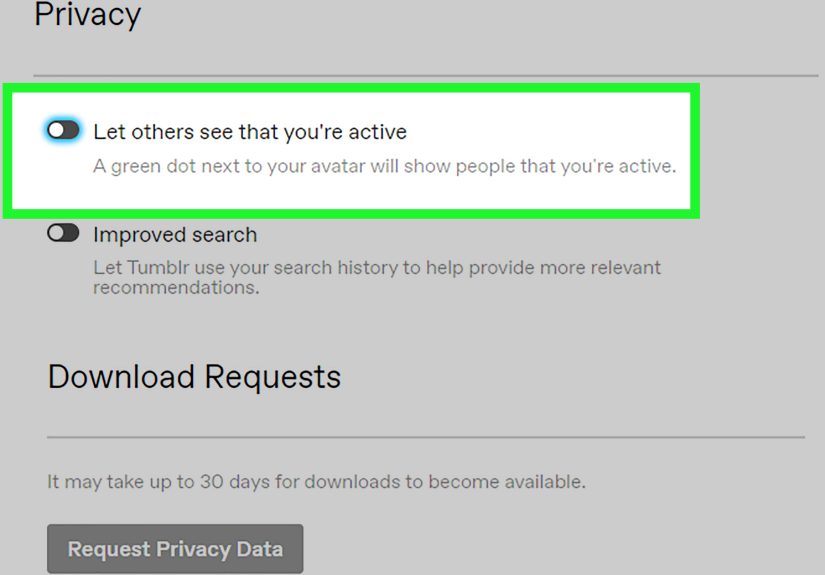
- Method 4: Exclude Your Blog from Tumblr Search and Recommendations
- Which Privacy Method Should You Choose?
- Common Mistakes to Avoid
- Real-World Experiences: What Privacy on Tumblr Actually Feels Like
- Final Thoughts
- SEO Tags
Tumblr is a delightful little corner of the internet where memes, mood boards, fandom essays, poetry, and midnight life updates can all live side by side. It is also a place where many users suddenly realize, “Wait… strangers can see this?” If that thought just made you sit up straighter, welcome. You are in the right place.
The tricky part is that Tumblr does not offer one giant red button labeled Make Everything Private Forever. Instead, it gives you several privacy tools that do different jobs. Some hide your blog from people without an account. Some keep posts out of search. Some lock a sideblog behind a password. And some help you quietly tuck older posts into a private corner without deleting them.
This guide breaks down four working methods to make your Tumblr presence more private, explains what each one actually does, and helps you choose the best option for your situation. Because “private” on Tumblr can mean anything from “not indexed in search” to “visible only to people with a password.” Those are very different levels of privacy, and mixing them up is how people end up accidentally publishing their emotional damage in 14-point font.
Quick Answer: Can You Make a Tumblr Blog Private?
Yes, but with an important catch: you cannot fully password-protect or privatize a primary Tumblr blog. If you want true password protection, you need a secondary blog, also called a sideblog. If you are using your main blog, your best privacy options are to hide it from logged-out visitors, make posts private, and remove the blog from Tumblr search and recommendations.
That means the right method depends on your goal:
- Need a real lock on the door? Use a password-protected secondary blog.
- Want to keep random web visitors out? Hide the blog from people without a Tumblr account.
- Need to hide specific posts or older content? Make posts private.
- Want less discoverability? Exclude the blog from Tumblr search and recommendations.
Why Tumblr Privacy Feels More Complicated Than It Should
Tumblr is part blogging platform, part social network, part creative scrapbook, and part digital attic filled with things you posted in 2016 and forgot existed. Because of that mix, its privacy settings are not all in one bucket. Some control who can load your blog. Others control whether your content appears in search. Others affect individual posts, not the whole blog.
That distinction matters. For example, a blog hidden from logged-out visitors is not the same as a password-protected blog. A blog excluded from Tumblr search is not the same as a blog invisible to everyone. And a private post does not automatically turn the whole blog private. Tumblr gives you layers, not a magic curtain.
The good news is that these layers can work together. The better news is that once you understand them, Tumblr privacy becomes much less mysterious and much more useful.
Method 1: Create a Password-Protected Secondary Blog
If you want the strongest privacy option Tumblr currently offers, this is it. A password-protected secondary blog is the closest thing to a private Tumblr diary, members-only writing space, or locked creative archive.
How it works
Tumblr allows secondary blogs to be password-protected. That means visitors need the password to access the blog. You can also add Tumblr users as members if you want a shared group space. This makes the feature especially useful for private journaling, collaborative fandom spaces, writing groups, or limited-access content for trusted readers.
How to set it up
- Open Tumblr on the web.
- Go to Account or Settings.
- Select the secondary blog you want to manage.
- Scroll to the bottom of the blog settings.
- Turn on Password protect this blog.
- Enter a password and save it.
Best for
- Personal journals
- Private writing projects
- Small communities or group blogs
- Anyone who wants actual gatekeeping, not just lower visibility
What to watch out for
This method works only for secondary blogs, not your primary blog. That is the biggest limitation and the reason many users end up creating a sideblog specifically for more private content. Also, password-protected blogs can be awkward on mobile: people who are not members may need to access them through a mobile browser rather than the Tumblr app. That is not exactly elegant, but it does work.
In plain English: if you need the strongest privacy Tumblr offers, build a sideblog and lock it. Think of it as a speakeasy for your thoughts.
Method 2: Hide Your Blog from People Without a Tumblr Account
This is one of Tumblr’s most useful privacy settings, and also one of the most misunderstood. When you enable the option to hide your blog from people without an account, your blog becomes visible only to users who are logged into Tumblr.
How it works
Once enabled, your blog is no longer viewable through its regular public web address in the same way. Logged-out visitors will be pushed toward the login page, and logged-in users are redirected through the Tumblr dashboard experience. In other words, random people wandering in from a web search or shared link hit a wall.
How to turn it on
- Open your blog settings.
- Find the Visibility section.
- Turn on Hide [blog name] from people without an account.
Best for
- Users who want to stop casual web visitors from seeing their blog
- Fandom or personal blogs meant for Tumblr users only
- People who want more privacy without creating a new sideblog
The catch
This setting is powerful, but it changes more than people expect. Your normal blog URL becomes less useful, your custom theme may not display at the regular web address, and standalone blog pages can also become inaccessible to logged-out visitors. So if you built a beautifully themed Tumblr like it was your little internet cottage, this setting may effectively pull the curtains and lock the front porch too.
That is why this method is best for users who prioritize privacy over public presentation. If your goal is “keep outsiders out,” it is excellent. If your goal is “showcase my custom theme to the world,” it is the opposite of excellent.
Method 3: Make Individual Posts or Older Posts Private
Sometimes you do not want to hide the whole blog. You just want to hide that one post. Or fifty-seven posts from your chaotic sophomore era. Fair. Deeply fair.
How it works
Tumblr allows you to make posts private, which means they do not appear publicly on your blog in the usual way and do not show up in Tumblr search. If you need to clean up older content without deleting it, this is one of the smartest tools available.
How to do it
For individual posts, edit the post and change its visibility to private if that option is available in your workflow. For larger cleanups, use the Mass Post Editor on desktop to select multiple posts and make them private in batches.
Best for
- Cleaning up older content
- Hiding personal posts without deleting them
- Keeping a public blog while moving sensitive content out of sight
- Writers and artists who want to archive drafts or experiments
Important warning
Mass-privating is handy, but it is not something to do half-asleep at 1:17 a.m. Tumblr’s own guidance warns users to choose carefully, because once posts are mass-privated, making them public again is not as simple as waving a digital wand. In practice, this method is best when you are sure the content should stay hidden.
Also remember: private posts are not the same as a private blog. Your blog itself may still exist publicly, but the selected posts will not be visible like normal published posts. This is ideal for “hide the evidence, keep the blog” situations.
Method 4: Exclude Your Blog from Tumblr Search and Recommendations
This method does not lock your blog, but it does reduce discoverability. If your main concern is being found through Tumblr’s internal search or recommendation system, this is a practical, low-drama move.
How it works
Tumblr offers a setting called Exclude [your blog name] from Tumblr search and recommendations. Once enabled, your blog will not appear in Tumblr search results or recommendation surfaces in the same way. That makes your blog harder to stumble across, especially for people who are not already looking for you directly.
How to enable it
- Go to your blog settings.
- Look under Visibility.
- Turn on Exclude [your blog name] from Tumblr search and recommendations.
Best for
- Users who want a lower profile
- Personal blogs that should not be easy to discover
- Creators who want to share direct links only
- Anyone not interested in Tumblr growth, reach, or platform discovery
What it does not do
This setting does not password-protect your blog. It also does not guarantee that old copies of content disappear instantly from external search engines. Search engines sometimes cache pages for a while, so reduced discoverability is not the same as instant digital invisibility. Think of this as lowering the lights, not demolishing the building.
Which Privacy Method Should You Choose?
Here is the simple version:
- Choose Method 1 if you need the strongest privacy and are willing to use a sideblog.
- Choose Method 2 if you want your blog visible only to logged-in Tumblr users.
- Choose Method 3 if the issue is specific posts, not the whole blog.
- Choose Method 4 if you mainly want to stop search-based discovery.
For many users, the smartest approach is a combination: keep the blog hidden from people without accounts, exclude it from Tumblr search, and private older posts that no longer belong in public view. It is the online equivalent of closing the blinds, silencing the doorbell, and finally cleaning out that one junk drawer.
Common Mistakes to Avoid
Assuming your primary blog can be fully locked
It cannot. If you want password protection, start with a secondary blog.
Confusing “hidden” with “password-protected”
Hiding a blog from logged-out visitors is useful, but it is not the same as requiring a password.
Forgetting about old posts
Many users adjust privacy settings and then forget that older public posts may still be sitting there like tiny time capsules with too much personal information. Review your archive.
Expecting search engines to forget instantly
Even after changing settings, cached versions may linger for some time. Privacy changes help going forward, but they are not a time machine.
Real-World Experiences: What Privacy on Tumblr Actually Feels Like
In practice, most people do not start thinking about Tumblr privacy until after one of three things happens: a friend finds a side of them they were not ready to explain, a stranger reblogs something that felt personal, or they realize an old post is still out there cheerfully living its best life without permission. Tumblr has always encouraged creativity and openness, which is wonderful right up until you remember that openness has an audience.
One common experience is the “I thought only Tumblr people would see this” moment. A user writes a vulnerable post, shares a fandom meta essay, or posts a deeply specific joke for mutuals, then discovers the blog is accessible more broadly than expected. That is usually when the hide from people without an account setting starts looking very attractive. It does not make the blog invisible, but it changes the vibe immediately. Suddenly your blog feels less like a storefront window and more like a room inside the building.
Another familiar experience is the slow-motion horror of scrolling through your own archive. Old usernames. Old opinions. Old formatting choices. Old crushes. Old everything. Making older posts private can feel less like censorship and more like emotional housekeeping. You are not erasing your history. You are just moving some boxes into storage where they belong.
Then there are users who discover that a secondary blog is the real privacy upgrade they needed all along. Instead of trying to force a public-facing primary blog to behave like a private journal, they create a sideblog for writing, reflection, or trusted community sharing. That shift often makes Tumblr feel usable again. There is less anxiety, less self-editing, and a lot more freedom to post without imagining every possible reader wandering in from the open web.
There is also a practical side to all this. Privacy settings can affect custom themes, pages, mobile access, and how easy a blog is to share. Some users love that tradeoff because peace and control matter more than presentation. Others discover they still want the public look of Tumblr but with fewer searchable footprints, so they choose the lighter combination of private posts plus search exclusion. That is why there is no single perfect setup. The best privacy plan is the one that matches how you actually use the platform.
The most helpful mindset is to stop asking, “How do I make Tumblr completely private?” and start asking, “Who do I want to keep out, and what do I want to protect?” Once you know that answer, Tumblr’s tools make much more sense. Maybe you want a locked sideblog for private writing. Maybe you want a mostly public blog with some hidden posts. Maybe you just want fewer accidental visitors and less discoverability. All of those are valid. Privacy is not one switch. It is a strategy.
And honestly, that is probably for the best. The internet is rarely all public or all private. Most of us live somewhere in the middle, posting with one eye on self-expression and the other on self-protection. Tumblr, for all its quirks, gives you enough options to find a workable middle ground. Which is more than can be said for some corners of the internet that still behave like oversharing is a lifestyle brand.
Final Thoughts
If you are trying to make your Tumblr blog private, the smartest move is to choose the privacy tool that matches your actual goal. For strong access control, use a password-protected secondary blog. For limiting casual web visitors, hide the blog from people without an account. For content cleanup, make posts private. And for lower discoverability, exclude the blog from Tumblr search and recommendations.
Tumblr privacy is not perfect, but it is flexible. Once you understand the difference between a private blog, a private post, and a less discoverable account, you can build a setup that feels much safer and much more intentional. Which is exactly what a personal blog should be: your space, your rules, and significantly fewer accidental witnesses.





 Close
Close