
Table of Contents >> Show >> Hide
- Before You Start: The 60-Second Cover Page Checklist
- Quick Compare: APA vs. MLA vs. Chicago Cover Pages
- How to Make an APA Cover Page (APA 7 Student Title Page)
- How to Make an MLA Cover Page (Spoiler: You Usually Don’t)
- How to Make a Chicago Cover Page (Often via Turabian)
- How to Choose the Right Cover Page (Without Spiraling)
- Common Cover Page Mistakes (and How to Avoid Them)
- Pro Tips: Make Your Cover Page Look Effortless (Even If It Wasn’t)
- Real-World Experiences: What Making Cover Pages Taught Me (Bonus ~)
- Conclusion
A cover page (a.k.a. a title page) is like the front door of your paper: it’s not the whole house,
but it’s the first thing your reader seesand yes, people absolutely judge it. The good news? Making a clean,
correct cover page in APA, MLA, or Chicago is mostly about following a short list
of rules and not freelancing at 1:58 a.m.
This guide walks you through exactly what goes on the page, where it goes, and how to format it,
with examples you can copy. We’ll also cover the sneaky detail that trips up a lot of students:
MLA usually doesn’t use a separate cover page at all. (MLA is basically saying, “Put your name on it and let’s move on.”)
Before You Start: The 60-Second Cover Page Checklist
- Read the assignment prompt first. Your instructor’s directions beat any style guide every time.
- Confirm the style: APA (often social sciences), MLA (often English/literature), Chicago/Turabian (often history/humanities).
- Set the basics: 1-inch margins, readable font, double spacing (most of the time).
- Use your word processor’s tools: page numbers, headers, and centering should be automaticnot “spacebar art.”
- Don’t over-design. Academic cover pages are not movie posters. Save the bold creativity for your thesis statement.
Quick Compare: APA vs. MLA vs. Chicago Cover Pages
| Style | Do you usually need a separate cover page? | Main items included | Common “gotcha” |
|---|---|---|---|
| APA (7th) | Yes (student title page is standard) | Title, author, affiliation, course, instructor, due date, page number | Student papers usually don’t include a running head |
| MLA (9th) | No (typically the first page heading replaces it) | Name, instructor, course, date on first page; title centered | People make a cover page when MLA didn’t ask for one |
| Chicago / Turabian | Sometimes (depends on instructor) | Title about 1/3 down; name/course/date later; centered, double-spaced | Page numbers often start after the title page |
How to Make an APA Cover Page (APA 7 Student Title Page)
In APA 7th edition, the student title page is the default “cover page” setup for class papers. It’s clean,
standardized, andonce you learn itfast to build. APA’s student title page includes the paper title, author name(s),
affiliation, and class details .
What Goes on an APA Student Title Page
- Page number: “1” in the top-right header. For student papers, the header is page number only .
- Paper title: Centered and bold (use title case).
- Author name: Your name (and any co-authors, if applicable).
- Author affiliation: Usually your school (e.g., “Central High School” or “State University”).
- Course number and name: Example: “PSY 101: Introduction to Psychology.”
- Instructor name
- Due date: Typically written as Month Day, Year (e.g., “December 31, 2025”).
APA Formatting Rules That Actually Matter
- Everything is centered on the page for the title block.
- Double-space the lines in the title block.
- Keep the title readable: concise but specific (no “Paper #3 Final FINAL for real this time”).
- Don’t add extra graphics, borders, or quotes. APA cover pages are not a scrapbook.
Step-by-Step: APA Cover Page in Word (or Similar)
- Set margins to 1 inch on all sides.
- Set the document to double spacing.
- Insert a page number in the top-right header (Page 1) .
- Click into the body and type your title block, keeping each line centered.
- Bold only the paper title line; leave the other lines normal unless your instructor says otherwise.
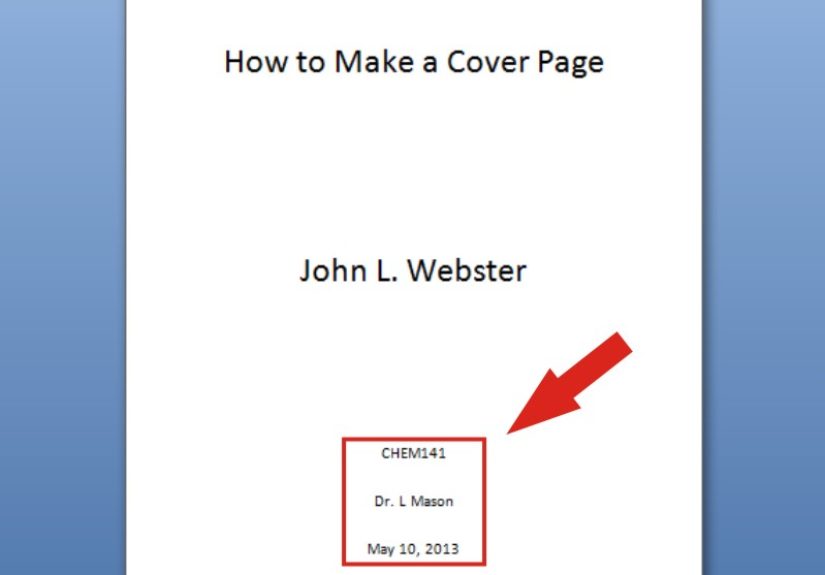
APA Student Title Page Example
Here’s a simple layout you can model (spacing will vary depending on your word processor):
APA Professional Title Page (Quick Note)
If you’re writing a professional paper (publication-style), APA may include additional elements (like an author note),
and the page header rules differ (professional papers can include a running head) . For most class assignments, the
student title page is the one you’ll use.
How to Make an MLA Cover Page (Spoiler: You Usually Don’t)
MLA format is famous for skipping the separate cover page. Instead, your first page does the job:
you place a short heading at the top-left, then center your title, and start writing. Purdue OWL and the MLA Style Center
both emphasize that a research paper does not normally need a title page .
Standard MLA First Page Setup (Most Common)
- Header (top right): Your last name and page number (e.g., “Taylor 1”) .
- Top-left heading (four lines, double-spaced):
- Your name
- Instructor’s name
- Course number/name
- Date
- Title: Centered on a new double-spaced line. Do not bold, italicize, underline, or quote it .
- Body text: Starts on the next double-spaced line after the title.
MLA Date Format (Don’t Let This One Ruin Your Mood)
MLA instructions commonly say to include “the date” in the heading . Many instructors prefer the classic
Day Month Year format (e.g., “31 December 2025”), but some classes accept “Month Day, Year.”
The safest move: follow your instructor’s preference, or match the examples your course materials use.
MLA First Page Example (No Separate Cover Page)
When You DO Need an MLA Cover Page
There are cases when an MLA-style title page is appropriatelike a group project or when your teacher explicitly
requires a separate title page . In those situations, follow the instructions you’re given. If your instructor doesn’t
specify a layout, a simple centered title page (title, your name(s), course, instructor, date) is usually acceptable.
How to Make a Chicago Cover Page (Often via Turabian)
“Chicago style” is a big umbrella. For student papers, many instructors use Turabian (which is compatible with Chicago) for formatting.
And here’s the key: Chicago/Turabian papers may use a title page or simply put the title on the first pagedepending on the class .
What a Chicago/Turabian Title Page Usually Includes
- Title (and subtitle if you have one), centered about one-third down the page .
- Your name
- Course information (course title/number)
- Date
- Sometimes the instructor’s name (depends on the assignment)
Chicago/Turabian Formatting Rules
- Center-align the title page text.
- Double-space the lines on the title page .
- Place title high-ish but not too high: roughly one-third down the page .
- Place your name/course/date lower: several lines after the title (often around two-thirds down) .
- Subtitles: commonly placed on the next line after a colon .
Chicago Title Page Example
If Your Instructor Says “No Title Page” in Chicago Style
Many Chicago-style class papers simply begin on page 1 with the title near the top, followed by the text.
If that’s your instruction, don’t force a cover page into the assignment like it’s a surprise guest star.
How to Choose the Right Cover Page (Without Spiraling)
- If it’s APA: make a student title page with the required class details .
- If it’s MLA: start with the MLA first-page heading; only create a separate title page if required .
- If it’s Chicago/Turabian: follow your instructortitle page may be required or optional .
Common Cover Page Mistakes (and How to Avoid Them)
- Using MLA like APA: adding a big formal cover page when MLA wanted a simple first-page heading .
- Forgetting the page number in APA: student papers still use page numbersjust not the running head .
- Over-formatting: weird fonts, decorative borders, or inspirational quotes (“Live, Laugh, Literature”). Save it for your planner.
- Misplacing details: course/instructor info belongs on APA title pages; it may not belong on Chicago unless your class requires it.
- Not matching capitalization: titles are usually in title case; all-caps titles tend to look like you’re yelling at your grader.
Pro Tips: Make Your Cover Page Look Effortless (Even If It Wasn’t)
- Use “Insert Page Number.” If you manually type page numbers, you’re volunteering for future misery.
- Keep a personal template. Save one APA title page and one MLA first page so you can reuse formatting later.
- Do a final “top-of-page scan.” Most cover page mistakes are visible within three secondsuse that to your advantage.
- When in doubt, follow the prompt. Style guides are rules; your instructor’s rubric is the boss fight.
Real-World Experiences: What Making Cover Pages Taught Me (Bonus ~)
After you’ve formatted enough cover pages, you start to notice a pattern: the “hard” part isn’t typing your nameit’s
managing the tiny details that feel too small to matter until they absolutely do. I’ve seen people write a fantastic paper
and still lose easy points because the cover page looked like it came from a different planet than the rest of the document.
The most common story goes like this: someone opens an old file, copies the title page, changes the title, and calls it a day.
Then the instructor notices the course number is wrong, the due date is last semester’s, and the paper is accidentally labeled
“Final Draft 2 (actually final).”
Another classic: MLA papers with a full cover page that belongs in APA. The writer is usually being responsibletrying to be
extra clear, extra formal, extra “I did school correctly.” But MLA is a minimalist. It wants your name, your instructor,
the course, and the date up top, then the title, then your writing. When students add an MLA cover page that wasn’t requested,
the paper can look unfamiliar to the grader, which is a weird way to start the relationship. It’s like showing up to a casual
hangout in a tuxedo. Not wrong in a moral sensejust confusing.
Chicago title pages create their own little adventures because different instructors teach Chicago differently. In one class,
the instructor wants a full title page with the title one-third down, your name two-thirds down, and the date at the bottom.
In another, the instructor wants no title page, but they still want your name and course info at the top of page onejust not
centered like a title page. The lesson I learned fast: Chicago is often less about one “one true cover page” and more about
matching the conventions your department expects. If you can find a sample paper from your course (or your school’s writing
center), it’s worth its weight in caffeine.
The funniest cover page drama I’ve watched unfold is the “centering problem.” People will hit the spacebar twelve thousand times
to push their title toward the middle, only to have everything shift the moment they change one word. The fix is almost always
boring: use center alignment, use paragraph spacing or line breaks, and let the word processor do its job. It’s not glamorous,
but neither is re-centering the same title five times because you swapped “Effects” for “Impact.” When your cover page stops
being a wrestling match, you suddenly have more energy for the actual paperwild concept.
My final takeaway: a cover page is a signal. It tells your reader, “I can follow directions, I understand the format, and I’m
not going to make you work harder than necessary.” Once you treat it as a quick professionalism check (not an art project),
it gets dramatically easier. And yesafter enough practice, you’ll be able to spot an APA vs. MLA vs. Chicago page from across
the room like a formatting superhero. A very nerdy superhero. But still.
Conclusion
If you remember only one thing, make it this: the right cover page depends on the style and the assignment.
APA student papers usually use a structured title page with course details; MLA usually skips the cover page and uses a first-page
heading; Chicago/Turabian title pages are common but often instructor-dependent. Set your margins, use double spacing, let your
software handle page numbers, and match the required layout. Clean formatting won’t write your paper for youbut it will keep you
from losing points for something that takes five minutes to fix.




 Close
Close