
Table of Contents >> Show >> Hide
- What adding a gift card to your Walmart account actually does
- What you need before you start
- How to add a gift card to your Walmart account in the Walmart app
- How to add a gift card to your Walmart account on Walmart.com
- How to use your saved Walmart gift card at checkout
- How many gift cards can you save?
- Can you check your Walmart gift card balance after adding it?
- Common problems when adding a Walmart gift card to your account
- Tips for adding a Walmart eGift card without frustration
- Safety tips when adding a gift card to your Walmart account
- Why adding a gift card to your Walmart account is worth it
- Real-world experiences related to adding a gift card to your Walmart account
- Final thoughts
If you have a Walmart gift card and want checkout to feel less like a scavenger hunt, adding it to your Walmart account is the smart move. Instead of digging through your wallet, your inbox, your junk drawer, or that mysterious pile of “important stuff” on the kitchen counter, you can save the card directly in your Walmart Wallet and pull it up when you need it.
The good news is that the process is simple. The slightly less glamorous news is that many shoppers still get tripped up by the same details: where the PIN is, whether eGift cards work the same way as physical cards, whether the card balance stays on the physical card after saving it, and why a gift card will not cover everything under the Walmart sun. This guide walks through all of that in plain English.
If your goal is to learn how to add a gift card to your Walmart account, use it online, and avoid the most common headaches, you are in the right place.
What adding a gift card to your Walmart account actually does
When you add a gift card to your Walmart account, you save it as a payment method in your Wallet. That means you can use it for eligible purchases on Walmart.com and in the Walmart app without manually typing the number every single time.
It also makes it easier to:
- Check the remaining balance
- Keep your gift cards organized with nicknames
- Use saved cards during checkout faster
- Access them through Walmart Pay in the app
One important detail: saving the gift card to your account does not cancel the physical card or magically vaporize it into the digital universe. The physical card still exists, and the balance remains tied to that card until you spend it.
What you need before you start
Before you add a gift card to your Walmart account, make sure you have these basics ready:
- A Walmart account and sign-in access
- A Walmart gift card or Walmart eGift card
- The 16-digit gift card number
- The PIN
- The Walmart app or access to Walmart.com
If you have a physical card, the PIN is usually hidden under the scratch-off area on the back. If you have an eGift card, the PIN is generally included in the confirmation email. That email is suddenly the star of the show, so do not delete it too quickly.
How to add a gift card to your Walmart account in the Walmart app
For most people, the app is the fastest route. Here is how to do it:
- Open the Walmart app and sign in.
- Tap Account.
- Tap the Settings gear in the upper-right area.
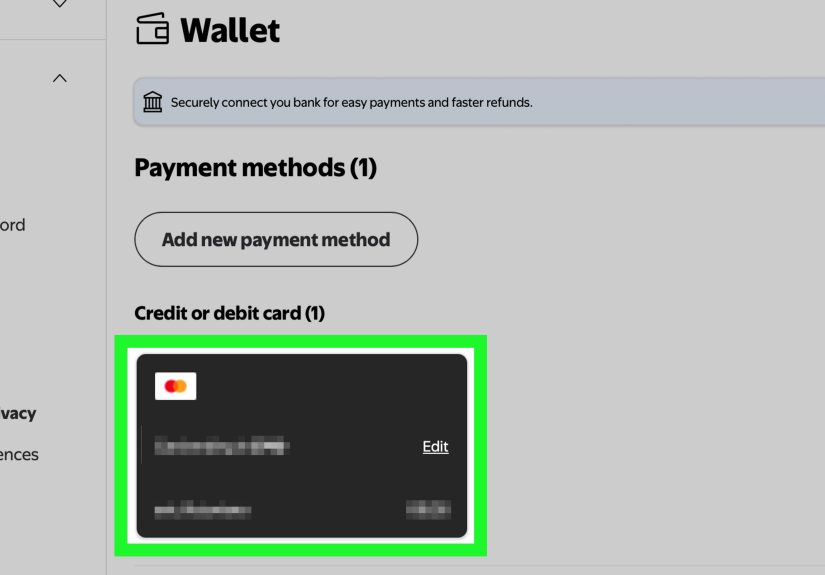
- Select Wallet.
- Tap Add new payment method.
- Select Gift Card.
- Enter the gift card number and PIN.
- Add an optional nickname if you want to label it, such as “Birthday card” or “Do not forget this one again.”
- Tap Save card.
Once saved, the card should appear in your Wallet as one of your available payment methods.
How to add a gift card to your Walmart account on Walmart.com
If you prefer a laptop, desktop, or giant monitor that makes simple tasks feel dramatic, the web version works too.
- Go to Walmart.com and sign in.
- Open Account.
- Select the Settings icon.
- Choose Wallet.
- Click Add new payment method.
- Select Gift Card.
- Type in the card number and PIN.
- Add a nickname if helpful.
- Click Save card.
That is it. No fireworks, no confetti cannon, but a very practical little win.
How to use your saved Walmart gift card at checkout
After the gift card is saved in your account, you can usually apply it during checkout just like another payment method.
For online orders
When you check out on Walmart.com or in the app, go to the payment section and select the saved gift card. If your total is more than the available balance, Walmart may allow you to cover the rest with another payment method, such as a debit card, credit card, or PayPal, depending on the order and checkout flow.
For in-store purchases through the app
If you use Walmart Pay, your saved gift cards can also be available as payment methods inside the app. That is helpful if you want to shop in-store but keep your payment methods organized digitally.
How many gift cards can you save?
Walmart allows you to save up to five gift cards to your Walmart or Sam’s Club account at one time. That is enough for most normal humans and at least a few very enthusiastic holiday shoppers.
If you have more than that, you may need to remove one before adding another.
Can you check your Walmart gift card balance after adding it?
Yes. One of the nice perks of saving a Walmart gift card to your account is easier balance visibility. You can also check the balance separately if needed.
If you are trying to avoid the classic “I thought there was $40 left on this card” moment, it is a good idea to confirm the balance before a larger purchase.
Just keep in mind that the displayed balance can sometimes be an estimate. Most updates happen quickly, but occasional delays can happen after transactions.
Common problems when adding a Walmart gift card to your account
Even easy tasks can become weirdly stubborn online. Here are the most common issues and what to do about them.
1. The PIN is not working
Double-check that you entered the correct PIN and not part of the card number. On a physical card, scratch the back carefully so every digit is visible. On an eGift card, use the PIN shown in the email, not any unrelated order number.
2. The card number will not save
Make sure you are adding a valid Walmart gift card and not another card type. A Walmart MoneyCard, prepaid card, or third-party gift card is not the same thing. It also helps to re-enter the numbers manually if copy-and-paste creates spacing or formatting errors.
3. The balance looks wrong
Balances typically update quickly, but a recent purchase, refund, or pending transaction can make things look off for a bit. If the amount still seems wrong, check again later or contact gift card customer service.
4. You already saved too many cards
If you have reached the five-card limit, remove an older saved card and add the new one. Think of it as a very mild digital closet clean-out.
5. You want to combine multiple gift cards into one
Walmart does not allow you to consolidate several gift cards into a brand-new single gift card. You can save multiple cards to your account, but that is not the same as merging them into one super-card.
6. You want to use a gift card for Walmart+ membership
This is one of the big gotchas. Walmart+ membership billing generally requires a credit card, debit card, or PayPal. A Walmart gift card is not the standard payment method for starting the membership.
Tips for adding a Walmart eGift card without frustration
Digital gift cards are convenient, but they also create more opportunities for inbox chaos. These tips help:
- Search your email for “Walmart eGift card” before assuming the card disappeared into the void
- Copy the number carefully, but review it before saving
- Use the original email to confirm the correct PIN
- Save the card to your Walmart Wallet as soon as you receive it
- Keep the email until you have used the full balance
That last point matters. Digital convenience is wonderful until you need a detail you thought you would “definitely remember later.”
Safety tips when adding a gift card to your Walmart account
Gift cards are convenient for shoppers and unfortunately very attractive to scammers. Treat your gift card information like cash.
- Never give the gift card number or PIN to a stranger
- Never pay a bill, fine, fee, or “urgent emergency” with a gift card because a caller, texter, or email told you to
- Do not trust random third-party balance-check websites asking for the card number and PIN
- Keep your receipt and original card or email until the balance is fully used
- If something seems off, go directly through your Walmart account or Walmart customer support
If someone is pressuring you to buy a gift card and send them the numbers, that is not a payment plan. That is a scam wearing a fake mustache.
Why adding a gift card to your Walmart account is worth it
Saving a Walmart gift card in your account is not just about convenience. It also reduces small checkout mistakes that can turn into big annoyances. You are less likely to mistype a card number, forget a balance, or lose track of which card still has money left on it.
It also helps if you shop across multiple formats:
- Online from your computer
- In the Walmart app
- In-store with Walmart Pay
- During holiday shopping when you are juggling multiple cards and too many tabs
In other words, adding the gift card now saves time later. Future-you will appreciate the favor.
Real-world experiences related to adding a gift card to your Walmart account
One very common experience is the “I know I have a gift card somewhere” scenario. A shopper gets a physical Walmart gift card for a birthday, tucks it into a drawer, and forgets it exists until they are halfway through an online order. At that point, instead of restarting the entire checkout flow later, they add the card to the Walmart Wallet and use it right away. That feels simple, but it is actually one of the biggest benefits of saving the card: it turns a random piece of plastic into a usable account payment method that is easier to find the next time.
Another common experience happens with eGift cards. Someone receives one by email during the holidays, skims the message, and assumes they can just click once and spend instantly. Then they discover they still need the gift card number and PIN. The process is not hard, but it is one of those moments where people realize that “digital” does not always mean “automatic.” Once the card is saved to the account, though, future purchases become much smoother. Many shoppers end up wishing they had saved it to Wallet the day they got it.
Parents and busy households often have a slightly different experience. They may have several small-balance gift cards from birthdays, rebates, or returns, and they want to use them before they disappear into family life forever. Adding them to the account helps keep things organized, especially if each card gets a nickname. Instead of wondering which card still has money left, they can track saved cards more easily. It is not exactly thrilling, but it is the kind of quiet organization that makes online shopping less chaotic.
There is also the “checkout surprise” experience. A shopper assumes a Walmart gift card can cover absolutely anything tied to Walmart, including membership charges or every kind of account payment. Then they find out that some charges, such as Walmart+ membership billing, are handled differently. That does not mean the gift card is useless. It just means people benefit from knowing in advance where gift cards work well and where another payment method is required.
In-store shoppers who use Walmart Pay often describe another helpful benefit: fewer items to carry and fewer numbers to type. When a gift card is already saved in the app, it fits more naturally into the same shopping flow as other payment methods. That can be especially useful during big shopping weekends when the line is long, the cart is full, and no one wants to stand there scratching at a card with a car key trying to reveal the PIN like they are decoding a treasure map.
Then there is the security side. Some shoppers only learn the hard way that gift cards should be handled like cash. They may nearly share a card number in response to a fake customer support message or a suspicious text. Once people understand that no legitimate business or government agency asks for payment through a gift card number and PIN, they become much more careful. Saving the card directly in the official Walmart Wallet often feels safer and more organized than passing the details around or storing them in random notes apps.
Overall, the real-world experience is usually the same: adding a Walmart gift card to your account is not complicated, but it is surprisingly useful. It saves time, reduces friction, keeps balances easier to track, and makes both app and web checkout less annoying. That is not glamorous, but in the world of online shopping, “less annoying” is a genuine luxury.
Final thoughts
If you are wondering how to add a gift card to your Walmart account, the process is refreshingly straightforward. Sign in, go to your Wallet, choose Add new payment method, select Gift Card, enter the number and PIN, and save it. Once it is in your account, you can use it more easily online and through the Walmart app.
The real advantage is not just adding the card. It is removing friction from every purchase after that. You spend less time hunting for numbers, less time guessing balances, and less time wondering whether that gift card is still hiding in a coat pocket from three winters ago.
And that, frankly, is the kind of retail victory we can all get behind.






 Close
Close