
Table of Contents >> Show >> Hide
- What Is Wireless MIDI Latency?
- Why Wireless MIDI Feels Late Even When It Technically Works
- When Wireless MIDI Is Perfectly Fine
- When A Hardwired MIDI Solution Is Better
- How To Diagnose Wireless MIDI Latency Before Rewiring Everything
- Building A Hardwired MIDI Setup That Actually Works
- Wireless MIDI Vs Hardwired MIDI: Which Should You Choose?
- Common Mistakes That Make MIDI Latency Worse
- A Practical Example: The Late Drum Pad Problem
- Experience Notes: When The Cable Saves The Session
- Final Thoughts
Wireless MIDI is one of those modern conveniences that feels like wizardry until your snare hit arrives late enough to file a tax extension. One minute you are enjoying a beautifully cable-free studio, the next minute your keyboard, drum pad, or foot controller is responding with just enough delay to make your groove feel like it had a small argument with gravity.
The good news: wireless MIDI latency does not mean your gear is broken, your talent has evaporated, or your synth is haunted. It usually means your setup has run into the practical limits of Bluetooth MIDI, radio interference, operating system handling, device pairing, or audio buffer settings. And when timing matterslive performance, drum programming, tight synth sequencing, or recording expressive partsa hardwired MIDI connection can save the day with the heroic energy of a roadie who actually labeled every cable.
This guide explains why wireless MIDI latency happens, when it matters, how to troubleshoot it, and why a simple USB MIDI or 5-pin DIN MIDI cable can still be the most reliable “advanced technology” in the room.
What Is Wireless MIDI Latency?
MIDI latency is the delay between an action and the result. You press a key, hit a pad, move a fader, or stomp a pedal, and the connected instrument or software responds slightly later. With wireless MIDI, that delay can come from the Bluetooth connection, the receiving device, the operating system, the DAW, the virtual instrument, the audio interface, or the audio buffer. In other words, latency is not one villain wearing a cape. It is more like a group project where nobody wants to take full responsibility.
Classic MIDI does not transmit audio. It sends performance instructions: note on, note off, velocity, sustain pedal, modulation, pitch bend, program change, clock, and controller data. That is why MIDI files can be tiny compared with audio files. MIDI says, “Play middle C at this velocity,” not “Here is the full sound of a piano note.”
Wireless MIDI, usually Bluetooth Low Energy MIDI, sends those instructions without a physical cable. For composing on an iPad, controlling a synth from across the room, or keeping a small desktop clean, it can be fantastic. Many modern wireless MIDI products advertise very low latency, and in the right conditions they perform impressively. But “low latency” is not the same as “no latency,” and musicians have the rare superpower of noticing timing weirdness faster than most people notice a missing phone charger.
Why Wireless MIDI Feels Late Even When It Technically Works
The tricky thing about wireless MIDI latency is that it can be small enough to measure in milliseconds but large enough to annoy a human being. A few milliseconds may not matter when switching patches, turning pages, or triggering background textures. But when playing drums, bass lines, funk clavinet, tight arpeggios, or fast piano parts, tiny timing shifts become musical speed bumps.
Bluetooth MIDI Is Not Bluetooth Audio
One common misunderstanding is treating Bluetooth MIDI like Bluetooth headphones. Bluetooth audio has a reputation for delay because it has to encode, transmit, receive, decode, and play back audio. Bluetooth MIDI is different: it sends compact performance data rather than a full audio stream. That is why Bluetooth MIDI can be much faster than Bluetooth audio.
Still, Bluetooth MIDI depends on wireless communication, and wireless communication depends on the environment. Your controller may be excellent, but if the room is crowded with phones, tablets, routers, laptops, smart watches, wireless microphones, and one suspiciously powerful coffee machine, the 2.4 GHz airspace can get busy. Wireless MIDI does not need much bandwidth, but it does need consistent timing.
Jitter Can Be Worse Than Latency
Latency is delay. Jitter is inconsistency in delay. If every note arrives exactly 8 milliseconds late, you may compensate naturally or adjust track delay in your DAW. If one note is 4 milliseconds late, the next is 18 milliseconds late, and the next arrives like it took the scenic route, the performance feels uneven.
That is why musicians often describe wireless MIDI issues as “sloppy,” “spongy,” or “not tight,” even when the average latency number looks acceptable. Your ear and hands are reacting not only to the delay, but to the instability of the delay.
Your Audio Buffer May Be the Real Culprit
Sometimes MIDI gets blamed for latency that is actually coming from audio monitoring. If you press a MIDI key and a software piano responds late, the MIDI signal may have arrived quickly, but your computer still has to generate audio through a virtual instrument and send that audio through your interface.
A large audio buffer, heavy CPU load, demanding plug-ins, or an overloaded session can create enough monitoring delay to make any MIDI controller feel sluggish. Before you toss your wireless adapter into a drawer labeled “betrayal,” check your DAW buffer size, audio driver, sample rate, and monitoring path.
When Wireless MIDI Is Perfectly Fine
Wireless MIDI is not the enemy. It is a tool, and like every tool, it shines in the right job. If you are controlling a synth editor from a tablet, changing presets, moving drawbars, using transport controls, writing automation, or playing simple parts where timing is not microscopic, wireless MIDI can be wonderfully convenient.
It is also excellent for reducing cable clutter. A wireless controller on a coffee table, a compact keyboard beside a laptop, or a pedalboard that sends program changes without a long cable across the stage can make a setup cleaner and faster. For many home studios, Bluetooth MIDI is reliable enough that the convenience outweighs the occasional millisecond wobble.
Wireless MIDI also helps mobile creators. iPad musicians, loopers, live electronic performers, and composers who sketch ideas away from the main studio often benefit from pairing a small controller and getting to work quickly. No interface, no hub, no spaghetti pile. Just connect and create. That is a beautiful thing.
When A Hardwired MIDI Solution Is Better
A hardwired MIDI solution becomes the smarter choice when timing matters more than convenience. If you are recording drums from pads, playing fast keyboard lines, syncing multiple hardware sequencers, sending MIDI clock to drum machines, or performing live where one late patch change can produce the facial expression of a keyboardist seeing a ghost, cables are your friend.
Hardwired MIDI is predictable. USB MIDI and traditional 5-pin DIN MIDI both remove the uncertainty of wireless pairing and radio interference. They do not magically eliminate every possible delayyour computer, DAW, interface, and instruments still matterbut they reduce one major source of timing variation.
USB MIDI: Simple, Direct, And Usually Fast
USB MIDI is the most common hardwired option for modern controllers. Plug a USB cable from your keyboard, pad controller, or control surface into your computer, install any required driver, select the device in your DAW, and play. In many studios, USB MIDI is the fastest route from “why is this late?” to “oh good, music again.”
For best results, use a short, good-quality USB cable. Avoid stacking multiple unpowered hubs like a technological Jenga tower. If your controller keeps disconnecting, try a different USB port, a powered hub, or a different cable. USB cables are cheap enough to be suspicious, but a bad one can waste an entire afternoon and make you question your life choices.
5-Pin DIN MIDI: Old-School, Reliable, Still Useful
The classic 5-pin DIN MIDI cable has been around since the early 1980s, and it remains useful because it is simple and dependable. It sends MIDI data in one direction per cable: MIDI Out from one device to MIDI In on another. Need two-way communication? Use two cables. Elegant? Maybe. Glamorous? Not really. Reliable? Absolutely.
Traditional MIDI DIN is especially handy with hardware synths, drum machines, sequencers, grooveboxes, and older keyboards. A dedicated MIDI interface can connect these devices to a computer while keeping routing clear and stable. For live rigs, DIN connections are often easier to understand quickly: this cable goes out, that cable goes in, and nobody needs to open a Bluetooth settings panel while the drummer counts off.
How To Diagnose Wireless MIDI Latency Before Rewiring Everything
Before switching completely to cables, it helps to identify where the delay is coming from. A practical test can save money, time, and your relationship with your gear.
Step 1: Test One Controller And One Sound
Open a simple project with one lightweight virtual instrument. Turn off heavy plug-ins, convolution reverbs, mastering chains, and anything that makes your CPU fan sound like a leaf blower. Set your buffer to a low value, such as 64 or 128 samples if your system can handle it, and test the controller.
If the latency improves, the problem was probably not only wireless MIDI. Your session load or monitoring settings were adding delay.
Step 2: Compare Wireless And Wired On The Same Device
If your controller supports both Bluetooth MIDI and USB MIDI, test the same part both ways. Do not change the instrument, buffer, or DAW settings. Record a few notes or drum hits and compare how the performance feels. If wired feels tighter immediately, the wireless link is likely contributing to the problem.
Step 3: Check Distance And Line Of Sight
Wireless MIDI often works best when devices are close and not blocked by metal stands, racks, walls, bodies, or other electronics. Move the controller closer to the receiver. Remove unnecessary Bluetooth pairings. Turn off nearby devices you are not using. Yes, this includes the tablet streaming cooking videos next to your synth rack. The risotto can wait.
Step 4: Update Drivers And Firmware
Wireless MIDI reliability depends heavily on software. Update the controller firmware, Bluetooth MIDI drivers, operating system, DAW, and any manufacturer utility. On Windows systems especially, driver support can make a noticeable difference. On Mac and iPad setups, Audio MIDI Setup and app-level Bluetooth MIDI settings should be checked carefully.
Building A Hardwired MIDI Setup That Actually Works
The best hardwired MIDI setup is not necessarily the most expensive. It is the one that uses the shortest stable path between your performance and the sound source.
For A Simple Home Studio
If you mainly play software instruments, connect your MIDI keyboard directly to your computer via USB. Use your audio interface for monitoring, set a reasonable buffer, and keep your DAW session lean while recording. After the performance is captured, you can raise the buffer and add all the gorgeous plug-ins your CPU can survive.
For Hardware Synths And Drum Machines
Use a dedicated MIDI interface with enough input and output ports for your hardware. Connect MIDI Out from the interface to MIDI In on each sound module or synth. If you need to capture knobs or sequencer data from a device, connect that device’s MIDI Out back to the interface. Label the cables. Future you will be grateful, and future you is already dealing with enough.
For Live Performance
Keep the live rig boring in the best possible way. Use wired connections for critical patch changes, tempo sync, backing track triggers, and keyboard performance. If you still want wireless control, reserve it for non-critical functions: setlist navigation, mixer control, or parameters where a tiny delay will not derail the song.
Bring spare cables. Bring a backup USB cable. Bring a compact MIDI adapter if your rig depends on it. Nothing teaches respect for cables like troubleshooting Bluetooth onstage while the audience watches you perform the ancient ritual of turning things off and on again.
Wireless MIDI Vs Hardwired MIDI: Which Should You Choose?
Choose wireless MIDI when convenience, portability, and clean setup matter most. It is great for composing, casual control, mobile rigs, editor apps, and low-pressure environments. Choose hardwired MIDI when timing, repeatability, and confidence matter most. It is better for recording tight performances, live gigs, complex hardware synchronization, and drum programming.
The smartest setup may use both. Wireless MIDI can handle flexible control tasks, while hardwired MIDI handles the mission-critical performance path. That way you enjoy modern convenience without letting your kick drum wander around like it forgot the address of beat one.
Common Mistakes That Make MIDI Latency Worse
Using Bluetooth MIDI And Bluetooth Audio Together
If you are playing a Bluetooth MIDI controller while listening through Bluetooth headphones or speakers, you may be stacking delays. Bluetooth audio latency is often much more noticeable than Bluetooth MIDI latency. For recording or real-time playing, use wired headphones or direct monitoring through an audio interface.
Recording With A Huge Buffer
Large buffer sizes are useful during mixing because they help your computer process more plug-ins. During recording, they can make virtual instruments feel late. Lower the buffer while tracking, then raise it again when mixing. This is the DAW equivalent of wearing sneakers for running and slippers for relaxing.
Daisy-Chaining Too Much Gear
Traditional MIDI is serial, meaning data travels in sequence. Long chains of devices, heavy MIDI clock traffic, dense controller data, and multiple channels can create timing congestion. Use a MIDI thru box or multi-port MIDI interface when routing to several hardware devices.
Ignoring Firmware Updates
Manufacturers often improve Bluetooth MIDI behavior, pairing stability, and driver compatibility through updates. If your wireless MIDI adapter or controller has not been updated since the era when everyone was baking sourdough, it is worth checking.
A Practical Example: The Late Drum Pad Problem
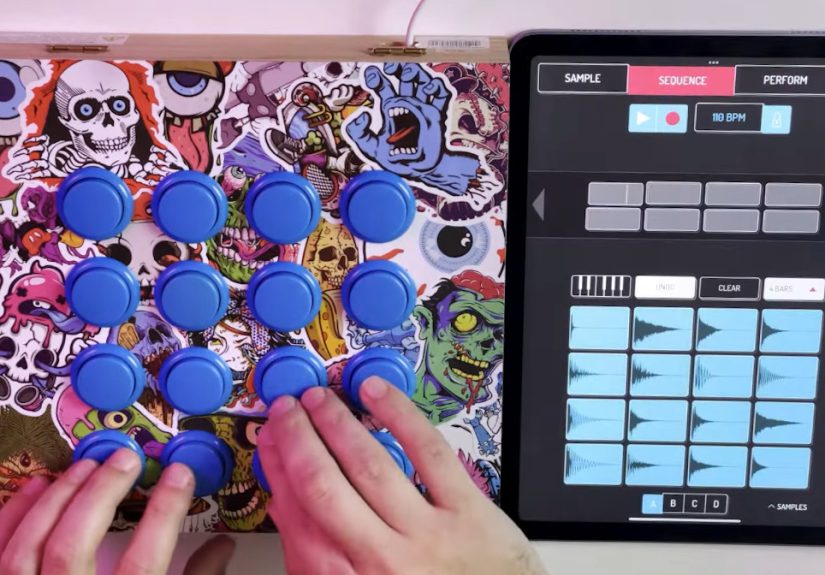
Imagine you are using a wireless pad controller to record a drum groove into a DAW. The pads feel fine when tapping slowly, but once you play hi-hats and ghost notes, the groove feels mushy. You lower the audio buffer, close background apps, and move the controller closer to the laptop. Better, but still not tight.
Then you connect the controller by USB. Suddenly the kick and snare land where your hands expect them to land. The performance feels more immediate, and your timing returns from its mysterious vacation. In this case, the hardwired solution did not make you a better drummer. It simply removed the extra timing uncertainty that was making you sound worse than you are. That is a very good cable.
Experience Notes: When The Cable Saves The Session
There is a specific kind of studio panic that happens when everything looks connected but nothing feels right. Wireless MIDI can create exactly that mood. The controller is paired. The DAW sees it. The virtual instrument responds. Technically, the system is working. Musically, however, the part feels like it is wearing wet socks.
In real production work, the issue often appears during the most inconvenient moment. A producer may be building a track with a wireless keyboard because the desk is already packed with an audio interface, laptop stand, monitor controller, hard drives, and a mug that should have been washed yesterday. The first few chords are fine. Then the bass line feels slightly behind the beat. The player tightens up. The DAW grid says the notes are late. The player tries again. Now the take is stiff. Congratulations: the technology has entered the creative process wearing muddy boots.
The fastest fix is usually not philosophical. It is physical. Plug in the USB cable. Or run 5-pin DIN from the controller to a MIDI interface. Restart the instrument if needed. Re-arm the track. Play again. Suddenly the hands, ears, and speakers agree on reality. That moment feels small, but it changes the energy in the room. Instead of troubleshooting invisible radio behavior, everyone gets back to making decisions about melody, tone, rhythm, and arrangement.
One common experience with wireless MIDI is that it behaves beautifully during setup and then gets weird later. That can happen because the environment changes. More devices enter the room. A phone starts syncing. A laptop switches power modes. A tablet reconnects. A performer moves farther away. A metal stand blocks the signal. Wireless systems are convenient because they are flexible, but that same flexibility means the setup is more sensitive to the surroundings.
Hardwired MIDI is not glamorous, but it is emotionally comforting. A cable gives you visible routing. If the MIDI Out goes to the MIDI In, and the interface sees data, the problem becomes easier to isolate. Is the DAW receiving notes? Is the channel correct? Is local control on or off? Is the synth assigned to the right input? These are ordinary problems, not mysterious gremlins hiding inside the Bluetooth menu.
For live players, this matters even more. In a studio, latency is annoying. Onstage, latency feels like betrayal with stage lights. A keyboardist triggering software sounds needs confidence that every note will speak immediately. A drummer using pads needs the snare to respond like a snare, not like a polite email response. A guitarist using a MIDI foot controller for patch changes needs the next sound before the chorus, not halfway through the singer’s big moment.
The best practical habit is to separate “creative convenience” from “performance reliability.” Use wireless MIDI when sketching ideas, controlling non-critical parameters, or working casually. Use hardwired MIDI when recording final takes, syncing hardware, performing live, or playing rhythmically demanding parts. That approach keeps wireless MIDI in your toolkit without forcing it to do a cable’s job.
There is also a psychological benefit. Once the hardwired connection is in place, players often stop second-guessing themselves. Timing improves because confidence improves. The musician no longer wonders, “Was that me or the controller?” That question is poison for a performance. A cable cannot write a better hook, but it can remove enough doubt for the musician to write one.
Final Thoughts
Wireless MIDI is useful, modern, and often impressively responsive. It deserves a place in today’s studio and live rig. But when latency appears, especially during timing-critical playing, a hardwired MIDI solution is still the dependable rescue plan. USB MIDI, 5-pin DIN MIDI, and dedicated MIDI interfaces may not look futuristic, but they solve real problems with beautiful simplicity.
The lesson is not “wireless bad, cables good.” The lesson is “use the right connection for the job.” Wireless MIDI is great when freedom matters. Hardwired MIDI is better when timing matters. And when the groove is on the line, the humble cable may be the most musical piece of gear you own.
Note: This article is written for web publishing and keeps the source material synthesized into original, reader-friendly guidance without inserting visible source links inside the article body.





 Close
Close