
Table of Contents >> Show >> Hide
- What You’ll Learn
- What “Dirty Power” Actually Means
- Where Dirty Power Comes From in Real Homes
- Signs You Might Have Dirty Power
- How to Confirm Dirty Power (Without Turning Yourself Into a Human Circuit Tester)
- 5 Ways to Protect Your Home From Dirty Power
- 1) Install a whole-house surge protector (Type 1 or Type 2 SPD)
- 2) Use point-of-use surge protection for sensitive electronics (Type 3)
- 3) Add a UPS (battery backup) where sags and outages hurt the most
- 4) Filter the noise (EMI/RFI) in problem zones with power conditioning
- 5) Fix the fundamentals: wiring, grounding/bonding, and load management
- Quick Protection Checklist (So You Don’t Buy a “Surge Protector” That’s Basically a Fancy Extension Cord)
- When to Call a Pro Immediately
- Real-World Experiences: What Dirty Power Looks Like in Day-to-Day Life
- Experience #1: “My Wi-Fi resets every time the fridge turns on.”
- Experience #2: “My LED lights flicker… but only in one room… on Tuesdays… when the dishwasher runs.”
- Experience #3: “My speakers hum, my guitar amp buzzes, and my office sounds like a beehive.”
- Experience #4: “After a storm, half my stuff is fine… and half is toast.”
- Experience #5: “My lights randomly get super bright… and then dim… and my neighbor says it’s haunted.”
- Conclusion
- SEO Tags
Your electricity is supposed to be boring. Quiet. Predictable. A steady 120/240-volt rhythm that keeps your fridge cold, your Wi-Fi alive, and your coffee maker
morally obligated to work before you’ve spoken to another human.
“Dirty power” is what happens when electricity stops being boring. It’s the catch-all, plain-English way to describe power quality problemsvoltage spikes,
sags, swells, electrical noise, and waveform distortion (harmonics) that can make electronics glitch, shorten appliance life, or create those fun little mysteries like,
“Why does my TV reboot when the AC kicks on?”
What “Dirty Power” Actually Means
In an ideal world, the electricity coming into your home is a smooth sine wave at 60 Hz (in the U.S.). In the real world, your power can get “dirty” when that ideal
waveform is disrupted or when voltage moves outside the range your devices expect.
The most common “dirty power” problems
-
Surges/spikes/transients: Very fast, very short over-voltage events. Some are tiny and frequent; others are big enough to send electronics to the
great recycling bin in the sky. - Voltage sags (dips): Brief drops in voltageoften caused by motor start-up in HVAC systems, refrigerators, well pumps, or power tools.
- Voltage swells: Brief increases in voltage. These can stress electronics and shorten lifespan over time.
-
Electrical noise (EMI/RFI): High-frequency interference riding on your wiringthink “static” for power lines. It can show up as buzzing audio,
weird device behavior, or flaky smart-home gear. -
Harmonics: Waveform distortion caused by non-linear loads (devices that don’t draw power in a nice, smooth way). Modern electronicsLED lighting,
phone chargers, variable-speed motors, solar inverterscan contribute. - Interruptions/outages: The ultimate “dirty power” move: power goes away entirely, then comes back… often with a lovely little surge for dessert.
Dirty power vs. “dirty electricity” (the internet version)
You’ll sometimes see “dirty electricity” used in a health/EMF context. Some claims go far beyond mainstream electrical engineering and aren’t the focus here.
This article sticks to what homeowners can measure and electricians can address: protecting your home’s wiring, appliances, and electronics from power quality issues.
Where Dirty Power Comes From in Real Homes
Dirty power can be caused by issues on the utility side, by what’s happening inside your home, or by the awkward handshake between the two.
The key takeaway: your home doesn’t need to be “old” to have dirty power. A brand-new smart home packed with LED drivers, chargers, and inverters can be
just as “noisy” as a 1970s ranch with a panel that’s seen things.
Outside your home (utility/grid + Mother Nature)
- Lightning: Even a nearby strike can induce surges on overhead lines.
- Utility switching events: Grid reconfiguration, capacitor bank switching, and fault clearing can create transients.
- Neighborhood load changes: Large motors or industrial equipment nearby can create disturbances that ripple outward.
- Storm damage and loose connections: Especially dangerous if the neutral connection is compromised (more on that soon).
Inside your home (your stuff, lovingly ruining your waveform)
- HVAC compressors, refrigerators, well pumps: Motor inrush can cause sags.
- LED lights + dimmers: Mismatched dimmers and drivers can create flicker and noise.
- Switch-mode power supplies: Chargers, computers, TVs, gaming consolesmodern electronics are efficient, but not always “quiet.”
- EV chargers and variable-speed drives: Great technology; also a common harmonic/noise contributor.
- Solar inverters: Usually well-designed, but they’re still power electronics that can interact with the rest of the system.
- Loose connections or wiring issues: The least glamorous cause and often the most important to fix.
Signs You Might Have Dirty Power
Some symptoms are annoying but normal-ish. Others are your house politely saying, “Please stop ignoring me before I start an electrical fire.”
The “annoying-but-common” list
- Lights briefly dim when the AC or fridge starts
- Occasional flicker with certain LED bulbs
- Audio hum/buzz in speakers or guitar amps
- Wi-Fi/router randomly restarting (especially after little “blips”)
- Smart plugs or smart bulbs that act like they’re possessed
The “call someone” list (do not collect $200)
- Flickering or brightening across multiple rooms (not just one bulb)
- Breakers tripping often with no clear reason
- Outlets or switches warm to the touch, or any burning smell
- Electronics dying prematurely (multiple devices over a short period)
- Lights getting noticeably brighter when a big load turns off (can indicate neutral issues)
How to Confirm Dirty Power (Without Turning Yourself Into a Human Circuit Tester)
You don’t need to become an electrical engineer overnight. You just need enough information to decide whether to add protection, adjust habits, or call a pro.
Step 1: Watch for patterns
When do problems happen? When the AC starts? When you run the microwave and toaster together? During storms? After outages? Patterns point to likely causes
(motor inrush, overload, utility events, etc.).
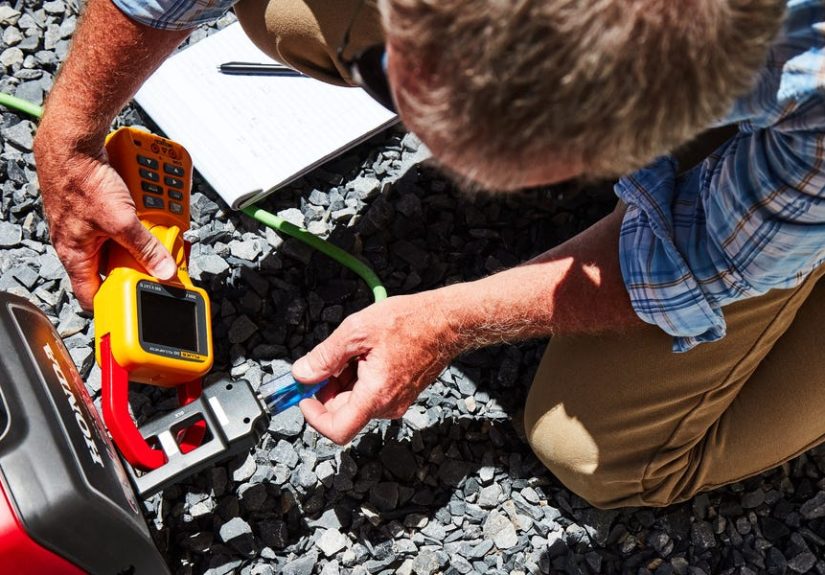
Step 2: Use simple, safe tools
- Plug-in outlet tester: Great for basic wiring issues (correct polarity, open ground, etc.).
- Smart plug energy monitors: Helpful for load awareness, but they won’t diagnose true power quality problems.
- Whole-home energy monitors: Can reveal big load events and sometimes voltage trends.
Step 3: Know when measurement belongs to a professional
If you suspect serious voltage swings, neutral problems, or repeated equipment damage, a licensed electrician (or utility, depending on where the issue is) can
measure voltage under load, check terminations, inspect the panel, and identify loose or overheated connections. That’s the kind of “data” you actually want.
5 Ways to Protect Your Home From Dirty Power
The best strategy is layered protection: stop big surges at the service, protect sensitive devices locally, and stabilize/clean power where it matters most.
Here are five practical, homeowner-friendly moves that work together.
1) Install a whole-house surge protector (Type 1 or Type 2 SPD)
A whole-house surge protectoralso called a surge protective device (SPD)is installed at (or near) your main electrical panel. Its job is to clamp
high-energy transients before they spread through your home’s wiring.
Why this matters: plug-in surge strips are “downstream.” They can help, but they’re not the best first line of defense when the surge enters at the service.
A panel-mounted SPD helps protect everything at once: appliances, HVAC controls, and the outlets your electronics use.
- Look for: UL 1449 listing, appropriate SPD type (Type 1 or Type 2), status indicators, and specs suitable for your service.
- Installation note: This is typically an electrician job, because it involves your service equipment and correct bonding/grounding.
- Reality check: An SPD does not “fix” low voltage, outages, or chronic wiring problems. It’s surge armor, not a magic wand.
2) Use point-of-use surge protection for sensitive electronics (Type 3)
Once you’ve got a whole-house SPD (or even if you don’t yet), protect your most delicate stuff where it plugs in: TVs, gaming consoles, computers, smart-home hubs,
and networking gear.
The not-so-fun truth: many “surge protectors” are basically power strips with marketing confidence. You want a unit that’s tested and listed, with
clear specs and a working indicator light.
- Choose models with: UL 1449 listing, a protection status light, and enough capacity for your setup.
- Replace when: The indicator says protection is gone, or after a major surge event (some devices sacrifice themselves quietly).
- Don’t daisy-chain: Power strips plugged into power strips is the electrical version of stacking shopping carts downhill.
3) Add a UPS (battery backup) where sags and outages hurt the most
A UPS (uninterruptible power supply) does two big things: it provides battery power during outages anddepending on the modelcan help ride through
short sags and minor voltage fluctuations. For home offices and networks, this is huge.
Think about what actually needs to stay on:
- Wi-Fi router + modem: Keep internet alive during short outages (and avoid the “everything rebooted” chaos).
- Desktop computer + monitor: Enough time to save work and shut down properly.
- NAS/home server: Prevent data corruption and drive damage from abrupt power loss.
Shopping tip: many homeowners do best with a line-interactive UPS that includes automatic voltage regulation (AVR). It’s a practical
middle ground that can smooth out common dips without constantly running the battery.
4) Filter the noise (EMI/RFI) in problem zones with power conditioning
If your issue is less “appliance death” and more “why does my speaker hiss like an angry snake,” you may be dealing with line noise.
That’s where power conditioners, EMI/RFI filters, and sometimes simple fixes like ferrite clips can help.
Use this approach when you have a specific symptom:
- Audio hum/buzz: Conditioning and proper grounding can reduce noise, but also check cable routing and ground loops.
- Home office glitches: A UPS with filtering + a quality surge protector can stabilize sensitive electronics.
- Radio interference: EMI filtering and ferrites on offending devices can help reduce conducted noise.
Friendly warning: the internet sells “miracle” plug-in gadgets that promise everything from cleaner power to better sleep to improved vibes in your houseplants.
Stick with reputable, safety-listed equipment and address the root causes.
5) Fix the fundamentals: wiring, grounding/bonding, and load management
This is the least exciting step and the most important. If your electrical system has loose connections, an overloaded circuit, or a compromised neutral, no amount
of fancy add-ons will make it “healthy.”
Here’s what actually moves the needle:
- Have an electrician inspect the panel: Tight terminations, no overheating, correct breaker sizing, no corrosion, no “mystery wires” doing yoga poses.
- Confirm proper grounding and bonding: Surge protection and filtering rely on a correct grounding/bonding system to work as designed.
-
Address loose/open neutral risks: In U.S. split-phase systems, a bad neutral can cause one “leg” to rise high while the other drops lowleading
to weird brightness changes and real damage potential. This can be urgent and may involve the utility if it’s on their side of the service. -
Manage big loads: Avoid stacking high-draw appliances on the same circuit; consider dedicated circuits for HVAC equipment, workshops, EV charging,
or sensitive home office gear. - Use compatible dimmers and quality LED drivers: Flicker and noise often come from mismatched components, not “mysterious dirty power.”
Quick Protection Checklist (So You Don’t Buy a “Surge Protector” That’s Basically a Fancy Extension Cord)
- Whole-house SPD: UL 1449 listed, Type 1 or Type 2, installed at/near the main panel by a qualified electrician.
- Point-of-use protection: UL 1449 listed, working indicator light, enough outlets for your setup (without daisy-chaining).
- UPS for critical gear: Right VA/Watt capacity, preferably line-interactive with AVR for typical home scenarios.
- Noise filtering: Use it for specific symptoms (audio buzz, interference), not as a substitute for fixing wiring issues.
- Safety first: Any burning smell, hot devices, frequent tripping, or whole-home flicker = call a licensed electrician.
When to Call a Pro Immediately
Dirty power can be “normal utility variation”… or it can be “your panel is overheating.” If you see any of the following, treat it as urgent:
- Burning smell, scorch marks, crackling/buzzing from outlets or the panel
- Hot outlets, hot cords, or repeated melted plugs
- Flickering/brightening across multiple rooms, especially with big voltage swings
- Multiple devices failing after outages or storms
- Breakers tripping frequently or “randomly”
Also: if symptoms suggest a neutral problem (odd light brightness changes across the home), the issue could be at the meter, service drop, or utility connection.
In many cases, that’s a “call the utility and electrician” situationquickly.
Real-World Experiences: What Dirty Power Looks Like in Day-to-Day Life
The phrase “dirty power” can sound abstract until it shows up in your living room wearing a trench coat and holding your router hostage.
Here are common, real-world scenarios homeowners run intoalong with the kinds of fixes that actually help.
Experience #1: “My Wi-Fi resets every time the fridge turns on.”
A classic. You’re on a video call, you say something brilliant, and then your screen freezes mid-genius because the refrigerator compressor kicked on.
What’s happening is often a brief voltage sag from motor inrush. Many routers and modems are basically tiny computers with zero patience for power dips.
The fix that usually feels like magic: put the modem/router on a small UPS. Not a huge onejust enough to ride through short dips and keep power stable.
Bonus: your internet stays up during brief outages, which makes you feel like a wizard during neighborhood blackouts.
Experience #2: “My LED lights flicker… but only in one room… on Tuesdays… when the dishwasher runs.”
LED lighting can be dramatic. Flicker can come from line voltage variation, dimmer incompatibility, or cheap drivers that don’t handle real-world power well.
The “only when the dishwasher runs” clue points to either load interaction on the same circuit or minor voltage changes your LED driver hates.
Practical fixes tend to be boring (which is good):
- Swap to dimmer-compatible LED bulbs and a dimmer rated for LEDs
- Have an electrician check for loose connections at the switch/outlet
- Move high-load appliances off that circuit (or add a dedicated circuit if needed)
The “don’t do this” fix: buying a random plug-in gadget that promises to “clean your electricity” and “harmonize your waveform.” Your house is not a spa.
Experience #3: “My speakers hum, my guitar amp buzzes, and my office sounds like a beehive.”
Audio gear is basically a detective for electrical noise. If you have buzzing or hum, it could be EMI/RFI noise on the line, a grounding issue, or a ground loop
through connected equipment (cable TV lines are infamous for this).
What helps in many homes:
- Power conditioning/EMI filtering on the sensitive equipment
- Better cable management (keep signal cables away from power cords)
- Fixing grounding/bonding issues (where a licensed electrician earns their keep)
The hidden twist: sometimes the “dirty power” culprit is a single devicelike a cheap charger or LED lampthat sprays noise back onto the circuit.
Unplugging suspects one-by-one can be surprisingly effective (and mildly satisfying).
Experience #4: “After a storm, half my stuff is fine… and half is toast.”
Lightning and utility switching can create high-energy transients that punch through unprotected electronics. If you only use point-of-use strips, some devices may
still get hit through other pathways (like cable/ethernet) or through the service.
The layered approach that prevents the sequel:
- Whole-house surge protector at the panel
- Point-of-use surge protection for sensitive electronics
- UPS for computers and networking gear
- Protection for data lines where appropriate (especially for home office setups)
It’s like locking your front door (whole-house SPD) and also not leaving your laptop on the porch (point-of-use protection).
Experience #5: “My lights randomly get super bright… and then dim… and my neighbor says it’s haunted.”
This is the one you take seriously. Strange, whole-home brightness changesespecially if some lights brighten while others dimcan point to a neutral problem.
In a split-phase system, a compromised neutral can create uneven voltage distribution, which can damage appliances and create safety hazards.
The “experience” here often goes like this: people swap bulbs, replace lamps, and blame the moon cycle… until an electrician or the utility finds a loose neutral
connection that needed immediate attention. Once corrected, the house stops doing its impression of a nightclub.
Moral of the story: not all dirty power is solved with gadgets. Sometimes the correct solution is simply: tighten, repair, or replace the failing connection.
Conclusion
Dirty power isn’t one single villainit’s a whole cast of characters: surges, sags, noise, harmonics, and wiring problems that can quietly wear down your home’s
electrical system. The good news is that protecting your home doesn’t require guessing or gimmicks. Use a layered strategy:
a whole-house SPD for big transients, point-of-use protection for electronics, UPS units where outages and sags matter, targeted filtering for noise problems, and
a solid electrical foundation with proper grounding and safe, tight connections.
If your symptoms feel like more than minor annoyanceespecially whole-home flicker, hot outlets, frequent trips, or weird voltage behaviorbring in a licensed electrician.
Your electronics will thank you. Your future self will thank you. And your router will finally stop acting like it’s negotiating for better working conditions.





 Close
Close