
Table of Contents >> Show >> Hide
- What “This Website” Really Means (Because There Isn’t Just One)
- How Anime Avatar Websites Work (No Lab Coat Required)
- Step-by-Step: How to Get a Great Anime Version of You
- What Can You Use Anime Avatars For?
- The Catch: Privacy, Face Data, and the “Where Do My Photos Go?” Question
- Ethics: Artists, Training Data, and Why This Topic Gets Heated
- Copyright: Can You Own Your Anime Avatar?
- Common Problems (And How to Fix Them)
- FAQ: Quick Answers About Anime Photo Converters
- Conclusion: Turn Yourself Into AnimeJust Do It Smart
- Real-World Experiences With “Turn Me Into Anime” Websites (Extra)
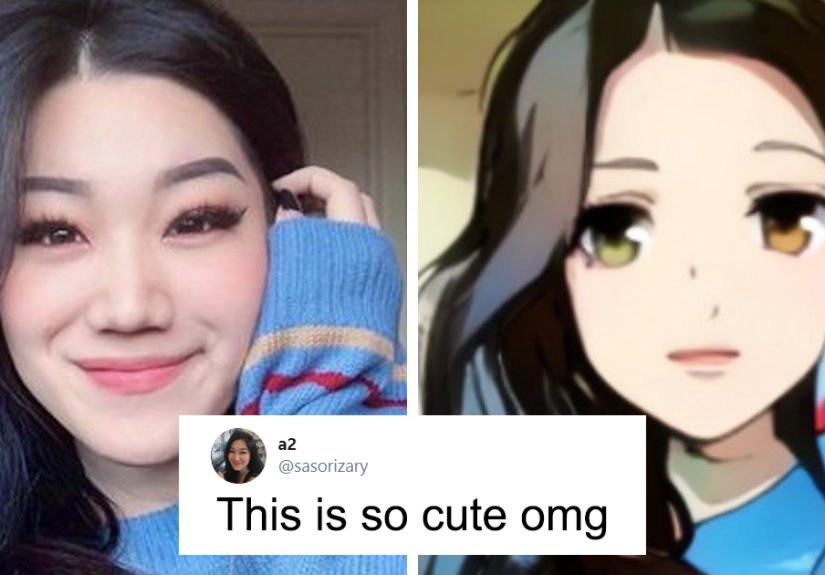
You upload a selfie, tap a style button that sounds like an anime opening (“Shōnen Glow,” “Moe Soft,” “Cyberpunk Hero”),
andboomyour new profile picture looks like it belongs on a poster for a show you absolutely swear you’ll start “this weekend.”
Websites and apps that turn people into anime characters have gone from niche internet toy to mainstream “everyone in the group chat did it”
in what feels like five minutes.
The short version: these tools use generative AI to transform photos into anime-style portraits. The long version: there’s a lot happening
behind that “Generate” buttonplus some important privacy, safety, and copyright questions worth knowing before you hand over a folder of selfies.
This guide breaks down how these anime avatar generators work, how to get better results, what to watch out for, and how to use them responsibly
without turning your face into a permanent resident of the internet.
What “This Website” Really Means (Because There Isn’t Just One)
When people say “this website that turns you into an anime character,” they’re usually talking about a whole category of tools:
online anime avatar generators and photo-to-anime converters. Some run directly in a browser. Others are mobile apps with a web landing page.
Many offer similar workflows:
- Upload a photo (sometimes 1, sometimes 10–20).
- Select an anime style (or type a prompt describing the vibe).
- Generate your anime portrait set.
- Download and share (optionally, loudly).
A few became famous for “magic avatar” packsbundles of stylized portraits produced from multiple selfies. Others focus on quick, one-tap
anime filters. The best ones feel like a digital artist met you once, remembered your face, and then redrew you in a totally different universe.
The worst ones… look like your face went on vacation and your eyebrows stayed home.
How Anime Avatar Websites Work (No Lab Coat Required)
Most modern “turn my photo into anime” tools rely on diffusion models or closely related generative AI techniques.
If you’ve heard terms like “Stable Diffusion,” “fine-tuning,” or “style transfer,” you’re in the right neighborhood.
Here’s the plain-English version of what’s going on:
1) The model learns patterns, not your life story
Generative image models learn from huge datasets of images and captions. They aren’t copy-pasting a single picture; they’re learning statistical
patternswhat “anime shading” tends to look like, how eyes are stylized, how hair highlights are drawn, and so on. Then they generate a new image
that matches the requested style.
2) Your selfies become the “reference” for identity
When an app asks for multiple photos, it’s usually trying to capture your face from different angles and lightingso the AI can produce results that
still look like you (but anime). Some systems build a temporary “concept” of your face to guide generation.
3) The “anime” part is a style layer on top
After the tool has a sense of your facial features, it applies the anime style you picked. Depending on the product, the style might be:
- a preset “model” (you pick from a menu of looks),
- a prompt-driven generation (“studio ghibli-ish” gets used a lotdon’t do trademark cosplay in your branding),
- or a hybrid that uses your photo plus a style slider.
That’s why the same selfie can produce wildly different outcomes. One style makes you look like a sweet slice-of-life protagonist.
Another makes you look like you’re about to monologue on a rooftop in the rain.
Step-by-Step: How to Get a Great Anime Version of You
You don’t need professional headshots, but you do need to feed the AI decent ingredients. Think of it like cooking:
better ingredients make better ramen. (Yes, we’re making an anime food metaphor. It was inevitable.)
Choose your “input photos” like you’re casting a character
- Use clear images: sharp focus, good lighting, minimal motion blur.
- Mix angles: front, slight left/right, and a couple with different expressions.
- Keep it consistent: avoid hats, heavy filters, or extreme face tuning that hides real features.
- Skip sensitive backgrounds: no mail, school IDs, addresses, or anything private.
Pick a style that matches your goal
“Anime character” is a big umbrella. Decide what you actually want:
- Profile pic: clean lines, simple background, face-forward framing.
- Fantasy hero: dramatic lighting, armor, glowing effects (fun, but less “realistic you”).
- Chibi: maximum cuteness, minimum realism.
- Cyberpunk: neon, city lights, bold contrast.
Generate more than once (but don’t spiral)
Most tools produce a set of images. Your job is to curate, not to treat it like a slot machine until 3 a.m.
Run a second pass if:
- the face doesn’t resemble you,
- the eyes drift strangely,
- hands are doing… experimental things,
- or the style is cool but the “you” part is missing.
What Can You Use Anime Avatars For?
Beyond “posting it everywhere,” anime portrait generators have a surprising number of legit uses:
Social + community
- Discord icons, Twitch panels, and gaming profiles
- Group chat stickers (the highest form of friendship)
- Event graphics for anime club meetups or watch parties
Creative projects
- Character concept art for stories and comics
- “About the author” images for blogs when you want privacy
- Personalized gifts (printed cards, framed “anime you” portraits)
Branding (with caution)
Some creators use anime-style avatars as a consistent online identity. If you do, make sure you have the right to use the outputs commercially,
and avoid anything that closely imitates a specific franchise’s signature look.
The Catch: Privacy, Face Data, and the “Where Do My Photos Go?” Question
Turning your face into an anime character sounds harmlessand it can bebut you’re still uploading biometric information (your face).
That deserves the same energy you’d give to sharing a passport photo: not panic, just caution.
Why your face is sensitive data
A face can be used for identification. Regulators and privacy advocates often describe facial images and face templates as biometric data.
Even if an anime avatar tool says it “just makes art,” the underlying workflow can still involve face analysis.
Practical privacy checklist before you upload
- Read the basics: Does the tool say how long it keeps your photos?
- Look for deletion controls: Can you request deletion or close your account easily?
- Avoid over-sharing: Don’t upload photos of other people without their permission.
- Be extra careful with minors: If you’re under 18, consider asking a parent/guardian before using a new AI photo service.
- Use a “clean” photo set: no uniforms, school names, addresses, or private documents in frame.
One more reality check: policies vary. Some companies claim they delete photos after avatars are generated; others may retain data longer for
product improvement or troubleshooting. When in doubt, treat any upload as “could exist longer than I want.”
Ethics: Artists, Training Data, and Why This Topic Gets Heated
Anime avatar generators sit at the intersection of fun and controversy. A lot of the debate centers on training datawhether models learned from
copyrighted art without consent, and how that impacts working artists.
You don’t need to solve the entire internet to be a decent human here. A responsible approach looks like:
- Don’t claim AI-generated art is “hand-drawn by me” if it’s not.
- If you’re using it commercially, confirm the license/terms for output usage.
- Support human artists when you want a specific, signature style.
Copyright: Can You Own Your Anime Avatar?
This is where the plot twist music starts. In the U.S., copyright protection generally requires human authorship.
If an image is generated entirely by an AI system, it may not qualify for copyright the way a traditional illustration does.
If you significantly modify, arrange, or incorporate AI output into a broader human-created work, it can get more nuanced.
The safest, practical takeaway for everyday users:
- For personal use: you’re usually fine using it as a profile picture (subject to the tool’s terms).
- For business use: check the tool’s commercial rights and consider adding meaningful human creative work (editing, compositing, design).
- For exclusive ownership: if you need something uniquely protectable, commission an artist or create a more human-authored final piece.
Common Problems (And How to Fix Them)
“It doesn’t look like me.”
- Use clearer, more consistent photos with similar lighting.
- Try styles labeled “identity-preserving,” “portrait,” or “realistic anime.”
- Avoid extreme angles (like dramatic low shots) for the input set.
“It’s over-stylized or weirdly dramatic.”
- Pick softer styles with fewer special effects.
- Use a neutral expression in at least half your photos.
- Reduce prompt intensity if the tool allows it (less “warrior queen,” more “weekday human”).
“The output is inappropriate or uncomfortable.”
If a tool generates unwanted sexualized or otherwise inappropriate results, stop using that style or platform and delete the outputs.
Choose services that clearly state safety measures and content restrictions, especially for teen users.
FAQ: Quick Answers About Anime Photo Converters
Is an anime avatar generator the same as a cartoon filter?
Not quite. Classic filters apply a predictable effect. Many anime avatar tools use generative AI, meaning the system creates a new image that
“interprets” your face and the chosen style, which can be more impressivebut also more unpredictable.
Do I need a lot of selfies?
Some tools only need one photo, but multi-photo packs often preserve identity better. If a service asks for 10–20 photos, it’s likely trying to
learn your facial features more accurately.
Are these tools safe?
“Safe” depends on the company’s data practices and your choices. Use reputable services, limit what you upload, avoid sharing others’ photos without consent,
and treat your face like the sensitive data it is.
Can I use my anime portrait for my brand?
Often yes, but check the tool’s commercial use terms. If you’re building a business identity around it, it’s worth choosing a platform with clear licensing,
plus doing additional human editing so the final asset is more uniquely yours.
Conclusion: Turn Yourself Into AnimeJust Do It Smart
Anime character generators are pure internet joy: fast, creative, and weirdly confidence-boosting (“Wait… I’d be an excellent protagonist.”).
But the best glow-up is the one that doesn’t cost you privacy or peace of mind.
Use clear photos. Pick styles that match your goal. Be thoughtful about what you upload and who you’re uploading for. And if you ever feel unsure,
remember the golden rule of the modern web: if you wouldn’t hand it to a stranger at the mall, maybe don’t hand it to an app with a “cute” logo and
a 40-page policy.
Real-World Experiences With “Turn Me Into Anime” Websites (Extra)
Experience #1: The “New Profile Pic Era” moment. Someone in a friend group tries an anime avatar generator “just to see,” posts the best one, and
suddenly everyone wants a matching set. The first surprise is how different styles change your vibe. A soft, pastel anime portrait can make you look
friendly and approachable, while a sharp, high-contrast cyberpunk style makes you look like you know the password to a secret underground club.
Most people end up saving a few “roles” for different platforms: wholesome anime for family-facing socials, a bold hero look for gaming, and a clean,
minimal portrait for professional spaces. The lesson: generate variety, then curate. Don’t post all 40. Your followers did not consent to an entire
season drop.
Experience #2: The “It’s a gift, but make it emotional” use case. A lot of users turn anime avatars into personalized giftsbirthday cards, small
prints, or custom phone wallpapers. The best outcomes happen when the creator pairs the avatar with a human touch: adding a meaningful quote, choosing
a background that references an inside joke, or designing a simple frame in a photo editor. The AI image is the spark, but the personalization is the
part people actually remember. The not-so-fun discovery is that some tools have output limits or paywalls, so planning ahead matters if you need a
specific style and resolution for printing.
Experience #3: The “This doesn’t look like me” disappointmentfixed by better inputs. People often blame the AI when the first results feel off, but
the input photo set is usually the culprit. One person uploads ten photos: five are heavily filtered, three are taken in dim lighting, and two are
group selfies where the AI guesses the wrong face. The output comes back with a face that’s vaguely familiar… like a cousin you only see at weddings.
The second attempt, using clear solo shots in consistent lighting, tends to snap the identity back into place. The lesson: treat your input set like
reference images for an artist. If you wouldn’t hand those photos to someone and say “draw me,” don’t hand them to the generator either.
Experience #4: The “Unexpected Weirdness” moment. Even with good photos, generative tools can produce odditiesextra accessories you never wore,
backgrounds that invent themselves, or hands that look like they’re auditioning for a surrealist art exhibit. Most users learn to expect a few
misfires in every batch. The best strategy is emotional distance: download what you love, delete what you don’t, and don’t take the weird ones
personally. It’s not a prophecy; it’s math doing its best.
Experience #5: The “Privacy Wake-Up Call.” Many users only think about privacy after they’ve uploaded a full photo set. Then they read a headline
about facial data, or they realize their selfie folder contains more personal context than they intended (school logos, name tags, location clues).
The smartest users pivot to a “clean upload” habit: a handful of neutral photos stored specifically for avatar tools, with simple backgrounds and no
identifying details. They also choose platforms that clearly explain retention and deletion practices. The lesson here isn’t “never do it.” It’s “do
it with intention.” Your face is not just another file.
Experience #6: The “Creator Upgrade.” Streamers, YouTubers, and small creators often use anime portraits as a semi-private brand identity. Instead of
showing a real headshot everywhere, they use a consistent anime avatar across thumbnails, channel icons, and banners. The best outcomes come when the
creator treats the AI output as a starting point, not the final asset: they adjust colors, add typography, create a consistent background, and keep a
recognizable silhouette. Over time, that consistent look becomes “the brand,” and the creator feels more comfortable being visible online without
oversharing. The lesson: if you want your anime avatar to feel uniquely yours, add a layer of human design decisions on top of the AI.





 Close
Close