
Table of Contents >> Show >> Hide
- Quick Verdict
- Key Specs and What They Mean in Real Life
- Design and Installation
- Video Quality and Field of View Performance
- Motion Detection, Alerts, and the “Notification Reality”
- Two-Way Talk, Quick Replies, and Audio
- Battery Life: What to Expect (and What to Do About It)
- Subscriptions and Ongoing Costs
- Alexa Integration and Smart Home Compatibility
- Privacy and Security Controls
- Ring Battery Doorbell Plus vs Other Doorbells
- Pros and Cons
- Who Should Buy the Ring Battery Doorbell Plus?
- Final Verdict
- Real-World Use Experiences: What It Feels Like Day to Day (Extra)
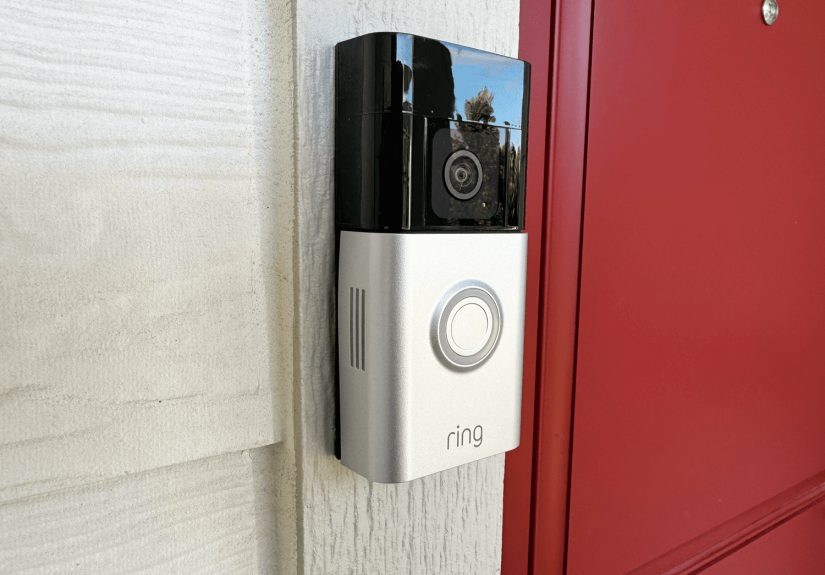
The Ring Battery Doorbell Plus is the kind of gadget that makes you feel like you’ve hired a tiny, tireless porch butlerone who never sleeps, never takes lunch, and never asks for health insurance. It’s a battery-powered video doorbell built for people who want “smart home security” without “smart home rewiring,” and it’s one of Ring’s most popular sweet-spot models thanks to its sharper head-to-toe view and higher resolution than older battery Rings.
In this Ring Battery Doorbell Plus review, we’ll break down what it does well (spoiler: package visibility and a clear 1:1 video frame), where it can frustrate you (spoiler: subscriptions and battery life reality checks), and who should actually buy it.
Quick Verdict
If you want a wireless doorbell camera with a tall, head-to-toe perspective that’s genuinely useful for seeing packages near your doormat, the Ring Battery Doorbell Plus delivers. Its 1536p “HD+” 1:1 video, color night vision, and customizable motion zones are a meaningful upgrade over older battery models.
The catch is that many of the “smart” benefits people expectlike recorded clips and advanced alertsare tied to a paid Ring subscription plan (and Ring’s subscription names and tiers have recently changed). If you’re okay paying ongoing fees for the Ring ecosystem, it’s a strong performer. If you want no subscription ever, you’ll want to look elsewhere.
Key Specs and What They Mean in Real Life
Video: 1536p HD+ in a 1:1 Aspect Ratio
Ring markets the Battery Doorbell Plus around its “Head-to-Toe” videoand that’s not just ad copy. You’re getting a 1:1 frame with a 150° x 150° field of view, designed to show more vertical space than typical wide-but-short doorbell footage. Translation: you’re less likely to get a crystal-clear video of someone’s forehead while your delivered package plays hide-and-seek below the camera’s view.
Night Vision: Color Night Vision
Color night vision is another practical win. You’re more likely to tell the difference between “friendly neighbor in a blue hoodie” and “mysterious figure in a dark hoodie” when the colors don’t collapse into one grayscale blob. (Not a scientific measurement, but you’ll know it when you see it.)
Wi-Fi: 2.4GHz
The Battery Doorbell Plus connects over 2.4GHz Wi-Fi, which is common for battery doorbells because it generally has better range through walls than 5GHz. Ring also notes you’ll want around 2.5 Mbps upload for best performance. In plain English: if your Wi-Fi struggles at your front door, you’ll feel it most during Live View loads and motion clip uploads.
Power: Quick Release Battery + Optional Hardwire
The quick-release battery pack is the “small feature” you appreciate most on the day you don’t have to unmount the whole doorbell just to charge it. You can also connect it to an existing doorbell system (with a compatible transformer) for continuous charging/trickle charging convenience, depending on your setup.
Design and Installation
This is a surface-mounted doorbell designed for DIY-friendly installs. In the box, Ring includes the basics plus a Corner Kit, which helps angle the camera if your doorbell sits on a side wall or a tight entry corner. That matters more than people thinkdoorbells mounted too flat on a narrow porch often end up recording “the world’s most detailed footage of your siding.”
Setup is typical Ring: mount it, scan a QR code, connect to Wi-Fi, and then spend five minutes tweaking settings because the default motion sensitivity assumes your porch is the stage for a daily parade. The good news is that customizing Motion Zones is straightforward once you’re in the Ring app.
Video Quality and Field of View Performance
The 1536p square frame is the star. For most homes, it’s a clear improvement over older 1080p battery doorbellsespecially in the “important details” zones: faces at the door, hands at the package, and the ground where deliveries actually land. Multiple reviewers point out that the head-to-toe framing helps capture packages and full-body approach shots that some doorbells miss.
Is it perfect? No. Like most doorbells, it can still struggle with extreme contrast (bright sun behind a visitor, deep shade on your porch). You’ll usually get usable footage, but it’s not magic. Think “good security camera,” not “Hollywood cinematography.”
Motion Detection, Alerts, and the “Notification Reality”
Custom Motion Zones
The Battery Doorbell Plus offers Advanced Motion Detection and customizable Motion Zones, which lets you draw the areas you actually care aboutlike your steps and walkwaywhile ignoring the street where every passing car would otherwise audition for “Most Annoying Notification.”
Person and Package Detection
Here’s where Ring’s ecosystem gets a little “choose-your-own-adventure”: smart alerts like person/package detection are listed as subscription-dependent features. If you pay for a plan, those alerts become much more usefulespecially if you want a nudge that something was dropped off without reviewing every motion clip.
Speed and Responsiveness
A doorbell camera is only as good as how quickly it shows you what’s happening. Some reviewers have praised the Battery Doorbell Plus for quick Live View pull-up times compared to other battery doorbells, which is exactly what you want when you’re deciding whether to answer the door or pretend you’re “not home” while standing three feet away.
Two-Way Talk, Quick Replies, and Audio
Two-way talk with noise cancellation is built in, and it does the job for typical door conversationsdelivery instructions, “wrong house,” or “yes, the dog is friendly, he’s just loud because he’s a professional.” Quick Replies let you play pre-set responses when you’re busy, which is surprisingly handy in real life.
Battery Life: What to Expect (and What to Do About It)
Battery life is the most misunderstood part of any battery video doorbell. Ring has promoted improved battery life for this model generation, and many reviewers do report solid longevityespecially compared with older models. But real-world runtime depends heavily on motion volume, sensitivity, Live View usage, and weather. Cold temps can also reduce battery performance (Ring lists operating conditions down to about -5°F).
If your front door faces a busy sidewalk, expect to charge more often. If your porch is quiet and you tune motion zones, you can stretch it significantly. And if you don’t want downtime while charging, many people solve that with a spare Quick Release Battery Pack or a compatible solar accessory.
Subscriptions and Ongoing Costs
Let’s talk about the elephant on the porch: without a subscription, you can use Live View and talk to visitors, but many of the features people consider “the point” of a video doorbellrecording, clip playback, and smart alertsare tied to a paid plan. PCWorld specifically notes that, without a Ring Protect subscription, you’re largely limited to live-streaming and lose access to recording and deeper integrations.
Plan Names and Prices (and the January 2026 Change)
As of January 14, 2026, Ring updated/renamed its subscription plansRing Home plans transitioned to Ring Protect plan names, with customers keeping the same features during the change.
On Ring’s pricing pages, Ring Solo (for one device) is listed at $4.99/month or $49.99/year, and Ring Multi (for all devices at one location) is listed at $9.99/month or $99.99/year. These are the numbers to keep in mind when you’re evaluating the “true cost” of owning the Battery Doorbell Plus.
Local Storage (Mostly Not… Unless You Go Deep)
The Battery Doorbell Plus itself doesn’t offer built-in local storage. If you want recordings, you’re typically looking at cloud storage via subscription. However, if you’re deep in the Ring ecosystem, PCWorld highlights that pairing with Ring Alarm Pro can enable local recording to a microSD card in that systemuseful for faster processing and some resilience if your internet goes down.
Alexa Integration and Smart Home Compatibility
If your home runs on Alexa, Ring is in its comfort zone. The doorbell works with Alexa for announcements (doorbell presses and motion), and you can pull up the live feed on compatible Echo Shows or Fire TV devices for hands-free checking.
If your smart home is primarily Apple HomeKit or Google-based, Ring can still function as a standalone doorbell camera, but it won’t feel as seamlessly “native” as doorbells built for those ecosystems.
Privacy and Security Controls
Video doorbells are inherently privacy-sensitive (they point outward, after all), so it matters that Ring includes customizable privacy settings. Use Privacy Zones to block areas you don’t want captured (like a neighbor’s window) and tune motion zones so you’re not collecting footage you don’t need. This is good etiquette and good practice.
Ring Battery Doorbell Plus vs Other Doorbells
Vs Ring Battery Doorbell Pro
If you’re comparing Ring models, the Battery Doorbell Pro sits above the Plus and adds higher-end features (often described in reviews as more advanced motion and mapping tools, plus enhanced audio and sensors). The Pro also costs more, so the Plus remains the better value for most people who simply want great head-to-toe video and reliable alerts.
Vs Budget Battery Doorbells
Cheaper battery doorbells can look tempting, but reliability, app polish, and ecosystem support are where Ring often justifies its priceespecially if you already have other Ring cameras, Chimes, or Alexa devices. In deals seasons, the Battery Doorbell Plus has been discounted heavily (even down near the $80 range), which can make it a no-brainer compared with unknown brands.
Vs Subscription-Free Alternatives
If your top priority is avoiding monthly fees, you’ll likely prefer brands that emphasize local storage and free smart detection. The trade-off is that you may lose some Ring strengths like very tight Alexa integration and (for many users) a smoother day-to-day app experience.
Pros and Cons
Pros
- Sharp 1536p HD+ 1:1 “Head-to-Toe” view that’s genuinely useful for packages and full-body approach shots
- Color night vision improves nighttime identification compared with basic grayscale systems
- Quick Release Battery Pack makes charging less annoying
- Strong Alexa integration (announcements, viewing on Echo Show/Fire TV)
- Customizable Motion Zones help reduce alert spam
Cons
- Many “must-have” features (recording, smart alerts) require a paid subscription
- 2.4GHz Wi-Fi only; front-door Wi-Fi strength matters a lot
- Battery life varies widely with motion volume, settings, and weather
Who Should Buy the Ring Battery Doorbell Plus?
Buy it if:
- You want a battery-powered doorbell camera with a true head-to-toe view for packages and full coverage
- You’re already in the Ring/Alexa ecosystem (or want to be)
- You’re okay paying for a subscription to unlock recordings and smarter alerts
Skip it if:
- You want local storage and no subscription costs
- Your Wi-Fi is weak at the front door and you can’t improve it
Final Verdict
The Ring Battery Doorbell Plus earns its “Plus” by focusing on the stuff that matters most at the front door: a taller frame that actually shows packages, a clear 1536p picture, solid night performance, and an app experience that most people can set up in one sitting.
It’s not the cheapest route to a secure porchespecially after you factor in Ring Solo or Ring Multi subscription costsbut it’s a strong choice for homeowners and renters who want reliable head-to-toe coverage and seamless Alexa integration. Just go in with eyes open: this is a “great doorbell camera,” and also a “doorbell camera that wants a subscription relationship.”
Real-World Use Experiences: What It Feels Like Day to Day (Extra)
Here’s the part most spec sheets skip: living with the Ring Battery Doorbell Plus is less like installing a “camera” and more like adding a new household habit. In the first few days, most people go through a mini calibration phase. You’ll get a burst of motion alertssome helpful, some wildly unhelpful. The mail carrier? Useful. Your flag waving in the breeze? Less useful. The neighbor’s cat doing a stealth mission across your walkway at 3 a.m.? Weirdly compelling, but not exactly a security event.
The good news is that the Battery Doorbell Plus usually becomes calmer once you adjust Motion Zones and sensitivity. People often start by shrinking zones to the steps and porch landing, then expand carefully to include the walkway. This small tuning step can change the entire experience from “my phone is vibrating like it’s training for a marathon” to “I only get alerts when something actually happens.” And because the view is head-to-toe, those zones can be drawn to include the ground where packages landso you’re not just catching faces, you’re catching outcomes.
Deliveries are where this doorbell earns its keep. A typical scenario: you’re in a meeting, your phone buzzes, and you open Live View. With the taller frame, you can often confirm a package is on the mat without doing a full detective routine (zoom, squint, rotate phone, wonder if that rectangle is a box or just sunlight). If you’re using Quick Replies, it’s also nice to tap a canned response like “Please leave the package at the door” when you can’t talk. It’s not glamorous, but it’s efficientlike texting, but for your porch.
Nighttime is another practical moment. Color night vision tends to make those late-evening “who was that?” checks easier, especially if your porch has a bit of ambient lighting. And if you’re in the Alexa ecosystem, the convenience of hearing announcements inside the house becomes surprisingly addictive. You’ll start to recognize patterns: the difference between a quick “motion detected” at the door versus the doorbell press that usually means someone wants attention right now. (It’s basically a new language: “ding-dong” means “person,” while “motion alert at 2:17 a.m.” means “either raccoon or regret.”)
Battery life becomes the long-term relationship test. In a quiet area, you may go a long stretch before needing to charge. In a busier spot, you’ll learn that every extra motion event is a tiny sip from the battery. Many people end up making small lifestyle changes: trimming zones, lowering sensitivity, turning off alerts during high-traffic times, or planning a “charging day” once a month. The Quick Release Battery helps because it turns charging into a quick swap instead of a full uninstall drama. If you add a spare battery, you can keep coverage going without downtimelike having a backup phone charger, but for your front door.
The subscription decision usually happens after the honeymoon. At first, Live View feels like enough. Then you miss somethingan attempted delivery, a quick porch visit, a “was that a person or the wind?” momentand you realize recorded clips and smart alerts are the difference between “I can check now” and “I can review what happened.” Some users happily pay for that peace of mind; others decide they’d rather choose a different brand that stores locally. Either way, the Battery Doorbell Plus makes the choice obvious quickly, because once you rely on the doorbell, you notice exactly what features you’re missing when you don’t have them.






 Close
Close