
Table of Contents >> Show >> Hide
- What Is a Leviton Universal Occupancy Sensor?
- How Leviton Occupancy Sensors Work
- Key Features to Look For
- Occupancy Sensor vs. Vacancy Sensor
- Best Places to Use a Leviton Universal Occupancy Sensor
- Benefits of Using a Leviton Occupancy Sensor
- Common Mistakes to Avoid
- How to Choose the Right Leviton Model
- Installation and Setup Considerations
- Real-World Experience: Living With a Leviton Universal Occupancy Sensor
- Conclusion
Walk into a room, wave your hands like you are landing an airplane, and suddenly the lights behave. That, in everyday terms, is the magic of a Leviton Universal Occupancy Sensor. It is not actually magic, of course. It is smart lighting control using motion detection, timing, load control, and sometimes ambient-light sensing to turn lights on when a space is occupied and turn them off when people leave. In other words, it is the kind of device that quietly saves energy while preventing the classic office mystery: “Who left the conference room lights on again?”
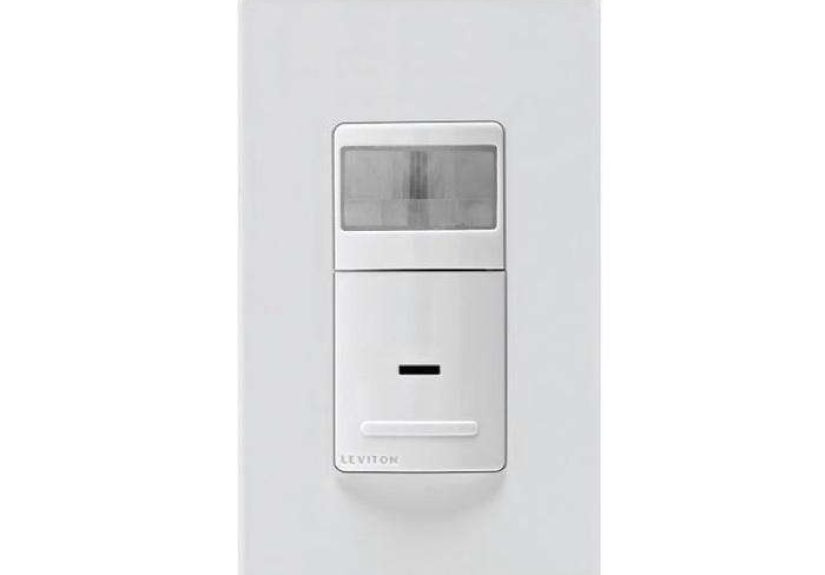
Leviton is one of the best-known names in electrical wiring devices and lighting controls in the United States, and its occupancy sensor lineup covers residential, commercial, wall switch, ceiling mount, PIR, multi-technology, vacancy, dimming, and smart sensor options. When people search for a “universal” Leviton occupancy sensor, they are often looking for a flexible model that can work across common lighting applications, voltage ranges, and room types. Popular Leviton models such as the ODS10 series are especially relevant because they combine commercial-grade reliability, passive infrared sensing, wide field-of-view coverage, adjustable settings, and compatibility with different lighting loads.
This guide explains what the Leviton Universal Occupancy Sensor does, how it works, where it fits best, what features matter, and how to think about real-world use. No electrical engineering degree required. A mild appreciation for not wasting electricity is helpful.
What Is a Leviton Universal Occupancy Sensor?
A Leviton occupancy sensor is a lighting control device that detects motion or presence in a room and automatically controls connected lighting. In occupancy mode, the sensor can turn lights on when someone enters and turn them off after the space has been vacant for a preset period. In vacancy mode, the user manually turns the lights on, and the sensor automatically turns them off when the room is empty.
The word “universal” can mean different things depending on the model and the buyer’s intent. In practical search language, it usually refers to flexibility. A universal-style Leviton sensor may support a wide voltage range, work with several lighting load types, fit a standard wallbox, use a familiar Decora-style design, and offer adjustable controls for sensitivity, time delay, and ambient light. Some commercial models also do not require a neutral wire, which can make them useful in retrofit projects where the wallbox wiring is older or limited.
Think of it as a light switch that got tired of being ordinary and went to night school.
How Leviton Occupancy Sensors Work
Passive Infrared Detection
Many Leviton wall switch occupancy sensors use passive infrared technology, often shortened to PIR. A PIR sensor detects changes in infrared energy, such as the heat signature of a person moving through the sensor’s field of view. It does not shine a beam across the room or scan faces like a spy movie gadget. It simply watches for heat movement across zones created by the lens.
This is why placement matters. A PIR sensor performs best when it can “see” people moving across its detection pattern. If someone is behind a cabinet, hidden by a partition, or sitting almost perfectly still in a corner, the sensor may not detect motion as reliably. That is not a defect; it is how PIR works. The sensor is smart, but it is not psychic. Yet.
Time Delay and Auto-Off Control
One of the most important features of a Leviton occupancy sensor is the adjustable time delay. This setting controls how long the lights remain on after the sensor stops detecting motion. Common settings may range from a quick test mode to longer delays such as 10, 20, or 30 minutes, depending on the model.
Shorter time delays save more energy but can be annoying in spaces where people sit still, such as offices, classrooms, and reading rooms. Longer delays feel more natural but may leave lights on longer than necessary. The best setting is usually a balance between energy savings and human patience. Nobody wants to be the person clapping in a quiet meeting because the lights gave up.
Ambient Light Hold-Off
Some Leviton models include a light sensor or photocell feature. This allows the device to keep lights off when there is already enough daylight in the room. For example, if a conference room has large windows and the sun is doing its job, the sensor can avoid turning on electric lighting unnecessarily.
This feature is especially useful in spaces with strong daylight, glass walls, skylights, or perimeter offices. It helps prevent the “lights on at high noon” problem, which is basically the lighting-control version of wearing sunglasses indoors.
Key Features to Look For
Wide Field of View
Leviton wall switch sensors in the commercial ODS10 family are known for a broad 180-degree field of view and coverage suitable for many medium-sized rooms. A wide viewing angle is valuable because wall switch sensors are usually mounted at doorway height, not in the center of the ceiling. The sensor needs to cover the room from one side, which is not always easy.
For spaces such as classrooms, offices, conference rooms, storage areas, lounges, and copy rooms, wide-angle coverage can make a noticeable difference. However, very large rooms, oddly shaped layouts, or spaces with partitions may need ceiling sensors or multiple sensors rather than one wall switch.
Adjustable Blinders
Some Leviton sensors include adjustable blinders that narrow the detection field. This is useful when the sensor sees too much. For example, a sensor near a hallway may accidentally detect people walking past the door and turn lights on when nobody entered the room. By adjusting the blinders, you can reduce false triggers and make the sensor behave less like an overexcited puppy.
Load Compatibility
Before choosing a Leviton occupancy sensor, always check the load rating and lighting type. Commercial and residential models may support different combinations of LED, fluorescent, incandescent, motor, ballast, or electronic loads. A sensor that works perfectly in an office may not be the right choice for a bathroom fan, warehouse fixture, or dimmable LED circuit.
Modern LED lighting is efficient, but it can be picky about controls. Matching the sensor to the load prevents flicker, buzzing, early failure, or mysterious behavior that makes everyone blame the building ghost.
Neutral or No-Neutral Wiring
Some Leviton occupancy sensors require a neutral wire, while others are designed for no-neutral installations. This distinction matters a lot. Many newer homes and commercial buildings have neutral conductors in switch boxes, but older properties may not. If the selected model requires a neutral and your box does not have one, the installation plan needs to change.
For safety and code compliance, wiring should be handled by a qualified person. At minimum, power must be shut off at the breaker, the circuit must be verified, and the product instructions must be followed exactly. Electricity is useful, but it is not known for having a forgiving personality.
Occupancy Sensor vs. Vacancy Sensor
The difference between occupancy and vacancy control is simple but important.
An occupancy sensor can automatically turn lights on when motion is detected and automatically turn them off when the room becomes vacant. A vacancy sensor requires manual-on operation but still turns lights off automatically after vacancy is detected.
Occupancy mode is great for restrooms, storage rooms, laundry rooms, utility areas, and spaces where people often enter with full hands. Vacancy mode is often preferred in bedrooms, private offices, classrooms, and areas where automatic-on lighting may be distracting or unnecessary. Many energy codes also favor manual-on or partial-on strategies in certain commercial spaces because they reduce unnecessary lighting use.
Best Places to Use a Leviton Universal Occupancy Sensor
Bathrooms and Restrooms
Bathrooms are classic occupancy sensor territory. People walk in, lights turn on, people leave, lights turn off. Simple. In commercial restrooms, sensors reduce wasted lighting time throughout the day. In homes, they are convenient for kids, guests, and anyone who has ever stumbled into a bathroom at night with the grace of a sleepy raccoon.
Conference Rooms
Conference rooms are famous for abandoned lights. A Leviton occupancy sensor can help keep lighting tied to actual use. For rooms with presentations, choose settings carefully. A sensor that turns lights off during a slide deck because everyone is sitting still will not win Employee of the Month.
Storage Rooms and Closets
Storage rooms may be occupied for short bursts and then forgotten. An occupancy sensor is ideal because it eliminates the need to find a switch while carrying boxes and helps prevent lights from staying on for hours after someone grabs one roll of tape.
Classrooms and Offices
In schools and office buildings, occupancy sensors can support energy management and code compliance. The right model and placement are important because people may remain seated for long periods. In these spaces, sensitivity, timeout settings, and sensor location should be planned thoughtfully.
Garages, Laundry Rooms, and Utility Areas
Residential Leviton Decora occupancy sensors are often useful in garages, laundry rooms, mudrooms, and utility spaces. These are areas where hands are often full, switches are sometimes inconvenient, and lights are easily forgotten.
Benefits of Using a Leviton Occupancy Sensor
Energy Savings
The main benefit is reduced lighting waste. Lights consume power when they are on, and occupancy sensors help ensure they are not on when a room is empty. Savings vary depending on room use, lighting wattage, timeout settings, and occupant behavior. In rooms where lights are frequently left on, the savings can be meaningful.
Convenience
Automatic lighting feels natural once installed correctly. You enter, the room responds. You leave, the system cleans up after you. It is like having a tiny lighting butler who never asks for a raise.
Longer Lamp and Fixture Life
Reducing unnecessary operating hours can help extend the practical life of lamps, drivers, and fixtures. LEDs are long-lasting, but they still age with use. Less runtime generally means less wear.
Improved Code Compliance
Commercial lighting controls are often part of modern energy codes and building standards. Leviton offers sensors designed for commercial applications, including models that support occupancy, vacancy, dimming, daylighting, and automatic shutoff strategies. The exact requirement depends on jurisdiction, building type, and project scope, so always check local code.
Common Mistakes to Avoid
Choosing the Wrong Sensor Type
Not every sensor is right for every room. A wall switch PIR sensor may work beautifully in a small office but struggle in a large room with partitions. A ceiling sensor may be better for open areas. A multi-technology sensor may be better where minor motion detection is critical.
Ignoring the Wiring Requirements
Neutral-required and no-neutral sensors are not interchangeable guesses. Before buying, check your wallbox and the product specifications. If you are unsure, bring in an electrician. The cost of professional help is usually lower than the cost of turning a simple switch replacement into a Saturday-long electrical soap opera.
Setting the Timeout Too Short
A 30-second test mode is useful for setup, not for normal living or working. If the lights keep turning off while people are still in the room, increase the time delay, adjust sensitivity, or reconsider placement.
Pointing the Sensor at Traffic Outside the Room
If the sensor can see hallway movement, it may turn lights on unnecessarily. Use adjustable blinders when available, reposition the device if possible, or select a different sensor layout.
How to Choose the Right Leviton Model
Start by identifying the space. Is it residential or commercial? Small or large? Open or divided? Do people move around often or sit still? Is automatic-on desirable, or would manual-on vacancy mode be better?
Next, check the electrical details. Look at voltage, load type, load rating, neutral requirement, single-pole or multi-way control, and whether dimming is needed. If the room uses 0-10V dimming, smart app configuration, or low-voltage controls, choose a model built for that job rather than forcing a basic sensor to act fancy.
Finally, consider user experience. A perfect sensor is not just technically compatible; it feels invisible. The lights turn on when expected, stay on while the room is used, and turn off after people leave. Good lighting control should feel boring in the best possible way.
Installation and Setup Considerations
Installation should follow the specific Leviton instruction sheet for the model being used. The general process usually involves turning off power, removing the existing switch, identifying conductors, connecting the sensor according to the wiring diagram, mounting the device, restoring power, and testing the settings.
After installation, test the sensor in real conditions. Walk into the room from different directions. Sit where people normally sit. Close doors. Check whether hallway movement causes false triggers. Adjust timeout, sensitivity, blinders, and ambient-light settings as needed.
Do not judge the sensor after five minutes of random waving. Occupancy sensors need thoughtful setup. A few small adjustments can be the difference between “this is brilliant” and “why am I eating lunch in the dark?”
Real-World Experience: Living With a Leviton Universal Occupancy Sensor
After using occupancy sensors in different spaces, the biggest lesson is that the product is only half the story. Placement and settings are the other half. A Leviton sensor in the right room feels effortless. A sensor in the wrong room, or one left on factory settings without testing, can feel like it has developed a personal grudge.
In a bathroom, the experience is usually excellent. The door opens, the lights turn on, and nobody has to touch the switch with wet hands. The auto-off feature is especially helpful in family homes where “turn off the lights” becomes a daily speech delivered by parents with the emotional depth of a Shakespearean tragedy. A properly adjusted Leviton occupancy sensor ends that drama quietly.
In a laundry room, the convenience is even more obvious. Carrying a basket, detergent, and the emotional burden of missing socks is already enough. Automatic lighting removes one small annoyance. The same applies to garages and mudrooms, where people often enter with groceries, tools, backpacks, or sports gear.
In office environments, the experience depends heavily on the room. A small copy room or storage room is nearly perfect for automatic-on/auto-off control. A private office may be better in vacancy mode because the user can decide when the lights should come on. For conference rooms, a longer timeout often makes sense because meetings involve long periods of limited movement. Nobody wants the lights to shut off right when someone says, “Let’s review the budget.” That is already scary enough.
One practical tip is to test the sensor at normal height and normal behavior. Do not just stand directly in front of it and wave. Walk through the actual doorway. Sit at the actual desk. Move the way people really move in the room. If the sensor misses normal activity, adjust sensitivity or timeout. If it detects hallway traffic, use blinders or reduce the field of view.
Another experience-based observation: ambient-light settings are worth learning. In rooms with strong daylight, photocell hold-off can prevent lights from turning on when sunlight is already doing the job for free. At first, this can feel like the sensor is not working. Then you realize it is working smarter. The lights are not broken; they are simply refusing to compete with the sun.
For homeowners, the most satisfying part is convenience. For facility managers, the value is consistency. People forget. Sensors do not get bored, distracted, or pulled into a conversation about lunch plans. Once configured, they repeat the same behavior day after day. That reliability is what makes Leviton occupancy sensors useful in schools, offices, small businesses, and homes.
The only real caution is expectation management. An occupancy sensor is not a full smart lighting system unless you choose a smart model. A basic PIR wall switch does not know who is in the room, what mood you are in, or whether you are trying to create “cozy movie lighting.” It detects motion and controls a load. That simplicity is actually a strength. Fewer moving parts, fewer apps, fewer passwords, fewer moments where your light switch asks for a firmware update before breakfast.
Overall, the Leviton Universal Occupancy Sensor concept works best when treated as a practical lighting upgrade rather than a gadget. Choose the correct model, install it safely, adjust it patiently, and use it where automatic control truly makes sense. Do that, and the sensor becomes one of those small improvements you stop noticing because it simply works.
Conclusion
The Leviton Universal Occupancy Sensor is a smart, practical lighting-control solution for homes, offices, schools, restrooms, storage rooms, conference rooms, garages, and other spaces where lights are often left on unnecessarily. With features such as PIR motion detection, wide-angle coverage, adjustable time delay, optional ambient-light hold-off, Decora styling, and model options for different wiring and load needs, Leviton offers a strong lineup for both residential and commercial applications.
The key is choosing the right sensor for the room. Occupancy mode is great when automatic-on convenience matters. Vacancy mode is better when users should decide when lights turn on. Commercial spaces may require specific code-compliant strategies, while homes may focus more on comfort and convenience. Either way, a well-selected and well-adjusted Leviton occupancy sensor can save energy, reduce hassle, and make everyday lighting feel a little more intelligent.
It will not make coffee. It will not fold laundry. But it will stop the lights from staying on in an empty room, and frankly, that is already more helpful than some meetings.






 Close
Close