
Table of Contents >> Show >> Hide
- What a Great Meeting Invitation Email Actually Does
- Start With the Subject Line (Because That’s the “Open Sesame”)
- The Best Structure: The 8-Sentence Meeting Invite (Short, Human, Effective)
- Step-by-Step: How to Write the Email (With Examples)
- Meeting Invitation Email Templates (Copy, Paste, Customize)
- Professional Tone Without Sounding Like a Corporate Robot
- Common Mistakes That Get Your Meeting Invite Ignored
- Calendar Invites: When to Use Them (and How Not to Be Weird About It)
- Follow-Up: The Polite Nudge That Saves Your Schedule
- A Quick Checklist Before You Hit Send
- Conclusion: Clarity Gets the “Yes”
- Experiences From the Inbox Trenches ( of Real-World Lessons)
If your meeting invitation email has ever been ignored so hard it started a new life in someone’s “Later” folder,
you’re not alone. Inboxes are crowded, calendars are full, and nobody wakes up thinking, “Please, universe, give me
another 30-minute meeting.”
The good news: a meeting invite email doesn’t need to be long, fancy, or written with a quill. It needs to be
clear, useful, and easy to act on. Your goal is simple:
help the recipient answer three questions in under ten seconds:
What is this? Why should I attend? What do you need from me?
This guide walks you through a practical, modern way to write a meeting invitation emailcomplete with subject lines,
structure, do-and-don’t lists, and templates you can copy and customize without sounding like a robot who learned
English from a toaster manual.
What a Great Meeting Invitation Email Actually Does
A strong meeting invitation email is basically a tiny travel brochure for your meeting. It sells the destination
(purpose), explains the itinerary (agenda), and gives the recipient everything they need to show up on time
(date, time zone, location/link, duration, prep, RSVP).
The non-negotiables (include these every time)
- Purpose: why you’re meeting and what outcome you want
- Who: who’s invited and why their presence matters
- When: date, start time, time zone, and expected duration
- Where: physical location or virtual meeting link (plus dial-in if relevant)
- Agenda: 2–5 bullets, not a 40-line epic poem
- Call to action: confirm attendance, pick a time, or reply by a deadline
Start With the Subject Line (Because That’s the “Open Sesame”)
The subject line is your first and sometimes only chance to get attention. Avoid vague subject lines like
“Quick chat?” unless you’re trying to build suspense like a streaming thriller. A meeting invite subject line should
be specific enough that the recipient can prioritize it without opening.
High-performing subject line formulas
- [Topic] + [Action Needed] + [Date] “Q1 Budget Review Feedback Needed by Feb 12”
- [Meeting Type] + [Topic] “Project Kickoff: Website Redesign”
- [Person/Team] + [Cadence] “Alex ↔ Marketing Weekly Sync (20 min)”
- [Decision] “Decision Meeting: Vendor Selection (30 min)”
Subject line examples you can steal (legally)
- Meeting Invitation: Q2 Roadmap Review (Thu, Feb 15)
- Client Check-In: Campaign Performance + Next Steps (30 min)
- Quick Alignment Needed: Launch Timeline (15 min)
- Interview Panel Scheduling Options Inside
- Request: 20-Min Intro Call About Partnership Ideas
One more tip: if the recipient is busy, a subject line that hints at the outcome (“Final Decisions Needed”) often
performs better than a subject line that just announces a meeting exists.
The Best Structure: The 8-Sentence Meeting Invite (Short, Human, Effective)
You don’t need a novel. You need a message that’s easy to skim. Here’s a simple structure that works for internal
meetings, client calls, and “please don’t ignore me” outreach.
- Greeting: “Hi Jordan,”
- Reason + value: one sentence on why you’re meeting
- Outcome: what you want to accomplish/decide
- When: propose a time (or offer options) + time zone + duration
- Where: location/link + any backup access
- Agenda: 2–5 bullets
- Prep: what to review/bring (optional but powerful)
- CTA: confirm, choose, or RSVP by a date
Make it skimmable (your reader is not a hostage)
- Use short paragraphs (1–3 lines)
- Use bullets for agenda and options
- Bold the most important details (time, time zone, decision needed)
- Put the call to action near the end (and sometimes near the top for very busy recipients)
Step-by-Step: How to Write the Email (With Examples)
1) Open with the purpose (and skip the throat-clearing)
Don’t start with: “I hope you’re doing well” + “I wanted to reach out” + “I was wondering if maybe…”
That’s three sentences to say nothing. Instead, lead with context and purpose:
Example: “I’d like to schedule a 30-minute meeting to review the Q2 launch plan and confirm final owners.”
2) Propose a time like a considerate adult
Provide one clear recommendation or a few options. If you can be flexible, say so. If the meeting is urgent, add a
reply-by date.
Example options block:
- Tue, Feb 13 10:00–10:30 AM ET
- Wed, Feb 14 2:00–2:30 PM ET
- Thu, Feb 15 11:00–11:30 AM ET
Always include the time zone. You might think “everyone knows we’re in Pacific,” until you meet the
colleague who moved to Miami and now lives in Eastern Time with a permanently confused calendar.
3) Include location or link (and don’t make it a scavenger hunt)
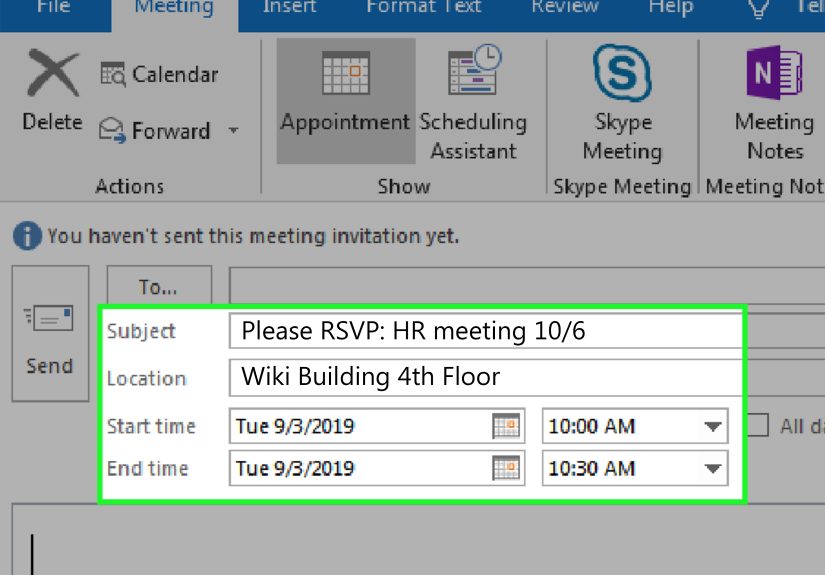
If it’s virtual, include the link and any backup details. If it’s in person, include room name and building.
If it’s hybrid, state the default (e.g., “Zoom unless you’re onsite”).
Example: “Location: Zoom (link below). Dial-in: available in the calendar invite.”
4) Add an agenda that proves you respect time
People accept meetings when they know what they’re walking into. Keep the agenda tight, outcome-focused, and
realistic for the duration.
Example agenda for a 30-minute meeting:
- 2 min Goal + decisions needed
- 10 min Current status + risks
- 15 min Discuss options
- 3 min Assign owners + next steps
5) Ask for the RSVP the right way (clear, polite, time-bound)
Your call to action should be unmissable. If you need a yes/no, ask for it. If you need them to pick a time, make
that the action. If you need prep, say what and by when.
Examples:
- “Can you confirm by Wednesday so I can lock the agenda?”
- “Please reply with your preferred time option (or share a slot that works).”
- “If you can’t attend, feel free to suggest a delegate.”
Meeting Invitation Email Templates (Copy, Paste, Customize)
Template 1: Internal team meeting invitation
Template 2: Client meeting invitation (professional, not stiff)
Template 3: Cold outreach meeting request (short, respectful)
Template 4: Rescheduling a meeting invitation (own it, fix it)
Professional Tone Without Sounding Like a Corporate Robot
Professional doesn’t mean personality-free. It means clear, polite, and appropriate for the relationship. Use a
greeting and closing that match your audience. With coworkers you know well, “Hi Sam” is perfect. With senior
leadership or external partners you don’t know, keep it a notch more formal.
Small tone tweaks that change everything
- Replace: “I was wondering if you might possibly…” With: “Are you available to meet…”
- Replace: “ASAP” With: “By Thursday, Feb 8 (if possible)”
- Replace: “Let me know” With: “Please reply with the best option by…”
Also: spelling, punctuation, and capitalization still matter. Your meeting invite is not a group chat, and ALL CAPS
reads like you’re yelling through the screen.
Common Mistakes That Get Your Meeting Invite Ignored
- Vague subject lines: “Touch base” tells me nothing.
- No agenda: People avoid mystery meetings like they avoid “quick favors” from that one colleague.
- Missing time zone: Congratulations, you just invented calendar chaos.
- Too much text: Long emails get skimmed, then forgotten, then discovered during spring cleaning.
- No clear CTA: If you don’t ask for a response, you might not get one.
Calendar Invites: When to Use Them (and How Not to Be Weird About It)
If you’re scheduling anything beyond an informal “got 5 minutes?”, a calendar invite helps: it holds the slot, puts
the details in the right place, and makes RSVP easier. Your email is the explanation and the nudge; the calendar
event is the logistics hub.
What to put in the calendar event description
- Meeting objective (one line)
- Agenda bullets
- Link + dial-in + passcode (if applicable)
- Pre-read links or attachments
- Contact person for issues (“If the link explodes, call/text…”)
Security note (because calendars can be abused)
People are increasingly cautious about clicking links in invitesespecially if the organizer is unfamiliar. Use
recognizable tools, avoid suspicious shortened links, and keep details consistent between the email and the calendar
event. Trust is a feature.
Follow-Up: The Polite Nudge That Saves Your Schedule
If you don’t hear back, follow up. Not with “Following up” alone (which is the email equivalent of tapping someone’s
shoulder and saying nothing). Follow up with value, clarity, and an easy next action.
Follow-up email example
A Quick Checklist Before You Hit Send
- Subject line clearly says what and why
- Time, date, time zone, and duration are included
- Location or link is included (and tested)
- Agenda is short and matches the duration
- CTA is obvious (confirm, choose, RSVP by when)
- Spelling and names are correct (yes, this matters)
Conclusion: Clarity Gets the “Yes”
Writing a meeting invitation email isn’t about sounding impressive. It’s about making the recipient’s decision easy.
When your invite has a clear subject line, a purpose with outcomes, real scheduling details, and a simple RSVP ask,
you don’t just get more acceptancesyou get better meetings.
Think of every meeting invitation as a promise: “This will be worth your time.” The email is where you prove you
mean itbefore anyone even clicks “Accept.”
Experiences From the Inbox Trenches ( of Real-World Lessons)
After years of sending (and receiving) meeting invitations, I learned that most “bad meeting emails” fail in the same
predictable ways. The funny part? The sender usually thinks they’re being helpful. The tragic part? The recipient’s
calendar disagrees.
Lesson one: your subject line is not a teaser trailer. I once received an invite titled “Important.”
Important what? A promotion? A crisis? A surprise birthday Zoom? It turned out to be a 15-minute sync about a
spreadsheet tab. The meeting itself was fine, but the subject line created anxiety that could’ve been avoided with
seven extra words.
Lesson two: agenda bullets are kindness in list form. The fastest way to increase acceptance rates is
to show people you’ve already done some thinking. Even a simple agenda like “(1) decide X, (2) assign Y, (3) next
steps” tells the recipient you’re not hosting a meeting for sport. When I started adding agendas, I also noticed
something unexpected: people came prepared. Meetings got shorter. Decisions happened. I stopped needing “meeting about
the meeting” meetingswhich should honestly be illegal in at least three states.
Lesson three: time zones are a trap disguised as a clock. I once scheduled a call with a partner who
had recently relocated. We both arrived “on time,” just in different universes. Now I write times like “2:00 PM ET
(11:00 AM PT)” when I’m coordinating across regions, and I include the date spelled out to avoid “Is that 3/4 or 4/3?”
confusion. If your meeting includes anyone outside your office, assume time is a complicated concept and be generous
with clarity.
Lesson four: the CTA should feel like one button. If your email asks the recipient to do three things
(“confirm,” “review attachment,” “bring updates,” “fill a pre-survey,” “also brainstorm names for the new initiative”),
they’ll often do none. I learned to pick a primary action (“Reply with which slot works”) and make everything else
optional (“If you have time, skim the one-page brief”).
Lesson five: links must be trustworthy. With the rise of phishing attempts, some recipients hesitate
before clicking anything unfamiliarespecially in calendar invites. I now avoid sketchy link shorteners, I name my
meeting clearly, and I keep the email details consistent with the calendar description. Trust is built through
predictability, and predictability is built through not being weird.
Finally, I learned that a great invite is a tiny act of empathy. It says: “I respect your time, I know why we’re
meeting, and I’ll make it easy for you to show up and succeed.” Do that consistently, and people won’t just accept
your meetingsthey’ll actually look forward to them. (Okay, maybe not look forward. But they’ll accept them
faster. That’s basically joy in corporate America.)







 Close
Close