
Table of Contents >> Show >> Hide
- Why Data Privacy Matters More After Roe
- Start With a Personal Privacy Threat Model
- Lock Down Your Phone First
- Control Location Data Before It Controls the Story
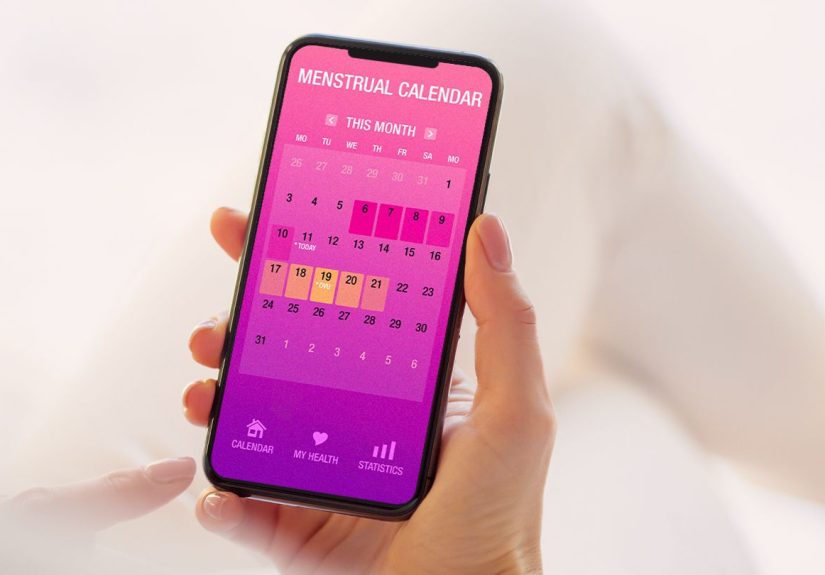
- Rethink Period-Tracking and Health Apps
- Use Safer Browsing and Search Habits
- Protect Messages and Emails
- Secure Your Accounts Like They MatterBecause They Do
- Reduce Data Broker Exposure
- Be Careful With Payments and Receipts
- Know What HIPAA Doesand Does NotDo
- Think Before Posting Online
- Protect Shared Devices and Family Accounts
- Create a Simple Monthly Privacy Routine
- When Legal Risk Is Possible, Get Real Advice
- Personal Experiences and Real-World Lessons: What Data Protection Looks Like in Daily Life
- Conclusion: Privacy Is a Practice, Not a Panic Button
Note: This article is for general privacy education, not legal advice. Laws change quickly, and reproductive health rules vary by state. If you believe your information may be involved in a legal matter, speak with a qualified attorney before deleting, altering, or sharing records.
In the post-Roe United States, “personal data” is not just a boring phrase buried in a privacy policy written by a committee of caffeinated robots. It can be your location history, search history, period-tracking app entries, text messages, payment records, pharmacy purchases, telehealth chats, email confirmations, cloud backups, and even the innocent-looking app permissions you accepted while half-asleep and trying to order tacos.
Since the Supreme Court overturned Roe v. Wade in 2022, reproductive health privacy has become a bigger concern for patients, providers, advocates, journalists, researchers, and everyday people who simply do not want their most sensitive decisions turned into a data trail. The issue is not only about abortion. It is about how modern technology collects, stores, shares, sells, and sometimes exposes health-related information. In other words: your phone may be helpful, but it is also a tiny gossip machine with a glass screen.
The good news is that protecting your data does not require becoming a cybersecurity wizard who wears a hoodie in a dark room. It requires a few smart habits, realistic risk awareness, and a healthy suspicion of apps that want your location “for a better experience.” Better for whom, exactly? Let’s get practical.
Why Data Privacy Matters More After Roe
Before the post-Roe era, many people treated reproductive health data as private by default. That assumption was never perfect, but it felt comfortable. Today, the privacy landscape is more complicated. State abortion laws differ dramatically. Some states protect reproductive care; others restrict it. Meanwhile, companies continue collecting enormous amounts of consumer data, often outside the protections people associate with medical privacy.
A common misunderstanding is that all health-related information is protected by HIPAA. It is not. HIPAA usually applies to covered health care providers, health plans, health care clearinghouses, and their business associates. It does not automatically cover every app, search engine, data broker, website, wearable device, or social media platform that may collect health-adjacent details. A period-tracking app may know more about your cycle than your doctor does, but that does not mean it is governed like your doctor’s office.
The Data Trail Is Bigger Than You Think
Reproductive health data can include obvious information, such as clinic appointments or medication records. But it can also include indirect signals: maps searches, rideshare receipts, browser history, location pings near health facilities, purchases of pregnancy tests, messages to friends, or emails from appointment systems.
None of these details alone tells a complete story. But data becomes powerful when combined. A single puzzle piece is harmless; a thousand puzzle pieces can become a courtroom exhibit, a marketing profile, or a deeply creepy spreadsheet. That is why the best privacy strategy is not panic. It is data minimization: collect less, share less, store less, and leave fewer breadcrumbs.
Start With a Personal Privacy Threat Model
“Threat model” sounds like something from a spy movie, but it simply means asking: what am I trying to protect, from whom, and how much effort is realistic? A journalist helping sources may need stronger safeguards than someone cleaning up old app permissions. A patient traveling across state lines may have different concerns than a person who only wants to keep health searches out of targeted ads.
Ask yourself three questions:
- What data is most sensitive? Location history, health app entries, private messages, payment records, search history, or cloud backups?
- Who might access it? Apps, advertisers, data brokers, abusive partners, employers, schools, law enforcement, or people who borrow your phone?
- What steps are realistic? Strong passwords, app permission cleanup, encrypted messaging, safer browsing, and less cloud syncing are manageable for most people.
The goal is not to live off-grid in a cabin guarded by raccoons. The goal is to reduce unnecessary exposure while keeping your life usable.
Lock Down Your Phone First
Your phone is often the center of your digital life. It holds your messages, maps, photos, passwords, app data, browsing activity, and probably several screenshots you forgot existed. Start there.
Use a Strong Screen Lock
Use a long passcode, not a cute four-digit PIN like “1234,” “0000,” or your birthday. A longer numeric code or alphanumeric passphrase is harder to guess. Biometrics such as Face ID or fingerprint unlock are convenient, but laws and real-world situations can be complicated. If you are worried about someone forcing access to your phone, learn how to quickly disable biometric unlock on your device.
Update Your Operating System
Software updates fix security flaws. Yes, updates always arrive at the exact moment you need your phone, because technology has comedic timing. Still, install them. Running old software is like locking your front door but leaving a window open with a sign that says, “Please be gentle.”
Review App Permissions
Go through your apps and check which ones have access to location, contacts, camera, microphone, Bluetooth, photos, and health data. Many apps ask for more than they need. A flashlight app does not need your location. A coupon app does not need your microphone. A wallpaper app does not need to know your soul.
Set location access to “While Using the App” when possible. Turn off “Precise Location” for apps that only need a general area. Delete apps you no longer use. The most private app is the one that is not installed.
Control Location Data Before It Controls the Story
Location data is one of the most sensitive categories of information in a post-Roe environment. It can reveal where you live, work, worship, shop, socialize, and receive health care. It can also be collected by apps, ad networks, data brokers, and device services.
Turn Off Unnecessary Location History
Check Google, Apple, and other account settings for location history, significant locations, visited places, timeline features, and location-based personalization. These tools may be convenient, but convenience often means “we remembered everything so you do not have to.” That is not always a gift.
On your phone, review system-level location settings and app-level permissions. If an app does not need location to function, turn it off. For maps and rideshare apps, consider enabling location only when actively using the service.
Be Careful With Geotagged Photos
Photos can store location metadata. If you share images online or send them to others, remove location data when possible. This matters for clinic visits, travel, protests, support work, or any sensitive event. A picture may be worth a thousand words, but metadata can add a few paragraphs you did not mean to write.
Rethink Period-Tracking and Health Apps
Period-tracking apps became a major topic after Roe because they can store intimate information: cycle dates, symptoms, pregnancy status, sexual activity, medication, mood, and notes. Some apps have improved privacy practices, but users should still be cautious.
Check What the App Collects
Before using any reproductive health app, review its privacy policy. Look for plain answers to these questions: What data is collected? Is it sold or shared? Can you delete it? Is data encrypted? Does the company respond to law enforcement requests? Is there an option to use the app without creating an account?
If the policy is vague, aggressively cheerful, or written like a haunted legal thesaurus, that is a warning sign.
Consider Lower-Data Alternatives
For some people, a paper calendar, offline notes, or a privacy-focused app with local-only storage may be enough. If you use a digital tool, enter only what you truly need. Avoid detailed notes that would be sensitive if exposed. Data minimization is not glamorous, but neither is having your private life stored in a server farm because an app wanted “engagement.”
Use Safer Browsing and Search Habits
Search history can reveal sensitive questions before a person has even made a decision. Browsers, search engines, websites, internet service providers, and ad trackers may all collect pieces of browsing activity.
Use Privacy-Protective Search Tools
Consider search engines and browsers that limit tracking. Use private browsing windows when you do not want local history saved on your device, but understand the limits: private mode does not make you invisible to websites, networks, employers, schools, or internet providers. Private browsing is more like closing the blinds, not demolishing the house.
Clear Old Browsing Data Thoughtfully
Regularly clearing cookies, cache, and browsing history can reduce tracking. However, if you are involved in an active legal matter or have received a preservation request, subpoena, or legal notice, do not delete records without legal advice. Privacy hygiene is smart; destroying evidence after legal notice can create serious problems.
Protect Messages and Emails
Texts, chats, and emails can contain appointment details, travel plans, emotional support conversations, screenshots, links, and receipts. Messaging privacy matters because conversations often feel casual until they are not.
Use End-to-End Encrypted Messaging
For sensitive conversations, use end-to-end encrypted messaging services where only the sender and recipient can read the content. Turn on disappearing messages when appropriate, but remember: recipients can screenshot, forward, photograph, or otherwise save what you send. The safest message is the one that does not contain unnecessary sensitive details.
Limit Details in Messages
You do not need to write a novel in a text thread. Keep sensitive messages simple. Avoid sharing full names, addresses, appointment details, travel routes, or medical specifics unless necessary. When possible, move complex legal or medical questions to qualified professionals using secure channels.
Check Cloud Backups
Encrypted messaging can lose some protection if chats are backed up to the cloud in a less secure form. Review backup settings for messaging apps, email, photos, and notes. If you do not need cloud backup for sensitive content, turn it off or limit what syncs.
Secure Your Accounts Like They MatterBecause They Do
Account security is the boring broccoli of digital privacy. Nobody gets excited about it, but it keeps the whole system healthier.
Use Strong, Unique Passwords
Use a reputable password manager to create and store unique passwords for every important account. Reusing passwords is risky because one data breach can unlock multiple accounts. If your email password is the same as your shopping account password from 2014, congratulations: you have created a nostalgia-based security vulnerability.
Turn On Two-Factor Authentication
Enable two-factor authentication for email, cloud storage, banking, social media, health portals, and phone carrier accounts. Authenticator apps or security keys are generally stronger than SMS codes, though any second factor is better than none.
Protect Your Main Email Account
Your email is the reset button for your digital life. If someone controls your email, they may access your accounts, receipts, appointments, files, and messages. Give your email account the strongest password and two-factor protection you can.
Reduce Data Broker Exposure
Data brokers collect and sell information from apps, public records, purchases, location signals, online behavior, and other sources. Some data may be used for advertising. Some may be sold to other companies. Some may become available to government agencies or private parties through legal or commercial channels.
Opt Out Where Possible
Many data brokers offer opt-out forms, though the process can be annoying enough to qualify as a character-building exercise. Consider using reputable opt-out services if you can afford them, or manually opt out from major people-search sites and broker databases. Focus first on removing addresses, phone numbers, family links, and location-related information.
Use Data Minimization in Daily Life
Give companies less information. Use guest checkout when possible. Decline unnecessary loyalty programs. Avoid linking every account to the same social login. Use separate email addresses for shopping, health, work, and personal communication. Do not hand over your birthdate unless it is truly needed. Your favorite candle store does not need to know your entire astrological profile.
Be Careful With Payments and Receipts
Payment records can reveal purchases, travel, clinic visits, donations, and subscriptions. Banks, card companies, apps, merchants, and email inboxes may all store transaction details.
For sensitive purchases or travel, think about what records are created. Receipts may go to email. Ride histories may remain in apps. Hotel and airline bookings may sync to calendars. Pharmacy rewards programs may store purchase histories. None of this means you should panic; it means you should know where records live.
Delete unnecessary receipts and old account data as part of normal privacy maintenance, unless legal advice tells you otherwise. Turn off automatic calendar imports for sensitive emails. Review shopping and payment app privacy settings.
Know What HIPAA Doesand Does NotDo
HIPAA can protect certain medical records held by covered health entities. Recent federal rules have strengthened protections around reproductive health information in some circumstances, including limits on using or disclosing protected health information for certain investigations or liability efforts related to lawful reproductive care.
But HIPAA is not a magic privacy force field. It usually does not cover your search history, most consumer apps, data brokers, social media posts, or location data collected outside the health care system. A clinic portal may be protected; a random app that tracks symptoms and sells analytics may not be protected in the same way.
Think Before Posting Online
Social media can turn private life into public evidence, public conflict, or permanent screenshots. Be careful with posts about pregnancy, miscarriage, abortion, travel, clinic visits, support work, donations, or helping someone else access care.
Review privacy settings, but do not rely on them completely. Friends can share posts. Platforms can change rules. Screenshots travel faster than common sense. Avoid posting real-time location updates during sensitive trips or events. Consider removing old posts that reveal personal health details, again keeping legal considerations in mind if any formal matter exists.
Protect Shared Devices and Family Accounts
Many privacy risks come not from hackers in distant countries but from shared tablets, family phone plans, synced browsers, smart speakers, shared cloud albums, and household accounts. If someone else can see your search history, location, messages, or purchases through shared access, adjust those settings.
Log out of accounts on shared devices. Turn off browser syncing where needed. Check family sharing settings for app downloads, locations, subscriptions, and purchases. Review smart speaker histories and connected home apps. Your refrigerator probably does not need to be part of your privacy strategy, but at this point, who knows?
Create a Simple Monthly Privacy Routine
Privacy works best as a habit, not a crisis project. Once a month, do a quick checkup:
- Delete unused apps.
- Review location permissions.
- Update your phone and computer.
- Check privacy settings on health, maps, and messaging apps.
- Clear unnecessary browser data.
- Review cloud backups and synced devices.
- Remove old sensitive files, screenshots, and downloads when legally safe.
- Check whether your email and major accounts still have strong two-factor authentication.
This routine takes less time than arguing with a printer, and unlike the printer, it may actually help.
When Legal Risk Is Possible, Get Real Advice
Digital privacy tips are useful, but they are not a substitute for legal help. If you receive a subpoena, warrant, court order, preservation request, employer inquiry, school investigation, or law enforcement contact, pause before responding. Contact a lawyer or a reputable legal aid organization. Do not guess. Do not lie. Do not delete records after legal notice. The “I panicked and clicked everything” defense is not a strategy.
Also remember that privacy is not only an individual responsibility. Companies, lawmakers, regulators, and courts all play major roles. Individuals can reduce risk, but stronger privacy laws, limits on data brokers, reproductive health shield laws, and corporate data minimization are essential for meaningful protection.
Personal Experiences and Real-World Lessons: What Data Protection Looks Like in Daily Life
One of the most useful ways to understand post-Roe data privacy is to imagine ordinary moments. Not spy-thriller moments. Normal ones. A person searches for reproductive health information late at night. A friend offers a ride. Someone saves a clinic address in a maps app. A partner texts, “What time is the appointment?” A pharmacy receipt lands in email. A period-tracking app sends a cheerful notification with the emotional subtlety of a marching band.
Individually, these moments feel harmless. Together, they form a timeline. The lesson is not that everyone should stop using technology. That is unrealistic. The lesson is that privacy has to be built into routines before stress arrives.
A practical experience many people share is the “app cleanup surprise.” You open phone settings and discover that a weather app has precise location access, a shopping app has background tracking, and three apps you forgot existed are still collecting data like tiny raccoons in the digital trash. Removing those permissions feels small, but it immediately reduces exposure. It is also strangely satisfying, like cleaning a drawer and finding money, except the money is your dignity.
Another common lesson comes from shared accounts. A person may assume their searches are private, only to realize their browser syncs across a family laptop. Or they may discover that app purchases, map searches, photos, or location sharing are visible through family settings. This is not always malicious. Sometimes it is simply convenience stacked on convenience until privacy falls over. Checking shared devices and family plans can prevent accidental disclosure.
Messaging is another real-world challenge. People often write sensitive details in texts because texting feels temporary. But messages can be backed up, searched, screenshot, forwarded, or shown to someone else. A better habit is to keep sensitive conversations minimal and use secure channels when needed. Instead of writing every detail, people can share only what is necessary. Privacy is not about being mysterious; it is about not creating extra records for no reason.
People also learn that deletion is not always simple. Deleting an app may not delete the account. Deleting a message may not delete the recipient’s copy. Clearing browser history may not remove data held by websites or service providers. That can feel frustrating, but it also clarifies the best strategy: prevent unnecessary collection in the first place. Less data collected means less data to clean up later.
For people supporting friends, the experience is similar. Helpers may focus on the other person’s privacy but forget their own. Their messages, calendars, rideshare histories, payment apps, and photos may also create records. Support should include thoughtful communication: fewer details, safer channels, careful travel records, and no public posting. A supportive friend does not need to become a secret agent; they just need to avoid turning private support into a digital scrapbook.
The biggest lesson is emotional: privacy protection is not paranoia. It is preparation. Wearing a seatbelt does not mean you expect a crash. Locking your door does not mean you hate your neighbors. Reviewing your data settings does not mean you are doing something wrong. It means you understand that modern technology collects more than most people realize, and sensitive health decisions deserve more respect than a targeted ad profile.
In a post-Roe U.S., protecting your data is an act of practical self-care. It helps preserve autonomy, reduce unwanted exposure, and keep private life private. The steps are not perfect, and no checklist can remove every risk. But strong passwords, fewer app permissions, safer messaging, controlled location settings, cautious health-app use, and smart legal awareness can make a meaningful difference.
Conclusion: Privacy Is a Practice, Not a Panic Button
Protecting your data in a post-Roe U.S. is not about disappearing from the internet or treating every phone notification like a villain entrance. It is about understanding how sensitive information moves and making deliberate choices. Start with your phone. Limit location tracking. Review health apps. Use encrypted messaging. Secure your accounts. Reduce data broker exposure. Be careful with payments, cloud backups, shared devices, and social media.
Most importantly, remember that privacy is strongest when it becomes routine. A few minutes each month can reduce risks that would be much harder to fix later. Your data tells a story. Make sure you are the editor, not an app, advertiser, broker, or stranger with a spreadsheet.




 Close
Close