
Table of Contents >> Show >> Hide
- Why Facebook Groups Still Matter
- Before You Join: Understand the Types of Facebook Groups
- How to Find a Facebook Group to Join
- How to Join a Group on Facebook on Desktop
- How to Join a Group on Facebook on Mobile
- What Happens After You Join a Facebook Group?
- How to Increase Your Chances of Getting Approved
- Common Reasons You Cannot Join a Facebook Group
- Tips for Joining the Right Facebook Group
- Facebook Group Etiquette for New Members
- A Quick Example: Joining a Local Community Group
- Extra Real-World Experiences With Joining Facebook Groups
- Final Thoughts
Joining a Facebook group sounds easy until you open the app, tap around for a minute, and somehow end up watching a video of a raccoon stealing cat food. It happens. The good news is that learning how to join a group on Facebook is actually simple once you know where to look, what the group privacy settings mean, and what admins expect before they approve new members.
Whether you want to connect with local parents, swap recipes, join a neighborhood buy-and-sell group, network with professionals, or find fellow fans of obscure 1980s sci-fi movies, Facebook Groups can be one of the most useful corners of the platform. The trick is joining the right group, following the rules, and making a good first impression.
This guide walks you through exactly how to join a Facebook group on desktop and mobile, explains the difference between public and private groups, shows what to do if your request is pending, and shares a few smart tips so you do not accidentally enter a group like a bull in a china shop.
Why Facebook Groups Still Matter
Facebook Groups are built around shared interests, not just friend lists. That makes them especially useful if you want conversation, advice, recommendations, and niche communities. A good group can help you find moving boxes, dog trainers, study partners, job leads, hobby tutorials, or twelve people who care deeply about cast-iron skillet seasoning.
For users, the value is simple: groups feel more focused than the main feed. Instead of scrolling through random updates, you get topic-based posts, community advice, and direct interaction with people who actually care about the same thing. That is why local groups, support communities, buy-and-sell groups, parenting groups, gaming groups, and professional networking groups remain so popular.
Before You Join: Understand the Types of Facebook Groups
Before you tap that shiny Join Group button, it helps to know what kind of group you are looking at. This can save time, confusion, and the digital equivalent of knocking on a locked door.
Public Facebook Groups
Public groups are easier to discover. You can usually find them through Facebook search, view the group name, description, and often some visible content before joining. Depending on the group settings, joining may be instant or may still require admin approval.
Private Facebook Groups
Private groups are more restricted. You can often still find them in search, but access is controlled. In many cases, you must request to join and wait for an admin or moderator to approve your membership. Some private groups also ask membership questions to screen new members.
Hidden or Invite-Only Groups
Some groups are not searchable in the usual way. If a group is hidden, you typically need a direct invite or link from an existing member or admin. So if you cannot find a group by name, it may not be gone. It may simply be hiding better than your left sock after laundry day.
How to Find a Facebook Group to Join
If you do not already have a direct link, start by searching strategically. On Facebook, type a keyword into the search bar related to your interest. For example:
- “Chicago apartment rentals”
- “Beginner sourdough baking”
- “Moms of Dallas”
- “Graphic design jobs remote”
- “Vintage Nintendo collectors”
Then filter the results by Groups. Browse the names, descriptions, location details, and visible rules. Look for signs that the group is active, on-topic, and moderated well. A great group usually has a clear purpose, recent posts, and rules that do more than say “be nice” in three different ways.
How to Join a Group on Facebook on Desktop
If you are using Facebook on a laptop or desktop, here is the standard process.
Step 1: Log In to Facebook
Open Facebook in your browser and sign in to your account. You need an active Facebook account to join most groups. No account, no group entry. Facebook is picky like that.
Step 2: Search for the Group
Use the search bar at the top of the page and enter the group name or topic. Click the Groups filter to narrow the results.
Step 3: Open the Group Page
Click the group you want to join. Read the group description carefully. Check whether it is local, interest-based, professional, or support-focused. Also review the rules if they are visible.
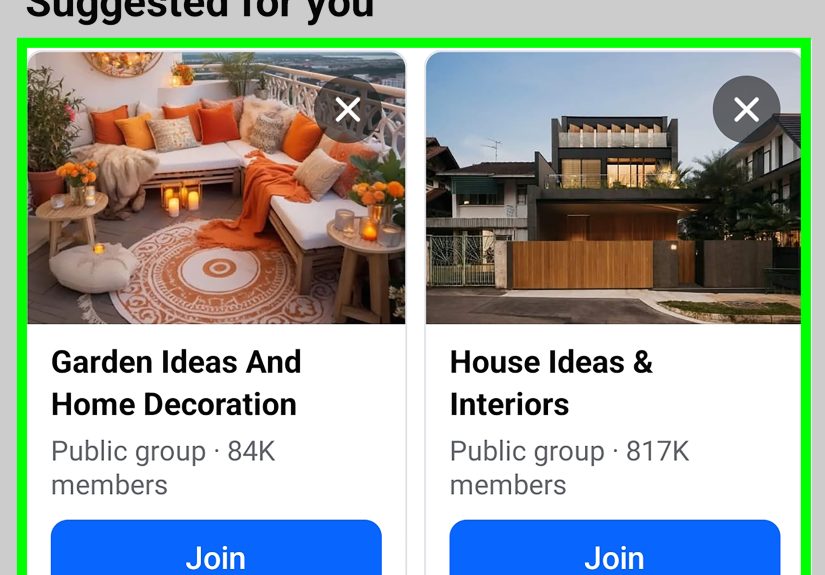
Step 4: Click “Join Group”
Near the top of the group page, click the Join Group button. If the group is open for immediate access, you may be admitted right away. If it is private or moderated, your request may be marked as pending.
Step 5: Answer Membership Questions
Some groups require you to answer questions before admins review your request. These questions help moderators filter out spam, fake accounts, bots, and people who think group rules are merely decorative.
Answer honestly and clearly. If a group asks why you want to join, do not overthink it. A short, polite answer works well: “I am interested in local gardening tips and would love to learn from the community.” That sounds much better than silence or “idk.”
Step 6: Agree to the Rules
Some groups ask you to confirm that you will follow the rules. Read them. Seriously. This tiny act of responsibility can save you from joining a group and getting removed five minutes later for posting the exact thing the rules banned.
Step 7: Wait for Approval if Needed
If the group requires admin approval, your request will remain pending until a moderator reviews it. Once approved, you can access the group and start participating.
How to Join a Group on Facebook on Mobile
If you are using the Facebook app on iPhone or Android, the steps are very similar.
Step 1: Open the Facebook App
Launch the app and make sure you are logged in.
Step 2: Tap the Search Icon
Search for the group by name or topic. Then tap the Groups category in the results to filter out pages, posts, and other distractions.
Step 3: Select the Group
Open the group page and review the description, location, member focus, and rules.
Step 4: Tap “Join Group”
Tap the Join Group button. If prompted, answer the membership questions and confirm your agreement with the rules.
Step 5: Check Your Request Status
If approval is required, you will see that your request is pending. Once accepted, the app will update and the group content will become available.
What Happens After You Join a Facebook Group?
Once you are approved, you can usually do the following:
- Read posts and comments
- React to discussions
- Create your own post, depending on group permissions
- Upload photos or media if allowed
- Participate in polls, events, chats, or community threads
Some groups also have entry rules for new members, such as post approval, admin review, or limits on promotional content. If you joined a professional or local community group, it is smart to observe for a bit before posting. Spend a few minutes learning the tone of the group. Is it casual? Strictly informational? Memes welcome? Memes banned? These things matter.
How to Increase Your Chances of Getting Approved
If your goal is to join a private Facebook group without getting ignored, a few best practices can help.
Complete Your Profile
Admins are often cautious about approving blank or suspicious-looking accounts. A real profile photo, basic bio information, and normal activity can make your request appear more trustworthy.
Answer Questions Thoughtfully
If the group asks why you want to join or whether you agree to the rules, give clear answers. Lazy responses can look like spam.
Do Not Message Admins Repeatedly
One polite follow-up is fine if a very long time has passed, but sending multiple messages right after requesting access is a quick way to look like trouble.
Make Sure the Group Fits You
If the group is for residents of a specific city, verified professionals, current students, or people with a shared experience, make sure you actually qualify. Admins usually notice when someone barges into a local hiking group from three states away for no obvious reason.
Common Reasons You Cannot Join a Facebook Group
If the join button is missing or your request is not working, one of these issues may be the reason.
The Group Is Hidden
Some groups are invite-only or hidden from standard search. You may need a direct link or invitation from an admin or member.
Your Account Looks Suspicious
New or incomplete profiles are sometimes filtered out by moderators trying to reduce spam and fake accounts.
You Were Previously Declined or Removed
If your request was denied before, or if you were removed from the group, you may not be able to rejoin right away.
The Group Has Special Membership Limits
Some groups allow only certain categories of members, such as local residents, customers, school families, or organization members. In those cases, admins may ask for screening details before approval.
Tips for Joining the Right Facebook Group
Joining a Facebook group is easy. Joining a good one is the real skill. Here is how to avoid low-quality communities.
Check for Recent Activity
An active group will usually have fresh discussions, comments, and interaction. If the latest post is from the geological past, keep moving.
Read the Rules First
Rules tell you everything about the vibe. If the group is clear, organized, and specific, that is usually a good sign.
Look at the Description
A strong group description explains who the group is for, what members can post, and what the community is trying to achieve.
Watch for Spam
If every visible post looks like self-promotion, scams, or repeated links, the group may not be worth your time.
Facebook Group Etiquette for New Members
Once you are in, resist the urge to make your first post “Hi everyone!!! Buy my thing!!!” That is a fast lane to being ignored, reported, or removed.
Instead, follow this playbook:
- Read the pinned post or welcome post
- Introduce yourself only if the group encourages introductions
- Use the search feature before asking a question that may have been answered already
- Stay on topic
- Be respectful in comments
- Avoid oversharing personal information in large public communities
Think of it like entering a room where a conversation is already happening. Listen first, then contribute something helpful.
A Quick Example: Joining a Local Community Group
Let us say you just moved to Austin and want restaurant recommendations, apartment tips, and local events. You search “Austin local community group” on Facebook, filter by Groups, and find a private group with a detailed description and active discussion.
You tap Join Group, answer two questions, and agree to the rules. One question asks whether you live in the Austin area. Another asks if you agree not to post spam or business promotions. You answer honestly, submit your request, and get approved later. Once inside, you read a few recent posts, then ask for neighborhood coffee shop recommendations. Boom. You are in the loop, caffeinated, and slightly more powerful than before.
Extra Real-World Experiences With Joining Facebook Groups
In real life, the experience of joining Facebook groups is often less about clicking a button and more about finding the right digital neighborhood. Plenty of people join their first group because they need something practical: a babysitter recommendation, apartment advice, local events, tutoring support, or a place to sell a bicycle that has somehow lived in the garage for eight years. Then something funny happens. They stay because the group becomes useful in ways they did not expect.
For example, local buy-and-sell groups can be incredibly helpful when you are moving, decorating on a budget, or trying not to spend a ridiculous amount on furniture that your cat will claim by sunset. Parenting groups can offer school updates, activity ideas, and a sense that other adults are also surviving on caffeine and determination. Hobby groups can turn a solo interest into an actual community. Someone joins a bread-baking group for one sourdough starter tip, and next thing you know, they are discussing crumb structure like a tiny flour-covered professor.
Professional Facebook groups can also be surprisingly valuable. Freelancers, marketers, designers, real-estate agents, and small business owners often join niche communities to ask questions, compare tools, and share job leads. When the group is well-run, it feels less like social media and more like a giant ongoing workshop. The best groups have active moderators, clear rules, and members who answer questions without acting like they were personally offended by a beginner asking one.
There are also emotional and social benefits. Many people join support-oriented groups during stressful seasons of life: moving to a new city, caring for a family member, changing careers, dealing with a health challenge, or adjusting to parenthood. These communities can create a sense of connection that is hard to find in a generic feed. Even simple reassurance like “I went through that too” can make a big difference.
Of course, not every experience is perfect. Some groups are too quiet, too chaotic, too promotional, or too dramatic. A few feel like a town hall meeting crossed with a garage sale and seasoned with unnecessary conflict. That is why the smartest users treat group joining like auditioning a community, not collecting memberships like trading cards. They read the rules, scan the recent posts, notice how moderators respond, and ask whether this is a place they actually want to spend time.
The best experience usually comes from joining fewer groups and participating more intentionally. Instead of joining fifty random communities, join a handful that truly match your interests. Comment thoughtfully. Ask clear questions. Share something useful. Respect boundaries. In other words, be the kind of member you would want in your own group. Do that, and Facebook Groups can become one of the most practical, helpful, and unexpectedly human features on the platform.
Final Thoughts
If you have been wondering how to join a group on Facebook, the process is straightforward once you know the basics. Search for a group, review the description, tap or click Join Group, answer any membership questions, and wait for approval if required. After that, the real win is not just getting in. It is joining the right community and participating in a way that makes the experience useful for you and everyone else.
The best Facebook groups feel like digital rooms full of people who are there for a reason. Find those rooms. Read the rules. Be helpful. And maybe, just maybe, do not start with a sales pitch or a blurry photo captioned “anyone know what this is?” unless the group is specifically for mystery objects.






 Close
Close