
Table of Contents >> Show >> Hide
- The Short Answer: How Long Steam Refunds Usually Take
- How the Steam Refund Timeline Actually Works
- Steam’s Standard Refund Rules for Games and Software
- What Else Can Be Refunded on Steam?
- What Usually Slows a Steam Refund Down?
- How to Request a Steam Refund the Right Way
- Common Steam Refund Scenarios
- What If Steam Approved the Refund but You Still Do Not See the Money?
- What to Expect Emotionally, Logistically, and Financially
- Real-World Experiences: What Steam Refunds Usually Feel Like in Practice
- Final Takeaway
You bought a game on Steam. Maybe it crashed before the main menu. Maybe it ran like a slideshow narrated by your graphics card’s final breath. Or maybe you simply realized that “overwhelmingly positive” does not always mean “your kind of fun.” So now you want your money back, and the big question is not can Steam refund you. It is when.
The good news is that Steam’s refund system is one of the more consumer-friendly ones in gaming. The less exciting news is that there are two clocks involved: the time it takes Valve to review your request, and the time it takes your payment method to stop moving like a sleepy turtle. Those are not always the same thing.
If you want the short version, here it is: many Steam refund requests get a response pretty quickly, but the actual money usually shows up within a week after approval. Sometimes it arrives sooner. Sometimes international payment methods take longer. And sometimes your bank decides to make the story more dramatic than necessary.
The Short Answer: How Long Steam Refunds Usually Take
In most normal cases, Steam says you will receive a full refund within a week of approval. That is the timeline most people care about most, because approval is only half the journey. Once Valve says yes, the refund still has to travel back through the original payment route or land in your Steam Wallet.
Here is the practical version:
- Refund request review: often fairly fast, sometimes within hours, though not guaranteed.
- Refund after approval: usually within 7 days.
- International payment methods: may take longer than 7 days.
- If the original payment method cannot accept the refund: Steam may credit your Steam Wallet instead.
That means you should not panic if the approval email arrives but your bank balance still looks unchanged for a little while. Valve and your payment provider are doing two different jobs. Steam approves. Your financial institution finishes the trip. One is a button click on Valve’s side; the other is the banking equivalent of waiting for toast to pop.
How the Steam Refund Timeline Actually Works
Step 1: You submit the refund request
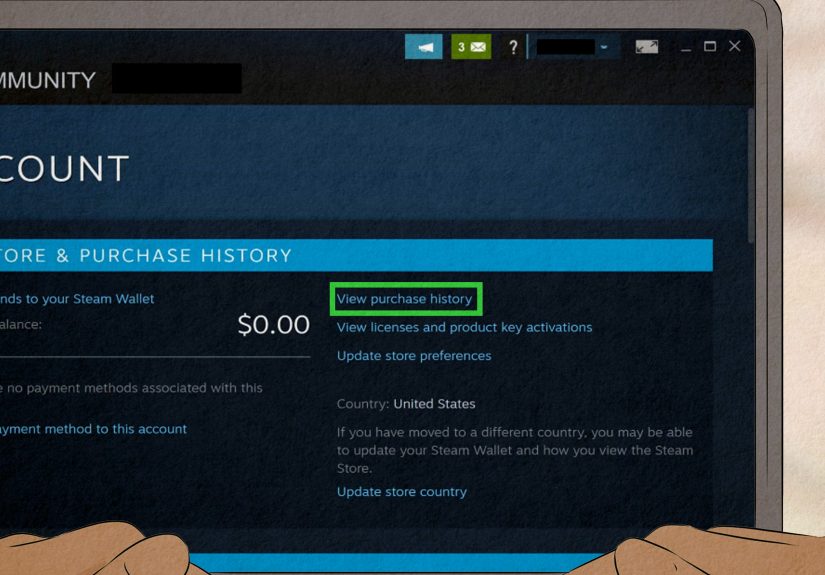
You start by going through Steam Support and selecting the purchase you want refunded. From there, you choose the refund option, pick your preferred destination when available, and submit the request. This is the easy part. No boss fight. No side quest. Just a few clicks and a reason for the request.
Step 2: Steam reviews the request
If your purchase fits the normal rules, the review process is usually straightforward. Steam’s public support stats often show refund-request response times that are much faster than a full day, which is encouraging if you are checking your inbox every eleven minutes like a responsible digital shopper. Still, fast response times are not a promise that every refund will be approved instantly.
Some cases move more slowly than others. Requests that fall outside the usual refund rules, involve unusual payment methods, or require additional review can take longer. Steam also says you can still ask for a refund even if you are outside the standard rules, but those cases are handled individually.
Step 3: The refund is approved
Once approved, Valve says the refund is issued within a week. That is the key phrase. Not within a week of purchase. Not within a week of regret. Within a week of approval.
Step 4: Your payment method catches up
This is where people get confused. If you chose the original payment method, your bank or payment provider still needs to post the refund. That can be quick, or it can feel like your money stopped for snacks on the way home. Steam specifically notes that international payment methods may take longer, which means the actual visible credit can lag behind the approval notice.
Steam’s Standard Refund Rules for Games and Software
Steam’s best-known rule is simple: for most games and software on the Steam store, the standard refund window applies if the purchase was made within the last 14 days and the title has been played for less than 2 hours. That is the headline rule most players know, and it is still the core one.
This policy is generous enough to let you test whether a game actually runs, whether the controls feel like a dream or a punishment, and whether your “I’ll probably love this” impulse was correct. But it is not a free long-term rental plan. Once you move too far past the 14-day window or blow past the 2-hour playtime threshold, approval becomes much less predictable.
That said, Steam also leaves the door open for exceptions. If your case falls outside the normal policy, you can still submit the request. Valve says it will take a look. That does not mean automatic success, but it does mean the policy is not a brick wall in every unusual situation.
What Else Can Be Refunded on Steam?
Steam refunds are not limited to full games. The rules change depending on what you bought, and that is where people often trip over the fine print.
DLC
DLC bought through the Steam store can be refundable within 14 days, as long as the underlying game has been played for less than 2 hours since the DLC purchase and the DLC has not been consumed, modified, or transferred. Some third-party DLC is marked nonrefundable before purchase, so read the store page instead of trusting your optimism.
In-game purchases
Valve-developed games can offer refunds on in-game purchases within 48 hours of purchase if the item has not been used, modified, or transferred. For non-Valve games, refunds depend on whether the developer has opted in to that policy.
Pre-orders and early access
Steam’s current policy is especially important here. If you buy a title before release, the 14-day refund window starts on release day, but any playable early or advanced access time now counts toward the 2-hour limit. In other words, pre-release playtime is no longer a magic loophole. If you spend too long in early access, that time can count against refund eligibility later.
Steam Wallet funds
You can request a refund for Steam Wallet funds within 14 days of purchase if those funds were bought on Steam and have not been used.
Renewable subscriptions
Some recurring subscriptions can be refunded within 48 hours of the initial purchase or automatic renewal, as long as the subscription was not used during the current billing cycle.
Bundles
Bundles can qualify too, but Steam looks at combined usage time across the items in the bundle. If the total usage is under 2 hours and none of the items were transferred, you may be eligible.
What Usually Slows a Steam Refund Down?
If your refund is dragging its feet, there is usually a reason. Not always a satisfying reason, but a reason.
- The payment method is slow: This is common with banks and some international payment methods.
- The original payment method is unsupported for refunds: In that case, Steam may route the money to your Steam Wallet.
- Your request is outside the standard rules: Extra review can add time.
- Weekends or holidays: Financial processing is not famous for its sense of urgency.
- You are checking too fast: Not a real technical cause, but spiritually it does make the wait feel longer.
Another source of confusion is the difference between support response time and refund settlement time. Steam’s support stats can look impressively quick, but that does not mean the funds will materialize in your bank account at the same speed. Think of it this way: the ticket can be answered fast, while the money still takes the scenic route.
How to Request a Steam Refund the Right Way
If you want the smoothest possible experience, use Steam Support and follow the standard path instead of trying to freestyle your way through account pages.
- Sign in to your Steam account through Steam Support.
- Select Purchases or the recent product you want help with.
- Choose the game, DLC, or other item.
- Select I would like a refund.
- Choose the refund method when available.
- Submit the request with your reason.
Keep your explanation simple and honest. “The game crashes on launch” is better than writing a dramatic novel about betrayal, confusion, and destiny. Steam does not need a monologue. It needs a clear reason.
Common Steam Refund Scenarios
You bought a game by mistake
This is one of the easiest refund stories. Maybe you clicked too quickly, bought the wrong edition, or realized you already owned it on another platform. If you are still within 14 days and under 2 hours of playtime, the refund process is usually straightforward.
The game runs terribly on your PC
This is practically what the policy was made for. If you launch the game, discover your system turns every cutscene into a flipbook, and stop before crossing the 2-hour mark, your chances are good.
You bought a pre-order, then changed your mind
If the game has not released and is not playable yet, you can generally request a refund before release. If you had early or advanced access and actually played it, that time now counts toward the refund limit.
You played too long
If you are well over 2 hours, Steam may still review the request, but it becomes a case-by-case situation instead of a routine one. This is the moment where hope should remain polite and realistic.
Your bank card is not showing the refund yet
If Steam approved the refund, but the card statement still looks unchanged, give it time. Steam says seven days is the typical window after approval, and longer delays can happen with international methods. If the wait goes beyond that, the next call is usually to your bank rather than to your keyboard’s refresh key.
What If Steam Approved the Refund but You Still Do Not See the Money?
Start by checking the exact date and time of the approval email. Then count from there, not from the original purchase date. If you are still inside the 7-day window, patience is annoying but normal.
If you have gone beyond 7 days, especially with a card or bank refund, contact your financial institution and ask whether there is a pending refund transaction. Steam’s own guidance points people in that direction when the money has not appeared after the usual window.
Also make sure the refund did not go to your Steam Wallet. In some cases, Steam cannot push the money back to the original payment method, and the wallet gets credited instead. That is still your money; it is just wearing a Valve costume now.
What to Expect Emotionally, Logistically, and Financially
The emotional side of a Steam refund usually follows a predictable arc. First comes confidence: “This will be quick.” Then comes refreshing your email. Then refreshing your bank app. Then opening Steam again to “just check one thing,” which is how many people end up browsing the store while waiting for a refund from the store. Humanity is complicated.
Logistically, the process is usually cleaner than the panic suggests. Steam’s refund rules are easy to understand for normal game purchases, and the support flow is fairly direct. Financially, the wait is usually short enough that it is a mild inconvenience rather than a life event. But it helps to set the right expectation: approval can be quick, while final posting still depends on payment rails outside Valve’s control.
Real-World Experiences: What Steam Refunds Usually Feel Like in Practice
In real life, the Steam refund experience tends to fall into a few familiar patterns. The first is the “that was surprisingly painless” story. Someone buys a game on impulse, launches it, realizes within 20 minutes that the performance is rough or the controls are not clicking, submits a refund request the same day, and gets an approval email fairly quickly. The money then appears a few days later, and the whole episode becomes a tiny life lesson in not buying games at midnight after watching one trailer and a suspiciously enthusiastic comment section.
The second pattern is the “approved fast, paid slow” experience. This is where people start wondering whether Steam changed its mind, stole the money, or sent it by carrier pigeon. In reality, the refund has often already been approved, but the bank or payment provider has not posted it yet. This is especially frustrating because the user has done everything right. The request was within the policy. The playtime stayed under the limit. The approval arrived. Yet the account balance still sits there, completely unbothered. In most cases, the money eventually shows up without drama. The waiting is the dramatic part.
Then there is the “I was technically outside the rules, but I asked anyway” story. Maybe the player went a little over 2 hours because they were troubleshooting crashes, or maybe they discovered a major issue after a weekend away pushed them past the 14-day mark. These cases are not guaranteed, but they are why it is still worth asking politely. Steam does review requests outside the normal rules, and some users do get a positive result when the situation is reasonable and clearly explained.
Another common experience involves pre-orders and early access. This catches people off guard because they assume pre-release playtime does not really count. Today, that is no longer a safe assumption. If you jumped into an early-access or advanced-access build and spent enough time with it, that playtime can count against the standard 2-hour rule. For some players, the surprise is not the refund request itself. It is realizing that the clock started in a way they did not expect.
There is also the Steam Wallet twist. Some users expect every refund to go neatly back to the original card, only to discover that the payment method used does not support that return path through Steam. When that happens, the refund may land in Steam Wallet instead. This is not usually a mistake; it is just how the system handles certain payment methods. It can feel a little strange if you wanted the money back in your bank account, but it is still a completed refund.
Overall, most Steam refund experiences are less about whether the system works and more about whether expectations were realistic. People who know the two big rules, understand the difference between approval and settlement, and remember that banks operate on their own timeline usually come away thinking the process is fair. People who expect instant cash-back within minutes tend to have a rougher emotional journey. In other words, the biggest trick to surviving a Steam refund is simple: request it promptly, stop playing the game, watch for the approval email, and do not treat your banking app like a live sports scoreboard.
Final Takeaway
So, how long does it take for Steam to refund you? Usually, the money is issued within a week after approval, while the request itself may be answered much faster. If you use an international payment method, the timeline can stretch longer. And if your original payment method cannot receive the refund, Steam may send the funds to your Steam Wallet instead.
The smartest move is to request the refund as soon as you know the purchase is not working out. Stay inside the 14-day window, keep playtime under 2 hours when possible, and do not confuse “approved” with “already visible on my card.” That one misunderstanding causes half the stress.
In other words, Steam refunds are usually not painfully slow. They are just slow enough to make you open your email more often than necessary.






 Close
Close