
Table of Contents >> Show >> Hide
- Why Build an ESP32 Weather Station on a PCB?
- The Core Hardware Stack
- PCB Design Choices That Actually Matter
- Enclosure and Outdoor Placement: Where Accuracy Lives or Dies
- Firmware Flow for a Low-Power Weather Station
- Common Mistakes Builders Make
- A Practical Build Strategy
- Experience-Based Lessons From Real ESP32 Weather Station Builds
- Final Thoughts
Note: Clean HTML body only for direct publishing. Source links intentionally omitted.
There are two kinds of weather stations in this world. The first kind looks amazing on your workbench, flashes a heroic boot screen, and then reports that your office is apparently located inside a volcano. The second kind is built with a little more discipline: solid power design, smart sensor placement, a sensible enclosure, and firmware that knows when to wake up, do its job, and go back to sleep. This article is about building the second kind.
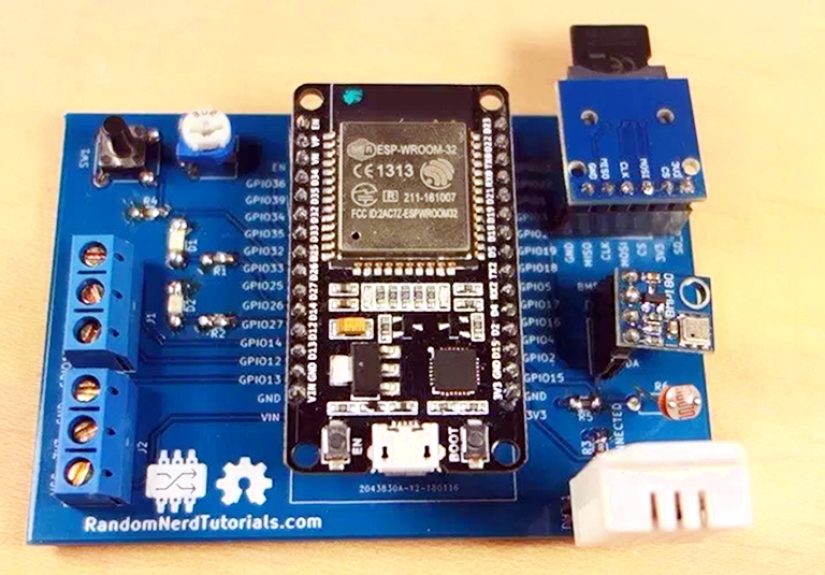
An ESP32 weather station on a PCB is one of those projects that sounds simple until the details start throwing tomatoes. The ESP32 is a great fit because it gives you Wi-Fi, plenty of GPIO, deep-sleep support, and a huge ecosystem. Put it on a custom PCB with the right environmental sensors, and you can build a compact station that logs temperature, humidity, barometric pressure, and even expanded measurements like rainfall or wind if you want to get ambitious. The trick is that weather projects are not just electronics projects. They are also measurement projects, which means accuracy matters just as much as blinking LEDs and beautiful traces.
That is why the “on a PCB” part matters. A custom board turns a spaghetti monster of jumper wires into something reliable, repeatable, and publishable. It lets you shorten signal paths, improve power integrity, place connectors exactly where they belong, and build around real-world constraints like outdoor mounting, battery operation, and radio performance. It also lets you make fewer ugly decisions at 1:00 a.m. with a soldering iron in one hand and regret in the other.
Why Build an ESP32 Weather Station on a PCB?
Using a breadboard is great for early testing, but weather stations are not desk ornaments. They live in enclosures, deal with heat, moisture, and cable runs, and often need to run for months with minimal drama. A proper PCB solves several problems at once.
First, it improves stability. I2C sensors such as the BME280 or SHT31 behave much better when they are connected with short, predictable traces instead of mystery wires that act like little antennas. Second, it improves power efficiency. The ESP32 can take a reading, transmit data, and drop into deep sleep, which is exactly what you want for battery-powered or solar-assisted weather logging. Third, it improves maintainability. Once the board is laid out properly, you can build the same design again without rediscovering every mistake like it is a family tradition.
A custom board also helps you design for expansion. Maybe version one measures temperature, humidity, and pressure. Version two adds a rain gauge input, an anemometer connector, a small e-paper display, a battery charger, or an external antenna option. A PCB gives those ideas a home instead of forcing them to dangle from dupont wires like electronic ivy.
The Core Hardware Stack
1. The ESP32 Module
The heart of the project is usually an ESP32 module rather than a bare chip, especially if you want a faster path from idea to working device. Modules simplify RF design, make certification less painful, and reduce the odds that your Wi-Fi range will be “excellent within a radius of one disappointed foot.” For a weather station, the ESP32 gives you enough performance to read sensors, calculate derived values, timestamp readings, push data to an API, publish to MQTT, or update a display.
The real superpower is not raw speed. It is duty-cycling. A weather station does not need to act like a gaming laptop. It can wake up every few minutes, sample sensors, send data, and go back to sleep. That behavior makes the ESP32 a practical choice for low-power environmental monitoring, especially when paired with a battery or small solar setup.
2. Environmental Sensors
If you want a practical first version, start with a sensor that combines temperature, humidity, and barometric pressure. The BME280 is a classic choice because it is compact, widely supported, and easy to integrate over I2C or SPI. It is popular for good reason: one tiny package gets you the three data points people expect from a basic weather station.
If humidity and temperature accuracy are your priority, an SHT31-class sensor is also a strong option. Many builders use a pressure sensor and a dedicated temperature-humidity sensor instead of relying on a single combo part, especially when they want more flexibility in sensor placement or calibration strategy. That is a perfectly reasonable move if your project goal is better measurement quality rather than minimum part count.
Whichever sensor you choose, remember an uncomfortable truth: the sensor is honest, but your board may not be. If the ESP32, regulator, charging circuit, or display sits too close to the sensing element, the board can warm the air around it and skew readings. That is why many successful boards physically separate the sensor section from the hottest components, sometimes even placing the sensor near a board edge or behind vent openings in the enclosure.
3. Power System
Your power design depends on where the station will live. Indoor display on USB power? Easy life. Outdoor node on battery? That is where the grown-up decisions begin.
For many builds, a 3.3V rail, clean decoupling, and a battery-friendly regulator are the minimum requirements. If you plan to charge a LiPo from USB or solar, you also need a charging circuit and basic battery protection strategy. The goal is not just to power the board, but to power it quietly. Weather data looks a lot less scientific when your rail is noisy and your sensor bus is throwing little tantrums.
4. Display Options
A display is optional, but it is also fun, and fun is allowed. Small OLED panels are easy and bright, but they consume more power than people like to admit. E-paper is often the smarter choice for a low-power weather station because it is readable outdoors and only needs meaningful power when refreshing the screen. If your station updates every 10 or 15 minutes, e-paper starts looking very attractive.
PCB Design Choices That Actually Matter
This is where a lot of weather projects quietly become heat sensors with Wi-Fi. Good PCB design is not glamorous, but it is the difference between reliable data and decorative fiction.
Respect the Antenna
If you use an ESP32 module with an onboard antenna, give that antenna room to breathe. Keep copper, traces, and components away from the antenna keep-out zone. Do not bury the antenna behind a metal bracket, jam it against a battery, or tuck it into a plastic box corner like it is being punished. If the antenna end can extend toward the board edge or outside the densest circuitry, even better.
Give the Board a Real Ground Strategy
A continuous ground reference matters for RF performance, power stability, and general electrical sanity. A four-layer board is ideal if the budget allows it, but a careful two-layer design can still work well for a hobby or prosumer station. What matters is intentional routing, short return paths, and enough local decoupling near the power pins and sensitive circuitry.
Separate Heat From Measurement
The sensor should not live in the thermal shadow of the ESP32, regulator, or charging chip. Leave space between the radio and the environmental sensor. Avoid putting the sensor next to a display driver, buck converter, or any component that gets warm during operation. If possible, place the sensor on a small “quiet” edge of the board, with ventilation in the enclosure nearby.
Design for Real Connectors
Weather stations love accessories. Rain gauges, anemometers, external power, programming headers, and battery leads all need clean connections. Put proper connectors on the PCB from day one. Future you will be deeply grateful when you are not trying to debug a wind vane through a breadboard jumper that only works when tilted at the emotional angle of 37 degrees.
Enclosure and Outdoor Placement: Where Accuracy Lives or Dies
You can build a beautiful board and still get lousy weather data if you mount it badly. Outdoor measurements are all about exposure. Temperature and humidity sensors should be protected from direct sun and precipitation, but still exposed to moving air. That is why radiation shields exist. Without one, your sensor will happily report the weather on the surface of the sunlit plastic housing instead of the actual ambient conditions.
Placement matters just as much. For temperature sensing, open, representative ground is preferable to patios, rooftops, dark walls, or concrete heat traps. In standard weather guidance, sensors are commonly mounted around five feet above ground, away from nearby obstructions and well clear of paved surfaces. In plain English: do not mount your proud new weather station above a barbecue grill and then act surprised when July looks aggressive.
If you add rainfall and wind measurements, placement gets even trickier because ideal locations for those sensors are not identical. That is one reason many serious stations separate the sensor suite from the main PCB enclosure. Your core board can handle logging and connectivity while external sensors sit where the data makes the most sense.
Firmware Flow for a Low-Power Weather Station
A smart ESP32 weather station usually follows a simple routine:
- Wake from deep sleep.
- Power or initialize sensors.
- Take one or more readings.
- Optionally calculate dew point, pressure trend, or altitude estimate.
- Connect to Wi-Fi.
- Send data to a dashboard, database, or MQTT broker.
- Refresh the display if one exists.
- Go back to sleep.
This pattern is efficient because Wi-Fi is one of the biggest energy costs in the system. If you keep the radio on all the time, your battery will not “last a while.” It will perform a magic trick and disappear. Deep sleep turns the project from a thirsty gadget into a practical remote node.
It is also worth averaging or filtering readings thoughtfully. Pressure data can be smoothed. Humidity can benefit from stable sampling intervals. Temperature may need an offset correction if the board enclosure or nearby components introduce a known bias. The right firmware does not fake accuracy, but it can reduce noise and make the station more consistent.
Common Mistakes Builders Make
- Placing the sensor too close to the ESP32 or regulator and wondering why the temperature reads high.
- Ignoring antenna clearance and then blaming Wi-Fi for being “moody.”
- Skipping a radiation shield for outdoor temperature and humidity readings.
- Using a gorgeous sealed enclosure with almost no airflow.
- Leaving the ESP32 awake full time when the project only needs readings every few minutes.
- Designing the PCB before deciding how the board will mount, vent, or connect to external sensors.
None of these are fatal. They are just extremely common. The good news is that a custom PCB lets you fix most of them in revision two, which every honest hardware project eventually reaches. Hardware engineers do not fail; they create version numbers.
A Practical Build Strategy
If you want the highest chance of success, do not begin with a giant feature list and a heroic promise to add “just one more thing.” Start with a compact design:
- ESP32 module
- BME280 or similar environmental sensor
- 3.3V regulation and proper decoupling
- USB or battery input
- Programming header
- Mounting holes and vent-aware enclosure plan
Once that works, add extras like e-paper, solar charging, a tipping-bucket rain gauge input, or wind measurement connectors. This staged approach helps you isolate errors and build confidence. It also keeps your first board from becoming an accidental tribute to feature creep.
Experience-Based Lessons From Real ESP32 Weather Station Builds
One of the biggest experience-driven lessons with an ESP32 weather station on a PCB is that the first successful boot is not the same thing as a successful station. On day one, you are thrilled because the serial monitor shows temperature, humidity, and pressure. On day three, you notice the temperature is always a little too warm. On day five, Wi-Fi gets weird when the enclosure is closed. On day seven, you realize your “outdoor” station has basically been measuring the microclimate inside a sunlit plastic lunchbox. That progression is normal.
Builders often discover that the physical design matters as much as the schematic. A board that looks electrically perfect on screen may still behave badly if the sensor is boxed in, if the antenna is blocked, or if the mounting location is poor. Many people learn this only after comparing their readings to a local trusted station or to another calibrated sensor. That comparison phase is incredibly valuable. It turns the project from a fun gadget into a useful instrument.
Another common experience is learning to love deep sleep. At first, many builders keep the ESP32 awake because it feels more “alive.” But once battery life becomes part of the story, deep sleep stops looking optional and starts looking brilliant. Waking up, taking a fast sample, publishing data, and going silent again feels elegant. It also makes the station seem more professional, because it behaves with purpose instead of just sitting there burning energy like a tiny Wi-Fi campfire.
Display choices also teach hard lessons. OLED screens look fantastic on the bench, and then outdoor use reveals glare, power draw, and visibility issues. E-paper often wins people over slowly. It is not flashy, but it is readable, efficient, and oddly satisfying. The first time you see weather data sitting clearly on a display with almost no ongoing power use, it feels like the project graduated from “maker experiment” to “small appliance.”
There is also a psychological shift that happens when the design moves from jumper wires to a PCB. Suddenly the project feels real. You stop asking whether it works right now and start asking whether it will still work next month. That shift improves decision-making. You care more about connector strain relief, mounting holes, firmware recovery, and whether a sensor can be replaced without redesigning half the board. In other words, you stop building for the photo and start building for the weather.
Perhaps the most useful lesson is this: weather stations reward patience. Small layout tweaks, a better vent pattern, a little more spacing around the sensor, or a smarter mounting location can improve results more than buying a fancier microcontroller ever will. The best builds are rarely the most complicated. They are the ones where the electronics, enclosure, firmware, and installation all agree to cooperate like mature adults for once.
Final Thoughts
An ESP32 weather station on a PCB is a fantastic project because it sits at the intersection of embedded systems, sensor design, RF layout, and real-world measurement. It is approachable enough for a serious hobbyist and deep enough to keep experienced builders entertained. If you get the fundamentals right, you end up with more than a cool gadget. You get a reliable local instrument that tells you what the weather is doing right where you are, not ten miles away at an airport that does not know your backyard exists.
Build the board cleanly. Respect the antenna. Keep the sensor cool and ventilated. Use deep sleep like you mean it. And above all, remember that in weather projects, bad placement can ruin good electronics faster than almost anything else. The clouds may be unpredictable, but your PCB does not have to be.





 Close
Close