
Table of Contents >> Show >> Hide
- What Is the Epson PX-8, and Why Does It Feel Like a Time Capsule?
- Modern Day BBS: Yes, They Still Exist (and They’re Having a Moment)
- The Secret Weapon: A Wi-Fi “Modem” That Pretends It’s 1993
- Hooking Up the PX-8: RS-232C, Cables, and the Ancient Art of “Why Won’t This Connect?”
- Terminal Software on CP/M: When Your “Downloads” Live on a Microcassette
- The 80×8 Lifestyle: Making Modern BBS Interfaces Fit a Tiny Window
- Choosing BBSes That Play Nice with Vintage Terminals
- Modern Reality Check: Security, Privacy, and Not Using Your Banking Password
- Why This Still Matters: The Internet, But Human-Sized
- Conclusion: Closing the Lid Without Logging Off (Emotionally)
- Experience Add-On: of Real-World PX-8 BBS Browsing Vibes
If you’ve ever looked at today’s internet and thought, “Wow, this would be better with more screeching modem noises and fewer autoplay videos,” congratulations:
your hobbies are about to get wonderfully inconvenient.
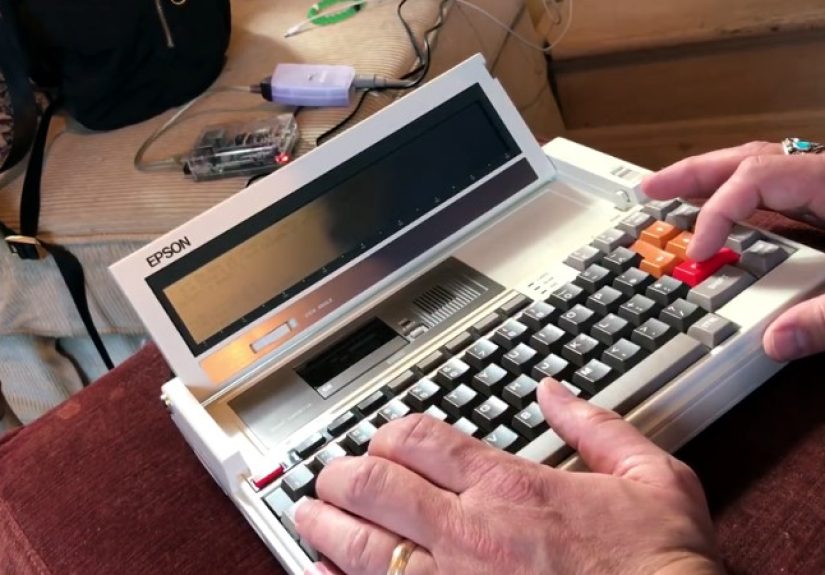
The Epson PX-8 is a mid-1980s CP/M “laptop” (think: briefcase with opinions) that boots fast, sips power, and displays a glorious
80 columns by 8 lines of textbecause who needs the other 16 lines when you can build character instead?
And yet, in 2026, you can still use this tiny slab of retro computing to browse modern bulletin board systems (BBSes)the original social networksthanks to a clever bridge:
a Wi-Fi-to-serial “modem” that speaks fluent Hayes AT commands like it’s 1991 and long distance charges are a personal attack.
In this guide, we’ll tour the PX-8’s quirks, the modern BBS landscape, and the practical how-to of getting a vintage CP/M machine chatting with telnet-accessible boards today.
Expect real setup advice, specific examples, and a little humorbecause if you’re using an eight-line screen by choice, you already understand joy through mild suffering.
What Is the Epson PX-8, and Why Does It Feel Like a Time Capsule?
The Epson PX-8 (sometimes nicknamed “Geneva”) sits in that magical era when portable computers were ambitious, battery-powered, and unapologetically weird.
It runs a customized CP/M-80 environment on a Z80-compatible CPU and leans heavily on ROM cartridges for software.
For storage, it famously uses a built-in microcassette drivebecause floppy disks were for people who enjoyed frivolous luxuries like “reliability.”
The headline feature (and frequent punchline) is the display: 80×8 text on a non-backlit LCD.
That means you get a full-width terminal view, but only eight lines talllike reading a novel through a mail slot.
Still, the PX-8 was designed for real work: WordStar on the go, basic spreadsheets, scheduling, and data entry.
It also includes serial connectivity via RS-232C, which is the key to BBS accessthen and now.
Why the PX-8 is surprisingly “BBS-shaped”
The BBS era loved three things: text, serial ports, and patience. The PX-8 brings all three to the party.
CP/M has a long history with terminal programs, communications utilities, and no-nonsense workflows.
If your goal is modern day BBS browsingmessage boards, file listings, chat, and low-drama social networkingthis machine is oddly perfect.
Not because it’s easy. Because it’s pure.
Modern Day BBS: Yes, They Still Exist (and They’re Having a Moment)
A bulletin board system is a computer you connect to (originally by phone line and modem) to post messages, download files, play “door” games, and hang out in a community.
Replace “phone line” with “internet,” and you’ve basically described how many BBSes operate today.
Most modern boards are reachable via telnet (sometimes SSH), and many still keep old-school dial-up alive through creative setups.
The modern BBS ecosystem is delightfully varied:
retrocomputing hubs, local community boards, niche fandom hangouts, ANSI art galleries, and boards that feel like living museumswith active users.
If you want a directory, you’ll find huge listings that track dial-up and telnet systems worldwide, including many that are text-first and friendly to vintage terminals.
What “browsing” means on a BBS
- Message bases: threaded conversations, announcements, and long-running community discussions
- File areas: curated archives, text files, and vintage software collections
- Chat: real-time or semi-real-time (depending on the system and your luck)
- Doors: classic BBS games and utilities, sometimes modern remakes
The best part: BBS culture tends to reward curiosity and good manners. The worst part: you’ll start saying things like “I’ll BRB, my terminal needs a better parity setting.”
Your friends may stop inviting you to brunch. But you’ll gain something better: a handle.
The Secret Weapon: A Wi-Fi “Modem” That Pretends It’s 1993
The Epson PX-8 expects a modem on its RS-232C portclassic dial-up style.
Modern networks don’t provide you a phone line (and if they do, it’s probably haunted), so the workaround is a small device that:
acts like a Hayes-compatible modem to the PX-8, but actually routes your connection over Wi-Fi to a telnet BBS.
In practice, these devices let you type familiar commands like:
ATZ (reset),
ATDT (dial),
anddepending on the firmwareconnect to hostnames, IP addresses, and ports instead of phone numbers.
Your PX-8 thinks it’s calling a BBS in the next town. The modem knows it’s calling a server across the country.
Everyone wins, especially your electricity bill.
Common options (and what to look for)
- Hayes AT command support (non-negotiable for vintage comms software)
- Wide baud rate range (300 for vibes, higher for practicality)
- Flow control support (XON/XOFF is often your friend on older systems)
- Telnet-friendly features (some devices handle telnet negotiation better than others)
- DB-25 serial compatibility or a clean way to adapt from DB-25 to whatever you have
The fun part is that many of these devices intentionally behave like old modems:
they report RING, CONNECT 2400, and all the cozy status messages that make your brain play dial-up sound effects from memory.
Hooking Up the PX-8: RS-232C, Cables, and the Ancient Art of “Why Won’t This Connect?”
Before software, before BBS lists, before your triumphant loginthere is cable reality.
The PX-8 uses RS-232C for communication with modems and acoustic couplers, which means you’ll need:
(1) a compatible serial interface on the PX-8 side, and
(2) a properly wired cable to your Wi-Fi modem device.
Here’s the part nobody puts on the box: serial can be hilariously picky.
If you’re not connecting, the cause is often one of these:
wrong cable type (null-modem vs straight-through),
mismatched baud rate,
wrong parity,
or flow control fighting you like two raccoons in a trash can.
Baseline serial settings to try first
- Baud rate: start with 300 or 1200 for authenticity, then try 2400 or 9600 if stable
- Data bits: 8
- Parity: none
- Stop bits: 1
- Flow control: XON/XOFF (software) is often a safe first choice
Once your serial settings match on both ends, you should be able to type AT and get an OK.
That tiny “OK” is the modern equivalent of a knight dubbing ceremony.
You are now officially allowed to say “I’m going online” and mean it in the 1980s sense.
Terminal Software on CP/M: When Your “Downloads” Live on a Microcassette
On modern PCs, you install a terminal app in seconds.
On the PX-8, you’re playing on hard mode: CP/M, ROM-based apps, and tape storage that rewards careful labeling like it’s a library card catalog.
Still, CP/M has a rich ecosystem of communications toolsterminal programs and file transfer utilities built for exactly this kind of work.
Your goal is simple: run a terminal program that can talk over the serial port and pass through the data cleanly.
Features that help:
scroll control, simple capture-to-file (if you have storage), and support for common transfer protocols (XMODEM is a classic).
How people typically move software onto a PX-8 today
- Serial transfer from a modern computer using a known protocol (slow, but dependable)
- Using existing ROM cartridges if you already have a comms utility available
- External storage accessories if your setup includes them (less common, more luxurious)
The practical advice: start with the simplest terminal method you can.
Once you can connect and interact, then worry about cleaner transfers and nicer workflows.
On an eight-line screen, “working” beats “perfect” every time.
The 80×8 Lifestyle: Making Modern BBS Interfaces Fit a Tiny Window
Let’s talk about the elephant in the roomexcept the elephant is only visible from the knees down because you have eight lines.
Many BBSes assume a 24- or 25-line terminal. ANSI screens often draw art, menus, and boxes that expect vertical space.
The PX-8 will display them… in installments.
Tips to keep your screen readable
- Prefer text/TTY modes when offered (many BBSes let you disable ANSI graphics)
- Set your terminal size (some boards let you declare your screen height; choose 8 if possible)
- Use “More” behavior: look for paging options so long messages don’t fly by
- Slow it down: dropping baud rate can make reading manageable and reduce overrun issues
- Embrace minimalism: file lists and message readers are your happy place; full-screen ANSI art is… an adventure
You may find that “browsing” a BBS on the PX-8 feels different from using a modern terminal with scrollback.
It’s closer to reading live: you focus, you navigate deliberately, and you stop skimming.
The PX-8 doesn’t let you pretend you’re multitasking, which is honestly refreshing.
Choosing BBSes That Play Nice with Vintage Terminals
Not all BBSes are created equalespecially if your terminal is essentially a wide business card.
When picking a board to browse on the Epson PX-8, look for:
clear menus, text-first layout, minimal ANSI dependency, and a community that still remembers what “8-N-1” means.
What to look for in a “PX-8-friendly” BBS
- Telnet access (host and port you can “dial” with your Wi-Fi modem)
- Configurable terminal settings (ANSI on/off, screen length, character set)
- Active message boards (so it’s not just a museumthough museums can be cool too)
- Clear help screens (because you will forget a command and blame the cassette drive)
Many directory sites and community lists categorize boards by type and accessibility.
If you’re new to modern day BBS browsing, start with boards known for welcoming users on odd hardware.
Half the fun is telling the sysop you logged in on a PX-8 and watching the collective nostalgia sparkle.
Modern Reality Check: Security, Privacy, and Not Using Your Banking Password
BBSing is charming, but telnet is typically unencrypted.
Treat it like talking loudly in a diner: don’t share secrets, don’t reuse important passwords, and don’t assume privacy.
Many BBS accounts are hobby identities anywayhandles, not résumés.
If you want extra peace of mind, keep your retro gear on a guest Wi-Fi network.
The point here is fun, not fortress-grade security.
Besides, the PX-8 already has enough going on emotionally with that eight-line screen.
Why This Still Matters: The Internet, But Human-Sized
Browsing a modern day BBS on an Epson PX-8 isn’t just retro cosplay.
It’s a reminder that online spaces can be smaller, slower, and more intentional.
BBS communities often feel like neighborhood bulletin boards rather than stadium crowds.
You read more carefully. You write more thoughtfully. You’re less likely to doomscrollpartly because doomscrolling is difficult when you can only see doom in eight-line slices.
And there’s a deeper joy: you’re not just consuming content.
You’re operating a systemcables, protocols, terminal quirks, and alland making something old do something meaningful today.
That’s not nostalgia. That’s craft.
Conclusion: Closing the Lid Without Logging Off (Emotionally)
The Epson PX-8 was built for a world of dial-up, text, and portable productivity.
With a modern RS-232 Wi-Fi modem and a CP/M terminal program, it can still roam that worldnow mapped onto telnet-accessible BBSes and internet-connected communities.
Yes, you’ll wrestle with cables. Yes, you’ll tweak baud rates like you’re tuning a radio in a storm.
And yes, the screen will make you question your life choices until you realize you’re smiling.
Because when you finally see that login banner appearline by line, perfectly imperfectyou’ll know you didn’t just browse a BBS.
You time-traveled with intent.
Experience Add-On: of Real-World PX-8 BBS Browsing Vibes
The first time I tried browsing a modern day BBS on the Epson PX-8, I made the classic mistake: I assumed the hard part would be “the internet.”
Nope. The hard part was the cable, because RS-232 is basically a choose-your-own-adventure book where every choice ends with “Nothing Happens.”
After a few rounds of swapping adapters and muttering phrases that would confuse a Victorian child (“Is this DTE? Is this DCE?”), I finally typed AT and got OK.
I felt like I’d successfully communicated with a friendly alien.
Then came the dialing. On a Wi-Fi modem, “dialing” is mostly theater, but it’s theater I adore.
I typed something that looked like a phone call, hit enter, and watched the PX-8 act like it was about to reach through the phone network and shake hands with destiny.
A moment later: CONNECT. No screeching audio, but my brain filled it in anyway, like muscle memory for nostalgia.
The BBS banner arrived as textsimple, clean, and oddly comforting.
And then the eight-line screen made its presence known.
Every menu felt like peeking through blinds.
ANSI graphics? Hilarious. It wasn’t “art” so much as “a suggestion of art,” like a billboard viewed from a fast-moving bus.
I quickly learned to look for a “no ANSI” option, or anything labeled “TTY,” “ASCII,” or “plain.”
The moment the BBS switched to a clean text menu, the PX-8 felt suddenly competentlike it stopped pretending to be a tiny TV and became what it really is: a serious text machine.
Reading messages was the best part.
With no scrollback safety net, I stopped skimming and started reading.
I’d open a post, let it fill the screen, then move down line by line like I was reading a teletype.
It slowed my brain in a good way.
Modern platforms train you to scan and bounce; the PX-8 trains you to pay attention.
I found myself replying more carefully too, because composing text on a vintage keyboard feels like writing a letternot firing off a comment.
File browsing was a mixed bag.
Lists are fine, but long directories can be a waterfall if your flow control is cranky.
I ended up lowering the baud ratenot because the PX-8 couldn’t handle more, but because I couldn’t.
Lower speed gave me time to actually see what was happening, and it made the whole experience feel more authenticlike the system and I had agreed to stop rushing.
The real magic arrived when someone in a chat or message base asked, “What are you calling in on?”
I answered honestly: “Epson PX-8, eight-line screen, living dangerously.”
The responses ranged from delight to disbelief, like I’d shown up to a car meet on a penny-farthing.
That’s the modern BBS charm: people still get excited about the how, not just the what.
By the end of the session, I hadn’t just browsed a BBSI’d joined a little pocket of internet where curiosity still counts as social currency.
I logged off, closed the lid, and immediately wanted to do it again. Because apparently I’m the kind of person who thinks eight lines is plenty. (It is. Mostly.)







 Close
Close