
Table of Contents >> Show >> Hide
- How a Sound-Triggered Arduino Flash Works
- Why Use an Arduino Instead of Just Pressing a Button?
- Core Components for the Project
- Safety First: Camera Flashes Are Not Toys
- Programming Logic: Simple but Powerful
- Digital Output vs. Analog Output
- Photography Setup: Making the Shot Work
- Common Problems and Fixes
- Why This Project Is Great for Learning
- of Practical Experience: Lessons From Building a Sound-Triggered Flash
- Conclusion
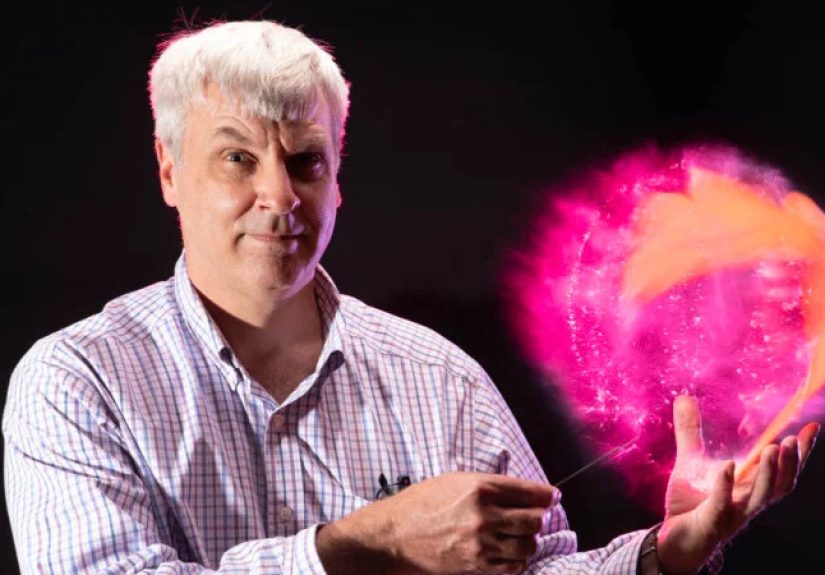
There are photography tricks that feel like magic until you peek behind the curtain and find a tiny microcontroller, a microphone, and a very sensible little switch doing all the hard work. “An Arduino triggers a flash with sound” sounds like the opening line of a garage-lab fairy tale, but it is actually a practical high-speed photography technique. The idea is simple: when a loud sound happenssay, a balloon popping, a glass cracking, or a clap sharp enough to scare the catan Arduino detects the sound and fires a camera flash at just the right instant.
This project sits at the fun intersection of Arduino electronics, sound sensors, DIY photography, and the glorious human urge to freeze chaos in a single frame. A camera shutter is often too slow to capture extremely fast motion by itself. A flash, however, can emit a very brief burst of light. In a dark room with the camera shutter held open, the flash becomes the real “exposure clock.” Trigger the flash at the right moment, and you can capture events that normally vanish before your brain has time to say, “Wait, did that balloon just explode?”
Recent high-speed photography projects have shown students using Arduino boards, microphone modules, and isolated flash trigger circuits to capture balloon pops and similar fast events. In one classroom example, a sound detector listens for a sharp noise; when the signal rises beyond a threshold, the Arduino sends a trigger pulse to the flash through an isolation component such as a reed relay or opto-isolator. Arduino’s own UNO Rev3 board is a popular choice because it offers digital input/output pins, analog inputs, and a familiar 5V development environment for quick prototyping.
How a Sound-Triggered Arduino Flash Works
The concept is easier than it looks. First, a sound sensor or microphone module monitors the room. Second, the Arduino reads the sensor’s output. Third, the program compares the sound level to a trigger threshold. Fourth, when the sound is loud enough, the Arduino activates a switching circuit. Finally, that switch closes the flash trigger connection for a tiny moment, and the flash fires.
Think of it as a tiny electronic security guard at a museum of chaos. The sensor says, “I heard something loud.” The Arduino says, “Was it loud enough?” The switch says, “I shall now poke the flash.” The flash says, “Boom, but politely.” The camera records whatever happened during that bright fraction of a second.
The Basic Signal Chain
A typical DIY Arduino flash trigger uses this chain:
- Sound event: A balloon pops, glass breaks, a clap happens, or another sharp noise occurs.
- Microphone module: The sensor converts sound pressure into an electrical signal.
- Arduino input: The Arduino reads either a digital HIGH/LOW signal or an analog value.
- Threshold logic: Code decides whether the sound is strong enough to trigger the flash.
- Isolation switch: A reed relay or opto-isolator separates the Arduino from the flash circuit.
- Flash pulse: The flash fires, freezing the subject in the dark room.
The most important design choice is whether to use the sound sensor’s digital output or analog output. Many inexpensive sound modules include both. A digital output goes HIGH when sound crosses a level set by a small onboard potentiometer. An analog output sends a changing voltage that represents sound intensity, giving the Arduino more flexibility. In one tested high-speed photography setup, the analog output ranged from 0 to 5V and the Arduino converted that voltage into values from 0 to 1023, allowing the program to trigger only when the reading exceeded the ambient noise level.
Why Use an Arduino Instead of Just Pressing a Button?
You can press a flash test button by hand, but your reflexes are not fast enough for most high-speed photography. Human reaction time is measured in fractions of a second. Many interesting motion eventswater splashes, balloon ruptures, powder bursts, snapping objectsunfold in milliseconds. By the time your finger reacts, the moment is already gone, probably laughing at you from the past.
An Arduino sound trigger removes the slow human from the timing loop. Once calibrated, the circuit responds automatically to the sound event. The photographer can set up the composition, open the shutter in a dark room, create the sound-producing action, and let the Arduino fire the flash. The final exposure is shaped more by flash duration and trigger delay than by the camera’s mechanical shutter speed.
Flash Duration Is the Real Secret
In high-speed flash photography, a shorter flash duration produces sharper frozen motion. Some studio flashes and speedlights produce very brief light bursts at lower power settings. In one classroom demonstration, an Einstein 640 flash at 1/256 power was measured at about 195 microseconds, short enough to capture a dramatic balloon pop with remarkable crispness.
That is why many photographers use a dark room and bulb mode. The shutter opens, but almost no light reaches the sensor until the flash fires. The flash becomes the instant that matters. It is less “taking a picture” and more “ambushing time with a lightning bug.”
Core Components for the Project
You do not need a Hollywood special-effects budget to build a sound-triggered flash system. The parts list can be surprisingly modest, especially if you already own an Arduino board and a manual flash. A basic build usually includes an Arduino UNO or compatible board, a sound detector module, jumper wires, a breadboard, a flash or strobe, and an isolation device such as a reed relay or opto-isolator.
1. Arduino UNO or Compatible Board
The Arduino UNO Rev3 is a practical starting point because it is widely documented and easy to program. The board is based on the ATmega328P and includes 14 digital input/output pins, 6 analog inputs, a 16 MHz ceramic resonator, USB connection, power jack, ICSP header, and reset button. That is more than enough hardware for a simple sound sensor and flash trigger circuit.
2. Sound Sensor or Microphone Amplifier
A sound sensor detects the noise that starts the photographic event. Simple modules often provide a digital trigger output, while more flexible boards provide an analog envelope or audio output. Adafruit’s electret microphone amplifier, for example, combines an electret microphone with a MAX4466 amplifier and supports adjustable gain, making it useful for measuring sound levels with Arduino. Its supply range and adjustable amplification help users tune sensitivity for different audio environments.
For beginners, a module with an onboard potentiometer is convenient. Turn the tiny screw, clap your hands, watch the serial monitor, and adjust until the circuit responds to the sound you care aboutnot the air conditioner, not your neighbor’s dog, and ideally not your own nervous breathing.
3. Reed Relay or Opto-Isolator
The isolation circuit is not optional. It is the polite fence between your Arduino and a flash unit that may contain unpleasant voltages. A reed relay behaves like a tiny magnetically controlled switch. It is affordable and easy to understand, though not always the fastest option. An opto-isolator, also called an optocoupler, uses light inside a sealed component to transfer a signal without direct electrical contact between two sides of a circuit. This makes it attractive for camera and flash triggering projects where electrical separation matters.
4. Manual Flash or Strobe
A manual flash is best because you can control its power. Lower power settings usually produce shorter flash duration, which is exactly what you want for freezing motion. Automatic TTL flash behavior is useful in event photography, but for this project, predictable manual output wins.
Safety First: Camera Flashes Are Not Toys
This is the part where the fun article puts on safety goggles and stops making balloon jokes for a moment. Camera flashes and xenon strobes can contain high-voltage capacitors. Even small camera flash capacitors may be charged to roughly 250–330 volts, and some flash or strobe circuits can go higher. Capacitors can also retain charge after power is removed, which means “I turned it off” is not the same as “it is safe to touch.”
Do not open a flash unit unless you are trained to work safely around high voltage. Do not connect an Arduino pin directly to unknown flash trigger contacts. Do not assume a vintage flash is safe for modern electronics. Measure trigger voltage, use proper isolation, and when in doubt, use modern low-voltage trigger equipment or a commercial optical/radio trigger. The goal is to freeze motion, not your heartbeat.
Why Isolation Matters
An Arduino output pin is designed for low-voltage logic, not for absorbing mystery voltages from an old flash found in a drawer labeled “probably fine.” Isolation allows the Arduino to control a separate circuit without sharing direct electrical contact. In optocoupler test circuits, the Arduino side and the camera or external circuit side remain electrically separate, reducing the chance that a voltage spike travels back into the microcontroller.
Programming Logic: Simple but Powerful
The code for a sound-triggered Arduino flash can be refreshingly small. The Arduino reads the sensor value, checks whether it is above a chosen threshold, sends a short pulse to the flash trigger pin, and then waits long enough to prevent repeat triggering. In one published example, the flash trigger pin is set HIGH for about 1 millisecond and then LOW again, while a delay gives the photographer time to close the camera shutter before resetting the system.
Example Arduino Logic
Here is the plain-English version of the program:
The delay before firing is where creativity enters. A delay of zero or one millisecond may capture the earliest stage of a balloon pop. A longer delay might show the balloon skin farther apart, the water cloud more developed, or the flying fragments in a more dramatic position. Adjusting delay is like moving a time cursor through a tiny explosion.
Digital Output vs. Analog Output
Using a digital output is convenient. You wire the module’s output pin to a digital Arduino input, adjust the onboard sensitivity, and check whether the pin goes HIGH when the sound occurs. It is simple, but the module decides where the threshold is.
Using an analog output gives more control. The Arduino reads a numerical value and the code decides what counts as “loud enough.” This is useful when ambient noise changes or when you want to fine-tune the trigger point. Arduino’s analog input system maps voltages into integer values, commonly 0 to 1023 on classic UNO-style boards, so the code can compare readings against a selected threshold.
Calibration Tips
Start by printing sensor values to the Serial Monitor or Serial Plotter. Observe the quiet-room baseline, then clap near the sensor. If the room sits around 70 and a clap spikes to 800, a threshold around 100 may work well. If the room is noisy, you may need a higher threshold or a better microphone placement. Once calibrated, turn off unnecessary serial printing during the actual shoot because serial output can slow the loop.
Photography Setup: Making the Shot Work
The electronics are only half the story. The photography setup matters just as much. A typical workflow looks like this:
- Place the subject against a dark background.
- Mount the camera on a tripod.
- Focus manually on the action point.
- Set the room as dark as practical.
- Set the camera to bulb mode or a long exposure.
- Open the shutter.
- Create the sound event.
- Let the Arduino trigger the flash.
- Close the shutter.
Because the room is dark, the sensor records little or nothing before the flash. The subject appears only during the flash burst. This is why a long camera exposure can still produce a sharp image of a fast event. The flash is acting like a tiny slice of daylight with dramatic timing.
Good Subjects for Testing
Balloons are classic because they are cheap, colorful, and loud. Add a little water, powder, or cornstarch, and suddenly you have a science-lab volcano wearing party clothes. Other possibilities include snapping dry pasta, dropping objects into water, popping soap bubbles, cracking eggshells, or capturing a clap with powder between hands. Always protect the camera, lens, flash, walls, pets, and any human who did not knowingly sign up to be dusted with flour.
Common Problems and Fixes
The Flash Fires Too Early
Add a small delay in the code before triggering the flash. Try 1 ms, 5 ms, 10 ms, and so on. The right value depends on the distance between the sound source and microphone, the type of event, and the image you want.
The Flash Fires Too Late
Reduce the delay, move the microphone closer to the sound source, or use a faster isolation method. Reed relays are simple and educational, but opto-isolators can be faster in many designs.
The Sensor Triggers Randomly
Raise the threshold, reduce microphone gain, isolate the setup from table vibrations, and test in a quieter room. If the sensor reacts to every footstep, it is not being artistic; it is being dramatic.
The Flash Does Not Fire
Check wiring, verify the trigger circuit with a safe test LED, confirm the flash is charged, and make sure the isolated switch is closing the correct flash contacts. Never troubleshoot by touching unknown flash trigger terminals with bare hands.
Why This Project Is Great for Learning
A sound-triggered Arduino flash project teaches several useful skills at once. You learn sensor input, threshold logic, timing, isolation, photography lighting, and real-world debugging. It also shows why “working once” is not the same as “working reliably.” A good trigger must ignore background noise, respond quickly, fire only once per event, and protect every device connected to it.
It is also satisfying because the results are visible. Many beginner electronics projects end with an LED blinking, which is great, but a frozen balloon explosion gives you something you can frame, share, and use to convince your family that the wires on the dining table were part of a serious artistic investigation.
of Practical Experience: Lessons From Building a Sound-Triggered Flash
The first experience most people have with an Arduino sound trigger is discovering that sound is messy. On paper, the project looks extremely tidy: sound happens, sensor notices, Arduino fires flash. In real life, the table bumps, the breadboard wiggles, the sensor hears your shoes, and the flash waits until the one perfect balloon pop to reveal that you forgot to charge it. This is normal. The project teaches patience faster than it teaches photography.
One practical lesson is to test each part separately before building the whole system. First, connect the sound sensor and watch readings in the Serial Monitor. Clap softly, clap loudly, snap fingers, pop a small balloon, and write down the approximate values. Second, test the output pin with an LED instead of a flash. If the LED blinks when the sound happens, your logic is working. Third, test the isolated switching circuit with a low-voltage circuit before attaching any flash. This step-by-step approach prevents the classic maker tragedy: blaming the code when the real problem is one jumper wire sitting in the wrong breadboard row.
Another experience-based tip is to control the room before blaming the Arduino. High-speed flash shots benefit from darkness, but the electronics benefit from order. Tape down loose wires. Put the microphone close to the sound source. Keep the flash, camera, and subject positions consistent. Use manual camera focus. Mark the action point with a stand, ruler, or small object before turning off the lights. Once the room is dark, every misplaced cable becomes a tiny ankle trap with dreams of slapstick comedy.
Expect to tune the delay many times. With a balloon pop, zero delay may capture the first tear. A few milliseconds may show the balloon peeling away. A slightly longer delay may reveal water or powder expanding into a cloud. There is no single “correct” delay because the best moment depends on the subject and artistic goal. Take notes after each shot. If frame 1 is too early and frame 2 is too late, the perfect setting may be hiding between them like a shy raccoon.
Flash power is another huge variable. Lower flash power often gives a shorter burst, which freezes motion better, but it also produces less light. That means you may need to move the flash closer, raise ISO moderately, open the aperture, or use reflective surfaces. Avoid simply blasting full power unless you want more blur from a longer flash duration. The cleanest high-speed images often come from balancing low flash power with careful placement.
Finally, build safety habits into the workflow. Use isolation, avoid opening flashes, verify trigger voltages, and keep liquids away from electronics. High-speed photography is exciting because it captures moments too fast to see, but the best projects are repeatable, safe, and boringly reliable behind the scenes. The chaos belongs in the photograph, not in the wiring.
Conclusion
An Arduino-triggered flash with sound is one of those rare DIY projects that feels technical, artistic, and slightly mischievous in all the right ways. With a microphone module, a microcontroller, a safe isolation circuit, and a manual flash, you can freeze events that normally disappear in a blink: popping balloons, splashing water, breaking objects, and tiny bursts of motion that look almost impossible to capture.
The secret is not just speed. It is timing, calibration, and safety. Use the sensor to detect the moment, the Arduino to make the decision, the isolation circuit to protect your gear, and the flash to carve a razor-thin slice of time into light. Do that well, and your camera becomes less of a camera and more of a time microscope.
Note: This article is written for educational and publishing purposes. Always use proper electrical isolation and avoid opening or modifying camera flashes unless you are qualified to work safely with high-voltage circuits.







 Close
Close