
Table of Contents >> Show >> Hide
- What the Prusa i3 MK3 Actually Is
- Core Specs at a Glance
- The Design: Familiar, Functional, and Unusually Thoughtful
- Why the MK3 Felt So Smart
- Print Quality: The Part Everyone Actually Cares About
- Kit or Prebuilt? A Surprisingly Important Question
- Where the MK3 Shows Its Age
- Why the MK3 Still Matters
- Who Should Appreciate the MK3 Today?
- Extended Experience: What Living With a Prusa i3 MK3 Feels Like
- Final Thoughts
- SEO Tags
If desktop 3D printers had a hall of fame, the Prusa i3 MK3 would already have a plaque, a spotlight, and probably a little velvet rope around it. This machine did not become famous because it looked futuristic or because it promised to print a spaceship before lunch. It became famous because it delivered something hobbyists and pros both crave: reliability without turning every print into a side quest.
When the Prusa i3 MK3 arrived, it felt like one of those rare products that actually deserved the buzz. It took the familiar i3 formula and loaded it with smarter electronics, better sensors, quieter motion, and a flexible spring-steel print sheet that made print removal feel less like a wrestling match and more like a magic trick. Suddenly, the printer was not just good at making parts. It was good at saving your sanity.
So what makes the MK3 special? Why do so many makers still talk about it with the kind of affection normally reserved for first cars, favorite guitars, and that one coffee maker that never lets them down? Let’s take a close look at the Prusa i3 MK3, from its design and features to its real-world performance, quirks, legacy, and the everyday experience of living with one.
What the Prusa i3 MK3 Actually Is
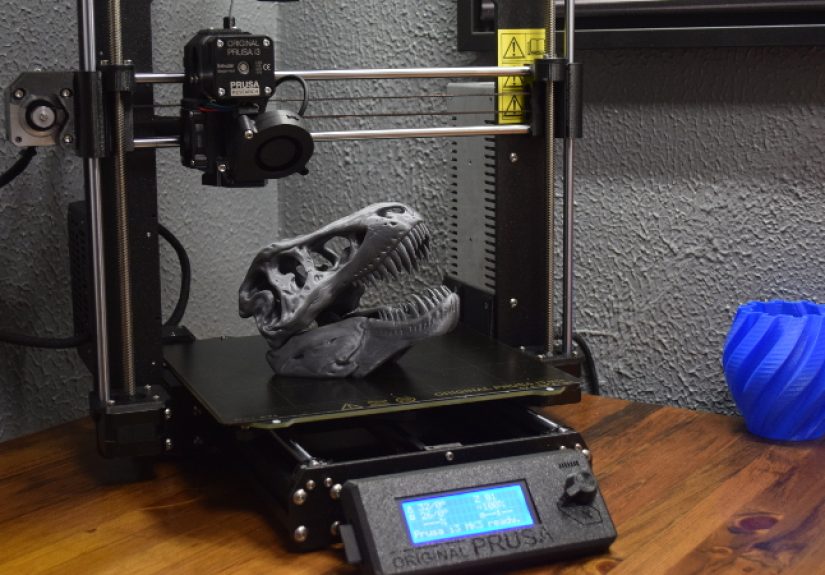
The Prusa i3 MK3 is an open-frame, Cartesian FDM 3D printer built around the well-known Prusa i3 architecture. In simple terms, it uses melted plastic filament to build objects layer by layer, and it does so with a design that is easy to understand, easy to maintain, and deeply rooted in the open-source maker world.
The machine sits in that sweet spot between beginner-friendly and enthusiast-approved. It has enough automation and smart protection features to help newer users avoid disaster, but it also offers the kind of tweakability, documentation, and upgrade culture that advanced users love. It is not a toy, and it is not an industrial monster either. It is a very capable workhorse that knows exactly what job it was born to do.
The MK3 is also part of a bigger story. It followed the MK2 line, then later gave way to the MK3S, MK3S+, and newer generations. But the MK3 is the point where Prusa really leaned into the idea that a consumer printer could be “smart” in practical ways, not just in marketing-department ways.
Core Specs at a Glance
- FDM/FFF desktop 3D printer
- Open-frame Prusa i3 design
- Build volume of about 250 x 210 x 210 mm
- Direct-drive extrusion system
- E3D V6 hotend with a 0.4 mm stock nozzle
- Removable magnetic spring-steel print sheet
- Automatic mesh bed leveling
- Trinamic stepper drivers for quieter operation
- Filament runout and print-protection features
- Available as a kit or factory-assembled machine
Specs alone do not tell the whole story, of course. Plenty of printers look impressive on paper and then spend their free time printing frustration. The MK3’s appeal comes from how these features work together in the real world.
The Design: Familiar, Functional, and Unusually Thoughtful
At first glance, the Prusa i3 MK3 does not look especially flashy. There is no giant touchscreen begging to be fingerprinted, no dramatic enclosure panels, and no spaceship styling. Instead, it looks like a printer designed by people who care more about clean first layers than cosplay points. That is a compliment.
The frame is sturdy, the layout is logical, and the machine is easy to understand once you spend a little time with it. That matters more than people realize. A printer that is physically readable is easier to maintain, easier to repair, and less intimidating when something needs attention. The MK3 wears its engineering on its sleeve, and that honesty is part of the charm.
One of the notable design improvements in the MK3 generation was the move toward a cleaner aluminum extrusion base, which helped the machine look and feel more refined than earlier iterations. It also reinforced the sense that this was not just another hobby kit; it was a mature product aimed at people who wanted dependable results.
Then there is the print surface. The removable spring-steel sheet is one of the MK3’s biggest quality-of-life wins. Anyone who has ever pried a stubborn print off a bed with the grim determination of a pirate opening a treasure chest will appreciate this. Finish the print, wait a bit, flex the sheet, and the part usually pops free. It is one of those features that seems small until you use it. After that, going back feels barbaric.
Why the MK3 Felt So Smart
The MK3 earned a lot of attention because Prusa packed it with practical sensors and safeguards. This was not empty “smart device” branding. These features were built to solve real problems that ruin real prints.
Power Panic
Let’s start with the feature name that sounds like a punk band. Power Panic is the MK3’s power-loss recovery system. If your electricity cuts out mid-print, the machine can store its position, park the print head, and recover when power returns. For anyone who has lost a nearly finished print to a random outage, this feature feels less like a convenience and more like emotional support.
Filament Detection
The original MK3 also made a big deal out of filament sensing. It could detect not only when filament ran out, but in the original design it could also monitor whether filament was actually moving. That was a bold idea, because failed prints often happen when filament stops feeding correctly and the printer keeps moving as if nothing is wrong. The MK3 tried to notice the problem before you came back to find a sad plastic ghost of your intended object.
Quiet Motion and Smarter Drivers
The MK3 used Trinamic stepper drivers, which made the machine much quieter than many competing printers of its era. Quiet printing is not just about comfort. It changes where and how often you are willing to use the machine. A printer that sounds like a bag of wrenches in a dryer gets banished quickly. A quieter one gets to stay inside the house and remain part of your daily workflow.
Those drivers also helped with features like sensorless homing and print error detection. In plain English, the printer could do more than just move around. It could pay attention while it moved around.
Thermal and Fan Monitoring
Prusa added more environmental and safety awareness too, including fan RPM monitoring and temperature compensation features that improved consistency. This matters because 3D printing is a game of tiny margins. A small drift, a stalled fan, or a weird temperature change can be enough to turn a beautiful print into modern art you did not ask for.
Print Quality: The Part Everyone Actually Cares About
All the sensors in the world would not matter if the MK3 printed like a confused glue gun. The good news is that the machine built its reputation on excellent real-world print quality. It became known as a printer that could produce clean, consistent parts without demanding constant babysitting.
For PLA and PETG, the MK3 is especially comfortable. These materials are the daily bread of desktop 3D printing, and the machine handles them with confidence. Dimensional accuracy is strong, surface finish is solid, and first-layer consistency is one of the printer’s strongest suits when it is dialed in properly.
The direct-drive setup also helps with flexible materials compared with many Bowden-style systems. It is not magic, and filament still has opinions, but the MK3 has the hardware foundation to handle a wider range of materials than many bargain printers from the same era.
That said, it is not invincible. Because it is an open-frame printer, more temperature-sensitive materials can benefit from an enclosure. Drafts, room temperature swings, and ambitious material choices can still cause trouble. The MK3 is very good, but it does not come with wizard robes.
Kit or Prebuilt? A Surprisingly Important Question
One of the most interesting things about the Prusa i3 MK3 is that many buyers had a choice between a kit and a fully assembled version. This was not just a pricing decision. It was a philosophy decision.
The kit version appealed to makers who wanted to understand every nut, belt, bearing, and wire. Building it yourself takes time, patience, and a willingness to become very familiar with assembly manuals. But the reward is real. When you build a machine piece by piece, troubleshooting becomes less mysterious later. You do not just own the printer. You know the printer.
The assembled version, on the other hand, was the fast track to actually printing things. If your goal was to make parts rather than spend a weekend becoming intimate with hex keys, the factory-built option made a lot of sense. More expensive, yes. But sometimes the best upgrade is not hardware. Sometimes it is skipping eight hours of assembly and getting straight to the fun part.
Neither option was wrong. The choice mostly depended on whether you were trying to learn the machine deeply or just wanted a dependable tool on your desk as soon as possible.
Where the MK3 Shows Its Age
Now for the honest bit. The MK3 may be beloved, but it is not frozen in time as the unbeatable king of all printers forever. Modern 3D printing has moved quickly, and newer machines have raised expectations around speed, automation, user interfaces, and enclosed designs.
Compared with newer generation printers, the MK3 can feel old-school. The LCD interface is functional rather than fancy. The open frame is practical, but not ideal for every material or every workspace. Print speeds that once felt brisk now look more modest next to today’s faster systems. And some of the MK3’s most ambitious original ideas, like the first filament-motion sensor approach, were later revised in the MK3S after real-world use exposed limitations.
None of this makes the MK3 a bad printer. It just means it belongs to a very strong generation of machines that helped define the hobby before the current speed race took over. In fact, part of the MK3’s charm is that it represents a more measured philosophy: dependable printing over flashy bragging rights.
Why the MK3 Still Matters
The Prusa i3 MK3 matters because it helped set the standard for what a premium desktop FDM printer should feel like. It showed that thoughtful documentation, strong community support, easy maintenance, reliable hardware, and smart failure protection could be just as valuable as raw speed.
It also helped cement Prusa’s reputation for ecosystem thinking. The printer was never just a pile of hardware. It came wrapped in slicer support, firmware updates, spare parts availability, upgrade paths, documentation, and a large community of users who had probably already solved the weird problem you just discovered at 11:47 p.m.
That combination is why so many makers speak about the MK3 with unusual fondness. It is a machine that often feels like it wants you to succeed. In the world of desktop 3D printing, that is not a small thing.
Who Should Appreciate the MK3 Today?
If you are looking at the MK3 today, the answer depends on what you want. If you want the newest, fastest, most modern thing possible, there are newer options that will grab your attention. If, however, you want to understand one of the most influential enthusiast printers of the past decade, or you want a machine with a proven reputation, excellent support culture, and meaningful upgrade history, the MK3 remains deeply relevant.
It is especially appealing to people who enjoy dependable engineering, open-source roots, repairability, and a printing experience that prioritizes consistency. In other words, it is for people who think “works well” is sexier than “looks futuristic.” A niche? Maybe. But a very good niche.
Extended Experience: What Living With a Prusa i3 MK3 Feels Like
The most interesting thing about the Prusa i3 MK3 is that the ownership experience tends to be more memorable than any single spec. People do not usually rave about it because of one number on a product page. They rave because of the pattern it creates over time.
A typical experience with the MK3 starts with cautious optimism. You load filament, start a print, and wait for the drama. Maybe you have used cheaper printers before. Maybe you are emotionally preparing for the usual routine: nozzle too high, bed too low, adhesion problems, random blobs, mystery noises, and a belt that suddenly acts like it is going through something. But the MK3 often surprises people by behaving like a tool instead of an experiment.
That does not mean it never needs maintenance. It absolutely does. Belts need attention, nozzles need cleaning, surfaces need care, and filament still finds ways to be annoying. But the overall feeling is different. The machine gives off the impression that it was designed by people who have personally suffered through failed prints and wanted fewer of them in the world.
Another common part of the MK3 experience is trust. After a while, owners often stop hovering over the first ten minutes of every print like nervous stage parents. They still check on things, of course, but there is less dread. The first layer goes down cleanly, the bed leveling does its job, and the printer gets on with it. That confidence is hard to quantify, yet it may be the most valuable feature the machine has.
There is also a certain satisfaction in the way the MK3 fits into a workshop or home office. It is not especially trendy, but it feels purposeful. It is the kind of printer that invites use. You print organizers, brackets, prototypes, repair parts, little gifts, jigs, and random ideas that showed up in your brain at the worst possible hour. The printer becomes less of an event and more of an appliance for making things.
For kit builders, the experience can be even more personal. Spending hours assembling the machine creates a bond that is part pride, part Stockholm syndrome, and part genuine familiarity. When something needs tightening or tuning later, it does not feel like opening a mysterious black box. It feels like helping an old teammate stretch before the next game.
Of course, long-term ownership also highlights the MK3’s age. Once you see newer high-speed printers zip around like they drank too much espresso, the MK3 can seem almost calm by comparison. But that calmness is also part of its appeal. It is not trying to set speed records every afternoon. It is trying to print your part correctly and let everybody go home happy.
In the end, the real experience of owning a Prusa i3 MK3 is less about hype and more about rhythm. Load filament. Slice model. Start print. Remove part. Repeat. That routine sounds boring, and that is exactly why so many people love it. In 3D printing, boring is beautiful.
Final Thoughts
A close look at the Prusa i3 MK3 reveals a printer that earned its reputation the old-fashioned way: by showing up, printing well, and solving problems that actually matter. It did not win people over with gimmicks. It won them over with consistency, smart engineering, and a user experience that respected the person standing in front of the machine.
Even now, the MK3 stands as one of the most important desktop 3D printers of its era. It helped define what makers should expect from a premium open-frame printer, and its influence can still be seen in how people talk about reliability, bed surfaces, quiet motion, support, and upgradeability.
If you want a short summary, here it is: the Prusa i3 MK3 is not legendary because it was perfect. It is legendary because it made desktop 3D printing feel more dependable, more thoughtful, and a lot less like a gamble. In this hobby, that is about as close to hero status as a machine can get.







 Close
Close