
Table of Contents >> Show >> Hide
- Why Battlefield Signals Matter in MLBB
- 1. Use the Three Core Signal Buttons for Instant Calls
- 2. Long-Press the Signal Wheel for More Precise Commands
- 3. Ping the Map Directly to Mark Enemies, Objectives, and Pressure Points
- 4. Customize Quick Chat So Your Most Useful Messages Are Always Ready
- 5. Send Status Warnings Before the Fight Starts
- 6. Combine Signals Like a Real Shot-Caller
- Common Mistakes Players Make With Battlefield Signals
- How to Make Your Team Actually Listen
- Player Experience: What Battlefield Signals Feel Like in Real Matches
- Conclusion
- SEO Tags
In Mobile Legends: Bang Bang, mechanics matter, hero picks matter, and yes, your internet connection matters more than anyone wants to admit. But one thing quietly decides a shocking number of matches: battlefield signals. Great players do not just fight well. They communicate well. They warn teammates about danger, call for objectives, announce a push, and tell the squad to back off before a five-second mistake turns into a forty-second death timer.
If you have ever yelled, “Why did nobody rotate?” while realizing you never pinged anything at all, welcome to the club. The good news is that MLBB gives you several fast ways to communicate without typing a novel in the middle of a team fight. The better news is that once you learn how to use those signals properly, your matches start feeling less like five strangers sharing a map and more like an actual team.
This guide breaks down six smart ways to send battlefield signals in Mobile Legends: Bang Bang, how to use each one effectively, and how to avoid turning your pings into background noise. We will also cover real-match examples, signal timing, and a longer section on player experience so the advice feels practical instead of sounding like it was written by a robot hiding in a bush.
Why Battlefield Signals Matter in MLBB
MLBB is a fast 5v5 MOBA. Rotations happen quickly, ambushes happen even faster, and objective windows can disappear before your coffee has cooled down. Because matches rely on lane pressure, jungle control, and timing around the Turtle and Lord, clear in-game communication can be the difference between a smooth snowball and a dramatic collapse worthy of its own sad violin soundtrack.
Battlefield signals help you do three things:
- Share information fast, such as missing enemies, danger zones, or incoming fights.
- Coordinate decisions, including pushes, retreats, ganks, and objective control.
- Reduce typing, which is important because typing in the middle of combat is usually a creative way to respawn.
Now let us get into the practical side of it.
1. Use the Three Core Signal Buttons for Instant Calls
Attack, Retreat, and Gather Are Your Fastest Tools
The most basic and most important battlefield signals in MLBB are the core command buttons: Attack, Retreat, and Gather. These are simple, loud, and immediate. That is exactly why they work.
Use Attack when your team has the numbers advantage, an exposed turret, a low-health enemy, or a secure objective window. Use Retreat when the fight is bad, vision is missing, your front line is dead, or your marksman is trying to duel five people with the confidence of a movie villain. Use Gather when you want teammates to collapse on a lane, Turtle, Lord, or upcoming team fight.
The trick is not just tapping these buttons. The trick is tapping them at the right moment. A late retreat ping is basically a decorative opinion. A well-timed retreat ping, sent two seconds before an enemy flank arrives, can save your whole team.
Example: Your mid laner spots the enemy jungler and roamer moving toward gold lane. Sending Retreat immediately gives your gold laner a chance to back off. Sending it after the gank starts is like telling someone to grab an umbrella after the hurricane has already moved into the living room.
2. Long-Press the Signal Wheel for More Precise Commands
Extended Signals Make You More Specific
Many players stop at the basic three-button system, but MLBB communication gets much better when you use long-press or contextual signal options. Depending on the current interface and setup, extended signal wheels can give you more precise battlefield calls tied to the situation on the map.
This matters because “Attack” is useful, but “Attack the Lord” is better. “Gather” is helpful, but “Gather at the Turtle” is a lot clearer when the clock is ticking and the junglers are circling the pit like sharks in expensive armor.
Long-pressing signal controls can also help players communicate status information more clearly, including ability timing, spell timing, or objective focus. That extra precision makes teammates more likely to respond because the call is concrete instead of vague.
Best use case: Before a Turtle fight, signal early, not late. A clean objective call 8 to 10 seconds before spawn gives the roamer time to set vision, the mage time to rotate, and the jungler time to stop farming like the orange buff is the only thing keeping civilization together.
3. Ping the Map Directly to Mark Enemies, Objectives, and Pressure Points
Map Pings Turn Awareness Into Action
One of the smartest ways to send battlefield signals in Mobile Legends: Bang Bang is by pinging the map directly. This is where signal use starts to look less like random button tapping and more like shot-calling.
Direct map pings help teammates understand where the action is happening, not just what you want them to do. That difference is huge. A retreat ping near top lane tells your EXP laner to back off. A gather ping near Lord tells the whole team to shift toward a major objective. A ping on an exposed turret can turn a scattered team into a five-player pushing machine.
Direct pings are especially useful for:
- Calling attention to a missing or spotted enemy.
- Marking Turtle or Lord when you want setup.
- Targeting a turret for a coordinated push.
- Warning a lane about a likely ambush path.
- Showing where the next team fight should happen.
Example: If the enemy jungler shows on the opposite side of the map, ping Lord immediately if your team has pressure. That small signal can create a quick macro decision: trade position for objective. Good teams do this all the time. Great teams do it before anyone has to type a single word.
4. Customize Quick Chat So Your Most Useful Messages Are Always Ready
Do Not Waste Quick Chat Slots on Fluff
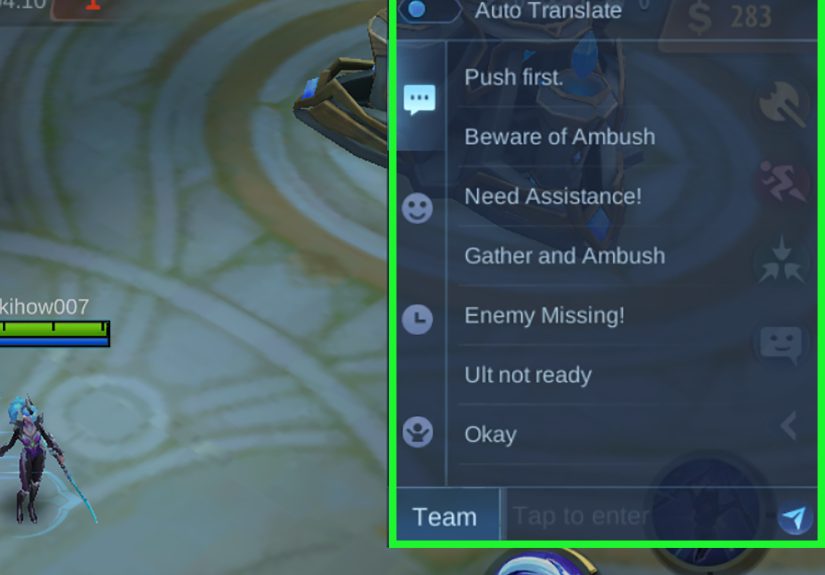
Quick Chat is one of the most underrated tools in MLBB. A lot of players leave default options untouched, then wonder why their communication feels clunky. The smarter move is to customize Quick Chat so the messages you actually need in ranked are always one tap away.
Your Quick Chat setup should support real battlefield decisions, not just decoration. Nice messages are fine. Funny messages are fun. But when the enemy assassin disappears from mid, “The enemy is missing!” is more valuable than anything that sounds like it came from a cheerful sticker pack.
Good Quick Chat choices usually include messages like:
- The enemy is missing!
- Beware of ambush!
- I need help!
- Wait for me!
- Let’s get the Turtle!
- Let’s get the Lord!
- Do not engage yet!
The best Quick Chat loadout depends on your role. Roamers and mids should prioritize warnings, map danger, and objective setup. Junglers should prioritize objective and timing calls. Gold laners may benefit from help requests and missing-enemy warnings. EXP laners often do well with split-push or collapse-related messages.
Simple rule: If a chat line does not help you win a fight, save an ally, secure an objective, or organize a rotation, it should probably not take up prime real estate.
5. Send Status Warnings Before the Fight Starts
Good Signals Prevent Fights, Not Just Describe Them
The best communication in MLBB is often preventive. It stops bad fights before they happen. This is why status signals and danger warnings matter so much.
If an enemy is missing, say it early. If a bush is suspicious, warn your team. If your ultimate is not ready, communicate that before someone dives. If you are low on mana or health, do not walk silently toward a doomed fight and then act shocked when things go badly.
Useful warning-style battlefield signals include:
- Enemy missing calls when a lane suddenly goes dark.
- Ambush warnings around jungle entrances, river bushes, and side lanes.
- Cooldown-related messages when your team should delay an engage.
- Wait-for-me calls when someone is about to start a fight 4v5.
- Help requests when a lane is about to get collapsed on.
These signals are gold because they create time. And in MLBB, time equals positioning, and positioning equals survival.
Example: Your mage rotates top and notices the enemy roamer hiding near a side bush. A quick Beware of ambush or direct ping can stop your gold laner from stepping into a trap. One tap saves one death. One death can save a turret. One turret can keep the map stable. That is how tiny signals create very non-tiny results.
6. Combine Signals Like a Real Shot-Caller
One Ping Is Fine. Layered Signals Are Better
If you really want to improve your MLBB communication, learn to stack your signals with intention. Strong shot-callers rarely use a single isolated ping. They combine signals so teammates instantly understand the plan.
For example:
- Gather + ping Lord = group for objective.
- Enemy missing + retreat ping on side lane = back off from a likely gank.
- Wait for me + gather ping near mid = delay engage until numbers are even.
- Attack + turret ping = do not chase kills, push the structure.
This layered style works because it removes ambiguity. Teammates do not have to guess what you mean. In a fast match, reducing confusion is half the battle.
There is also a big difference between spamming and leading. Spamming the same ping five times in a row can make teammates tune out. But using two clean signals in sequence usually feels purposeful. Think of it like this: a signal should sound like a decision, not a panic attack with sound effects.
Common Mistakes Players Make With Battlefield Signals
- Pinging too late: A warning after the ambush starts is not a warning. It is a commentary track.
- Using vague calls: “Attack” is not always enough. Mark the target or the objective.
- Ignoring role context: A jungler calling Lord is different from a split-pushing EXP laner randomly screaming for it.
- Over-spamming: Too many signals make teammates numb to the ones that matter.
- Never updating Quick Chat: Default setups often miss the phrases you actually need in ranked games.
How to Make Your Team Actually Listen
Here is the uncomfortable truth: sending a signal does not guarantee obedience. This is solo queue, not a military parade. But you can raise the odds that teammates respond.
First, send your call before the action becomes obvious. Second, make sure your own movement matches the signal. If you ping retreat and then walk into the river alone, your teammates may assume your judgment is powered by moonlight and bad decisions. Third, be consistent. Players are more likely to follow signals from teammates who seem aware, calm, and useful.
In other words, a good signal is not just a sound effect. It is a little piece of credibility.
Player Experience: What Battlefield Signals Feel Like in Real Matches
If you play enough MLBB, you start to notice that battlefield signals are not just tools. They become part of your rhythm. At first, a new player treats pings like emergency buttons. They hit Retreat when everything is already exploding, or they press Gather when half the team is still shopping in spirit form. But as experience builds, signals stop feeling reactive and start feeling predictive.
One of the biggest changes happens when you begin reading the minimap and sending signals before the danger becomes visible to everyone else. You notice mid lane go missing for two seconds. You see the enemy roamer disappear from river vision. You recognize that your gold laner is farming a little too far forward with exactly the kind of confidence that usually ends in a dramatic elimination. So you ping early. Sometimes that one small warning saves a death. Sometimes it saves a tower. Sometimes it saves your mood, which is honestly just as valuable.
There is also a huge difference between chaotic teams and coordinated ones, even in solo queue. In disorganized matches, players often chase kills, ignore objective timers, and treat the map like five separate side quests. In those games, good signaling becomes your way of creating order. A simple Gather at the Turtle can pull attention back to the right goal. A clean ping on a turret can stop allies from wandering into jungle fights that achieve absolutely nothing. It feels small in the moment, but over a full match, those little nudges shape the entire flow.
Experienced players also learn that each role sends different kinds of signals naturally. Roamers often become the team’s traffic controllers, warning about missing enemies and setting up fights. Junglers use signals to prepare objectives and control tempo. Mages use them to announce rotations and danger. Gold laners use them to request protection or call attention to pressure. EXP laners use them when they need collapse help or when a split push is creating space. The more you understand your role, the better your signals become.
And then there is the emotional side of communication, because yes, pings absolutely have emotional power. A smart retreat call can calm a reckless team. A well-timed attack ping can create momentum. A useful warning makes teammates trust you more. On the flip side, bad spam can make everyone ignore the system entirely. So the real skill is not just sending more signals. It is sending better ones.
After enough matches, battlefield signaling becomes almost instinctive. You stop thinking, “I should probably communicate.” You just do it. Ping the bush. Mark the Lord. Warn the lane. Call the backup. It becomes muscle memory, like checking cooldowns or kiting backward in a fight. And once that happens, your gameplay usually improves across the board, because better communication sharpens your awareness, your timing, and your macro decisions all at once.
That is why experienced MLBB players often look calmer even in messy matches. They are not relying on hope. They are relying on information. And in a game where one missed warning can throw an entire lead, that is a very big deal.
Conclusion
Learning the best ways to send battlefield signals in Mobile Legends: Bang Bang is one of the fastest upgrades you can make to your gameplay. You do not need a new hero, a flashy skin, or mythical mechanical talent from another galaxy. You need cleaner communication.
Use the core signal buttons well. Learn the long-press and contextual options. Ping the map with intention. Customize Quick Chat. Warn your team before the disaster starts. And when possible, combine signals like a real shot-caller instead of a person angrily poking the screen because life is pain and the marksman ignored the bush again.
In MLBB, good signals create better decisions, better decisions create cleaner fights, and cleaner fights usually lead to one beautiful result: the enemy base exploding while your team suddenly acts like it was coordinated the whole time.







 Close
Close