
Table of Contents >> Show >> Hide
- What “Hide Contacts on WhatsApp” Really Means
- Way #1: Lock the Chat So It Stays Hidden Behind Security
- Way #2: Archive the Chat to Get It Off Your Main Screen
- Way #3: Limit What Specific Contacts Can See
- Can You Completely Hide a Contact on WhatsApp?
- Which Method Is Best for You?
- Extra Tips for More WhatsApp Privacy
- Real-World Examples
- Experience and Lessons Learned: What People Usually Discover After Trying These Methods
- Final Thoughts
If your WhatsApp feels like a crowded party where every chat is talking at once, you are not alone. Plenty of people search for ways to hide contacts on WhatsApp because they want a cleaner inbox, more privacy, or a little breathing room from that one person who somehow sends “Hey?” like it is a full-time job.
Here is the important truth right up front: WhatsApp does not have a magic button that says “hide this contact from my contact list forever.” So if you were hoping for a spy-movie switch hidden behind a fake bookshelf, sorry. That feature does not really exist in the way many people expect.
What WhatsApp does offer is something more practical: several privacy and organization tools that let you hide chats from plain sight, lock sensitive conversations, and control what certain contacts can see about you. In real life, that is usually what people actually want when they search for this topic.
In this guide, we will break down the three simplest ways to hide contacts on WhatsApp, explain what each method really does, and help you choose the best one for your situation. We will also cover what not to expect, because nothing ruins a privacy strategy faster than a feature that only exists in somebody’s wishful thinking.
What “Hide Contacts on WhatsApp” Really Means
Before jumping into the how-to steps, it helps to define the problem. Most users mean one of these three things when they say they want to hide a contact on WhatsApp:
- They want a specific conversation out of sight.
- They want to stop a person from seeing profile details like status, profile photo, or last seen information.
- They want to reduce clutter so certain chats do not dominate the app.
Those are all reasonable goals. They just require different tools. Think of WhatsApp privacy like a toolbox instead of a single switch. You do not use a hammer to tighten a screw, and you do not use chat archiving when what you really need is blocking or privacy restrictions.
Way #1: Lock the Chat So It Stays Hidden Behind Security
If your goal is to keep a specific person’s conversation away from casual eyes, Chat Lock is usually the best method. This is the closest thing WhatsApp has to truly hiding a contact’s chat.
How Chat Lock Works
When you lock a chat, it moves out of the regular chat list and into a separate protected area. That means someone casually opening your WhatsApp will not immediately see that conversation sitting there in plain view. It adds a layer of privacy without forcing you to delete the chat or block the person.
Depending on your device and version of WhatsApp, locked chats may also be protected with biometric authentication, a passcode, or device security. In other words, it is not just “hidden-ish.” It is designed to be meaningfully harder for someone else to access.
When to Use It
Use Chat Lock when you want privacy, not drama. It works well for:
- Personal conversations you do not want visible on your main chat screen
- Work chats with private details
- Family conversations containing sensitive information
- Any chat you want out of easy reach when someone borrows your phone
Basic Steps
Open the chat, tap the contact or conversation name, and look for the lock option. On some devices, you may also be able to tap and hold the chat and find the feature from the menu. Once enabled, the conversation moves into a protected area that does not sit in your normal list like every other chat.
Pros and Cons
Pros: It is secure, practical, and ideal for individual chats. It also keeps the conversation intact, so you do not lose your messages.
Cons: It does not remove the person from your contacts. It hides the chat, not the actual contact entry tied to your phone book or WhatsApp account.
Best for: People who want to hide a conversation from view without deleting anything.
Way #2: Archive the Chat to Get It Off Your Main Screen
If Chat Lock is the vault, archiving is the closet. It is less secure, but it is fast, simple, and surprisingly useful.
What Archiving Actually Does
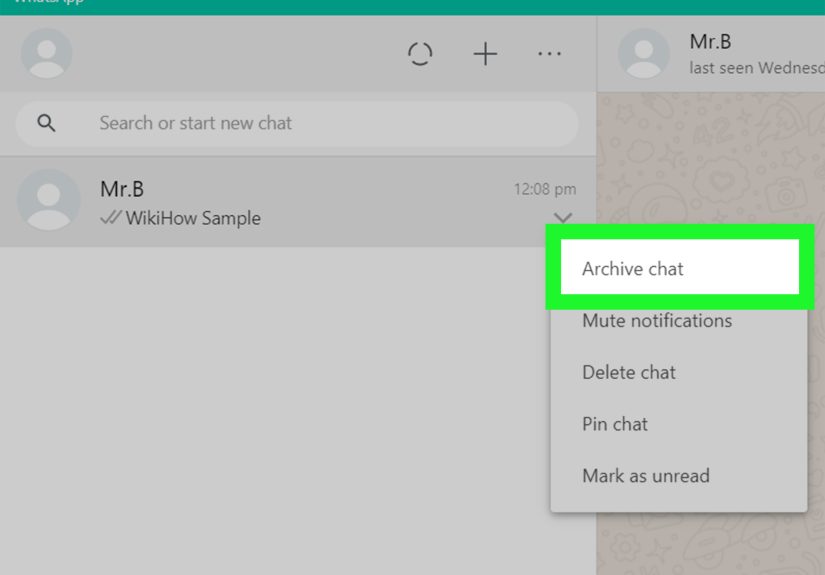
When you archive a chat, WhatsApp removes it from your main conversation list and places it in the Archived section. The chat is still there. The messages are still there. The person is still your contact. But the conversation is no longer front and center every time you open the app.
This is perfect for people who are not trying to hide something super sensitive. Maybe you just want less clutter. Maybe the chat is quiet most of the time. Maybe you are tired of seeing an old thread with your dentist, your landlord, your cousin, and that group project from the Stone Age.
When Archiving Makes Sense
Archive chats when your main goal is organization. This method is useful for:
- Inactive conversations you still want to keep
- People you do not message often
- Reducing visual noise on your home chat screen
- Separating low-priority chats from your daily conversations
How to Archive a Chat
On most phones, you can press and hold a chat or swipe on it to reveal the archive option. Once archived, it moves to a separate folder or section. If a new message arrives, your settings determine whether it stays archived or pops back into the main list.
That last part matters. If you want a truly tidy setup, check your archived chat settings so you are not surprised when one new “LOL” brings the whole thread back like an uninvited reunion tour.
Pros and Cons
Pros: Easy, fast, and great for decluttering. No need to remove the contact or change privacy settings.
Cons: It is not strong privacy protection. Anyone who knows how to use WhatsApp can still find archived chats.
Best for: Users who want to hide chats from the main screen for organization more than security.
Way #3: Limit What Specific Contacts Can See
Sometimes the issue is not that you want to hide them. It is that you want to hide your information from them. In that case, privacy settings are your best friend.
What You Can Restrict
WhatsApp lets you control who can see several pieces of profile information, including:
- Last seen and online status
- Profile photo
- About information
- Status updates
- Read receipts in some cases
You can often choose options like Everyone, My Contacts, Nobody, or My Contacts Except. That last one is especially useful because it lets you exclude selected people without making a grand announcement about it.
Why This Counts as “Hiding” a Contact
In practical terms, many users search for how to hide contacts on WhatsApp when what they really want is distance. They want a person to stop seeing updates. They want more privacy. They want less visibility without deleting the conversation or causing unnecessary friction.
Privacy settings accomplish exactly that. The contact still exists, but the relationship becomes much more controlled from your side.
When Blocking Is the Better Option
If a person is bothering you, spamming you, or making you uncomfortable, blocking may be the smarter move. Blocking is not subtle, but it is effective. It prevents messages and calls from getting through and hides several pieces of your profile activity from that person.
Blocking is not the same as simply hiding a contact, but sometimes it is the only option that solves the real problem. If you keep searching for “privacy” when the issue is actually “please leave me alone,” do yourself a favor and choose the stronger tool.
Pros and Cons
Pros: Strong control over your personal visibility. Great for managing boundaries without deleting your account or overhauling your app.
Cons: It does not make the contact disappear from WhatsApp’s ecosystem. It just limits what they can access.
Best for: People who want privacy from specific contacts rather than a cleaner chat screen.
Can You Completely Hide a Contact on WhatsApp?
Not exactly. And this is where a lot of articles on the internet get a little too creative for their own good.
WhatsApp does not currently offer a built-in feature that removes a saved person from your visible WhatsApp contacts list while still keeping everything else normal. If the number is saved in your phone and synced with WhatsApp, that contact is generally still part of your WhatsApp world.
So if your goal is total invisibility, your real options usually look like this:
- Delete or edit the contact in your phone’s contacts app
- Archive or lock the chat inside WhatsApp
- Restrict profile visibility through privacy settings
- Block the contact if needed
That may not sound as glamorous as “press one button and become mysterious,” but it is honest. And honest tech advice is much more useful than fantasy settings no one can actually find.
Which Method Is Best for You?
If You Want Maximum Privacy
Use Chat Lock. It is the strongest option for hiding an individual conversation from casual view.
If You Want a Cleaner Inbox
Use Archive. It keeps your main chat list neat without deleting anything.
If You Want More Personal Boundaries
Use privacy controls or blocking. This is the right move when you want to limit what someone can see or how they can reach you.
Extra Tips for More WhatsApp Privacy
If you want to go beyond the three main methods, here are a few smart habits that improve WhatsApp privacy overall:
- Turn on app lock so the whole app requires biometric or passcode access.
- Review status privacy before posting updates you do not want everyone to see.
- Mute chats that are noisy but not important enough to block.
- Use custom chat organization tools so high-priority conversations are easier to separate from everything else.
- Check notification previews on your phone so message content does not appear on the lock screen for the whole world to read over your shoulder at the grocery store.
Real-World Examples
Let us say you have an old work contact who does not need to see your profile updates anymore. In that case, changing your privacy settings makes more sense than archiving the chat.
Now imagine you share a phone with family members or often hand your phone to a child to watch videos. Chat Lock becomes the smarter option because it hides the conversation behind actual security.
And if your problem is simply that your chat list looks like a digital junk drawer, archiving older threads can make WhatsApp feel dramatically calmer in less than a minute.
Experience and Lessons Learned: What People Usually Discover After Trying These Methods
One of the most common experiences people have with WhatsApp privacy is realizing that they were searching for the wrong feature name. They start by typing “how to hide contacts on WhatsApp,” but what they really want is one of three things: less clutter, more privacy from other people using their phone, or fewer personal details visible to certain contacts. Once they understand that difference, everything gets easier.
A lot of users try archiving first because it is quick and feels satisfying. One swipe, and the chat is gone from the main screen. Instant relief. But then a new message arrives, the chat reappears, and suddenly they feel like technology has betrayed them personally. The lesson there is simple: archiving is great for cleanup, but it is not the same as securing a conversation. If privacy is the real goal, Chat Lock is usually the better answer.
Another common experience is discovering that hiding a chat is often more useful than deleting a contact. Deleting someone from your phonebook can create side effects. You may lose context for old messages, forget who the number belongs to, or end up answering a message from “+1 something-something” like you are auditioning for a detective show. Keeping the contact but controlling visibility is usually the more practical move.
People also learn very quickly that WhatsApp privacy settings are underrated. Small changes to profile photo visibility, status sharing, and last seen settings can make the app feel much more comfortable. You do not always need a dramatic solution. Sometimes a few selective restrictions create exactly the boundary you wanted without turning a normal situation into an awkward one.
Then there is the emotional side of it. Many users feel guilty about blocking someone, even when that person is clearly crossing a line. So they keep searching for softer workarounds, hoping there is a polite little setting called “Make This Person Less Exhausting.” There is not. If someone is harassing you, spamming you, or making you uneasy, blocking is not rude. It is responsible. Privacy tools are helpful, but boundaries matter more than etiquette when your peace is on the line.
Another real-life lesson is that phone-level privacy matters just as much as app-level privacy. Someone may carefully archive chats, tweak profile visibility, and lock individual threads, but still leave message previews glowing on the lock screen like a billboard. That defeats the whole point. The best experience usually comes from combining WhatsApp settings with smart phone settings, especially for notifications and biometric access.
Users who stick with these methods tend to settle into a simple rhythm. They archive low-priority chats, lock the truly private ones, and use privacy controls for everyone else. That combination works because it matches the real way people communicate. Not every contact is a security issue. Not every chat deserves a front-row seat. And not every problem needs a dramatic fix.
In the end, the biggest takeaway is this: WhatsApp may not offer a perfect “hide contact” switch, but it gives you enough tools to create a setup that feels private, organized, and manageable. Once you stop looking for one magical button and start using the right tool for the right situation, the app gets a lot less chaotic. And frankly, your blood pressure may thank you.
Final Thoughts
If you want to hide contacts on WhatsApp, the smartest approach is to stop thinking in terms of one feature and start thinking in terms of outcomes. Want security? Lock the chat. Want a cleaner screen? Archive it. Want distance and control? Use privacy settings or block the contact.
That is the real formula. Simple, effective, and much more useful than chasing a setting that does not actually exist.
So no, WhatsApp does not give you a secret invisibility cape for contacts. But with the right mix of chat lock, archived chats, and privacy controls, you can get very close to the result most people are actually after: a calmer, more private messaging experience.







 Close
Close