
Table of Contents >> Show >> Hide
- Before You Start: 60-Second Prep That Saves a Ton of Headaches
- Way #1: Add the Vanilla Gift Card as a Payment Method and Use It at Checkout
- Way #2: Move the Vanilla Balance into Your Amazon Gift Card Balance (Amazon Reload)
- Common Problems (and Fixes) When Amazon Declines a Vanilla Gift Card
- Returns and Refunds: Don’t Toss the Card Too Soon
- Safety Tip: Protect Your Vanilla Card Like It’s the Last Slice of Pizza
- FAQ: Quick Answers to Common Vanilla-on-Amazon Questions
- Conclusion: Two Easy Ways, One Happy Checkout
- Extra: 500+ Words of Real-World “Experiences” and Scenarios People Run Into
- Scenario 1: “It declined, but I swear there’s money on it.”
- Scenario 2: The “mystery pending charge” jumps in like a surprise guest
- Scenario 3: “I only have $18.73 lefthow do I use the weird leftover amount?”
- Scenario 4: The “I need this order to go through today” pressure cooker
- Scenario 5: “I’m never buying gift cards again” (the scam anxiety spiral)
A Vanilla gift card is basically money wearing a fancy little plastic outfit. It looks like a credit card, it acts like a
credit card, and yet the moment you try to use it online, it sometimes behaves like a cat near a bathtub: suspicious and
ready to bolt.
The good news: you can use a Vanilla gift card on Amazon in two simple, legit ways. The only “trick” is that Amazon
treats Vanilla cards as prepaid Visa/Mastercard cards (not as “Amazon gift cards”), so you have to use the
right workflow.
Below are the 2 easiest methods, plus the small-but-important details that prevent the dreaded “Payment
revision needed” message from ruining your checkout vibe.
Before You Start: 60-Second Prep That Saves a Ton of Headaches
1) Confirm what kind of Vanilla card you have
“Vanilla gift card” is an umbrella term. Many are prepaid Visa or prepaid Mastercard.
Functionally, that means Amazon usually processes them like a debit/credit card during checkout.
2) Check the exact balance (down to the cents)
This is non-negotiable. Prepaid cards can have activation fees (paid at purchase) and/or partial prior use. If you think you
have $50.00 but you actually have $49.12, Amazon will not “spot you the 88 cents.” It will simply decline the transaction.
Quick win: Write the exact balance down before you shop. You’ll use it to choose the cleanest option below.
3) Use your own billing ZIP/address if Amazon asks
Some online purchases trigger address verification (AVS). If Amazon prompts you for a billing address or ZIP code,
use your real U.S. address and ZIP. If your card has an online “manage/register” portal, adding your
address there can make online checkout smoother.
Way #1: Add the Vanilla Gift Card as a Payment Method and Use It at Checkout
This is the simplest approach when your Vanilla card has enough funds to cover the order total (including tax, shipping,
and any “just in case” holds). You’re basically telling Amazon: “Treat this like my debit card, because it kind of is.”
Step-by-step (desktop)
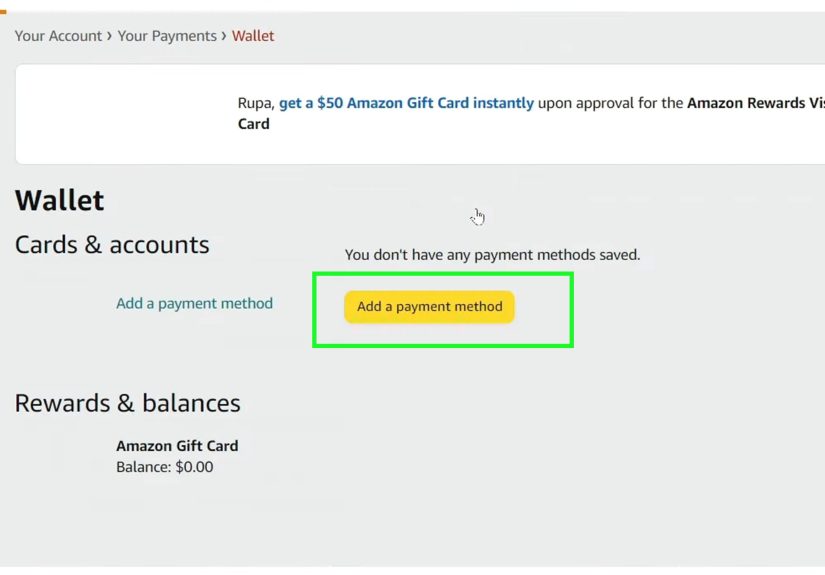
- Go to Your Account → Your Payments (or “Wallet”).
- Choose Add a payment method → Add a credit or debit card.
- Enter the Vanilla card number, expiration date, and CVV.
- For the name: enter it exactly as shown on the card (many Vanilla cards use something like “A Gift for You”).
- If prompted for billing details, use your current U.S. billing address and ZIP.
- At checkout, select this card as your payment method (you can identify it by the last four digits).
Step-by-step (Amazon app)
- Open the Amazon app and go to Your Account.
- Tap Your Payments.
- Tap Add (card/payment method) and enter the Vanilla card details.
- Checkout as usual and select the card by its last four digits.
Make this method work every time (the “don’t get declined” checklist)
-
Keep your total under the balance. Amazon generally doesn’t let you split one order across multiple
credit/debit cards. If the card can’t cover the total, you’ll need Way #2 (or a smaller cart). -
Watch the tax + shipping creep. That $24.99 item can turn into $27.13 fast, especially if you’re not
on Prime or your state has higher sales tax. -
Avoid pre-orders and backorders when funds are tight. Amazon may authorize funds early and charge later,
and timing can get weird with prepaid balances. -
Expect temporary authorization holds. Some banks/card programs hold funds briefly when Amazon verifies
the card. With prepaid cards, those holds can feel extra dramatic because your entire universe is $50.
Example: buying with a Vanilla card like a pro
Let’s say your Vanilla card balance is $50.00. You want:
a phone case ($14.99), a screen protector ($9.49), and a charging cable ($12.99).
- Items subtotal: $14.99 + $9.49 + $12.99 = $37.47
- Estimated tax (example): $3.09
- Shipping: $0.00 (Prime) or maybe $5.99 (non-Prime, depending)
If your total lands at $40.56, you’re golden. If it lands at $52.15, you’re not.
At that point, don’t fight your cartswitch to Way #2.
Way #2: Move the Vanilla Balance into Your Amazon Gift Card Balance (Amazon Reload)
This is the “make it behave like Amazon money” method. Instead of trying to use the Vanilla card directly on an order,
you use it to reload your Amazon Gift Card balance. Once the funds are in your Amazon balance, you can
shop more flexiblyand your balance won’t expire or get tripped up by checkout quirks.
Why this method is so popular
- Consolidation: If you have multiple prepaid cards, you can load them into one Amazon balance.
-
Less “split payment” pain: Amazon can apply your gift card balance first, then (if needed) charge the
remainder to one other payment method. - Convenience: You can reload once and shop later, without re-entering prepaid card details every time.
Step-by-step: reload your Amazon balance with a Vanilla card
- Go to Gift Card Balance (from Your Account → Gift Cards).
- Click Reload Your Balance.
- Choose an amount (or enter a custom amount). If you’re trying to empty the card, enter the balance as precisely as you can.
- Select your Vanilla card as the payment method (add it first if it’s not already saved).
- Complete the reload. The funds show up in your Amazon Gift Card balance.
Important note: Amazon may require a minimum reload amount, and that minimum can change over time.
If your Vanilla balance is below the minimum, use Way #1 to buy a small item instead (or use the card at another retailer that accepts prepaid Visa/Mastercard).
Example: using reload to avoid the “can’t split payments” problem
You have $25.63 left on a Vanilla card, and you want to place a $61.00 Amazon order.
If you try to pay directly with the Vanilla card, it’ll likely decline because it can’t cover the full amount.
Instead:
- Reload $25.63 (or the closest allowed amount) into your Amazon balance.
- At checkout, Amazon applies your gift card balance first.
- The remaining amount is charged to your primary card (one payment method, no drama).
Common Problems (and Fixes) When Amazon Declines a Vanilla Gift Card
Problem: “Your payment method was declined” (but the card has money)
- Mismatch in billing ZIP/address: If Amazon asks for billing details, use your real U.S. address and ZIP consistently.
-
Temporary authorization hold: Amazon may verify the card with a pending authorization. On a prepaid card,
that can briefly reduce available funds. Wait a bit and try again, or lower your order total. - Insufficient funds after tax/shipping: Re-check the total. If you’re even a little over, it won’t go through.
-
Some purchases are more finicky: High-risk digital items, certain third-party scenarios, or unusual purchase patterns
can trigger extra verification.
Problem: The order total changes later
This can happen with pre-orders, substitutions, split shipments, and certain marketplace situations. If your Vanilla card is
“exactly enough,” avoid orders where the final charge might shift. If you can’t avoid it, Way #2 (reload) is usually the safer play.
Problem: Your Vanilla card works elsewhere but not on Amazon
Some merchants handle prepaid cards differently, and some transactions require stronger verification. If Amazon is being picky:
- Try Way #2 (reload), which often “smooths out” prepaid quirks.
- Try a smaller cart total.
- Double-check the card’s balance and status via the issuer’s site/phone line.
Returns and Refunds: Don’t Toss the Card Too Soon
If you buy something with a Vanilla gift card and later return it, the refund typically goes back to the original payment method.
Translation: keep the physical card (and any packaging/receipt info) until you’re well past the return window.
If you used Way #2 and the money is in your Amazon balance, that balance is generally easier to manage for future purchasesanother reason
many people prefer reloading when they can.
Safety Tip: Protect Your Vanilla Card Like It’s the Last Slice of Pizza
Prepaid gift cards have been targeted by scams where thieves capture card info from packaging and drain funds before the buyer uses the card.
Reduce your risk with these quick habits:
- Buy cards from reputable stores and inspect packaging for tampering.
- Keep the purchase receipt until you’ve successfully used the funds.
- Check the balance immediately after purchase (and again before a big order).
- Never share the card number/CVV publicly or in response to “urgent” messages.
FAQ: Quick Answers to Common Vanilla-on-Amazon Questions
Can I use a Vanilla gift card to buy an Amazon gift card?
Often, yesbecause Amazon processes the Vanilla card like a prepaid Visa/Mastercard. But policies and fraud filters can vary.
If your goal is “Amazon-only convenience,” reloading your Amazon balance is usually the cleaner option.
Can I split a single Amazon order across two Vanilla gift cards?
Usually no. Amazon generally doesn’t let you split one order across multiple credit/debit cards. That’s why many people reload
each prepaid card into their Amazon balance instead.
What if my Vanilla balance is lower than Amazon’s reload minimum?
Use Way #1 and buy a small item whose total stays under your card’s remaining balance. If that’s not practical, use the Vanilla card
at another retailer that accepts prepaid Visa/Mastercard.
Why does Amazon place a “pending” amount that isn’t my final charge?
That’s typically an authorization holdAmazon verifying the payment method. It usually drops off after your bank/card program releases it.
On prepaid cards, it can feel more dramatic because your balance is limited.
Conclusion: Two Easy Ways, One Happy Checkout
If your Vanilla gift card has enough funds to cover your order total, the easiest path is to add it as a payment method and check out normally.
If your balance is smaller (or you want maximum flexibility), reload the funds into your Amazon Gift Card balance and shop from there.
Either way, the secret sauce is the same: know your exact balance, keep your total realistic, and don’t panic if Amazon throws a temporary authorization
hold into the mix. Your money isn’t goneit’s just doing a quick costume change backstage.
Extra: 500+ Words of Real-World “Experiences” and Scenarios People Run Into
Here’s what using a Vanilla gift card on Amazon often feels like in real lifebased on the most common situations shoppers describe.
If you’ve ever stared at a checkout screen like it personally insulted you, welcome to the club. We have snacks. (But you’ll need to keep the
cart total under $50.00 to buy them.)
Scenario 1: “It declined, but I swear there’s money on it.”
This is the classic. Someone gets a $50 Vanilla card, tosses it in a drawer, and weeks later tries to buy a $49.99 item. Amazon declines it.
Cue confusion. The usual culprit is that the final total isn’t $49.99 anymoretax pushes it to $53-ish, or shipping appears because Prime isn’t active
on that account. The fix is oddly simple: treat your prepaid balance like a strict budget. Build your cart, go to the final checkout page, and look at the
actual total. If you’re over, remove an item or choose a cheaper option. Once shoppers start doing that “final total check,” declines drop
dramatically.
Scenario 2: The “mystery pending charge” jumps in like a surprise guest
Another common moment: you try to place an order, and a pending authorization appears. On a normal credit card, you barely notice. On a prepaid card,
it can temporarily reduce your available balance enough to make your purchase fail. People often report that waiting a little while and trying again works,
or that lowering the purchase total by a couple bucks avoids the problem. The key takeaway is emotional: a pending authorization usually isn’t a final charge.
It’s verification. Prepaid cards just make it feel like Amazon is holding your money hostage for sport.
Scenario 3: “I only have $18.73 lefthow do I use the weird leftover amount?”
Leftover balances are where Way #2 (reload) shineswhen it’s available and when your remaining balance meets any minimum reload requirement. Shoppers love
reloading because it turns a random amount like $18.73 into usable Amazon balance that won’t expire, won’t get declined for being “not enough,” and can be
combined with other payment methods for larger purchases. If reload isn’t possible due to minimums, the next-best move is to buy something that naturally fits
the amount: household basics, a low-cost book, a phone accessory, or anything that stays comfortably below the remaining balance. People who succeed with tiny
balances tend to pick one item (not a multi-item cart), avoid subscriptions, and double-check the final total with tax included.
Scenario 4: The “I need this order to go through today” pressure cooker
When time matterslike a last-minute birthday giftshoppers often choose the fastest, least temperamental path: they reload to Amazon balance (if possible),
then pay for the item using their normal card for the remainder. This reduces the chance of a prepaid hiccup at the worst possible moment. If reloading isn’t
available, the best backup is to keep the order total well under the Vanilla balance (not “exactly equal,” but under) so small changes don’t break the payment.
In other words: don’t build a $49.99 cart on a $50 card and hope the universe is feeling generous.
Scenario 5: “I’m never buying gift cards again” (the scam anxiety spiral)
Unfortunately, some people learn about prepaid card scams the hard way. The most common advice shared after the fact is consistent: inspect packaging,
buy from reliable retailers, keep receipts, and check balances early. Many shoppers now check the balance immediately after purchasebefore they even leave the
parking lotbecause it’s the quickest way to catch issues while you still have proof of purchase. The goal isn’t paranoia; it’s a calm, practical habit that
keeps “free money” from turning into “free disappointment.”
Bottom line: once you know the two correct workflows (pay directly vs. reload), Vanilla gift cards stop feeling mysterious. They’re just prepaid cards with
boundaries. Respect the boundaries, and Amazon checkout becomes a lot less dramaticleaving you free to focus on the important stuff, like reading reviews
for a spatula at 2 a.m. because you “just want the best one.”







 Close
Close