
Table of Contents >> Show >> Hide
- What Does “Design Inside ChatGPT” Actually Mean?
- Why Canva in ChatGPT Is a Big Deal
- How the Workflow Might Look
- Canva, ChatGPT, and the Rise of AI App Workflows
- Benefits for Marketers, Creators, and Teams
- Important Limitations to Remember
- Best Practices for Designing with Canva Inside ChatGPT
- SEO and Content Marketing Impact
- What This Means for the Future of Design
- Experience Section: What It Feels Like to Use Canva Inside ChatGPT
- Conclusion
- SEO Tags
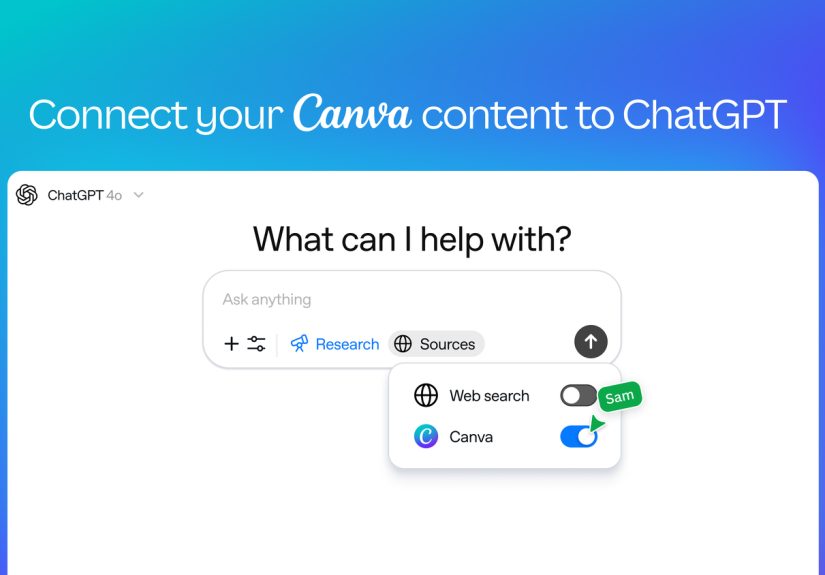
Canva now lets you design inside ChatGPT, which sounds a little like asking your coffee machine to write your marketing plan and then discovering it also makes excellent cappuccino art. But this is not just another flashy AI headline designed to make productivity nerds drop their keyboards. It represents a real shift in how people create visual content: instead of bouncing between a blank document, a design tool, a stock image library, a brand folder, and seventeen open browser tabs, users can start with a simple conversation and move directly toward an editable Canva design.
The big idea is simple: ChatGPT becomes the place where you explain what you need, and Canva becomes the design engine that turns that request into something visual. Need a pitch deck from a rough outline? A social media post for a product launch? A flyer for an event? A branded presentation that does not look like it was assembled at 1:13 a.m. by someone fighting with alignment guides? The Canva app in ChatGPT is built to shorten that journey.
This update matters because it brings design work closer to the way people actually think. Most projects do not begin with “I would like to select a template category.” They begin with messy human language: “Make this report look professional,” “Turn this campaign idea into a carousel,” or “I need a polished deck for a meeting tomorrow, and please don’t make it beige unless absolutely necessary.” With Canva inside ChatGPT, that messy beginning becomes part of the workflow instead of a problem to clean up later.
What Does “Design Inside ChatGPT” Actually Mean?
Designing inside ChatGPT means users can ask for Canva design help directly within a conversation. Instead of opening Canva first, choosing a format, browsing templates, copying text, pasting assets, and then manually shaping the result, users can describe the desired output in ChatGPT and use Canva’s connected design tools to create, preview, and edit the work.
In practical terms, this can include generating presentations, posters, social graphics, flyers, documents, or other visual materials from natural language prompts. The workflow may also allow users to preview design results in the chat and continue refining them with follow-up instructions. For example, a user could ask ChatGPT to help transform a product summary into a sales deck, request a more modern style, adjust the tone for executives, and then open the result in Canva for deeper editing.
The key phrase is editable design. This is not simply an image generator handing you a flat picture and saying, “Good luck, brave designer.” Canva’s strength has always been structured design: text boxes, layouts, templates, brand elements, icons, images, slides, and layers that can be changed. Bringing that structure into ChatGPT makes the workflow more useful for real business, education, marketing, and creator projects.
Why Canva in ChatGPT Is a Big Deal
For years, creative work has been split between thinking tools and making tools. You brainstorm in one place, write in another, design somewhere else, export a file, send it for feedback, then repeat the whole circus until everyone agrees that the title slide “finally has enough energy.” The Canva and ChatGPT connection reduces some of that friction by bringing ideation, writing, and visual production closer together.
1. It Turns Conversation Into a Creative Interface
The most important change is not just speed. It is accessibility. Many people know what they want a design to communicate, but they do not always know which template, layout, font pairing, or visual hierarchy will get them there. A conversational workflow lets users start with intent instead of interface. You can say, “Create a bold Instagram post for a summer sale,” rather than hunting through menus like a raccoon in a pantry.
This is especially helpful for non-designers: small business owners, teachers, students, nonprofit teams, coaches, freelancers, and content creators. They may not have a design department waiting in the hallway with mood boards and artisanal sticky notes. What they do have is a message to share. Canva inside ChatGPT helps bridge the gap between having an idea and having a usable visual asset.
2. It Speeds Up First Drafts
First drafts are where creative projects often get stuck. A blank canvas can be intimidating, whether it is literally Canva or metaphorically your soul staring at a Monday morning deadline. With ChatGPT and Canva working together, the first draft becomes easier to generate. You can feed in a rough outline, a product description, a campaign brief, or a list of talking points and ask for a design direction.
The output will not always be perfect. No AI tool should be trusted to understand your brand’s entire personality, your boss’s favorite shade of blue, or the mysterious rule that every presentation must include “one more data slide.” But it can produce a starting point quickly. That alone can save meaningful time, because editing something is often easier than starting from nothing.
3. It Makes Brand Consistency More Realistic
Brand consistency sounds glamorous until someone uploads a logo from 2016, stretches it sideways, and places it on a neon background “for visibility.” Canva’s ecosystem already supports brand kits, templates, colors, fonts, and reusable assets. When those resources connect with AI-assisted workflows, teams can move faster while still staying closer to approved visual standards.
For businesses, this is where the feature becomes more than a fun design shortcut. Marketing teams can use AI to draft on-brand campaign materials. Sales teams can create pitch decks without turning every slide into a freestyle performance. Internal teams can produce polished announcements, event graphics, or training materials without waiting days for a designer to rescue a layout.
How the Workflow Might Look
Imagine a small bakery preparing a weekend promotion. The owner types into ChatGPT: “Canva, create an Instagram carousel for a weekend croissant special. Make it warm, modern, and playful. Include three slides: offer, flavors, and call to action.” Instead of manually opening a design file and building from scratch, the user can begin with a generated concept and then refine it.
A follow-up prompt might say: “Make the tone more premium, reduce the text, and add a stronger call to action for pre-orders.” Another might say: “Turn this into a square post and a flyer.” The value is not that the AI magically knows everything. The value is that the design process becomes iterative in plain English.
For a teacher, the workflow could be just as practical. A history teacher might ask for a classroom poster explaining the causes of the American Revolution in a clean, student-friendly style. A nonprofit director might request a fundraising event flyer. A job seeker might turn a personal branding outline into a resume header or portfolio presentation. A startup founder might turn a rough business idea into a pitch deck that is at least 80% less likely to make investors squint.
Canva, ChatGPT, and the Rise of AI App Workflows
The Canva integration is part of a larger movement: apps are moving into AI chat interfaces. ChatGPT is no longer only a place for asking questions or drafting text. With app integrations, it becomes a workspace where users can call on connected tools to complete tasks. Canva fits naturally into that future because design is often the next step after writing, planning, or analyzing information.
This change also reflects the growing importance of the Model Context Protocol, commonly known as MCP, and similar connector systems. In simple language, these systems help AI assistants interact with external tools in a more structured way. For Canva, that can mean giving an AI assistant access to design-related capabilities such as creating files, editing content, finding assets, managing brand materials, or working with existing design libraries.
The long-term implication is enormous: AI tools are becoming less like isolated chatbots and more like command centers for work. Instead of asking AI for advice and then manually carrying that advice into another platform, users can increasingly ask AI to help perform the task in the tool where the final work lives.
Benefits for Marketers, Creators, and Teams
Faster Campaign Production
Marketing teams are constantly producing visual assets: social posts, email banners, pitch decks, lead magnets, ad mockups, event graphics, and internal announcements. Canva inside ChatGPT can help turn written campaign ideas into visual drafts faster. A marketer could paste a campaign brief into ChatGPT and ask Canva to create several design directions for LinkedIn, Instagram, and a presentation slide.
This does not eliminate creative strategy. In fact, it makes strategy more important. The better the prompt, audience description, offer, and brand direction, the better the design starting point. AI can accelerate execution, but it still needs human taste, judgment, and a clear goal. Otherwise, it may produce something technically attractive but strategically empty, like a beautifully wrapped box containing only vibes.
Better Support for Small Businesses
Small businesses often need professional-looking design but cannot always hire a designer for every small task. Canva has long served this audience with templates and easy editing tools. Adding ChatGPT to the workflow gives owners a more guided way to create materials. They can describe their business, audience, tone, and offer, then generate design drafts without needing to understand every design principle first.
A local fitness studio could create class schedule graphics. A salon could create a seasonal promotion. A real estate agent could generate open-house materials. A restaurant could turn a weekly special into a polished post. The common thread is speed plus usability. When design becomes less intimidating, more businesses can communicate consistently.
More Efficient Education and Training Materials
Educators and trainers can also benefit. Lesson slides, classroom posters, workshop handouts, and explainer graphics often take time to make, especially when the content already exists in notes or documents. With Canva inside ChatGPT, a teacher or trainer can begin with a topic and ask for a visual format that matches the learning goal.
For example, a training manager might request a five-slide onboarding deck from a policy summary. A teacher might ask for a visual timeline. A student group might create event posters. The result still needs review for accuracy, accessibility, and age appropriateness, but the production process becomes smoother.
Important Limitations to Remember
As exciting as this workflow is, it is not a magic wand with a Wi-Fi connection. Users still need to review every design carefully. AI-generated copy may need editing. Visual choices may not match the brand perfectly. Layouts may need adjustment. Data, names, dates, prices, and legal claims should always be verified before publishing.
Design quality also depends heavily on the prompt. “Make me a flyer” is not as useful as “Create a clean, modern flyer for a free Saturday coding workshop for high school students, using a friendly tone, three key benefits, and a clear registration call to action.” Context is fuel. A vague prompt gives the AI a tiny flashlight. A specific prompt gives it stadium lighting.
Accessibility matters too. Users should check contrast, font size, reading order, alt text, and whether the design works for people with visual or cognitive accessibility needs. AI can help, but it should not be the final judge. Before publishing, humans should review designs the same way they would review any public-facing content.
Best Practices for Designing with Canva Inside ChatGPT
Start With the Audience
Before asking for a design, explain who it is for. A flyer for busy parents should look and read differently from a pitch deck for investors. A TikTok-style announcement for teens should not sound like a corporate compliance memo that escaped from a filing cabinet.
Give the Format and Goal
Tell ChatGPT and Canva what you need: Instagram carousel, presentation, poster, resume, flyer, YouTube thumbnail, product announcement, or event invitation. Then explain the goal: attract signups, explain a concept, promote a sale, summarize research, or introduce a brand.
Include Brand Details
If brand consistency matters, include colors, tone, logo usage, preferred fonts, and any words or styles to avoid. A prompt such as “Use a calm, premium wellness style with soft neutrals and minimal text” is far more useful than “make it nice.” Nice is not a strategy. Nice is what people say when they cannot find the adjective drawer.
Ask for Variations
One of the strongest uses of AI design workflows is variation. Ask for three directions: playful, premium, and minimalist. Or request versions for different platforms. Comparing options helps users make better choices and avoid falling in love with the first draft just because it appeared quickly.
Finish in Canva When Needed
ChatGPT can help generate and refine, but detailed editing may still be best inside Canva’s full editor. That is where users can adjust spacing, replace images, fine-tune typography, manage layers, and prepare final exports. Think of ChatGPT as the creative co-pilot and Canva as the design cockpit. Please keep your hands, fonts, and brand guidelines inside the vehicle at all times.
SEO and Content Marketing Impact
For content marketers, Canva inside ChatGPT creates a faster bridge between written strategy and visual distribution. Blog posts can become Pinterest graphics. Reports can become LinkedIn carousels. Webinar outlines can become promotional slides. Product descriptions can become ad concepts. This matters because modern SEO is no longer only about ranking pages; it is also about building topic authority across formats.
Search engines increasingly reward helpful, original, experience-rich content. Visual assets can support that by making articles easier to understand, improving engagement, and giving brands more ways to repurpose ideas. A single well-researched article can become a slide deck, infographic, newsletter image, short-form social series, and downloadable checklist. Canva inside ChatGPT makes that repurposing workflow faster and more approachable.
However, speed should not become spam. Publishing more visuals is useful only if the visuals help real people. Thin, generic graphics will not build trust. The best results come from combining AI speed with human insight: original examples, brand personality, accurate facts, strong headlines, and visuals that make the message clearer.
What This Means for the Future of Design
Canva inside ChatGPT does not mean designers are obsolete. It means the entry point to design is changing. Professionals will still be needed for brand systems, campaigns, art direction, complex layouts, motion design, accessibility, strategy, and quality control. What changes is that more people can create decent first drafts and communicate visual ideas earlier in the process.
Designers may spend less time fixing basic layout requests and more time guiding systems, polishing important work, and creating stronger brand experiences. Non-designers may feel more confident turning ideas into visuals. Teams may collaborate faster because the rough draft appears sooner. The blank page loses some of its power, which is excellent news because the blank page has been acting smug for centuries.
Experience Section: What It Feels Like to Use Canva Inside ChatGPT
Using Canva inside ChatGPT feels less like operating software and more like briefing a creative assistant who happens to have access to a design studio. The biggest difference is the starting point. In a traditional Canva workflow, you usually begin by choosing a format or template. That is useful, but it can also push you into thinking visually before you have clarified the message. In the ChatGPT workflow, you can begin with the story, the audience, and the purpose.
A practical experience might start with a messy idea: “I need a presentation about our new productivity app for small business owners.” From there, ChatGPT can help sharpen the structure: problem, solution, features, proof, pricing, and call to action. Once the outline feels right, Canva can turn that structure into a design draft. That sequence feels natural because most people do not think in slide layouts first. They think in goals, points, and persuasion.
The most satisfying part is iteration. Instead of manually redesigning everything after the first version, you can ask for changes conversationally: “Make it more energetic,” “Use fewer words,” “Create a version for a younger audience,” or “Turn this into a one-page flyer.” This makes experimentation less expensive. You are more likely to test different angles because the cost of trying is lower. In creative work, that matters. The best idea is rarely the first idea; it is usually the third idea wearing better shoes.
There is also a noticeable psychological benefit. Many people delay design tasks because they feel uncertain. They worry the result will look amateur, off-brand, or too plain. Starting inside ChatGPT reduces that pressure because the first step is just a conversation. You can explain what you want in normal language, then let the system create a visual draft that gives you something concrete to react to.
Still, the experience is best when users stay involved. The tool may create a good layout, but humans should check whether the message is accurate, the tone is right, the brand feels authentic, and the design actually supports the goal. The workflow is not “type once and publish blindly.” It is “type, preview, refine, edit, and approve.” That is a healthier way to use AI because it keeps people in charge of taste and responsibility.
For teams, the experience can be even more useful. A marketer can draft the concept, a manager can review the message, and a designer can polish the final version in Canva. Instead of passing around vague instructions, the team can react to a visible draft earlier. That reduces confusion and speeds up feedback. In other words, Canva inside ChatGPT does not just help people make designs; it helps them have better conversations about design.
Conclusion
Canva now lets you design inside ChatGPT, and the result is a more natural, faster, and more flexible creative workflow. It brings together the strength of conversation, the structure of editable design, and the convenience of connected apps. For marketers, teachers, creators, students, small businesses, and busy teams, this can turn rough ideas into useful visuals with far less friction.
The smartest way to use it is not to treat it as a replacement for creativity, but as an accelerator for it. Bring a clear goal, provide context, ask for variations, review carefully, and finish the final polish in Canva when needed. Used well, this integration can help people move from “I need a design” to “I have a strong draft” faster than ever. And honestly, anything that reduces the time spent nudging text boxes by two pixels deserves at least a small round of applause.






 Close
Close